


Quick answer
Yes. Snapchat’s Family Center gives parents visibility into their teen’s contacts and time use, plus sensitive-content settings and a My AI switch. Both need accounts, and the teen must accept the invitation. Parents cannot read message content; location sharing needs the teen’s acceptance, while phone-level time and purchase restrictions are separate.
Start by choosing the problem you want to address: contact visibility, sensitive content, location or phone use. The setup and limits below explain which controls belong to Snapchat and which need your iPhone or Android settings.
Understanding Snapchat
Snapchat is a unique social media app popular with teens and young adults. It offers fun features like disappearing messages and creative filters. But it also raises some privacy and safety concerns for parents to be aware of.
Snapchat’s Popularity Among Teens and Young Adults
I’ve noticed Snapchat is hugely popular with younger users. Many teens and young adults use it as their main way to chat and share with friends. The app is designed for quick, casual communication. The app makes quick photo and video exchanges easy. I would not treat a disappearing message as private forever: saving, screenshots and sharing can leave a record.
Snapchat also has fun filters and effects that let users get creative with their posts. These features make the app engaging and entertaining for young people. Many teens check Snapchat multiple times a day to keep up with friends’ posts and stories.
Features of Snapchat
Snapchat has several key features that set it apart:
- Snaps: Photo and video messages, with saving and disappearance depending on the message and settings
- Stories: Photo and video posts with audience and lifetime settings
- Filters and lenses: Fun effects to add to photos and videos
- Snap Map: Location sharing with the people a user chooses
- Chat: Text messaging and video calls
Users can add fun stickers, text, and drawings to their snaps. The app also has a “Discover” section with news and entertainment content. Snapchat regularly adds new features to keep users engaged.
Privacy and Safety Concerns
While Snapchat can be fun, it does raise some privacy and safety concerns. Review the audience for stories and the people allowed to contact your teen. A friends list can include people they do not know well in real life.
Snapchat has privacy controls that let users limit who sees their content. Check those choices together rather than assuming they are already configured. The disappearing nature of snaps may also give users a false sense of privacy. Screenshots can still be taken.
There are also concerns about inappropriate content and online predators. Parents should talk to teens about being careful what they share. It’s important to only add real friends on the app. Snapchat has reporting tools for blocking and reporting concerning users or content.
Overview of Snapchat Parental Controls
Family Center is useful oversight, not a hidden message reader. I find seeing a teen’s connections a helpful starting point for a conversation, especially when an unfamiliar account appears. The right control depends on whether your concern is a contact, recommended content, late-night use or a purchase.
See activity
Family Center
- Recent conversation contacts
- Friends and time-use reports
Boundary: no message transcripts or individual viewing history.
Change Snapchat access
Family Center settings
- Hide Sensitive Content
- Disable My AI
Boundary: content filtering is limited; it is not a chat safety guarantee.
Use another control
Consent or phone settings
- Location: teen accepts sharing
- Time limits and purchases: Apple or Google controls
Boundary: linking Family Center alone does not enable these restrictions.
Who can use Family Center?
Snapchat’s current eligibility guidance says parents and caregivers must be 18 or older, with enrolled teens aged 13–17. A teen who turns 18 ages out. Account minimums can be higher in some jurisdictions, and availability can vary by country. Do not change a birthday or use an adult’s account to make a younger child eligible.
Both people need their own Snapchat accounts, and the teen must accept the connection. Installing the app on your phone alone does not enrol them. If your child is below Snapchat’s minimum age, a monitoring arrangement does not make the account appropriate.
Setting Up Snapchat Parental Controls

Step-by-step setup on iPhone or Android
Follow Snapchat’s Family Center invitation instructions. The connection is account based; the phone’s operating system does not turn it into full-device monitoring.
Connect your teen to Snapchat Family Center on iPhone or Android.
-
Prepare both accounts
Update Snapchat on both phones. Use your own account and your teen’s existing account, then add each other as friends by username.
-
Open Family Center
From your profile, open Settings and find Family Center. You can also search for Family Center in Snapchat.
-
Select your teen
Open the invitation setup, choose your teen from your friends or search for their account, and check the username carefully.
-
Send the invitation
Send the Family Center invitation. Explain which controls you plan to use so your teen recognises the request.
-
Accept and check the connection
Your teen opens the invitation in their direct messages and accepts it. Return to Family Center on your phone and confirm their account appears.
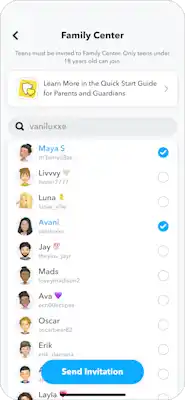
Snapchat’s Family Center invitation screen. Product image: Snapchat.
Sit together for the acceptance step. Invitations appear in the teen’s direct messages and can disappear after being viewed according to their chat setting. If it is no longer there, send a new invitation rather than repeatedly logging both people out.
Agree what you will check
Decide what would trigger a conversation before you start checking reports. An unfamiliar name is a reason to ask who the person is, not proof that something harmful happened. A busy messaging day may be a group project or an argument; the contact list cannot tell you which.
I recommend reviewing friends, content settings and location choices with your teen. Explain that you cannot read their messages through Family Center. Clear expectations make the tools easier to use without pretending they provide complete visibility.
Advanced Features for Guardians

Recent conversations and friends
Under Recent Conversations, parents can see who their teen contacted in the past seven days, including one-to-one and group chats. The view can include conversations later cleared or contacts blocked or unfriended. Recent group activity can show group members; it does not reveal what they wrote.
Use the flag option in Family Center to report a concerning account. Do not confuse the reporting action with removing a friend or blocking future contact. Review the teen’s own account settings together if they need to stop interacting with someone.
Time-use reports are not a screen-time lock
The time-use view shows a daily average over the past seven days and a day-by-day chart. It breaks activity into areas such as messaging, camera, Stories/Spotlight and the map. Tap a day to inspect its total. Recent activity can take a few hours to appear, and time-zone changes can affect totals.
A report helps you discuss habits; it does not itself enforce bedtime. For an enforced app allowance, use the supported controls on the teen’s phone: see our iPhone parental-controls guide or Android setup guide. Check exceptions and shared-device use before treating any total as a complete account of their day.
Location sharing needs a separate choice
Family Center can let you request your teen’s live location, but they must accept. You can share your own location back and use supported arrival/departure notifications for saved places. Linking the accounts does not automatically switch on live tracking.
Review who else can see the teen’s location in Snap Map. Agree when sharing is useful and check the phone’s location permissions. A missing or old location is not proof of where someone currently is, and the map should not be treated as an emergency-response service.
Purchases and subscriptions
Family Center’s Manage Purchases guidance directs you to Apple or Google parental controls for blocking purchases or requiring approval. Review the relevant store account, subscriptions and approval rules. This is not a Snapchat spending cap that automatically applies to every payment route.
Keep the purchase decision separate from contact monitoring. Before approving a subscription, check who pays, whether it renews and how it is cancelled. A phone purchase restriction and a Family Center connection solve different problems.
Protecting Teens from Online Risks

Snapchat’s tools reduce particular risks, but no single switch resolves bullying, unwanted contact and unsuitable recommendations. I would start with the behaviour you want to change, then choose the account or phone control that addresses it.
Combating cyberbullying and harassment
Snapchat lets users block and report concerning people or content. I think that is a useful first step, alongside a conversation with a trusted adult. Review the teen’s contact and audience settings and remove unfamiliar connections where appropriate.
The Community Guidelines prohibit harassment and other harmful conduct. Reports can lead to moderation action, but that is not a promise that a filter catches every hurtful message before it is sent. Do not tell a teen that turning on Family Center makes private chat safe automatically.
Sensitive content: what the switch covers
In Family Center, expand Settings and enable Hide Sensitive Content. Snapchat describes this as limiting sensitive or suggestive material in places such as Stories and Spotlight. Some posts may still get through.
This setting does not let a parent inspect each video watched, read private messages or guarantee that every explicit image is blocked before sending. Those are different capabilities. Talk about not forwarding harmful material, seeking help and using reporting tools rather than relying on an assumed automatic protection.
My AI has its own setting
If you do not want your teen using the chatbot, turn on Disable My AI in Family Center settings. Snapchat says the chatbot will then stop replying to the teen and stop storing or processing their queries.
My AI is a chatbot, not a parent, moderator or reliable safety adviser. Disabling it is distinct from hiding sensitive recommended content and from changing who can contact your teen. Check each setting independently.
Engaging with the Snapchat Community

Community guidelines and reporting tools
I can report concerning accounts through Family Center. For content on the teen’s own account, use the app’s report option for the relevant Snap, Story or chat. Make sure the report is about the correct account or item and explain what happened clearly.
A report asks Snapchat to review a possible violation; it does not provide a guaranteed response time or outcome. Blocking, reporting and stopping an interaction are separate actions. If something poses an immediate threat, seek appropriate real-world help rather than waiting for an app report.
A short family check-in
I suggest asking three practical questions: are all of your contacts people you recognise, do you know who can see your story and location, and do you know how to block or report an unwanted interaction? Walk through those controls together rather than relying only on a dashboard.
Keep the conversation open when a setting fails or an uncomfortable message arrives. A teen who expects to lose all access may be less willing to tell you what happened. Technical settings are most useful when they support an agreed response.
Resources and Support for Parents

Official resources and practical help
I found Snapchat’s explanatory videos and privacy guidance helpful for getting familiar with the app. The current parent guide explains the Family Center connection and available controls. Use Snapchat Support for account-specific setup instructions rather than assuming a chatbot answer is authoritative.
When checking a feature, note whether you are on the parent’s account or the teen’s account. Advice about reporting from a teen’s chat is not necessarily the same as reporting a contact through Family Center. App versions and local availability can also change what appears.
When your teen does not appear
Snapchat’s missing-teen troubleshooting includes an unseen or expired invitation, a request not accepted, the teen leaving Family Center or turning 18, and local availability. Confirm the specific cause before reinstalling apps or creating another account.
If both accounts are eligible and connected but a report looks old, remember that recent time-use activity may be delayed. Look at the selected day and category rather than comparing one number with a different phone report. If an account remains absent, check the invitation together and use official support.
When the wrong thing is blocked
Identify which layer contains the rule. A phone app allowance belongs in Apple or Google settings; a Stories/Spotlight content filter belongs in Family Center; a missing location needs the sharing choice and phone permissions checked. Turning off every restriction to solve one issue removes protections unrelated to that issue.
After changing a rule, check the result with your teen on their own device. I recommend keeping a note of the particular setting you changed so the next adjustment does not become a series of guesses.
Conclusion and Personal Recommendation
Snapchat’s parental controls offer a good starting point for keeping teens safer on the app. The Family Center feature lets parents see who their teens are talking to, which I find helpful.
I recommend parents have open conversations with their kids about online safety. Set clear rules and expectations for Snapchat use.
It’s important to remember that no controls are perfect. Teens can still find ways around restrictions if motivated. That’s why building trust is key.
I suggest parents create their own Snapchat accounts to better understand the app. This allows you to see how it works firsthand.
Regular check-ins about your teen’s online experiences are crucial. Ask about who they’re talking to and what content they’re seeing.
In the end, a combination of technical controls and open communication is ideal. This balanced approach helps keep teens safer while respecting their privacy and independence.
Frequently Asked Questions
How can parents use Snapchat Family Center to monitor their child’s activity?
It provides friend and recent-contact visibility without message contents. Parents can also inspect time-use reports and supported settings. It is not a transcript reader or a list of every post the teen watched.
What features can be enabled through Snapchat parental controls on Android devices?
Use Family Center for Snapchat’s supported controls. Use Google’s eligible phone and account controls separately for app time and purchases. A third-party monitoring product’s Android capabilities depend on its current product, device and setup; do not assume full Snapchat-message access.
How do I set up Snapchat parental controls on an iPhone?
Connect your own account and your teen’s account as friends, send the Family Center invitation and have your teen accept it. Current eligibility is parents/caregivers aged 18 or older and teens aged 13–17, subject to local availability. Apple’s phone-level restrictions are separate.
Can you restrict content and privacy settings on Snapchat for child accounts?
Hide Sensitive Content limits sensitive or suggestive content in areas such as Stories and Spotlight. It is not a complete private-chat filter. Review the teen’s audience, contacts and location settings together; location requests require acceptance.
Does Family Center automatically limit Snapchat screen time?
Time-use reporting shows activity totals and categories; it is not an enforced daily app limit. Configure the relevant Apple or Google device controls if you want an app allowance or bedtime restriction.
What should parents do if the Snapchat Family Center is not functioning properly?
Update both apps and confirm the accounts are friends and eligible. Check whether the invitation was accepted or disappeared, whether the teen left or aged out, and whether Family Center is available locally. Send a fresh invitation only if the original connection is missing.
Share this article

Stuart Kerr Spindlow is Impulsec’s Publisher, Chief Editor and Lead Reviewer. He writes and maintains coverage of consumer cybersecurity and digital-safety software, with a focus on practical suitability, limitations and the evidence behind product claims. Read Stuart’s full profile.