


This WebWatcher review reaches a cautious buying verdict: I would not purchase it for a current device without written confirmation of compatibility and the exact functions required. Its published information leaves material questions that an old star rating cannot resolve. That does not prove the software has stopped working; it means the evidence is insufficient for an unconditional recommendation.
TL;DR: WebWatcher is a monitoring-focused product, but its published compatibility information needs clarification. Check the refund conditions before paying. For ordinary family rules, start with parental controls; for message monitoring, compare the specific child platform and setup requirements.

My assessment and what has changed
My software testing informs this review’s editorial perspective. Current purchase advice also has to account for the documentation a buyer can rely on today. I separate earlier experience and archived images from current vendor specifications; neither an old screenshot nor a past successful setup establishes support after operating-system changes.
The decisive issue is purchase confidence. A monitoring service can be useful only if it supports the actual device and the particular information the family needs. A broad compatibility slogan is not enough when more specific published limits raise doubts.
I am not giving a new numerical performance score. A score would need a defined rubric and current evidence behind its components. The recommendation below explains the actual tradeoffs instead.
WebWatcher compatibility: get a specific answer

The official homepage lists guaranteed ranges of iOS 8–15, Android 4–12, Windows 7–10 and macOS 10.8–11, alongside broader “or later” wording elsewhere. Those statements do not clearly establish support for newer systems. Its iPhone description also requires a PC or Mac on the same Wi-Fi network.
Before paying, give support the phone model, operating-system version, computer details where relevant and the exact apps you need covered. Ask for a written answer about those particulars. Do not downgrade a device’s security merely to fit an old advertised support range.
- Does the current device and operating-system version have explicit support?
- Which message types are available: complete conversations, selected incoming content or notifications?
- Does the setup depend on a computer, local backup or recurring access to the child’s phone?
- What happens after an operating-system or monitored-app update?
If the answer is vague, I would choose a better-documented option. This is a buying judgment based on the information gap, not a claim that I personally measured a current installation failure.
What the monitoring claims actually mean

The homepage’s Android feature notes limit several social-app entries to incoming messages and some entries to received notifications. It lists 1,000 screenshots per licence. The displayed starting price is $10.83 per month, but that headline alone does not establish the final billing term, taxes or checkout total.
An app name on a feature list is not proof of complete conversation access. For a parent, the practical difference matters: seeing that an interaction occurred is different from understanding its context. Ask what the dashboard actually shows for the particular app, rather than assuming every message, attachment and deletion will appear.
More collected material also means more material to interpret and protect. My preference is to choose the least intrusive function that addresses the family’s actual concern. If the problem is bedtime use, a schedule is more proportionate than collecting messages. If the concern is a harmful conversation, explain why message supervision is needed and what its limits are.
A monitoring dashboard should not be confused with prevention. A report about activity does not by itself establish that the software can block the app, stop a conversation or prevent harm. Check those functions independently.
Setup and day-to-day practicality
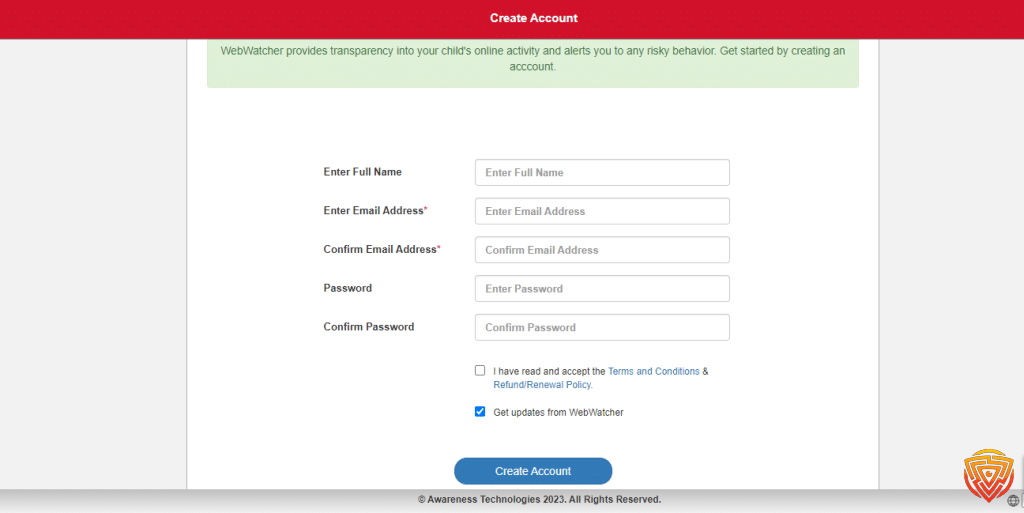
For a family, setup is not just installing software once. Consider who maintains it, which credentials are required and how you notice stale data. If a computer is part of the workflow, it needs to be realistically available. A household without that routine should not buy first and hope it will be convenient later.
I would assess the dashboard by whether it helps answer a specific question accurately, not by the sheer amount of information it contains. Reports need timestamps and context. A missing entry should not automatically be interpreted as evidence that a child concealed something.
There is no verified installation-time or capture-rate measurement attached to this updated assessment. I therefore do not repeat promises of a five-minute setup, perfect collection or tamper-proof operation as my own results.
Price and refund terms: read before buying
WebWatcher’s refund policy describes automatic renewal and a conditional remedy: notify it within 72 hours of purchase about substantial non-performance and allow support 3 days to resolve it. Missing individual items do not qualify in the same way as an entirely missing data type.
The policy excludes several situations, including unsupported operating systems, change of mind and expecting multiple devices from one licence. It also says manually confirming functionality to unblur data forfeits its refund offer. Requests must use a written support ticket; phone or live chat is not the stated refund route.
I would not describe this as an unrestricted money-back trial. Read the applicable purchase terms and retain the support answers before proceeding. A checkout total and clear device count are more useful for budgeting than a monthly-looking headline.
Compare equivalent coverage: the number of child devices, the actual payment period and the functions needed. A cheaper-looking figure is not better value if the plan cannot cover the required device or task.
Alternatives I would compare first
Scroll horizontally to see all columns.
| Product | Price and devices | Child devices | Main features | Important limitations |
|---|---|---|---|---|
 Qustodio QustodioFull review | Basic: US$59.95/year for 5 devices. Complete: $104.95/year for family devices under the unlimited-use terms; accounts reviewed at 25 devices. Check pricing | Child devices: Windows 10+; macOS 10.15 through 26; Android 9+; iOS 15+; Google Play-capable Chromebook; Fire OS 6+ (standard profiles). Parent iOS app requires iOS 16+. | Web/app controls, time limits, reports and location tools. Advanced routines and monitoring depend on plan/platform. | iOS calls/messages and supported WhatsApp/LINE alerts require a Windows/Mac computer and the documented sync setup. Panic button is Android-only; social-app coverage varies by platform. |
 Bark BarkFull review | US$5/month or $49/year for Jr; $14/month or $99/year for Premium. Unlimited children/devices. Tax may apply. Check pricing | iOS and Android child apps; other device/account workflows differ. | Jr: screen-time, app/web controls and location. Premium adds alerts about supported content and communications. | iOS content monitoring uses Bark Desktop, Bark Sync or Bark Home; setup requirements differ and alerts are not instantaneous. Account/app coverage varies; Phone and Watch are separate products. |
 MMGuardian MMGuardianFull review | Single child: US$4.99/month or $49.98/year. Family: $9.99/month or $99.98/year for up to 5 child devices. Parent apps do not count. Check pricing | Android and iPhone app workflows; platform-specific setup and capabilities differ. | Message reports and safety alerts; app/web controls and location. Android supports SMS and selected social apps; iPhone supports SMS/iMessage and documented WhatsApp/Kik reports. | iPhone message reports require a computer Sync App and the same Wi-Fi network; no iPhone call/SMS blocking. Android SMS reporting requires MMGuardian as the default messaging app. Tablet-only licences are separate. |
- Qustodio: my starting point for routine parental rules.
- Bark: compare for supported risk alerts.
- MMGuardian: compare for specific message reports.
Qustodio: start with the family rules you need
I would start with Qustodio when the problem is managing apps, browsing or daily device use. Those controls address a different need from WebWatcher’s activity collection. Basic covers five devices; the more expensive Complete plan adds capabilities, so compare the specific feature before upgrading. Message monitoring on a child’s iPhone still requires a computer. This is a suitability recommendation, not evidence that Qustodio collects more messages than WebWatcher.
Bark: choose alerts when a full message history is unnecessary
Bark Premium is the more relevant option when you want alerts about supported concerns rather than a complete conversation archive. Bark Jr does not provide the same content-monitoring brief. Bark’s iPhone setup guidance describes Desktop, Bark Sync and Bark Home workflows; alerts require analysis and are not instantaneous. Check which workflow fits the household before treating Bark as a simpler replacement for WebWatcher’s computer-dependent iPhone setup.
MMGuardian: compare the exact message-reporting task
I would compare MMGuardian first when message reports are the main requirement. Its documented iPhone workflow covers SMS, iMessage and specified social messages through a computer Sync App on the same Wi-Fi network. That dependency remains a tradeoff, rather than disappearing when you change brands. For one child, the published annual app price of US$49.98 is US$9.90 less than twelve US$4.99 monthly payments, before tax. That calculation compares billing choices, not monitoring performance; the annual option requires paying for the year upfront.
These are different use cases, not three interchangeable versions of WebWatcher. My parental phone-monitoring comparison explains the tradeoffs. For ordinary app rules, I would also check the phone’s built-in controls before buying any subscription.
My default direction for routine family supervision is a control-focused product, not the largest possible collection of private data. A family with a specific message-supervision need can make a different choice after verifying compatibility and agreeing appropriate boundaries.
Who should consider WebWatcher?
It may remain a consideration for an authorised parent with a clearly defined monitoring need, a specifically confirmed supported setup and an acceptable understanding of the refund conditions. The documentation gap makes it a poor default recommendation for someone who simply wants a dependable purchase decision for a newer phone.
I would rule it out for a buyer who cannot obtain a precise support answer or cannot maintain the required setup. I would also rule out the purchase when the real requirement is only screen-time scheduling. More invasive collection would not solve that task more appropriately.
Privacy and responsible use
Use any monitoring arrangement only with appropriate authority and transparency. Protect the parent account, avoid sharing credentials and consider what sensitive information will be stored outside the phone. The child’s privacy and the privacy of people communicating with them both matter.
The provider’s terms of service are part of the purchase decision, but a vendor’s marketing is not a guarantee that every use is lawful. Do not treat this review as approval for covert monitoring of a partner, employee or another adult.
Final verdict
WebWatcher is a conditional consideration, not my default parental-control recommendation. Confirm compatibility and the required data types in writing before buying. If that cannot be resolved, choose an alternative whose current support and workflow are clear.
Frequently asked questions
Is WebWatcher still available?
Its website offers the product, but availability is not proof of support for every current device. Confirm your exact setup before purchase.
Does this review prove WebWatcher no longer works?
No. The concern is insufficiently clear current compatibility information. An information gap is different from a measured installation failure.
Should I rely on an old WebWatcher star rating?
No. A purchase recommendation should reflect current compatibility, functions and terms, with any performance score supported by a clear rubric.
Is WebWatcher a complete parental-control replacement?
Do not assume that monitoring activity provides every blocking or scheduling function. Compare the actual task you need to perform.
What should I ask support before buying?
Provide the device, operating system, relevant computer setup and apps you need covered. Ask for written confirmation of support and the information available.
What is the best alternative?
Choose by task: routine parental rules, supported risk alerts or specific message supervision. The alternatives section explains why there is no universal substitute.
Share this article

Stuart Kerr Spindlow is Impulsec’s Publisher, Chief Editor and Lead Reviewer. He writes and maintains coverage of consumer cybersecurity and digital-safety software, with a focus on practical suitability, limitations and the evidence behind product claims. Read Stuart’s full profile.
Hi Nancy, thanks for sharing your experience. If you were charged unexpectedly and have been unable to get a refund after repeated attempts, I can understand why you are upset. Billing disputes and refund handling are a major part of whether any service feels trustworthy, so comments like this are useful for other readers. I would keep copies of your charge records, cancellation attempts, and support emails in case you need to escalate the dispute with your card provider.