


T-Mobile FamilyMode Review: Quick Verdict USD 10 monthly

Name: T-Mobile FamilyMode
Description: T-Mobile FamilyMode is best for existing T-Mobile households that want screen-time routines, pause controls, content filters and location tools. It requires a qualifying account, supported apps and correct permissions; some home-network controls need compatible hardware. It does not provide full private-message monitoring.
Offer price: 10
Currency: USD
Operating System: Android, iOS
Application Category: Parental control software
T-Mobile FamilyMode review: 3.4/5
Strong time, pause and location controls for T-Mobile households, balanced by setup dependencies, filtering limits and narrower monitoring than specialist tools.
Overall
-
Family rule controls
-
Monitoring scope
-
Child-platform coverage
-
Setup requirements
-
Family privacy controls
-
Family plan value
Pros
- Clear time, pause and allow/block controls
- Useful family location features
- Simple account-level monthly pricing
Cons
- Best fit only for qualifying T-Mobile households
- Permissions and optional network hardware add setup
- Not full message or social-media monitoring
T-Mobile FamilyMode is a practical family-management layer for households already inside T-Mobile’s ecosystem, but it is not a universal monitoring suite. It is strongest for setting routines, pausing access and checking location; its effectiveness depends on correct app permissions, supported devices and, for some whole-home controls, compatible network hardware.
T-Mobile’s current product and support pages describe a $10 monthly service, support for up to 17 lines (up to 12 voice lines and five mobile-internet lines), filters, daily internet limits, allow/block lists, pause controls and location tools. The provider also warns that filters may not catch every page and that some HTTPS traffic can limit filtering. Those boundaries matter more than a long feature list.
How the assessment works
This review uses six equal-weight parental-control criteria: family rule controls, monitoring scope, child-platform coverage, setup requirements, family privacy controls and family plan value. The result is an editorial assessment of buyer fit, not a laboratory measurement or customer average.
| Criterion | Score | Why |
|---|---|---|
| Family rule controls | 4.0/5 | Strong schedules, limits, pause and allow/block controls, with known filtering limits. |
| Monitoring scope | 3.5/5 | Useful activity and location visibility, but not a full transcript or social-monitoring product. |
| Child-platform coverage | 3.5/5 | Broad mobile support and account-line coverage; exact functions depend on device and permissions. |
| Setup requirements | 3.0/5 | Requires a qualifying account, apps and permissions; some home controls need compatible hardware. |
| Family privacy controls | 3.0/5 | Role and location controls are available, but families should minimise location history and review permissions. |
| Family plan value | 3.5/5 | Reasonable for a T-Mobile household using several controls; less compelling outside that ecosystem. |
We assess FamilyMode for household use, giving equal weight to family rules, monitoring scope, child-device support, setup, privacy and plan value. It fits existing T-Mobile households best; its value is less compelling when a family needs deeper app-specific monitoring.
What FamilyMode can control
- Time: daily internet limits, bedtimes or scheduled offline periods and manual pause.
- Access: category filters plus allow and block lists. Treat these as guardrails, not perfect content detection.
- Location: family location and alerts when device permissions, connectivity and supported app settings are active.
- Home devices: some network-level controls require compatible T-Mobile equipment or the optional Home Base described by T-Mobile support.
Installed-app blocking and internet restriction are different. Pausing network access does not uninstall an app, erase downloaded content or guarantee that every cellular, encrypted or offline activity is stopped.
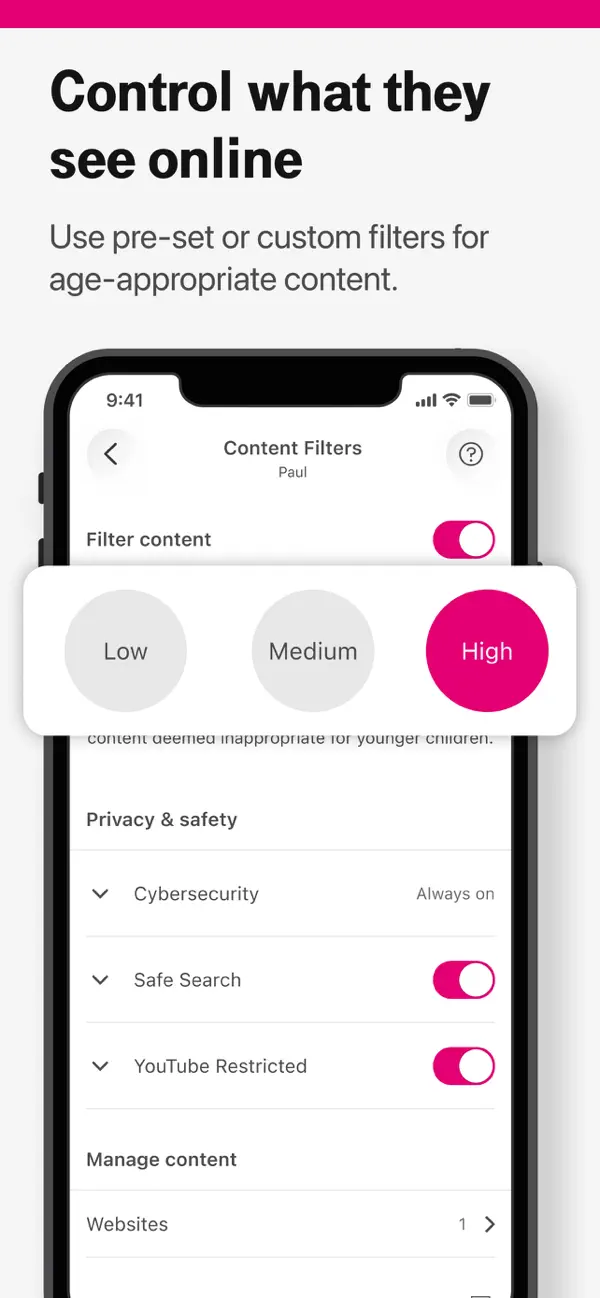
Setup and everyday use
- Confirm the line and plan are eligible on the current T-Mobile account.
- Install the parent and child-side components specified by T-Mobile and create the correct profiles.
- Grant location and background permissions only where needed, then explain those permissions to the child.
- Set one rule at a time—such as bedtime—then test it on the child device before adding more.
- Recheck after operating-system updates, app reinstalls, phone replacements and router changes.
A common failure mode is assuming a dashboard setting proves the child device is enforcing it. Verify on the device itself. Location can be delayed or unavailable when permissions, battery optimisation, connectivity or account pairing is wrong.
Privacy and family-fit considerations
Location history is sensitive household data. Use it for a defined safety purpose, keep the smallest history and alert set that meets that purpose, and periodically remove access for old devices or adults who no longer need it. Monitoring should be proportionate and transparent.
FamilyMode is not designed to provide full private-message transcripts across every app. A supported alert, usage category or location event should never be described as complete surveillance of a child’s communications.
Price and value
T-Mobile currently advertises FamilyMode at $10 per month. Optional home-network hardware has separate terms and the support pages describe Home Base pricing. Check the live account and hardware requirements because equipment, plan eligibility and taxes can affect the actual cost.
The value case is strongest when the household already uses T-Mobile and wants the same limited set of routine controls across multiple lines. A family needing detailed cross-platform reporting, school-device administration or deeper app-specific controls should compare specialist parental-control products.
Final verdict
T-Mobile FamilyMode is a solid choice for T-Mobile families that want understandable time, access and location controls in one service. Its 3.4/5 assessment reflects useful everyday rules balanced against setup dependencies, filtering limitations and a narrower monitoring scope than specialist tools.
Frequently asked questions
How much does T-Mobile FamilyMode cost?
T-Mobile’s current product page advertises the service at $10 per month. Compatible router or Home Base hardware and plan requirements can add conditions, so confirm the live account terms.
Can FamilyMode read text messages?
Do not treat it as a full message-transcript product. Its documented strengths are time, access, location and activity controls; availability varies by device and permission.
Why is FamilyMode location not updating?
Check child-device location permission, background access, battery optimisation, connectivity, app version and account pairing. GPS reporting depends on those conditions.
Can a child bypass FamilyMode?
No parental-control service is bypass-proof. Device removal, permission changes, alternate networks and offline content can affect enforcement. Use transparent rules and periodic device checks.
Does FamilyMode block every inappropriate website?
No. T-Mobile notes that filtering can miss content and that some HTTPS traffic may limit filtering. Combine filters with age-appropriate supervision and device-level safeguards.
Share this article

Stuart Kerr Spindlow is Impulsec’s Publisher, Chief Editor and Lead Reviewer. He writes and maintains coverage of consumer cybersecurity and digital-safety software, with a focus on practical suitability, limitations and the evidence behind product claims. Read Stuart’s full profile.