


Quick answer
Instagram Teen Accounts add built-in contact, content and time protections. Link parental supervision to review supported activity and set additional limits; it does not reveal message contents. Under-16s need a parent to make built-in protections less strict. Meta’s updated 13+ content setting also requires parent permission to leave for under-18s. A time reminder or overnight notification mute is different from blocking access.
Instagram can help teens keep up with friends, photographs and interests, but the same app can bring unwanted contact and constant notifications. I recommend starting with the teen’s own account settings and a clear conversation about what supervision shows. This guide explains the controls you can use, the age distinctions and the limits you should understand.
Teen Accounts and parental supervision are different
Teen Accounts apply protective defaults to accounts Instagram identifies as belonging to teens. Parental supervision connects a parent or guardian with the teen’s account for supported oversight and additional controls. It is not a second adult-owned account that lets you impersonate your child or inspect everything they do.
Meta’s Teen Accounts announcement, updated in October 2025, confirms that the rollout reached every country where Instagram is available in June 2025. Its original privacy scope distinguishes all under-16 accounts from new accounts created by under-18s; do not assume every existing 16- or 17-year-old account has the same history or current privacy state. Check the actual account.
Use your teen’s correct age and your own adult account. Account age, app version, territory and available controls can affect what you see. If a setting is absent, investigate that account and the current Help Center instructions instead of creating another account with a false birth date.
Which settings require a parent?
The general under-16 rule and the updated under-18 content rule are separate. An older teen is not automatically free to opt out of the new content setting just because they can manage some other protections. Conversely, the 13+ content rule is not evidence that a parent can read a 17-year-old’s messages.
With supervision established, parents can manage supported requests and additional limits. Decide together which changes need approval and which choices your teen can make. If you allow a teen to manage a setting, explain the effect rather than treating permission as a one-time technical formality.
Set up supervision with your teen
Connect the parent and teen through the supported supervision flow, then review the account’s actual protections and time rules.
-
Check both accounts and update the app
Use the teen’s actual account and the parent or guardian’s own account. Update Instagram and confirm that the birth date and available Teen Account settings are appropriate.
-
Open Instagram’s supervision controls
Use the supervision or Family Center controls available in the current app, or Meta’s official Family Center guidance. Review what the connection allows before inviting the teen. Menu labels can change between versions.
-
Send the invitation and complete acceptance
Create the invitation through the supported supervision flow and have your teen accept it from their account. A sent invitation alone does not establish supervision; confirm that both accounts show the connection.
-
Agree the time and contact rules
Review account privacy, who can contact the teen and the supervised time controls. Set an appropriate daily limit or scheduled break if you want an access restriction, rather than relying on the default reminder.
-
Review requests and revisit the agreement
Explain how setting-change requests are handled and what activity the parent can see. Recheck the saved controls together after a device, account or app change, and use the current confirmation screens when supervision changes.
Meta’s Instagram Family Center resources are the starting point for the current flow. Supervision is a shared connection, not a way to secretly take over the teen’s password. Keep both accounts secure and use the official invitation process.

Instagram’s Teen Account settings and parent-permission prompt. Image: Meta.
The supplied example shows the account-privacy decision and a prompt to add a parent. It illustrates the supported workflow; the labels on a current account may differ. Confirm the completed connection and settings on both sides instead of assuming the invitation has worked.
I find the explanation before setup especially useful: what the parent will see, what remains private and what happens when a limit is reached. A teen who understands the agreement is better placed to ask for help when something goes wrong.
Understand contact, privacy and content controls
Private accounts and message restrictions
I recommend keeping an account private unless there is a clear reason to change it. Private status requires approval of new followers and limits access to posts, but it is not a guarantee that an approved follower will act responsibly or never share something elsewhere. Review the follower list together and discuss what your teen is comfortable publishing.
Teen Account messaging defaults restrict who can contact the teen to people they follow or are already connected with. Tags and mentions are also limited, and Hidden Words helps filter offensive comments and message requests. These controls address different routes of interaction; one switch is not a complete shield against bullying or unwanted contact.
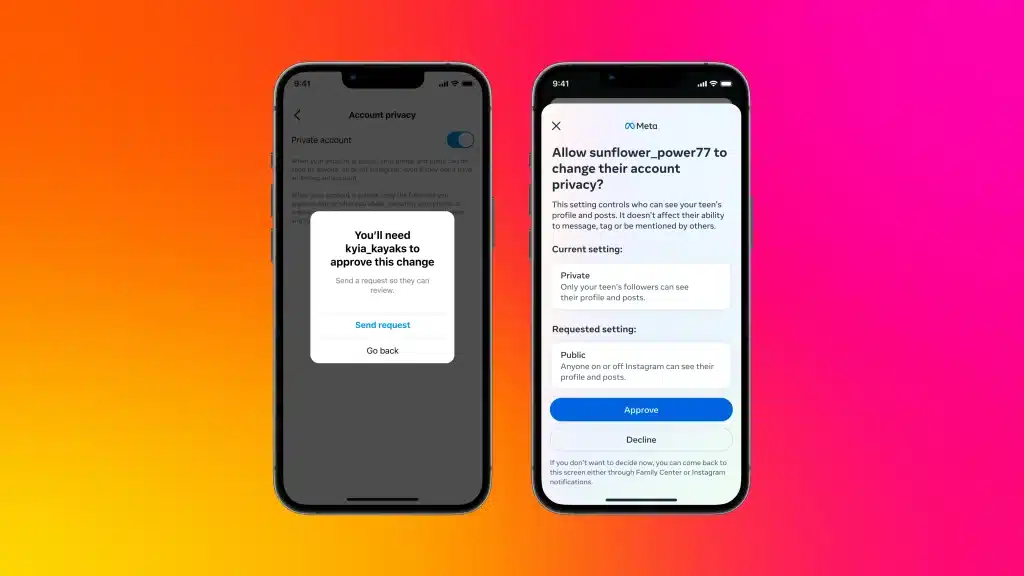
A teen’s privacy-change request and the parent’s decision screen. Image: Meta.
Before approving public status, talk about who could view the posts and how your teen will handle new followers and contact requests. A useful response is a reasoned decision, not simply accepting every request to avoid another conversation.
The updated 13+ content setting
On 9 April 2026, with an update on 15 May, Meta announced the international expansion of its revised Teen Account content settings. The announced default for under-18s draws on 13+ movie-rating criteria; leaving that setting requires a parent’s permission. Check the options shown for your account as the expanded feature becomes available.
The change extends filtering across more places where teens encounter content, rather than applying only to recommendations from unfamiliar accounts. Meta also describes restrictions on following or interacting with accounts that routinely post unsuitable material. Do not treat an account you already follow as automatically outside the teen-content rules.
Parents wanting a stricter option can consider Limited Content where available. Meta describes additional content restrictions and the removal of the ability to view, leave or receive comments in that setting. Read the implications before selecting it, because it changes participation as well as what the teen sees.
The movie-rating comparison describes Meta’s policy approach, not a certification that every Instagram post has been reviewed or rated. Meta states that the Motion Picture Association did not collaborate on or endorse the setting and that imperfect filtering can still leave some unsuitable material visible. Keep reporting and conversations available rather than assuming the content filter makes them unnecessary.
Live and unwanted images in messages
Meta added parent-permission requirements in April 2025 for under-16s to use Instagram Live or turn off protection that blurs unwanted images in direct messages. Those are specific capabilities with age conditions; they do not mean parents receive a copy of every message or image. Check the relevant account’s controls before agreeing to loosen a protection.
Use time controls for the outcome you want
The default daily reminder appears after 60 minutes. It encourages the teen to leave Instagram, but the reminder itself is not the same as locking them out. Sleep mode, normally scheduled from 10 pm to 7 am, mutes notifications and sends automatic replies to direct messages. It does not establish that the teen cannot open the app during those hours.
Supervised daily limits and scheduled blocks do a different job. Meta says the parent can set a daily allowance that prevents app access once the limit is reached, or block access during specified periods. Use those controls when the aim is to protect homework, a meal or bedtime, and check the saved schedule instead of relying on notification silence.
- Reduce interruptions: review notification and sleep settings.
- Prompt a break: use the daily reminder and explain what to do when it appears.
- Restrict Instagram access: use the available supervised daily or scheduled limit.
- Manage the entire device: configure the separate iPhone or Android controls for that wider job.
A workable rule should describe when your teen can request more time and who decides. Plan for an occasional legitimate exception without making the normal rule unclear. Review how the limit affects the account in use; a restriction on one Instagram account should not be assumed to control every app, browser or separate account on the phone.
Our iPhone parental controls guide and Android parental controls guide explain the complementary device settings. Keep account-level and device-level controls distinct so you know what each one covers.
What parents can see, and what stays private
Instagram supervision can show supported account and activity information. Meta’s Teen Account announcement describes visibility into whom a teen messaged during the past seven days, without revealing the messages themselves. A contact name is a starting point for a conversation, not evidence of what was said or whether the exchange was harmful.
The Family Center resources also describe available follower notifications, blocked-account information, account-privacy settings and reports that the teen chooses to share. Reporting visibility is conditional: do not assume every report is automatically sent to the parent.
Current Family Center guidance includes the topics a supervised teen has asked Meta AI about during the previous seven days. That topic-level view is different from a complete transcript. Features and labels evolve, so review the actual dashboard and its explanation rather than claiming that supervision exposes every search, conversation or deleted action.
I would use those signals to ask an open question: “How do you know this person?” or “Was anything uncomfortable?” Avoid treating a partial activity view as a full record of your teen’s life. Encourage them to bring an incident to you even if it never appears in the dashboard.
Keep expectations explicit. Supervision does not mean reading all private messages, seeing every viewed post or monitoring the rest of the device. A third-party app’s general marketing claim should not be substituted for documented access to Instagram’s encrypted or private content.
Handle unwanted contact and missing settings
When an interaction feels wrong
Review the available block, restrict and report options with your teen. Blocking is appropriate for ending unwanted contact; restricting can change how interactions appear. Reporting asks Instagram to review a possible rule violation. These actions have different effects, and none guarantees an immediate platform response.
If your teen is willing to show an exchange, look at it together without promising that the supervision panel already contains it. Keep necessary details private and avoid spreading another person’s content through public posts. Help the teen choose the appropriate in-app action and someone they trust to talk to.
When supervision is not connected
- Check that the invitation was accepted from the intended teen account, rather than merely sent.
- Confirm both apps are current and that you are reviewing the correct parent and teen accounts.
- Read the age and regional conditions for the missing control.
- Review the actual confirmation if supervision has been stopped or changed.
- Use the official Help Center route for account access or age-verification problems.
Do not try to solve a missing age-appropriate setting by changing a birth date to adulthood, sharing the parent password or installing an unknown “account monitor.” Those choices can create a new problem without making the existing controls work.
Rules also need revisiting as a teen gets older. Agree how supervision and permissions will change, and distinguish that family decision from what Instagram currently allows. A conversation and a supported account change are more useful than assuming the same settings will remain appropriate indefinitely.
The Instagram routine I recommend
Start with the Teen Account protections, keep account privacy and contact rules conservative, then add supervision for the specific limits and information your family needs. Check the current content setting, agree a workable time rule and explain what the parent can actually see.
I value Instagram’s built-in protections as a practical starting point, alongside ongoing conversations about followers, posts and uncomfortable contact. The useful goal is a teen who can make better decisions and ask for help. A reminder, a filter or an activity panel should not be presented as complete protection or unrestricted parental access.
Frequently asked questions
Do Instagram Teen Accounts require parental supervision?
Built-in Teen Account protections apply without a connected parent. Supervision adds supported parental controls and is needed for relevant parent-permission decisions. Confirm the account’s actual settings and age conditions.
Can a parent read Instagram messages through supervision?
No. Meta describes visibility into recent messaging contacts, not message contents. Do not treat a contact list or topic summary as a transcript.
Does the 60-minute reminder block Instagram?
No. The default reminder prompts a break. Use an available supervised daily limit or scheduled access block when you want to prevent app access. Overnight notification muting is also different from blocking.
Can a 16- or 17-year-old leave the updated 13+ content setting alone?
Meta’s 2026 expansion describes parent permission for under-18s to leave that setting. This is separate from the general under-16 rule for making other built-in protections less strict. Check feature availability on the account.
Does Instagram show parents every report a teen makes?
No. Family Center describes reports the teen chooses to share. Do not assume every report generates a parental alert or that supervision contains every incident.
Do Instagram controls manage the entire phone?
No. They concern supported Instagram accounts and features. Use the separate iPhone or Android parental controls for broader device rules, and review other apps and accounts independently.
Share this article

Stuart Kerr Spindlow is Impulsec’s Publisher, Chief Editor and Lead Reviewer. He writes and maintains coverage of consumer cybersecurity and digital-safety software, with a focus on practical suitability, limitations and the evidence behind product claims. Read Stuart’s full profile.