


Gryphon AX Review: Quick Verdict

Product Name: Gryphon AX
Product Description: Gryphon AX is a tri-band Wi-Fi 6 router for family internet controls.
Brand: Gryphon
Our verdict
I would consider Gryphon AX for a new Wi-Fi 6 family network with profile-based internet rules. It cannot expand a Guardian or Tower mesh. Check current stock, the exact pack and paid-service requirements before buying.
Overall
-
Family rule controls
-
Monitoring scope
-
Child-device coverage
-
Setup requirements
-
Family privacy controls
-
Family plan value
Pros
- 👨👩👧 Profile-based rules across assigned household devices
- 🕒 Internet schedules, allowances and access controls
- 📱 App administration and documented support resources
Cons
- 🚫 AX cannot mesh with Guardian or Tower
- 📵 Router rules do not cover every offline or away-from-home activity
- 💳 Direct hardware sold out; paid-service terms need checking
The Gryphon AX combines tri-band Wi-Fi 6 hardware with household internet rules managed in the Gryphon Connect app. The decision is whether those family controls justify replacing your Wi-Fi system, particularly if you already own a Guardian or Tower network. For the wider model choices, see my Gryphon router review and model guide.
Who should choose Gryphon AX?
I recommend considering Gryphon AX when you want a new Wi-Fi 6 family network and prefer managing children’s connected devices through household profiles. I would not buy it as an expansion node for an existing Guardian or Tower system: Gryphon explicitly says AX cannot be used with those models.
It is a less convincing purchase if your existing router already covers the home and the missing feature is simply a bedtime rule on one phone. Start with the controls already available on that device or router. Changing network hardware adds setup work and cost; it does not automatically improve a child’s rules when they leave home.
Hardware and mesh compatibility
The official AX listing identifies this model as AX4300, tri-band Wi-Fi 6, with one-pack and two-pack options. Those pack sizes describe different hardware purchases. Compare the exact pack rather than assuming a price or coverage figure applies to both.
AX4300 is a wireless speed class. It is not a promise that one laptop, your broadband connection or a distant room will receive 4.3 Gbps. The vendor’s own current materials use differing aggregate speed wording, so I would choose by the internet connection, wired-port requirements and devices you actually have rather than that headline number.
Expanding an existing Gryphon network
AX does not mesh with Guardian or Tower. If you own one of those systems, an AX purchase means planning a separate compatible system rather than adding a newer node to the old mesh. For a fresh AX mesh, decide where the additional node can maintain a useful connection to the main router; walls and placement matter more than a simple floor-area claim.
Gryphon advertises coverage up to 3,000 square feet for one AX and 5,000 for a two-pack. Treat these as manufacturer coverage estimates, not a survey of your home. A larger pack is useful only if the node locations and connections suit the building. Before buying for a multi-gigabit service, confirm the exact Ethernet port rates and required wired connections with Gryphon.
Parental controls: useful rules with clear boundaries
Gryphon’s AX app tutorial documents user profiles, device assignment, age-related filtering, Safe Search, browsing-history settings and app-access controls. That approach suits a family whose child uses several connected devices: the profile is the place to organise the rules.
The useful distinction is internet access control. Restricting an app’s network access does not uninstall it or necessarily stop its offline features. Review each child’s assigned devices and exceptions, explain the rules, and avoid treating a preset as a substitute for supervision.
Schedules and daily limits
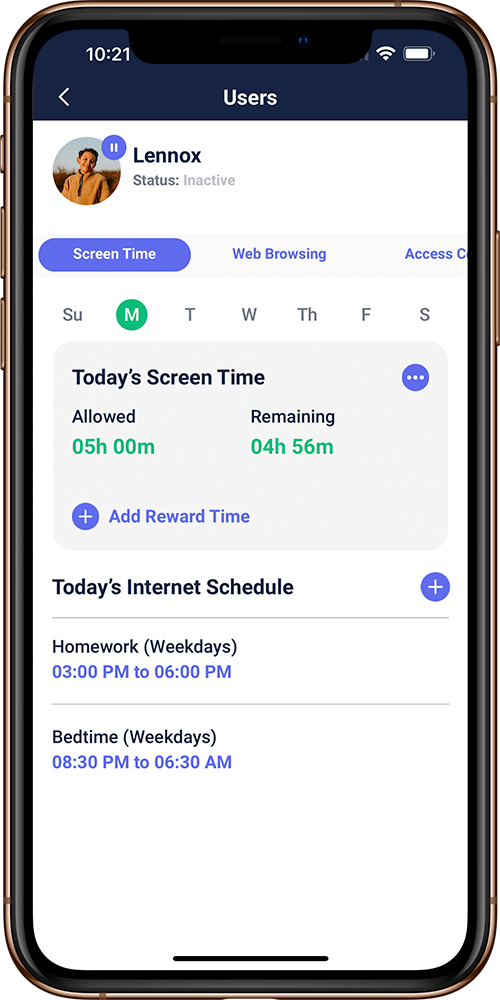
The official screen-time guide shows daily schedules, allowed internet time, additional time rewards and website rules. Bedtime and homework rules serve different purposes: one cuts internet access, while another can leave permitted school resources available.
Gryphon’s support explanation says its time accounting follows network traffic. A video that has already buffered can continue after the connection is cut; a downloaded game or film may work offline. My practical recommendation is to pair network schedules with device-level limits when the household rule concerns total screen use.
Browsing activity is not message monitoring
Browsing-history and access controls can help you discuss online habits, but a router log is not a transcript of conversations. Gryphon’s privacy policy says it has no visibility into encrypted internet traffic. Choose a different supported tool if your actual requirement is a particular device-level alert, and establish the permissions and limits before relying on it.
Away from home
The AX’s home-network rules do not automatically follow a phone onto mobile data or a different Wi-Fi connection. Gryphon advertises HomeBound through Premium Protection for supported smartphones and tablets. Check the current device, app and subscription requirements before treating away-from-home controls as part of the purchase.
Setup, administration and support
Management takes place in the Gryphon Connect app; Gryphon’s support documentation says there is no browser-based administration interface. Have a supported management phone, account access and your ISP connection details ready before replacing a working router.
The AX app guide covers adding devices, assigning users, contacting support and managing additional settings. It also describes blocking new devices until approved and adding a second administrator. Those are useful household controls, but administrator access should be limited to people who need it.
Keep the modem or ISP gateway requirement separate from the Wi-Fi decision. AX is a router, not a universal replacement for cable, DSL or fibre termination equipment. If your ISP requires its own gateway or connection settings, reconcile those first. Gryphon offers app-based support and a web help centre; confirm compatibility before disconnecting the old setup.
Security, privacy and account access
I see router-level security as another layer, alongside updated devices, account protection and appropriate endpoint security. Gryphon markets additional threat-blocking and network-monitoring functions through its paid protection services. Feature availability is not proof that every malicious download or phishing page will be stopped.
The Gryphon app and services privacy policy describes network metadata used for intrusion detection, temporary transfer of network information through its servers and aggregation of filtering decisions. These are vendor statements about data handling, rather than an independent security audit.
Use a strong unique management password, protect the management phone and enable available account protections. Explain household monitoring to the people affected and decide who can see reports. My reservation is that centralising rules also centralises administrative responsibility; a family should plan for account recovery as well as everyday blocking.
Price, subscriptions and current availability
On 18 October 2026, Gryphon’s direct AX listing showed sold out. Its displayed US-dollar price is not an available checkout offer. Check the exact pack, seller, stock and full amount due before committing, especially if a marketplace listing uses a generic “Gryphon router” title.
Hardware and optional services are separate decisions. Gryphon’s Premium Protection page describes the paid security and away-from-home service, but its displayed monthly and annual pricing figures are inconsistent. I would confirm the billing period, amount charged, renewal and included devices in the current account or checkout rather than rely on an older review’s price.
Choose the features you need first, then ask what remains active without a paid plan and what changes when a trial ends. Do not assume that a hardware return window, subscription trial and subscription cancellation policy are the same thing. For a refurbished or used AX, check condition, account transfer and warranty separately.
Alternatives and my final verdict
If you want a less ambitious home-network replacement, compare Guardian separately; it is a different hardware model, not an AX mesh accessory. If the existing Wi-Fi works well, the Wi-Fi parental-control guide can help you assess available settings before purchasing more equipment. For a wider hardware shortlist, read mesh-router parental controls.
My verdict: Gryphon AX is a conditional choice for a new family Wi-Fi 6 network. Profile-based rules and app administration are its attraction. The barriers are current stock, the separate cost and requirements of advanced services, and the inability to reuse Guardian or Tower nodes. I would resolve those three points before paying for a pack.
The rating assesses family rule controls, monitoring scope, child-device coverage, setup requirements, family privacy controls and family plan value with equal weight. It reflects suitability and limitations, rather than a speed benchmark or a customer-rating average.
Frequently asked questions
Can Gryphon AX mesh with Guardian or Tower?
No. Gryphon’s AX listing explicitly says it cannot be used with Guardian or Tower models. Plan an AX-compatible system rather than treating it as an expansion node for either.
Does Gryphon AX control all screen time?
It manages supported internet access on its network. Buffered video and offline activity can continue, so total screen-use limits may also require device settings.
Do Gryphon AX controls work on mobile data?
Home-router rules do not automatically follow mobile data. Gryphon advertises HomeBound through Premium Protection for supported phones and tablets; check current setup and subscription requirements.
Can AX replace my modem?
AX is a router. Your cable, DSL or fibre service may still need a modem, termination unit or ISP gateway. Check your provider’s requirements.
Is Gryphon AX currently available direct?
The official listing showed sold out on18October2026. Check current stock, exact pack and seller terms before buying.
Share this article

Stuart Kerr Spindlow is Impulsec’s Publisher, Chief Editor and Lead Reviewer. He writes and maintains coverage of consumer cybersecurity and digital-safety software, with a focus on practical suitability, limitations and the evidence behind product claims. Read Stuart’s full profile.