


Gryphon Guardian Review: Quick Verdict

Product Name: Gryphon Guardian
Product Description: Gryphon Guardian is a dual-band Wi-Fi 5 router for family internet controls.
Brand: Gryphon
Our verdict
I would consider Guardian when household filtering matters more than a newer Wi-Fi standard. Its older dual-band hardware, used-unit account/support checks and paid away-from-home requirements make it a conditional purchase. Check current stock and seller terms first.
Overall
-
Family rule controls
-
Monitoring scope
-
Child-device coverage
-
Setup requirements
-
Family privacy controls
-
Family plan value
Pros
- 👨👩👧 Profile-based rules across assigned household devices
- 🕒 Internet schedules, allowances and access controls
- 📱 App administration and documented support resources
Cons
- 🚫 AX cannot mesh with Guardian or Tower
- 📵 Router rules do not cover every offline or away-from-home activity
- 💳 Direct hardware sold out; paid-service terms need checking
The Gryphon Guardian is a compact dual-band Wi-Fi 5 router built around family internet controls. Its appeal is adding household rules without buying the AX model’s newer Wi-Fi hardware. The important questions are whether its network capability fits your home and whether the exact unit, account and services remain a sensible purchase. My Gryphon router model guide explains the wider range.
Who is Guardian a good fit for?
I would consider Guardian for a household that values shared filtering and internet schedules more than a newer Wi-Fi standard. It may also suit an existing owner who wants to keep a working setup, provided Gryphon confirms the compatible hardware and current service support.
I would be more cautious about buying an unknown used unit for a large or difficult-to-cover property. A lower purchase price does not settle placement, account ownership, subscription entitlement or support. If your current router already meets the network need, device-level family controls may be the smaller change.
Guardian hardware: Wi-Fi 5, not AX
The manufacturer’s Guardian user guide specifies simultaneous 2.4 GHz and 5 GHz radios and 802.11ac support. This is the dual-band AC1200 / Wi-Fi 5 family, not tri-band Wi-Fi 6. The wireless class is a combined specification, not an internet speed delivered to one device.
Gryphon’s re-certified Guardian listing advertises up to 1,800 square feet for one unit and 5,000 for a three-pack. Those estimates cannot tell you how a particular room will perform. Walls, router placement, clients and the connection between nodes all affect usable coverage.
Ethernet and compatible expansion
The user guide distinguishes the Internet connection from the remaining local connection. Do not count both sockets as spare LAN ports: the upstream connection needs its own port. If you need several wired devices or a particular backhaul arrangement, confirm the exact unit’s port roles and supported topology with Gryphon before ordering.
Gryphon AX cannot join a Guardian or Tower mesh. That explicit restriction makes AX a separate system decision. For Guardian/Tower expansion, ask Gryphon to match the exact existing models and firmware rather than relying on a seller’s generic compatibility claim.
For a household replacing an ageing network, I would compare Guardian’s older wireless standard against the features you need now. A newer router may be the better fit for compatible devices or demanding local-network use, but a standard alone does not establish the speed through your walls.
Family profiles, filters and app access
Gryphon’s Getting Started app guide shows profiles with age-related settings, device assignment, Safe Search, browsing-history controls and app-access rules. The value is organising several connected devices around one child’s household rules.
I would start with an age-related profile and then review the school sites, games and services the child needs. A preset is a starting point. If a necessary resource is blocked, make a narrow exception rather than immediately moving the whole profile to a less restrictive age category.
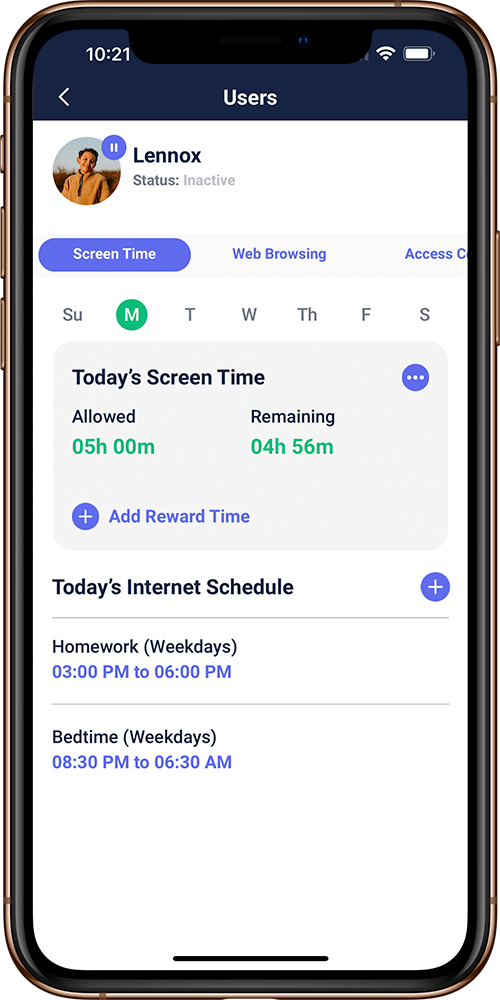
App blocking here concerns supported network access. It does not remove an installed app, read all its messages or prevent offline use. The useful question is which connection the device is using and which rule applies to it; avoid assuming every connected device is automatically assigned to the right child.
Internet time versus total screen use
The official screen-time tutorial covers homework and bedtime schedules, internet suspension and daily allowances. Gryphon’s support explanation makes a material qualification: time is calculated from network traffic, not everything displayed on a screen.
A buffered programme may continue after internet access stops. A downloaded film or offline game may continue without any router traffic at all. Pair Guardian with device-level limits if the family rule is about total time on the device, and explain that distinction when setting expectations.
Browsing history and away-from-home limits
Browsing records can help a parent discuss access patterns, but should not be treated as message transcripts. Gryphon’s privacy policy says it does not see encrypted traffic content. Use monitoring proportionately, explain it to household members and limit access to the reports.
Guardian’s router controls apply to traffic passing through the managed network. A phone using cellular data or a different Wi-Fi network has taken another path. Gryphon advertises HomeBound through Premium Protection for supported smartphones and tablets; confirm the current app, device and account requirements before relying on it away from home.
Setup and ongoing administration
Guardian is managed through the Gryphon Connect app rather than a browser administration page. The hardware guide starts with the app, an account and the router’s QR code; the official hardware checklist explains connecting to a separate modem or modem-router combination.
For an existing modem-router gateway, first establish how Guardian will connect and which network the family’s devices will use. A child remaining on a separate, unmanaged Wi-Fi network will not gain Guardian’s network rules merely because a Guardian is elsewhere in the home.
The app tutorial describes approving new devices, adding another administrator and background security updates. These controls are useful, but they do not provide a dated promise of future firmware support for a particular used unit. Before buying older hardware, ask Gryphon about current support and confirm the account can be set up in your name.
Gryphon’s help centre offers app-based contact and setup resources. I would use those to resolve ISP or expansion compatibility before replacing a working network. Do not assume a router replaces the modem, fibre termination equipment or other hardware your ISP requires.
Security and family privacy
Guardian’s family-control role should be kept separate from claims about malware detection. Gryphon markets additional security services, but network filtering does not replace updates, strong accounts and appropriate endpoint security. It cannot guarantee that every phishing page, malicious file or risky behaviour is blocked.
The Gryphon app and services privacy policy describes temporary routing of network information through company servers, network metadata used for intrusion detection and aggregation of filtering decisions. That is more informative than assuming everything remains local because the hardware sits in your home; it remains the vendor’s description of its own practices.
Protect the management account and phone, keep administrator access limited and use available account safeguards. The privacy tradeoff is having one place to manage family activity. Decide what you need to monitor and how long you need that information rather than enabling every available history feature by default.
Price, condition, subscriptions and availability
On 18 October 2026, the official re-certified Guardian one-pack was sold out. A re-certified unit is a different purchase from a new unit or a used marketplace listing. Compare the actual condition, supplied accessories, account transfer and seller before treating a low headline price as value.
Gryphon’s re-certified listing describes returned units as Grade A with accessories, a one-year hardware warranty and a 90-day Premium Protection trial limited to new Gryphon account activations. Check those exact seller terms when stock returns; they should not be assumed to apply to a private resale.
Do not budget from the old $79 annual security plan or $4.99 HomeBound examples repeated in older reviews. The current protection-service page presents paid services with inconsistent price figures. Confirm the full charge, billing period, renewal and required devices in the current account or checkout.
I would compare the total cost of the specific Guardian unit and required services against keeping the current router with device-level controls. For a used unit, an already-used trial, missing accessories or unresolved account transfer can outweigh an apparent saving. Hardware return terms and subscription cancellation terms also need separate checks.
Alternatives and my final verdict
Choose AX instead when you specifically want Gryphon’s Wi-Fi 6 hardware and are prepared to build a separate AX system. Start with the Gryphon model guide to compare the range. If the existing Wi-Fi is satisfactory, review how to add parental controls to Wi-Fi before buying replacement hardware.
My verdict: Guardian is a conditional family-control option for a modest network, not the default choice for a new high-capacity mesh. Its profile-based rules are useful; the limitations are older Wi-Fi hardware, traffic-based time accounting and the cost and setup of services beyond the home network. For a used or re-certified unit, support and account ownership come before price.
The rating gives equal weight to family rule controls, monitoring scope, child-device coverage, setup requirements, family privacy controls and family plan value. It is an editorial assessment of suitability and limitations, not a measured Wi-Fi result or a customer-rating average.
Check Gryphon Guardian Availability
Frequently asked questions
Is Gryphon Guardian a Wi-Fi 6 router?
No. Guardian is a dual-band Wi-Fi5/AC1200 model. Gryphon AX is a separate Wi-Fi6 model.
Can Guardian mesh with Gryphon AX?
No. Gryphon’s AX listing explicitly excludes Guardian and Tower compatibility. Ask Gryphon to confirm exact hardware before expanding a Guardian/Tower network.
Does Guardian stop all screen activity at bedtime?
No. It manages supported network access. Buffered content and offline activity can continue, so total screen-use rules may also need device settings.
Do Guardian controls work on mobile data?
Home-network rules do not automatically follow a phone onto cellular data. Gryphon advertises HomeBound through Premium Protection for supported devices; confirm the current entitlement and setup.
Is a used or re-certified Guardian a good buy?
Only if the model, condition, account transfer, current support and total service costs suit your needs. Gryphon’s direct re-certified listing showed sold out on18October2026; private resale terms can differ.
Share this article

Stuart Kerr Spindlow is Impulsec’s Publisher, Chief Editor and Lead Reviewer. He writes and maintains coverage of consumer cybersecurity and digital-safety software, with a focus on practical suitability, limitations and the evidence behind product claims. Read Stuart’s full profile.