


NordVPN Review: Quick Verdict

Name: NordVPN
Description: Paid consumer VPN with ten simultaneous connections. Regional plan inclusions and advanced desktop protection vary.
Operating System: Windows, macOS, Linux, Android, iOS
Application Category: VPN Software
Our verdict
NordVPN suits readers who want ten simultaneous VPN connections and can choose a regional bundle by its actual included features. Advanced malware protection is limited to supported desktop apps; pricing, renewal and trial eligibility vary by market. The review below explains those differences and a practical setup check.
Overall
-
Privacy assurance (4.5/5)
-
Connection controls (4.5/5)
-
Platform feature coverage (3.5/5)
-
Household device allowance (4.0/5)
-
Plan and renewal terms (3.5/5)
-
Setup and help resources (4.5/5)
Pros
- Ten simultaneous VPN connections
- Optional desktop security tools in supported bundles
- Published independent no-logs assurance history
- Broad desktop and mobile app support
Cons
- Regional tier names and inclusions vary
- Renewal can exceed the introductory rate
- Advanced scanner unavailable in the Mac App Store app and on mobile/Linux
- No permanent free VPN plan
This NordVPN review focuses on the buying and setup decisions that change its value: regional tiers, desktop-versus-mobile protection, trial eligibility, renewal and app configuration. It distinguishes documented features from performance you still need to check on your own connection.
NordVPN: who it suits

The strongest case for NordVPN is a paid VPN across several devices, with optional extra security products you will actually use. It is a weaker fit if you need a permanent free service, more than ten simultaneous connections or identical advanced protection on every operating system.
Scroll horizontally to see all columns.
| Product | Pricing (devices/users) | Main capabilities |
|---|---|---|
| NordVPN Full review | Paid VPN: up to 10 simultaneous devices. Introductory totals, local currency and annual renewal vary by offer. View plans | Consumer VPN; higher bundles add separate products/features. |
What NordVPN protects: separate the tunnel from the extras
The VPN app routes included traffic from your device to a NordVPN server. A browser extension has a narrower scope than a whole-device app. HTTPS is another layer, connecting the browser or app to its website or service; it does not begin and end at the VPN server.
| Layer or route | What it covers | What remains outside that claim |
|---|---|---|
| Device-to-VPN-server tunnel | Included traffic routed through the VPN app | Deliberately excluded apps; a compromised device; signed-in identity |
| HTTPS/TLS connection | Supported browser/app-to-service connection | Information you submit to that service and its account records |
| DNS-based filtering | Supported domain requests and block lists | Comprehensive file scanning or removal of an existing infection |
| Eligible desktop security extras | Documented browsing/download protections in the correct app and plan | Identical features on every device or guaranteed detection |
That distinction changes what I would pay for. A phone user seeking encrypted connections does not automatically need a higher bundle for a desktop scanner. Conversely, a Windows buyer specifically wanting download screening should check that feature’s entitlement rather than assuming every VPN tier includes it. Ten simultaneous connections describe the allowance, not ten identical security suites.
NordLynx is the service’s WireGuard-based protocol. Start with the recommended app settings and a suitable nearby server. Additional hops such as Double VPN address a particular routing or trust preference; they do not remove browser cookies, conceal information supplied to a website or demonstrate faster connections. Choose a configuration for a clear purpose rather than enabling every advertised extra.
Desktop protection: app build, permissions and feature names matter
NordVPN now distinguishes Next-gen antivirus from Real-time protection. Next-gen antivirus is the desktop package with download scanning, quarantine and browsing protections. Real-time protection is DNS-based filtering; it is not another name for the file scanner. Older labels may remain during the rollout.
The desktop package supports Windows 10 (64-bit) and Windows 11, and macOS 12 or later using the sideloaded app. The Mac App Store build, mobile apps and Linux do not include that scanner. App-vulnerability checks are Windows-only. A connected VPN badge alone therefore cannot confirm that file scanning is active.
Next-gen antivirus can operate without an active VPN connection. The DNS feature normally depends on VPN routing; the support page also describes a separate mobile exception. Check the installed app’s current controls rather than assuming identical behaviour on a phone and desktop.
On a Mac, follow the platform setup instructions and review required permissions. Choose the included function you need, then confirm its status separately from the VPN connection.
For an everyday household, check three things separately: the device’s VPN connection, the relevant protection module’s status, and the selected plan’s entitlement. If you primarily use a phone or the Mac App Store build, a bundle bought solely for an unavailable desktop extra is poor value. If a file is flagged, use the supplier’s documented review process rather than assuming that a quarantine count proves a detection rate.
A practical performance and access check
Test the same task before and after connecting: a video call, file download or stream you legitimately access. Keep the device, location and time similar, use a nearby server first and record protocol, endpoint, latency and throughput. Repeated results are more useful than one headline number.
If the connection is slow, compare with the non-VPN baseline, change to another nearby endpoint and then try a supported alternative protocol. A congested access network can limit both results. Do not infer a provider-wide problem from one distant server.
Streaming access can change by service, title rights, account region and VPN IP. Test the specific service you need before committing to a long plan; a past success with one catalogue does not promise access everywhere. Respect the service terms and local restrictions.
For peer-to-peer use, check the relevant app and server guidance and only share content you have rights to distribute. Do not choose NordVPN on the assumption that it provides inbound port forwarding. A VPN does not make downloads trustworthy.
Do not rely on an old claim of success in a highly restricted country. Blocking conditions can change quickly, and a connection working somewhere else is not evidence for your destination. Plan an authorised fallback before travel and follow applicable local requirements.
Setup without losing the protection you wanted
Install the official app or official store version, sign in and connect. Confirm the VPN status and compare your outward IP before and after connection. On a Mac, select the app distribution that actually includes the feature you are buying; the App Store and sideloaded versions differ.
Review automatic connection, trusted-network exceptions and the kill-switch mode in that app. A setting that blocks only unexpected drops is not the same as blocking all traffic whenever the VPN is disconnected. Try an ordinary reconnect and a network switch so you understand the behaviour.
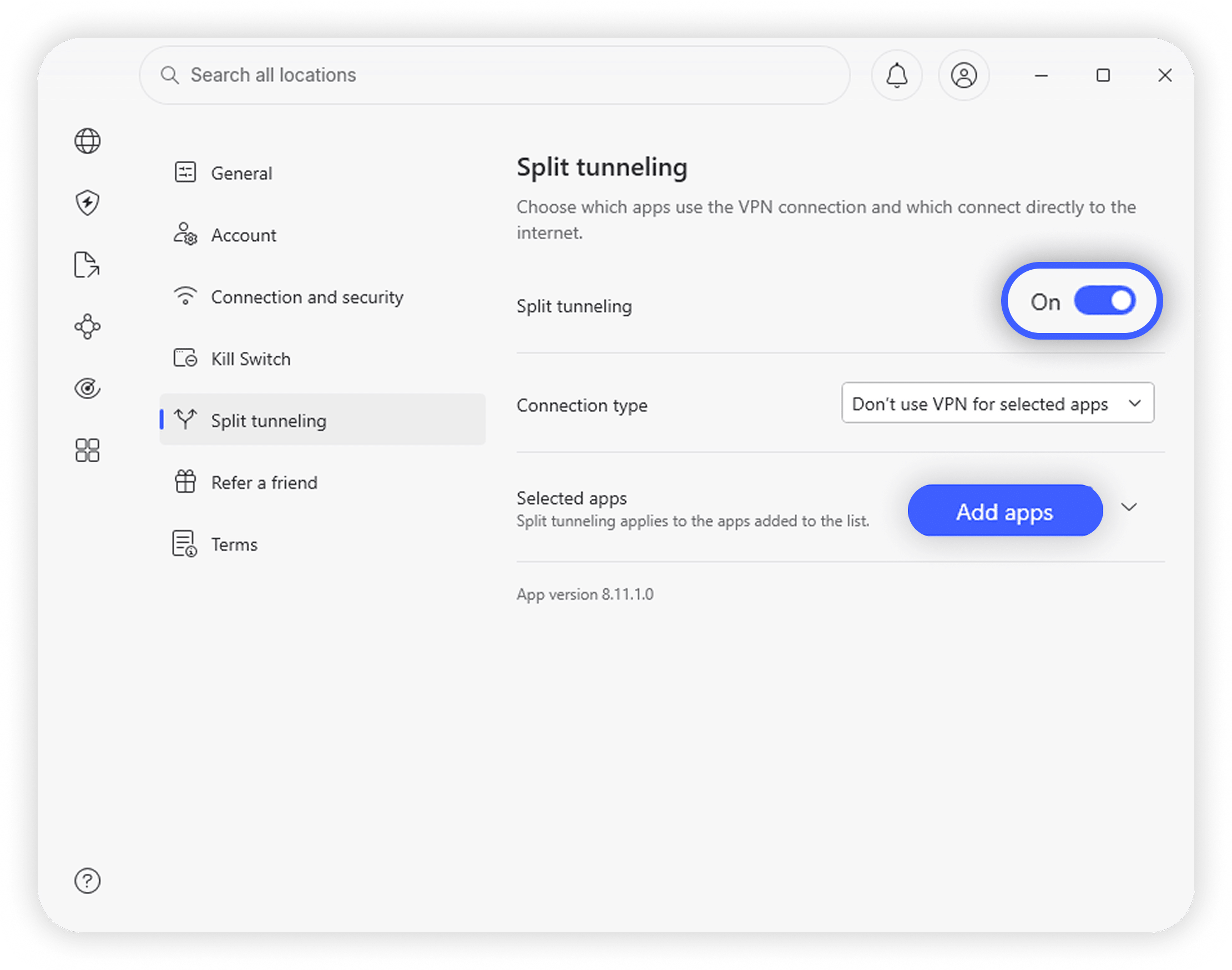
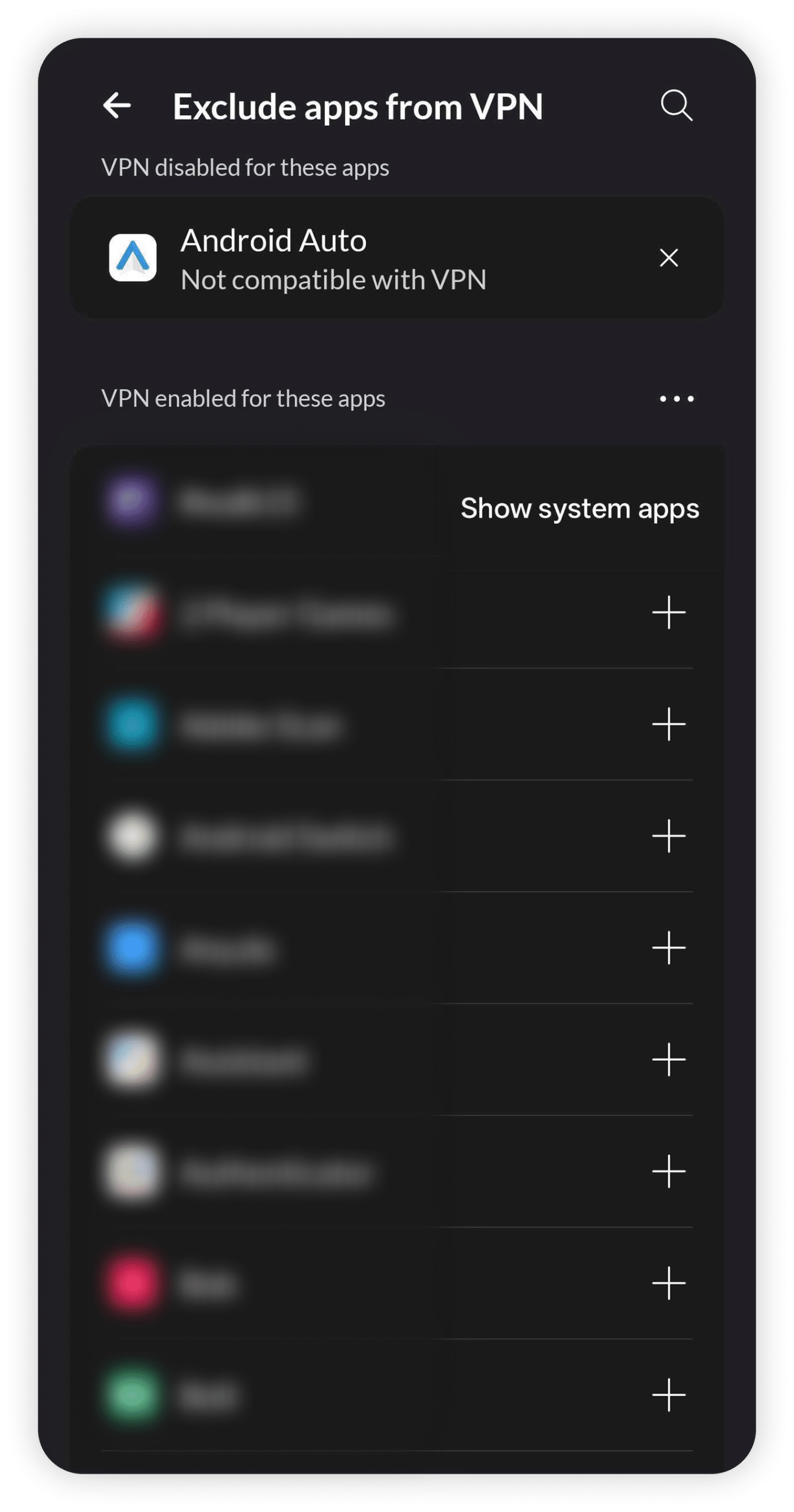
Split tunnelling is an exception list: an excluded app can reach the internet outside the tunnel. Use it for a defined compatibility need, not as an unexplained performance tweak. Browser secure-DNS settings, another VPN and employer controls can also affect routing.
On venue Wi-Fi, a captive portal may not load while a strict blocking mode is active. Pause sensitive work, deliberately disconnect only for the expected portal login, then reconnect and confirm protection. Do not ignore certificate warnings or install unexpected profiles.
For help, provide the operating system, app version, protocol and symptom to official support. Remove passwords, tokens and personal browsing details from screenshots or diagnostic files. A useful troubleshooting record is more important than an invented support-response time.
Routing exceptions are a privacy decision
NordVPN’s split-tunnelling guidance distinguishes app exclusions from Linux Allowlist rules. Linux exceptions concern ports or subnets, can match both directions and bypass the kill switch for matching traffic. A broad subnet exception is not equivalent to excluding one named app.
| Need | Check | Privacy consequence |
|---|---|---|
| One Windows or Android app outside the VPN | Its supported app-exclusion setting | That app’s excluded traffic uses the ordinary route |
| A Linux port or subnet exception | All traffic matching the rule, in both directions | The matching traffic is outside the tunnel and kill-switch protection |
| An excluded service still fails | App route and DNS behaviour separately | An excluded IP route does not establish separate DNS routing |
| A temporary compatibility workaround ends | The saved exception list on that device | Remove an unnecessary exception instead of forgetting the bypass |
Nord documents a possible mismatch in which an excluded app sees the ordinary public IP while DNS still uses NordVPN. Treat that as a troubleshooting lead, not a promise that exclusion will restore every streaming or local service. Change one setting at a time and check the intended task again.
Keep a short note of why each exception exists. If you need an employer-managed connection, ask the organisation’s IT team how it should coexist with a personal VPN; do not override its access controls. If the only workable setup bypasses protection for your main sensitive task, reconsider the configuration before committing to a long subscription.
Devices: ten connections, with platform differences
The current subscription supports ten simultaneous VPN connections. Count phones, laptops, tablets and TVs that will be online together; merely having an app installed does not mean every device is using a connection at the same time.
NordVPN lists native apps for Windows, macOS, Linux, Android and iOS, plus supported TV and browser options. Check the current minimum OS and exact feature set for your device on the official app page. A supported OS does not mean its scanner, kill switch or routing controls match another app.
A router installation can cover devices behind that router, but supported firmware, setup and router performance matter. The mobile app is not a substitute for configuring the router correctly. Be clear about whether you need whole-device coverage or only browser traffic.
If you need many simultaneous paid connections, compare the unlimited-device policies of services such as Surfshark or PIA. If you need only occasional one-device use without paying, consider an ongoing free service such as Proton Free.
Plans and renewal: a worksheet for the actual checkout
NordVPN prices and tier names vary by market. Choose the VPN tier first, then pay for an extra only when it solves a supported device or security need. A password manager, storage allowance, dedicated IP and desktop scanner are different products or capabilities, not requirements for the encrypted tunnel.
The offer page checked on 27 October 2026 advertises extra introductory months and explains that its percentage saving compares the introductory monthly equivalent with the current monthly equivalent of annual renewal. It is not a promise that the same price continues indefinitely. Avoid comparing a local-currency checkout with a screenshot priced in another currency.
- Initial period: record the full charge and every included month. Divide the charge by that complete period, including qualifying bonus months.
- Renewal: record its charge and term separately. A 27-month introduction does not make a later annual renewal cover 27 months.
- Extras: check which are subscription additions, which expire or renew separately, and which work on your actual app build.
- Exit: keep the cancellation confirmation and the payment-channel refund rules. Stopping automatic renewal and requesting an eligible refund are separate actions.
For a short need, the smaller commitment can be preferable to the largest advertised discount. For ongoing use, compare the initial period plus at least the first renewal rather than only the headline monthly equivalent. Check the current plan conditions and your checkout’s charge date; do not assume a general promotion applies to your country, payment method or renewal.
A same-currency renewal example
The pricing page retrieved on 27 October 2026 served Brazilian-real prices: Basic at R$294.30 for 27 introductory months, renewing at R$382.80 per year, with VAT potentially applicable. This is a dated regional example, not a US-dollar quote or an offer for every reader. Use your own checkout’s currency, term and tax details.
| Period | Charge and covered months | Calculated monthly equivalent |
|---|---|---|
| Introduction | R$294.30 / 27 months | R$10.90 |
| First annual renewal | R$382.80 / 12 months | R$31.90 |
| Introduction plus one renewal | R$677.10 / 39 months | R$17.36 |
These are equivalents, not a promise of monthly billing. The combined figure is rounded only after adding the two charges and dividing by 39. Comparing the introductory equivalent with another provider’s renewal equivalent would answer a different question. Keep the initial and renewal periods visible when deciding whether the longer commitment fits your household.
Trial and refund: two different decisions
NordVPN’s current website trial is seven days for eligible first-time users on selected one- or two-year bundles. Its support terms list Prime, Ultimate Max, Ultra or Complete Max depending on the offer, and eligibility in the US, Canada, Australia, UK, France, Japan, Netherlands, Germany, Denmark, Finland, Norway, Sweden, Spain, Italy and Poland. Credit card or PayPal is required; the chosen plan bills automatically unless cancelled before the deadline. Check that your regional checkout actually displays the trial before enrolling.
A separate three-day Google Play trial is offered to eligible first-time Android users under store terms, with stated country exclusions. Do not describe either trial as available to every buyer in every country. NordVPN has no permanent free VPN plan.
The 30-day money-back guarantee applies to an eligible initial subscription purchase, not ordinary renewals unless local law requires otherwise. Apple App Store purchases use Apple’s refund process. Requesting a refund and disabling future renewal are separate actions.
Read the official trial terms and refund policy before enrolling.
Privacy evidence and its limits
NordVPN publishes a no-activity-logging policy and independent assurance history. Its 3 February 2026 announcement describes Deloitte Lithuania’s sixth no-logs engagement, conducted between 10 November and 12 December 2025, with the final report issued on 12 December 2025.
That is a point-in-time assessment of the stated systems and controls. The complete report requires a Nord Account; the public announcement is not the same as independently reading every report detail. Do not treat the result as a guarantee about every future release or every category of personal data.
Read the privacy policy for account, payment and optional diagnostic information as well as traffic-logging claims. A consumer VPN does not remove the information websites retain when you sign in, consent to tracking or submit a form. Server location is also different from the account entity or the local rules applying to you.
Check DNS, IPv6 and WebRTC exposure on the actual device, then repeat after reconnecting or changing networks. That can reveal configuration problems, but a clean check on one day does not certify all apps or locations. Keep split-tunnel exclusions visible when interpreting the result.
Sources: NordVPN’s dated assurance announcement and Nord Account privacy policy.
Support and feedback: use the right evidence
NordVPN offers its official support centre and live chat. Use the current platform instructions instead of a tutorial for a different app build. Before contacting support, note whether the problem is internet access, VPN connection, a particular website or the optional scanner.
Public reviews can reveal recurring complaints, but star averages change and combine different countries, products and billing experiences. Look for a recent report about your actual device or subscription issue rather than treating an old aggregate score as a speed or privacy test.
This review does not promise a measured response time or universal streaming success. During an eligible trial or refund period, test the everyday jobs that matter to you and keep a record of a genuine unresolved issue.
Where NordVPN is the wrong fit
Choose another route if you need a permanent free plan, more than ten simultaneous VPN connections or an advanced scanner on an unsupported platform. A low introductory rate can also be poor value if you only need one month or will not use the bundle extras.
For a minimal-signup account model, compare Mullvad or IVPN. For many paid devices, compare Surfshark. For a no-cost one-device start, consider Proton Free. None is a universal winner; account terms, app support and your goal decide the fit.
A VPN is not a cure for account theft, malware already on the device, phishing or targeted traffic correlation. Address the relevant device and account risks first, and avoid relying on a marketing guarantee of total anonymity.
Alternatives worth considering
Proton VPN: Consider it when an ongoing free plan or Proton’s open-source app approach fits better. Free has fewer location choices and one connection; check which paid features you actually need.
Private Internet Access: Compare it for detailed routing controls and a household with many devices. The extra configuration options require care, and features still vary by platform.
How the ratings reflect this review
The six ratings assess consumer privacy, device coverage and the buying decision. Each is an editorial judgment out of five: 3 means mixed, 4 strong with meaningful limitations, and 5 an exceptional fit for that criterion. Half steps sit between those judgments. The overall 4.1/5 is their equal-weight average, rounded to one decimal. These category-specific criteria replace the earlier general software scorecard.
- Privacy assurance — 4.5/5: Published no-logs assurance and privacy safeguards are useful; account and operational data remain distinct from browsing logs.
- Connection controls — 4.5/5: Kill-switch and encrypted-tunnel options provide useful connection controls; behaviour differs by app.
- Platform feature coverage — 3.5/5: Broad app coverage, but desktop protection and split-tunnelling availability are not identical across operating systems.
- Household device allowance — 4.0/5: Ten simultaneous VPN connections suit many households, with a defined cap.
- Plan and renewal terms — 3.5/5: Multiple bundles and regional renewal terms make the total commitment more important than the headline monthly equivalent.
- Setup and help resources — 4.5/5: Platform-specific setup and troubleshooting guidance covers practical connection checks; documentation breadth does not measure support response quality.
Final recommendation
NordVPN is a reasonable paid choice for a ten-device setup when its local tier includes tools you need on supported platforms. Start with the VPN tier, check renewal, and upgrade only for an extra product that solves a specific problem. If you qualify for a trial, note its billing deadline; otherwise treat the eligible refund period as a paid purchase condition.
Frequently Asked Questions
How many devices can use NordVPN at once?
The current subscription permits ten simultaneous VPN connections. Platform support and advanced security features still differ by app.
Is NordVPN’s advanced malware protection on iPhone?
No. The advanced scanner supports eligible Windows and sideloaded macOS versions. Mobile DNS-based filtering is a different feature.
Does the Mac App Store app include the same scanner?
No. The advanced Scam, phishing, and malware protection feature requires the supported sideloaded macOS app.
Is the seven-day website trial available everywhere?
No. It is limited to eligible new users, selected bundle terms, supported payments and the countries listed in the official trial conditions.
Can I get a refund after an ordinary renewal?
The initial-purchase 30-day guarantee does not cover ordinary renewals, unless applicable local law requires otherwise. Store purchases can have different processes.
Is the promotional monthly figure what I pay each month?
Usually it is an equivalent for an upfront subscription. Calculate the initial covered period and renewal period separately.
Does the no-logs assurance make me anonymous?
No. It concerns the stated activity-logging systems at the assessed time. Accounts, cookies and information you submit can still identify you.
Will NordVPN always unblock a streaming service?
No. Availability can change by service, region, account and VPN address. Check the specific lawful service you need on your own setup.
For a broader shortlist, see our privacy VPN guide. For network setup, see the public Wi-Fi guide.
Share this article

Stuart Kerr Spindlow is Impulsec’s Publisher, Chief Editor and Lead Reviewer. He writes and maintains coverage of consumer cybersecurity and digital-safety software, with a focus on practical suitability, limitations and the evidence behind product claims. Read Stuart’s full profile.
This review was useful because it did not just repeat NordVPN’s marketing points, but actually weighed the strengths in speed, security, and streaming against the higher pricing and a few real-world limitations.
What stood out most to me was the way the article explained why NordVPN appeals to both beginners and more advanced users. The balance between simple apps and deeper features like Double VPN and Meshnet was well covered.
What stood out most to me was the way the article explained why NordVPN appeals to both beginners and more advanced users. The balance between simple apps and deeper features like Double VPN and Meshnet was well covered.
Helpful review overall. The sections on streaming, torrenting, and censorship-heavy regions made it easier to see where NordVPN performs well in practice and where expectations should be more cautious.
This felt more trustworthy than most VPN reviews because it did not treat fast speeds as the whole story. The article also looked at audits, leak protection, support quality, and day-to-day usability.
What I found most useful was the honest positioning of NordVPN as a premium option. It sounds like a strong all-rounder, but the review also makes clear that not everyone needs to pay for that level of feature depth.
I appreciated that the article explained specialty features in plain English. Double VPN, Onion over VPN, and Meshnet can sound intimidating, but here they were actually made understandable.
This was a strong guide because it clearly separated who NordVPN is best for from who should probably look elsewhere. That kind of practical framing is more helpful than just giving a high score and leaving it at that.
The strongest part for me was the privacy section. A lot of VPN reviews mention no-logs, but this one did a better job explaining the role of audits, jurisdiction, and RAM-only infrastructure in making that claim more credible.
I liked that the article covered both the polished side of NordVPN and the annoyances, like occasional connection quirks, premium pricing, and inconsistent performance in stricter countries. That made the review feel more grounded.