


ExpressVPN Review: Quick Verdict Basic: USD 83.72 for the first 28 months; then USD 99.95/year

Name: ExpressVPN
Description: Consumer VPN with Basic, Advanced and Express Pro tiers: 10, 12 and 14 simultaneous connections. Blocking features and extras vary by tier and platform. Introductory charges and annual renewal differ.
Offer price: 83.72
Currency: USD
Operating System: Windows, macOS, iOS, Android, Linux
Application Category: SecurityApplication
Our verdict
ExpressVPN Basic is my starting choice for its core VPN across up to ten connected devices. Its broad platform options, documented connection controls and public privacy audits are strengths. Compare the full renewal charge and upgrade only for extras you will use. Advanced allows 12 simultaneous connections and Express Pro 14. Features vary by platform; neither plan guarantees streaming access.
Overall
-
Privacy assurance
-
Connection controls
-
Platform feature coverage
-
Household device allowance
-
Plan and renewal terms
-
Setup and help resources
Pros
- Apps across major platforms
- Documented connection controls and privacy audits
- Basic, Advanced and Pro offer distinct device allowances
Cons
- Introductory and renewal costs differ
- Features depend on tier and platform
- No permanent free plan or guaranteed streaming access
This review explains the practical buying fit of ExpressVPN, including its plan tiers, supported devices and connection controls. Use the limitations alongside the editorial ratings in the opening verdict, and check the renewal cost before committing.
Choose the plan by the problem it solves
Basic is the starting point for the core VPN across a household of up to ten simultaneous devices. Advanced adds two connections and additional products; Pro adds four over Basic and a different bundle. A higher tier is worthwhile only when its extras replace a real need. A larger device cap is not a stronger encryption setting.
| Your requirement | Decision to compare | Tradeoff |
|---|---|---|
| Core VPN, up to ten active devices | Start with Basic | Check the local renewal bill |
| Tracker blocking or password-management bundle | Assess Advanced on each supported platform | Do not pay twice for an extra you already have |
| A consistent dedicated exit address | Compare the available add-on with Pro’s inclusion | A stable address can link repeated activity |
| More than fourteen concurrent devices | Compare an unlimited-device service or supported router deployment | A router changes setup and shared exit-location behaviour |
Basic, Advanced and Pro: choose the right allowance
The current connection policy allows 10 simultaneous connections on Basic, 12 on Advanced and 14 on Pro. Installed apps are not the same as concurrent connections. A VPN-configured router counts as one connection, but the router must actually support the configuration; a phone leaving the home network needs its own protection.
On the US-dollar offer page checked 22 October 2026, Basic costs $83.72 for the first 28 months and lists a $99.95 annual renewal. Advanced is $125.72 initially with a $119.95 annual renewal; Express Pro is $209.72 initially with a $199.95 annual renewal. Taxes and local offers can change the checkout total. The advertised $2.99, $4.49 and $7.49 figures are introductory monthly equivalents, not month-to-month payments.
For me, Basic is the starting point. Paying for Pro solely to obtain two more concurrent connections than Advanced can be poor value if you do not need its other benefits. Check the tier descriptions before comparing an all-inclusive bundle with another provider’s VPN-only price. Our ExpressVPN price guide explains the billing arithmetic.
A low headline monthly figure can disguise the budget change. Divide the first charge by 28 for the introductory equivalent, but divide the annual renewal by 12 for the next year: Basic is about $8.33 per month at renewal, Advanced $10.00 and Pro $16.66. The term length matters just as much as the price. Those renewal equivalents do not mean ExpressVPN takes a payment every month; the quoted renewal is an annual charge.
Scroll horizontally to see all columns.
| Product | Pricing (devices/users) | Billing / refunds |
|---|---|---|
 ExpressVPN Full review | US Basic offer: $83.72 for 28 months; listed renewal $99.95/year; 10 simultaneous devices. Advanced/Pro are different bundles. Check pricing | Listed Basic annual renewal $99.95; checkout, tax and eligibility apply. |
Compare the cost over the same ownership period. If the checked USD offer and renewal remain unchanged, Basic’s first 40 months cost $83.72 + $99.95 = $183.67, or about $4.59 per month across that whole period, before tax. Advanced totals $245.67 and Pro $409.67 over those 40 months. This is an assumption-based budget example, not a locked future price; use your actual order and renewal notice.

Advanced makes sense when you actually want its tracker blocking or included password manager, not simply because it sits in the middle of the pricing page. Pro adds a larger allowance and bundle benefits such as a dedicated IP. A dedicated IP can help a service recognise a consistent address, but it is not a stronger anonymity setting: a fixed address is easier to associate with repeated activity. Check whether that specific convenience is worth the higher renewal bill.
Count devices that connect at the same time. Two adults with two phones and two laptops already use four connections; a tablet and supported TV bring that to six. Basic still has room in that example. A shared router can cover compatible home devices through one VPN connection, but it introduces router setup and puts several devices on the same exit location. It also cannot protect a phone using mobile data outside the house.
Privacy and security: useful protection with clear limits
ExpressVPN routes covered traffic through an encrypted connection to a VPN server. Websites see that server’s exit IP rather than your ordinary public IP. HTTPS still matters, and signing into an account still identifies you to that service. The official trust centre explains the service’s no-logs commitments and audit material; an audit evaluates a defined scope at a particular time, rather than proving every future connection private.
The Internet Kill Switch documentation is worth reading for your specific platform: a kill switch can block traffic when a VPN connection drops, and availability or controls vary by client. Keep the app updated and check its settings. Split tunnelling deliberately exempts selected traffic; do not exclude a browser and then assume its browsing is covered.
ExpressVPN’s blocking features are also tier-dependent. Basic includes Lite protections, while tracker blocking belongs to Advanced and Pro. These protections require an active VPN connection on supported platforms. Domain blocking is useful, but it is not antivirus, complete child supervision or a guarantee that every harmful page will be blocked.
TrustedServer, Lightway and what they establish
ExpressVPN describes TrustedServer as a RAM-only server design. That reduces reliance on persistent disks for the server operating environment. It is a useful architectural safeguard, not proof that nobody can ever observe your activity. You still trust the VPN operator for the covered network path, and the websites you visit still handle the information you send them.
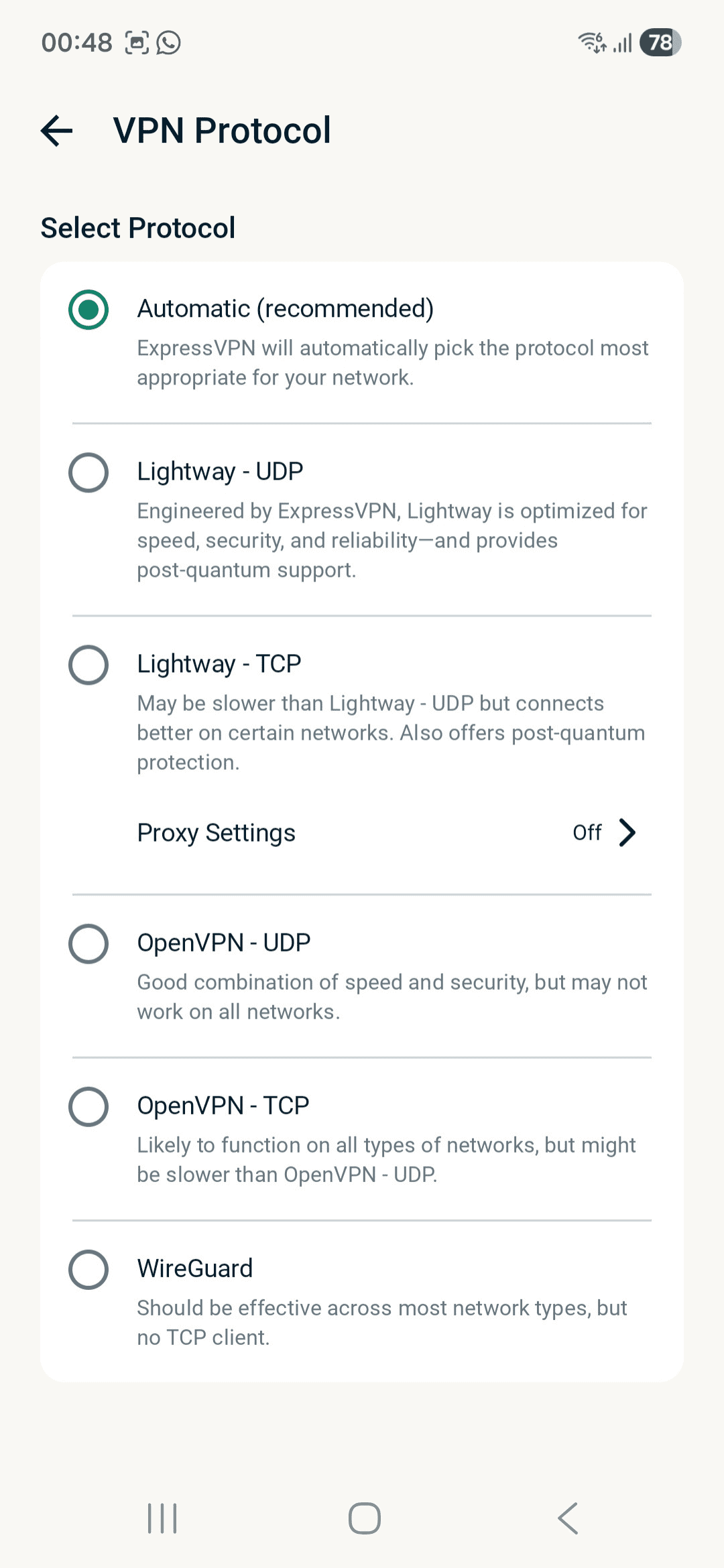
Lightway is ExpressVPN’s own VPN protocol, with an open-source core and published security assessments. Protocol design, app reliability and the route to a destination all affect the experience. A protocol name or an audit does not establish a download speed for your home connection. Use automatic selection first; compare a supported alternative only if you encounter a specific compatibility issue.
Read the date and subject of an audit before using it to make a buying decision. A password-manager assessment, browser-extension assessment and VPN infrastructure review examine different products or boundaries. The useful question is which component has been scrutinised and what the report covers, rather than how many audits appear in the marketing total.
Connection controls: decide the default before adding exceptions
The standard Internet Kill Switch protects an interrupted connection but does not block ordinary traffic after you deliberately disconnect. Its advanced mode is the separate choice when you want access blocked whenever the VPN is absent. Decide which behaviour you want before treating a disconnected internet connection as a fault.
For a printer or shared drive, check local-network access before excluding an entire app. Deliberate local access and tunnel protection answer different questions. On employer-managed devices, ask which arrangement is supported instead of changing corporate network controls yourself.
The current desktop split-tunnelling guide distinguishes app rules from IP/subnet rules. On Windows, WireGuard requires disconnecting and reconnecting for a changed rule to apply. A rule added to the list is therefore not sufficient evidence that the current connection uses it.
Avoid broad public-IP exclusions as a shortcut for a large website. Shared infrastructure and changing addresses can make the rule affect unrelated destinations or fail to cover the intended one. Use the smallest supported exception, confirm the task and review it again after troubleshooting. An excluded app follows its direct route; HTTPS remains a separate protection between the browser and website.
Android app exclusions and iOS website exclusions have different scope. Check the specific client’s current instructions before buying around a desktop feature. A useful household decision starts with which app on which operating system needs the exception, not whether “split tunnelling” appears on the main feature list.

Setup and everyday use
Install the official app for the device you intend to protect, sign in, connect to a nearby recommended location and confirm the app reports a connected state. Start with automatic protocol selection; change it only when a supported troubleshooting step calls for it. On a TV or router, check the exact supported platform before paying. Smart DNS, where used, does not supply the same encrypted tunnel as a VPN app.
I would judge the service on the tasks that matter to me: a normal video call, my usual websites and the streaming service I already pay for. Test at the times and locations you normally use it. A closer VPN server often reduces the extra route, but congestion, the access network, protocol and destination all influence performance. There is no defensible universal “fastest VPN” conclusion from a server’s advertised link capacity.
If a site stops working, try a supported alternative location, check whether the site restricts VPN traffic, and use the official support guide. Do not assume a VPN makes every catalogue or censored service accessible. Check local rules and the service’s terms when travelling.
A practical first-session check
Before installing, list the devices you need to protect and the task on each: browsing on a phone, a work call on a laptop or a supported TV app. Check the official download requirements, including the operating-system version. A device that can browse the ExpressVPN website is not automatically a supported VPN client. On a work-managed device, follow the organisation’s software and network policy.
After connecting, check the app’s status and a normal website. Then try the tasks you actually bought the VPN for. A browser IP check can confirm the browser’s exit address at that moment; it cannot certify every app or excluded route. Use our VPN leak-testing guide for a more deliberate check, including reconnecting after sleep or a network change.

For a video call, pay attention to audio stability and delay as well as a speed-test result. For a download, compare the same task on the same access network. For streaming, check your own subscription and usual device; availability can change with account rules and VPN detection. Keep any results tied to that device, server and time rather than generalising them into a universal performance ranking.
When a connection or service fails
First separate “the VPN will not connect” from “the VPN connects but one website fails.” For the first, check ordinary internet access, app updates and the provider’s supported connection troubleshooting. For the second, try an appropriate alternative location and check the service’s restrictions. Changing the protocol, location and exclusions together makes it difficult to identify the cause.
If local resources stop working, review the local-network setting before excluding whole applications. If a work service requires its own VPN or a known network address, ask the organisation which connection arrangement it supports. Keep a record of the app version, device and error when contacting support. These practical checks are more useful than assuming every failure is a speed problem or disabling protection indiscriminately.
Refunds, trials and renewal
The app-store trial and an eligible website purchase refund are different arrangements. A website plan is charged upfront; its eligible 30-day money-back window is not a free month. Store purchases follow the store’s billing process and exclusions. Turning off renewal and asking for a refund are separate actions. Save the purchase date, billing period and cancellation instructions.
When I would choose another VPN
For a household that exceeds a fixed connection allowance, compare our Surfshark review; its unlimited paid VPN connections come with their own renewal and platform conditions. For a continuing free plan, read the Proton VPN review. For a flat prepaid monthly rate and five devices, see the Mullvad review. These alternatives address different unmet needs, without implying a speed or streaming winner.
Read the VPN buying guide for those distinct fits. Compare those buying fits with the device allowance, controls and renewal terms that matter to you.
How the ExpressVPN ratings inform your choice
The six ratings assess privacy assurance, connection controls, platform features, household allowance, renewal terms and help resources. Each carries the same weight. They describe buying fit rather than a measured speed ranking.
- Privacy assurance — 4.5/5: public audits and documented privacy architecture offer useful scrutiny. Read each audit’s scope; neither it nor a no-logs policy guarantees every future connection.
- Connection controls — 4/5: a documented kill switch and split tunnelling offer practical control, with availability and behaviour that vary by platform.
- Platform feature coverage — 4/5: broad app and router options suit mixed devices; Smart DNS and native VPN apps provide different protection, and blocking features vary by tier.
- Household device allowance — 4/5: Basic’s ten simultaneous connections cover many households. Higher tiers add two or four; an unlimited-device competitor may suit a larger household better.
- Plan and renewal terms — 3.5/5: the discounted first term is substantially longer than the annual renewal period. A refund window has purchase-channel conditions, and bundle extras must justify the added cost.
- Setup and help resources — 4/5: official platform guides and live-chat access provide several support routes. Availability of help does not promise a particular response or resolution time.
The total is 24 points across six criteria, giving an overall editorial rating of 4.0/5.
Final verdict: buy the allowance you need
ExpressVPN Basic is the most sensible starting point if you want its core VPN across a mixed household of up to ten connected devices. Upgrade only for a specific benefit you will use. If flat monthly billing or unlimited simultaneous connections matters more, compare Mullvad or an unlimited-device alternative before committing. Confirm the full first charge, local taxes and annual renewal at checkout.
Frequently asked questions
Who is ExpressVPN best for?
A buyer who values straightforward apps and broad platform support. Compare a cheaper or unlimited-device service if those requirements matter more.
How many devices can I use?
Basic allows 10 simultaneous connections, Advanced 12 and Pro 14. A compatible VPN router counts as one connection; installed apps are not the same as connected devices.
Does ExpressVPN make me anonymous?
No. The VPN changes the network path and exit IP, but logins, cookies and information you submit can still identify you. Continue to use HTTPS and safe account practices.
Does ExpressVPN block ads and trackers?
Blocking depends on tier and supported platform. Basic has Lite protections; tracker blocking is an Advanced/Pro feature. The VPN must be connected for supported blocking features to operate.
Is the 30-day guarantee a free trial?
No. An eligible website subscription is paid upfront and has a refund window. A mobile app-store trial follows separate store billing and eligibility rules.
Will ExpressVPN always unblock streaming services?
No. Access can change with the service, account, VPN location and detection rules. Check your own subscribed services rather than assuming a universal result.
Share this article

Stuart Kerr Spindlow is Impulsec’s Publisher, Chief Editor and Lead Reviewer. He writes and maintains coverage of consumer cybersecurity and digital-safety software, with a focus on practical suitability, limitations and the evidence behind product claims. Read Stuart’s full profile.
ExpressVPN is indeed the fastest VPN for torrenting. I was using Ivacy earlier, but their connection always drop, though they are very economical, but service is not as good as ExpressVPN.