


Mullvad VPN Review: Quick Verdict €5/month

Name: Mullvad VPN
Description: Privacy-focused VPN for five registered devices. Standard pricing is EUR5 per month. Connection controls and platform limitations are assessed editorially.
Offer price: 5
Currency: EUR
Operating System: Windows, macOS, Linux, Android, iOS
Application Category: SecurityApplication
Our verdict
Best for: privacy-focused households with five or fewer devices that want an account-number signup and a flat €5 monthly rate without a long introductory-price commitment.
Main limit: controls vary by platform, streaming access is not guaranteed, and the 14-day refund has payment-method exclusions. Count devices and check your platform before buying.
Overall
-
Privacy assurance
-
Connection controls
-
Platform feature coverage
-
Household device allowance
-
Plan/renewal terms
-
Setup/help resources
Pros
- Account number without required signup email
- Flat €5 monthly standard rate
- Useful connection and traffic controls
- Published source and scoped security assessments
Cons
- Five registered devices
- Controls differ by platform
- Refund excludes cash, crypto and vouchers
- No guarantee for every streaming service
This Mullvad VPN review examines the account-number setup, connection controls, platform differences and total cost. It separates documented capabilities from practical limits, so you can decide which settings and payment method suit your devices.
Mullvad VPN: who it fits

I would put Mullvad on a shortlist for a household of up to five devices that values account data minimisation and wants to buy time as needed. A generated account number replaces the usual email-and-password signup. Keep that number secure: convenience is lower if you lose it, and payment or support correspondence can still contain personal information.
Choose by your actual job. For ordinary privacy on shared networks, the tunnel and connection controls matter. For a large household, count each phone, tablet and computer before paying. For television services, games or a work VPN, check compatibility rather than treating a privacy score as proof that every service will work.
Privacy assurance and its boundaries
The privacy policy distinguishes VPN activity from payment and support data. No email requirement is a useful reduction in account information, but “no logs” should not become “no information is ever processed.” Bank transfers, card transactions and messages to support have their own data trail.
Mullvad publishes a dated audit archive. Recent entries include an Android assessment on 1 June 2026, a GotaTun audit on 6 March 2026 and account/payment-service work on 21 January 2026. These are different scopes. An app security assessment is not a fresh speed test, a guarantee about every production server, or proof that a website cannot identify you.
HTTPS continues between your browser and the website; a VPN does not replace it. The VPN tunnel protects included device traffic as far as the VPN server. Signed-in accounts, endpoint compromise, cookies and traffic deliberately excluded by split tunneling remain relevant limits.
Connection controls: useful defaults, careful exclusions

Use the connection details to confirm which route and features are active before changing settings. This vendor example explains the interface; the screen does not establish your own connection’s speed or prove that an excluded application uses the tunnel.
The official app guide explains its built-in kill switch and optional Lockdown mode. The first protects connection transitions; the second can require a VPN connection even after you deliberately disconnect. That stronger rule can also prevent ordinary internet access when the tunnel is unavailable.
Multihop adds another VPN server to the route. DAITA is intended to obscure traffic patterns, but additional traffic, battery use and server availability matter. Do not enable every option on a metered mobile connection without understanding the cost. Neither feature is an antivirus or a measured promise of faster browsing.
Split tunneling lets selected applications bypass the VPN. This can help with an incompatible service, but those applications lose the tunnel protection. Desktop and Android behaviour differ, and the current macOS implementation has permissions and application limitations. Do not describe iOS as having identical split-tunnel controls.

There are two different reasons an app might use a direct connection: you deliberately excluded it, or you disconnected under a setting that allows normal access without the VPN. Check both before interpreting an IP result. Mullvad’s ordinary kill switch protects an unexpected interruption; Lockdown mode is the separate choice for blocking internet access when the VPN is deliberately off.
Use exclusions sparingly. A printer, casting device or local service may need local-network access instead of an entire browser being excluded. If an excluded app contains both a compatibility-sensitive task and ordinary browsing, remember that the exclusion applies to the application’s relevant network traffic, not just the one website you had in mind.
Platforms, current protocols and five devices
Mullvad supplies applications for Windows, macOS, Linux, Android and iOS. Check the exact download page for your operating-system version; a platform name alone does not establish support for an old device. The current macOS download page lists macOS 14 or later for its current release.
OpenVPN is no longer a current Mullvad option: the removal date was 15 January 2026. Old setup articles or imported draft references to choosing OpenVPN should not guide a new installation. Use current WireGuard-based applications and the matching help instructions.
The allowance is five registered devices. A laptop, a phone and a tablet use three slots; adding two other family devices fills the account. Remove a retired device before adding another. This is a meaningful household limit even though the plan price is simple.
Choosing a server without overcomplicating the route
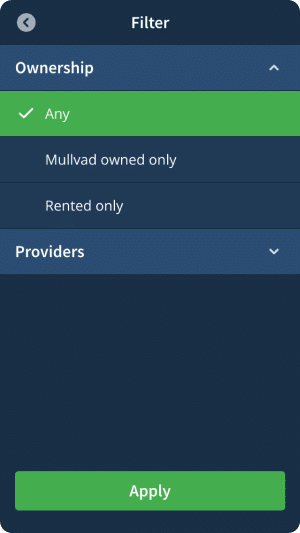
The application’s location selector includes filters for server ownership and provider. These can help if you deliberately want to avoid a particular hosting provider or choose an owned server, but neither label is a universal safety certificate. Pick a practical location first, then use a filter for a defined reason. A very restrictive filter can reduce the locations available to you.
Multihop changes the route by adding an entry server before the exit server. The website sees the exit IP, while the additional hop adds another part of the path to troubleshoot. Choose it for a specific threat model rather than assuming that more hops always improve everyday browsing. Extra routing can also increase delay, which matters for calls and games.
DAITA addresses traffic-pattern analysis rather than the content of a page. Its additional traffic is especially relevant on a limited mobile allowance, and its available server routes can differ from an ordinary connection. Start with a working baseline, enable the setting you need and check the tasks and data budget that matter to you. A privacy feature is not evidence of better measured battery life or throughput.
Pricing, payment and refunds
Scroll horizontally to see all columns.
| Product | Pricing (devices/users) | Billing / refunds |
|---|---|---|
| Mullvad VPN Full review | €5 per month, VAT included; 5 devices. Same monthly rate across prepaid durations. View plans | Prepaid top-ups; payment-method/refund exceptions apply. |
The published standard price, checked on 20 October 2026, is €5 per month. At that rate six months is €30 and twelve months is €60. These are arithmetic equivalents, not special introductory offers or promises of a lower renewal rate. A payment method discount or your bank’s exchange rate can change what you actually pay.
Buy time through the intended account and check the receipt and balance. Do not assume the generated account number makes a card payment anonymous. Cash and cryptocurrency have different practical and refund implications; select the method for your needs rather than treating it as an automatic privacy upgrade.
The current refund instructions, updated 26 August 2026, provide a 14-day window for eligible payments. Cash, cryptocurrency and vouchers are excluded. Apple App Store payments must be handled through Apple. This is not a 30-day guarantee, a free trial or an ongoing free plan.
Setup and help resources
Start with the official download for your operating system, keep the account number safely, add time to that account and connect. Check the application’s connection state. A successful browser connection check applies to that browser; it does not verify every application, every split-tunnel exclusion or all future networks.
If something cannot connect, identify whether the failure is login/API access, the VPN tunnel, a blocked service or a local printer. The help centre separates these cases. Changing several privacy settings at once makes troubleshooting harder. Retest the intended task after one change and keep necessary work or family connections in mind.
The app offers a problem-report workflow and the help centre provides written guides. A reply to a support report requires an email address. We do not assign a support-resolution speed or claim a new battery, streaming or throughput test from those documents.
A setup checklist that respects the five-device limit
Start by counting devices, not people. A parent with a phone, laptop and tablet uses three registered devices; a partner’s phone and laptop fill the remaining two. A new computer may require removing a retired registration. That is a practical reason to compare an unlimited-device service even when Mullvad’s privacy features appeal to you.
- Download the current client from Mullvad for the actual operating system and version. Do not follow an old OpenVPN installation guide.
- Save the account number somewhere you can recover it safely. Confirm you are adding time to that exact account.
- Connect with the default settings and check that the application reports a protected connection.
- Check a normal website and the everyday app you need. Review any local-network access or split-tunnel exclusion separately.
- Try a routine network change or wake from sleep. Confirm the app reconnects before relying on the connection.
The check is specific to that device and configuration. A successful browser check does not demonstrate coverage of an excluded app, a second household device or every future network. Keep the account number and payment reference available privately for recovery; do not put either into a public screenshot or a forum troubleshooting post.
Diagnosing common problems
Account or payment problems: check the account number, remaining time and payment processing instructions. The application has API-access controls for reaching account services; that is a different stage from carrying browsing traffic through the tunnel. A failed account request does not by itself prove the exit server is slow.
Tunnel connection problems: check whether ordinary internet access works, read the current client’s error and follow the matching supported help article. Change one relevant setting at a time. Keep Lockdown behaviour in mind: internet access being blocked while no VPN is connected can be the setting working as intended.
One website or app fails: distinguish a VPN-location restriction from a general connection failure. Try an appropriate alternative location, and check the service’s own rules. If you consider an exclusion, understand that it removes tunnel protection for that app. A local printer or shared drive belongs to a local-network check rather than a claim about streaming access.
Support needs more detail: note the operating system, app version, network and exact error. Mullvad’s problem-report workflow is useful for that context; supplying an email address is necessary if you want a reply. Do not infer a support-resolution time from the existence of a report button.
Streaming, work and everyday performance
Mullvad’s strongest buying case here is predictable payment and privacy-oriented controls. That does not make it the automatic choice for a household buying primarily to access a specific television service. Catalogue access can change, and the right question is whether your own subscribed service works on the device you intend to use. Check that requirement before buying a long balance of time.
For work calls and games, delay and stability can matter more than a headline download rate. Start with a sensible nearby location and assess the actual task on your normal network. A distant exit server, an extra hop or a congested access network can change the result. The published capabilities support an editorial assessment of fit; they do not supply a fresh personal speed, latency or battery test.
Likewise, downloading a file successfully is not proof of permanent compatibility with every service. Follow applicable rules, keep HTTPS and account security in place, and treat the VPN as one network tool. If your household needs more than five devices, a particular router setup or a streaming-first product, compare that requirement directly rather than treating an overall star score as a universal ranking.
How the editorial score is assessed
The opening native review uses six equal-weight buying criteria on a five-point scale: privacy assurance, connection controls, platform feature coverage, household device allowance, plan/renewal terms and setup/help resources. The mean is 4.0/5. These are explained editorial judgements about documented capabilities and fit, not instrument measurements or a customer average.
Privacy assurance — 4.5/5: Account-number signup and the published distinction between VPN activity and payment/support records are particularly useful privacy choices. They do not provide complete anonymity, which rules out five. Connection controls — 4.5/5: The always-on kill switch, optional Lockdown, DNS controls and supported exclusions provide unusually useful control after the VPN service is running. The macOS startup limitation below is material; this score is not a promise that every packet from boot is protected.
Platform feature coverage — 4.0/5: Apps cover the main desktop and mobile systems, but supported controls and operating-system boundaries differ. Household device allowance — 3.0/5: Five devices fits a modest household but requires prioritising hardware in a larger one; two adults with a phone and laptop each leave only one registration. Plan/renewal terms — 4.0/5: Flat €5 monthly pricing avoids an introductory-price jump; payment-dependent refunds and no long-term discount keep it below exceptional. Setup/help resources — 4.0/5: Detailed platform guides and troubleshooting support ordinary setup, while account-number recovery and platform-specific settings still take care. This is not a measured support-response score.
macOS startup boundary: Mullvad’s desktop guide, updated 18 September 2026, says it cannot guarantee the app starts before other applications send traffic. System services can also send traffic before the VPN service starts. Wait for the VPN connection before launching privacy-sensitive apps; do not treat automatic connection or Lockdown as proof of protection from the first moment of boot. This documented limit is separate from an intentionally excluded app.
For a practical check of your own setup, use the VPN leak-testing guide. To compare household allowances and plan tradeoffs, see the VPN buying guide.
Mullvad alternatives: choose by the missing feature
Proton VPN: consider it if a continuing free plan is essential. Proton Free covers one device with unlimited data; it is a different offer from Proton’s paid plans and should not be treated as the same streaming or server-choice package. Our Proton VPN review explains the Free-versus-Plus decision.
Surfshark: consider it if Mullvad’s five-device allowance is too small. Surfshark advertises unlimited simultaneous connections, which can suit a larger household. Compare the full initial charge and renewal term rather than a monthly-equivalent headline. Read our Surfshark review for its platform and plan trade-offs.
These are alternatives for specific needs, not a ranking copied from overall scores. Keep Mullvad on the shortlist when its flat prepaid rate and account-number setup are the features you want.
Final verdict
Mullvad is a strong fit when you want a simple monthly VPN for five or fewer devices and are comfortable with an account-number workflow. Check the platform requirements and refund method before paying. If your main requirement is a particular streaming service or more household devices, compare that requirement directly instead of assuming a privacy-led recommendation solves it.
Frequently asked questions
How much does Mullvad cost?
The standard rate is €5 per month. At that rate twelve months costs €60; buying a year is not a standard long-term discount. Check the payment page for method-specific discounts, tax or currency conversion.
Does Mullvad offer a free trial or 30-day refund?
The current direct-purchase refund window is 14 days, not 30 days. Cash, cryptocurrency and vouchers are excluded. Apple App Store purchases follow Apple’s refund process. A refund policy is not an ongoing free plan.
How many devices can use one Mullvad account?
An account supports five registered devices. Remove an old device before registering a sixth. This is a household allowance, not unlimited installations or one account per person.
Does Mullvad still support OpenVPN?
Mullvad removed OpenVPN servers on 15 January 2026. Current advice should use WireGuard and supported current applications rather than old OpenVPN configuration instructions.
Does a VPN make me anonymous or stop malware?
A VPN changes the network path and protects included traffic to its VPN server. Websites can still identify signed-in accounts, cookies or browser fingerprints. It does not remove malware, secure a compromised endpoint or replace website HTTPS.
Can I stream every service or use split tunneling on every platform?
There is no guarantee of access to every streaming service. Split tunneling excludes selected apps from protection and is documented for desktop and Android, with platform-specific restrictions; do not assume the same controls on iOS.
Share this article

Stuart Kerr Spindlow is Impulsec’s Publisher, Chief Editor and Lead Reviewer. He writes and maintains coverage of consumer cybersecurity and digital-safety software, with a focus on practical suitability, limitations and the evidence behind product claims. Read Stuart’s full profile.