Home > Parental Control & Family Safety Software > Best Tracking App For iPhone Free 2026: Ultimate Guide

Best Tracking App For iPhone Free 2026: Ultimate Guide

Image 292

Trying to find the best tracking app for iPhone free in 2026? It can get confusing fast because there are so many options, and a lot of them start to look the same once you compare the basics.

Some apps stick to basic location sharing, while others go heavy on monitoring features. I’ve spent a lot of time testing these apps, hoping to make your search a little less frustrating.

Let’s look at the top options for the best tracking app for iPhone free. I’ll compare their features, ease of use, accuracy, and what kind of privacy you are really getting.

Whether you want simple family location sharing, full-on parental controls, or just a way to find your lost phone, this guide will help you choose the best tracking app for iPhone free for your situation.

I’ll also talk a bit about how these apps actually work and a few privacy things you might want to think about before installing anything.

TL;DR 📌 For most people, Find My is the best tracking app for iPhone free 2026; safe, kid-friendly, and crafted to give parents peace of mind when supervision is needed.

Key Takeaways

  • Top Free Tracking Apps Exist – There are reliable free options for iPhone users to track location safely, including family members or personal devices, without spending money. Always check app permissions and reviews before downloading.
  • Privacy and Security Matter – Even free apps must prioritize data protection. Look for apps with end-to-end encryption, minimal data collection, and transparent privacy policies to ensure your location info stays safe.
  • Ease of Use & Features – The best free phone tracking apps combine simple setup, real-time location updates, geofencing alerts, and battery efficiency for seamless daily use.

Ranked List of Best Tracking App for iPhone Free (2026)

To make this easier, I’ve ranked the best tracking app for iPhone free options based on what actually matters in real use: true free access, location accuracy, ease of setup, privacy, and whether the app works best for lost-device recovery, family location sharing, or child safety.

  1. Find MyBest free iPhone tracker overall (Top Pick 🏆)
  2. Life360 – Best for free family tracking across iPhone and Android.
  3. Glympse – Best for temporary location sharing.
  4. Google Find Hub – Best free Android device finder.
  5. iSharing – Best for easy family alerts and map-based sharing.
  6. GeoZilla – Best for basic family safety tracking.
  7. Microsoft Family Safety – Best for Microsoft households.
  8. Samsung Find – Best for Samsung families and Galaxy device recovery.
  9. FamiSafe – Best for parents who may later want premium parental controls.

Quick Comparison Table of the Best Tracking App for iPhone Free

Some of the best free location tracking apps are best for finding your own phone, while others are better for family location sharing or child safety. This comparison focuses on the tools that genuinely deserve a place in a best tracking app for iPhone free roundup without forcing you straight into a paid subscription.

This table compares free screen time, focus, and app blocking tools, including built-in Apple and Android options, free blockers, usage trackers, and habit-building apps.
SoftwarePricing (Devices)Free Plan / TrialKey FeaturesMy ViewAge Group FocusSupported PlatformsReview
Life360Free basic; Silver from $7.99/month; Gold from $14.99/month; Platinum from $24.99/month; 👉 Check Life360 PricingFree basic plan; 7-day trial on paid plans📍 Real-time location sharing
🏠 Place alerts
🕒 2 days location history on free plan
🚗 Driving and safety extras on paid plans
Best overall free child tracking app for most familiesKids to teensiOS, AndroidLife360 Review
Apple Find MyFree; Open GuideFree🍏 Family Sharing location
📍 Apple device and item tracking
📡 Offline finding for supported devices and items
🔐 Lost Mode and Activation Lock
Best free child tracking option for Apple familiesKids to teensiPhone, iPad, Mac, Apple Watch, AirTag, AirPods, Find My-compatible itemsFind My iPhone Guide
Google Family LinkFree; Open GuideFree📍 Child device location
⏰ Screen time limits
📱 App approvals
🛡️ Android and Google account supervision
Best free child tracking starter for Android familiesKids to teensAndroid child devices, Chromebook, compatible Fitbit Ace LTE, parent app on iOS/AndroidGoogle Family Link Review
GlympseFree; Open GuideFree📍 Temporary live location sharing
🔗 Share by link
⏱ Auto-expiring tracking
🌐 Easy ETA sharing
Best for temporary child pickup and travel sharingKids to teensiOS, Android, web viewerGlympse Guide
iSharingFree basic; paid Silver, Gold, and Platinum plans available; 👉 Check iSharing PricingFree basic plan; 7-day trial available for paid tiers📍 Real-time family GPS
🏠 Arrival and departure alerts
🗺️ Map sharing
🕒 Location history with limits by plan
Best for family alerts and arrival notificationsKids to teensiOS, Android, webiSharing Guide
GeoZillaFree basic; Premium from $9.99/month or discounted annual plans; 👉 Check GeoZilla PricingFree basic plan; 3-day trial may be available on Premium offers📍 Family location sharing
🏠 Place alerts
🕒 Location history on Premium
✅ Check-ins and battery alerts
Best for basic child safety location sharingKids to teensiOS, AndroidGeoZilla Guide
Microsoft Family SafetyFree basic features; premium family features may require Microsoft 365; Open GuideFree basic family safety features📍 Location sharing where available
⏰ Screen time limits
🔒 Content filters
🚗 Driving reports where available
Best for Microsoft households with kidsKids to teensWindows, Xbox, iOS, AndroidMicrosoft Family Safety Guide
SmartThings FindFree; Open GuideFree📍 Galaxy device tracking
👨‍👩‍👧 Shared Galaxy device location
🔔 Ring device
🔒 Lock, back up, or wipe lost devices
Best for Samsung familiesKids to teensSamsung Galaxy phones, tablets, watches, earbuds, SmartTags, webSamsung SmartThings Find Guide
FamiSafeFrom $4.99/month billed annually for up to 10 devices; monthly plan also available; 👉 Check FamiSafe Pricing3-day free trial; no permanent free plan📍 Real-time GPS
🚸 Geofencing alerts
🕒 Location history
⏰ Screen time and app controls
Best paid step-up option when free child tracking is not enoughKids to teensiOS, Android, Windows, macOS, Chromebook, Kindle FireFamiSafe Review

Finding a reliable best tracking app for iPhone free option does not have to be complicated or costly. With so many free phone tracking apps available, it can be hard to know which tools actually deliver accurate location tracking, family safety features, and easy setup without hidden fees.

1) Find My – Best Free iPhone Tracker Overall (Top Pick 🏆)

Findmyhomepage
findmyhomepage

Find My is the best tracking app for iPhone free because it comes built into Apple devices, works reliably, and does not push you into a paid plan just to handle the basics well.

For most iPhone users, this is the clear starting point. It covers the two biggest needs perfectly: finding your own lost Apple device and sharing location safely with family or trusted contacts.

It is especially strong for families already using iPhones, iPads, Apple Watches, or AirTags because everything sits inside one familiar Apple ecosystem.

Key Features

  • Built-in iPhone, iPad, Mac, Apple Watch, AirPods, and AirTag tracking
  • Lost-device map view with directions and sound alerts
  • Location sharing with trusted family members and contacts
  • Remote lock and erase options for supported Apple devices
  • Works through the Find My app and iCloud web access

Pros

  • Completely free for Apple users
  • No extra app setup for most iPhone owners
  • Excellent for lost-device recovery
  • Clean privacy controls and simple sharing options

Cons

  • Best for Apple households, not mixed-device families
  • More of a finder and location-sharing tool than a full parental control suite
  • Limited compared with paid family monitoring platforms

Pricing

Free. There is no separate subscription required to use Find My on supported Apple devices.

Why It’s Ranked Here

If your goal is to track an iPhone for free, nothing fits the intent better.


2) Life360 – Best for Free Family Tracking Across iPhone and Android

Life360reviewhomepage

Life360 is the strongest third-party choice for families who want real-time location sharing across both iPhone and Android without paying right away.

As one of the best tracking apps for Android phones as well as iPhone, it is more family-focused than Find My and works much better in mixed-device households. That makes it one of the easiest recommendations for parents who do not want everyone locked into the same phone brand, especially if they are also comparing broader parental control apps for iPhone.

The free plan is good enough for basic location sharing, while paid plans add more safety extras if a family later wants deeper features.

Key Features

  • Cross-platform family location sharing for iPhone and Android
  • Private circles for family members
  • Place alerts for arrivals and departures
  • Location history on the free tier
  • Upgrade path for driving and emergency features

Pros

  • One of the best-known family tracking apps
  • Works well across iPhone and Android
  • Useful free tier for everyday family use
  • Easy for non-technical users to understand

Cons

  • Best extras are reserved for paid plans
  • Some families may find constant location sharing a little intrusive
  • Battery impact can be higher than built-in tools

Pricing

Free plan available. Paid memberships unlock more history, alerts, and safety features.

Why It’s Ranked Here

Life360 is the best free family-tracking option for households using both iPhones and Android phones. It does not beat Find My for pure iPhone intent, but it is the best broad family tracker on this list.


3) Glympse – Best for Temporary Location Sharing

Best tracking app for iphone free
Glympsehomepage

Glympse is ideal for readers who do not want permanent tracking at all. Instead of building a full family dashboard, it lets you share your live location temporarily and then stops automatically.

That makes it a great fit for meeting friends, sharing an ETA, coordinating pickups, or letting someone know where you are for a short period without creating an always-on tracking setup.

It is one of the cleanest true free options in this space because the value is obvious and the privacy model is easy to understand.

Key Features

  • Temporary live location sharing
  • Location links that can be viewed in a browser
  • No long-term always-on tracking required
  • Simple ETA-style sharing for travel and meetups
  • Works across iPhone and Android

Pros

  • Truly useful free model
  • Strong privacy angle because sharing expires automatically
  • Very simple for casual users
  • No app needed for the viewer in many cases

Cons

  • Not designed as a full parental control platform
  • Not the best option for continuous family tracking
  • Lighter feature set than family safety apps

Pricing

Free for core location sharing use.

Why It’s Ranked Here

Glympse earns a top-three spot because it fits the “free tracking” angle honestly. It is not pretending to be a full monitoring suite; it is simply one of the best free tools for short-term, low-friction location sharing.


4) Google Find Hub – Best Free Android Device Finder

Google find hub
Image © 2026. All rights reserved.

Google Find Hub is the Android equivalent of what many readers like about Apple’s Find My. It is built around finding lost devices, securing them remotely, and taking action quickly from another device or the web.

It is not mainly a family-location app, but it absolutely belongs in this article because your keyword set includes Android tracking intent as well.

For Android users who just want a free, trustworthy device finder, this is one of the strongest options available.

Key Features

  • Locate lost Android devices on a map
  • Play a sound remotely
  • Secure or erase a lost device
  • Works from another Android device or a browser
  • Supports phones, tablets, headphones, and some accessories

Pros

  • Free and built around lost-device recovery
  • Backed by Google rather than a lesser-known app maker
  • Simple and practical for Android owners
  • Strong fit for mixed Apple and Android comparison intent

Cons

  • More focused on device recovery than family monitoring
  • Not the best pick for parents wanting ongoing child location alerts
  • Less feature-rich for family coordination than Life360

Pricing

Free to use with a supported Android device and Google account.

Why It’s Ranked Here

This belongs high on the list because many readers comparing free tracking apps also want a free way to find a lost Android phone. Google Find Hub is one of the most credible answers to that need.


5) iSharing – Best for Easy Family Alerts and Map-Based Sharing

Isharing home
Image © 2026. All rights reserved.

iSharing is a strong family-location app for people who want a more dedicated tracking experience than Glympse but do not necessarily need the broader safety branding of Life360.

It is built around real-time GPS location sharing, family visibility, and simple alert-based coordination. That makes it appealing for parents who mainly care about where someone is and when they arrive.

It is not the most famous option in the category, but it remains a relevant inclusion for a free tracking roundup.

Key Features

  • Real-time family GPS location sharing
  • Arrival and departure alerts
  • Map-based family visibility
  • Location history and notifications
  • Works across iPhone, iPad, web, and other platforms

Pros

  • Good focus on simple family location sharing
  • Easy to understand for parents
  • Useful alerts without too much clutter
  • Solid cross-platform support

Cons

  • Less mainstream than Find My or Life360
  • Some stronger features may push users toward paid upgrades
  • Not as good for lost-device recovery as built-in ecosystem tools

Pricing

Free to download with core tracking features available; premium extras may apply depending on plan and platform.

Why It’s Ranked Here

iSharing earns a place because it gives readers another legitimate family-tracking choice that is more focused than broad parental control apps and more suitable than stealth-monitoring products.


6) GeoZilla – Best for Basic Family Safety Tracking

Geozillahomepage
Geozillahomepage

GeoZilla is a family safety and location-sharing app that sits in the same general category as Life360 and iSharing, but it feels a little more middle-of-the-pack for most readers.

It covers the basics well enough: live location, alerts, and general family visibility. That makes it a reasonable option for households that want a simple family locator without depending entirely on Apple or Google tools.

It is not my first recommendation, but it is relevant enough to include for topical completeness.

Key Features

  • Real-time family location sharing
  • Arrival and departure notifications
  • Location history
  • Check-ins and safety communication tools
  • Cross-platform family locator approach

Pros

  • Covers the core family-tracking needs
  • Useful for families who want a dedicated locator app
  • Includes clear consent language around location sharing

Cons

  • Not as strong a brand or ecosystem fit as the top options
  • May feel redundant if your family already uses Apple, Google, or Samsung tools
  • Not the best option for readers who only want a forever-free device finder

Pricing

Free to download with basic location-sharing features; premium features may require a subscription.

Why It’s Ranked Here

GeoZilla makes the list because it is still a real family locator and safety app, but it sits below the stronger free-value and ecosystem-driven options above it.


7) Microsoft Family Safety – Best for Microsoft Households

Microsoftfamilysafety

Microsoft Family Safety is more than a tracker; it is a wider family management tool that combines screen time, filtering, and location-sharing features for households already tied into Microsoft accounts.

That means it is not the best pure answer for someone who only wants to track an iPhone for free, but it can be genuinely useful for families already living inside the Microsoft ecosystem.

Its relevance here comes from the fact that some readers do not just want location; they want location plus broader family-management tools from a major platform they already use.

Key Features

  • Location sharing for family members
  • Screen time management
  • Content filtering and family controls
  • Works alongside Microsoft family account tools
  • Available on mobile platforms for family use

Pros

  • Good fit for existing Microsoft households
  • Combines tracking with broader family controls
  • Backed by a major trusted platform

Cons

  • Less intuitive for pure iPhone tracking intent
  • Not as direct or as simple as Find My or Life360
  • Some readers will find it broader than they need

Pricing

Free core family safety access is available; some broader household benefits may depend on the Microsoft subscription setup you already use.

Why It’s Ranked Here

This is a niche-but-valid inclusion. It improves topical authority by covering another major ecosystem without pretending it is the best choice for every iPhone user.


8) Samsung Find – Best for Samsung Families and Galaxy Device Recovery

Samsung find
Image © 2026. All rights reserved.

Samsung Find is the best ecosystem-specific free tracking option for Galaxy users. It is especially useful for locating Samsung devices and viewing shared device locations within a family setup.

Like Google Find Hub, it is more device-centric than a full third-party family tracker, but it is highly relevant for readers who use Samsung hardware and want something built into that environment.

It is not high enough to beat broader options like Life360 for mixed families, but it absolutely deserves a place in a complete free-tracking roundup.

Key Features

  • Locate registered Galaxy devices on a map
  • Family member device location visibility when shared
  • Galaxy ecosystem integration
  • Web and device-based access
  • Strong recovery value for Samsung users

Pros

  • Excellent fit for Samsung users
  • Built around trusted device recovery
  • Useful family-sharing functionality within the ecosystem

Cons

  • Mostly relevant to Galaxy households
  • Not the best option for general cross-platform family sharing
  • Less useful for readers with primarily Apple devices

Pricing

Free with supported Samsung devices and account setup.

Why It’s Ranked Here

Samsung Find strengthens the article by covering a major mobile ecosystem properly. It is not a universal winner, but for Galaxy users it is one of the best free options available.


9) FamiSafe – Best for Parents Who May Later Want Premium Parental Controls

Famisafehomepage
famisafehomepage

FamiSafe belongs in this article with an important warning: it is much closer to a parental control platform than a pure free tracking app.

That means it should not sit near the top for this keyword. Still, it can be relevant for parents who start by comparing free trackers and then realize they may want extras like geofencing, screen time tools, app controls, or broader family-monitoring features later on, similar to what you get from a best free parental control app for iPhone guide.

Used honestly, it works as a bridge recommendation rather than a main free-tool answer.

Key Features

  • Location tracking and geofencing
  • Parental control dashboard
  • Screen time and app management tools
  • Designed for child safety rather than simple device finding
  • Upgrade path for more advanced monitoring

Pros

  • Broader than a basic tracker
  • Appeals to parents who want more than just location
  • Fits well as a step-up option from free trackers

Cons

  • Not a clean match for a pure “best free tracking app” keyword
  • Better framed as a free-to-paid parental control option
  • Should not outrank true free tools like Find My, Life360, or Glympse

Pricing

Usually positioned around a free trial or upgrade path rather than a permanently strong free tier.

Why It’s Ranked Here

FamiSafe stays on the list only because some parents comparing free trackers will want to see a more advanced parental-control option. It belongs at the bottom, not near the top.


How Free iPhone Tracking Apps Work

An isometric illustration of an iphone showing a map with location pins and tracking icons like radar signals, a gps satellite, and a shield around it.

Free phone tracking apps use your phone's built-in GPS and internet to share location info with other devices or web dashboards. These apps have to play by Apple's privacy rules and need to be set up properly to work right.

Device Compatibility and iOS Requirements

Most free tracking apps work on iOS 12 or newer. Your iPhone should have at least 2GB of storage free for things to run smoothly.

The apps need a bunch of permissions. You'll have to allow location access, notifications, and background refresh in your settings. If you are also managing a child’s device, this overlaps with how to put parental controls on iPhone.

Key requirements include:

  • Active internet connection (Wi-Fi or cellular)
  • Location services turned on
  • Battery optimization disabled for the tracking app
  • Apple ID signed in for some features

Some best tracking apps just work better on newer iPhones. The iPhone 6s and up have better GPS chips, so tracking is more accurate.

For Apple users, Family Sharing and Find My can handle a lot of basic family location needs without installing a separate third-party tracker, which is one reason built-in tools remain the best starting point for many families.

Location Accuracy and Real-Time Updates

GPS location tracking apps are usually accurate to within about 10-30 feet if you're outside. Indoors, though, the accuracy drops off since GPS signals have a hard time getting through walls.

Real-time updates? Well, they mostly depend on your internet speed and however you've set up the app's refresh rate. Most free apps only update every 1-5 minutes, which helps your battery last longer.

Factors affecting accuracy:

  • Weather conditions
  • Building density
  • Cellular tower proximity
  • GPS satellite visibility

These apps work by mixing GPS data with Wi-Fi and cell tower info. Honestly, this combo is way better than using GPS all by itself.

Battery drain really depends on how often the app updates and which one you use. If you set it to update every minute, your phone's going to lose charge a lot faster than if you let it refresh every five. Most tracking apps let you tweak these settings, so you can find a balance that works for you.


Privacy and Security Considerations

An iphone surrounded by symbols of security like shields, padlocks, and fingerprint icons connected by lines representing secure data flow.

Free phone tracking apps deal with sensitive location data and personal info, so you really want to know how they're protecting it. I always suggest checking what kind of security and permissions an app is asking for before you install it.

User Data Protection

Free phone tracking apps usually collect your location, device info, and sometimes even more personal details. The best tracking apps for iPhone prioritize privacy considerations while still letting you use their features.

Look for apps that use strong encryption to keep your data safe while it is being sent between devices. You want your location info locked down, not floating around unprotected, which is just as important here as it is in any free parental control app for Android.

A lot of these free phone tracking apps store your data on their own servers. It's worth checking where that data actually goes and how long they hang onto it. Some apps wipe your location history after a month, but others might keep it for longer.

Key privacy features to look for:

Some tracking apps require jailbreaking your iPhone, which honestly isn't worth the security risk or the voided warranty. I'd steer clear of those.

Permissions and Consent

Tracking apps on iPhone need certain permissions to work. I always check exactly what an app is asking for before I hit download.

Common permissions include:

  • Location services (always or while using app)
  • Contacts access
  • Camera and microphone access
  • Background app refresh

Getting clear consent from anyone you want to track is a must. Local laws and regulations require obtaining consent before you track someone's device, so do not skip this step. That matters whether you are using a family locator or a more controlled child-safe setup like Kids Place.

If you're tracking family, it's best to talk it over first. Open conversations go a long way toward building trust and making sure everyone knows how their info will be used.

iOS lets you manage app permissions easily. You can always go to Settings > Privacy & Security > Location Services and change what access each app has, whenever you want.


Final Verdict: Which Free Tracking App Is Best?

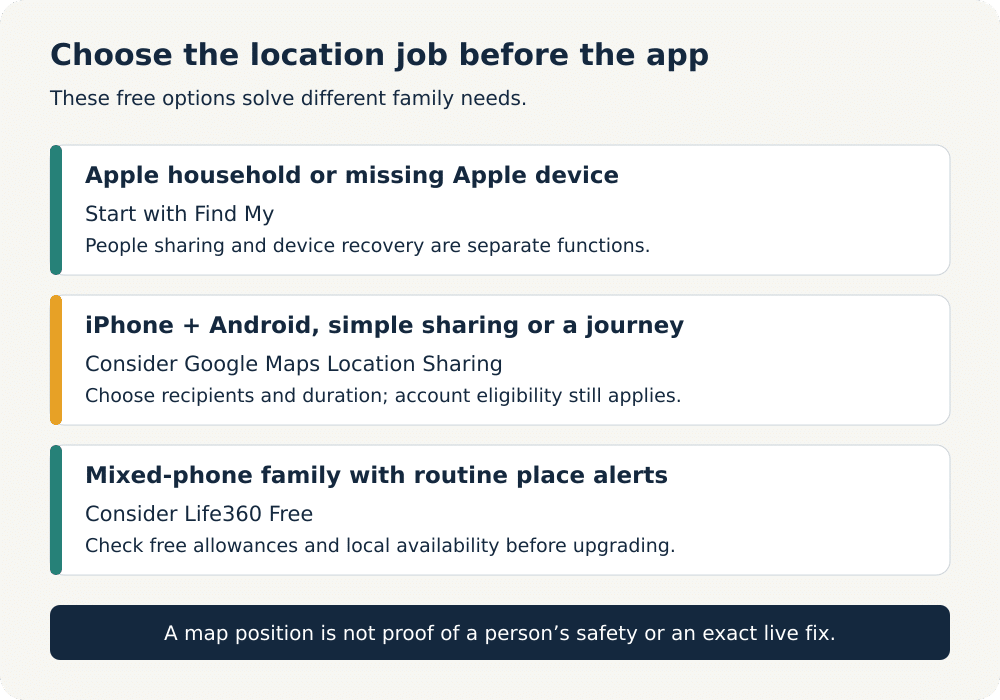
If you want the best tracking app for iPhone free, my top recommendation is still Find My. It is the best overall fit for most readers because it is already built into Apple devices, genuinely free, easy to use, and highly reliable for both lost-device recovery and approved family location sharing. For pure intent match, it is the clearest winner in this best tracking app for iPhone free guide.

For families using a mix of iPhones and Android phones, Life360 is the strongest free third-party option. It gives you a better cross-platform family tracking experience than Apple’s built-in tools, especially if not everyone in the household uses the same ecosystem.

If you only need temporary live location sharing rather than constant tracking, Glympse is the better pick. And if your main goal is finding a lost Android or Samsung phone, Google Find Hub and Samsung Find are more relevant than most general tracking apps.

The main thing is to choose a tool that matches your real use case. Some apps are best for finding your own phone. Some are better for family coordination. Others are really parental control tools rather than true free tracking apps. Once you separate those categories, the right choice becomes much easier.

My Personal Recommendation

If you asked me what I would actually use, I would start with Find My for any Apple-first household and only move to Life360 if I needed broader family tracking across both iPhone and Android.

That is the most sensible setup for most people. It keeps things simple, avoids pushing you into unnecessary paid plans too early, and gives you the best balance of safety, ease of use, and privacy.

If free tools stop being enough and you later need features like geofencing, app controls, screen time management, or broader parental supervision, that is when it makes sense to look at more advanced parental control apps. But for a true best tracking app for iPhone free article, Find My still deserves the top spot.


Frequently Asked Questions

These are the questions I see most often when people compare the best free phone tracking apps for iPhone and Android, especially around location accuracy, family safety, privacy, and the difference between free trackers and paid parental control apps.

Is there a free app to track an iPhone?

Yes. Apple’s built-in Find My app lets you track an iPhone for free if the device is signed into your Apple ID and has Location Services enabled. You can view the phone on a map, play a sound, and use lost-device features without paying for a separate subscription.

Which app is best for location tracking for free?

For most iPhone users, Find My is the best free option because it is built in, easy to use, and highly reliable. For mixed households using both iPhone and Android, Life360 is usually the best free family tracking app. If you only need temporary live sharing, Glympse is one of the simplest choices.

What are the top-rated free phone tracking apps for families on iPhone?

The top-rated free family tracking apps for iPhone are usually Find My, Life360, and Glympse. Find My is best for Apple households, Life360 is best for families using both iPhone and Android, and Glympse works well for temporary location sharing without always-on tracking.

Which GPS tracker apps for iPhone provide the most accurate location services without charge?

Find My is usually the most accurate free option for iPhone because it is built into Apple’s ecosystem and combines GPS, Wi-Fi, and network data. Life360 is also a strong free option for live family location sharing, especially when you need cross-platform support.

How can parents use free iPhone tracking apps to help keep children safe?

Parents can use Find My for simple family location sharing and lost-device recovery, while Life360 is better if the family uses both iPhone and Android devices. The safest approach is to use tracking openly, with clear consent and shared expectations, rather than trying to monitor someone secretly.

Are there any cross-platform tracking apps available for free that work with both iPhone and Android?

Yes. Life360 is one of the best free cross-platform tracking apps for families using both iPhone and Android. Glympse is another useful option if you only need temporary live location sharing rather than a full family tracking dashboard.

What are the limitations of using a free tracking app compared to paid versions?

Free tracking apps usually focus on the basics such as live location sharing, device finding, and simple alerts. Paid versions often add more location history, geofencing, emergency features, app management, and broader parental controls. For many families, the free tools are enough to start with, but they are usually less feature-rich than premium plans.

Can I track a phone online without installing any apps?

In some cases, yes. Find My can be accessed through Apple’s web tools if the device is already linked to your Apple ID and configured properly. Android users can use Google Find Hub through a browser for supported devices. In both cases, the setup needs to be done in advance.

Can someone track me on my iPhone without me knowing?

Legitimate iPhone location sharing tools such as Find My usually require setup, permissions, and account access. If you are concerned about unwanted tracking, review Settings > Privacy & Security > Location Services, check which apps have location access, review your Apple ID and Family Sharing settings, and remove anything you do not recognize.


That’s all for now! 📌

Choosing the best tracking app for iPhone free comes down to balancing ease of use, privacy, accuracy, and whether you need simple device recovery or broader family tracking.

Start with Find My, compare Life360 if you need cross-platform family tracking, and only move into paid parental control tools if the free options stop being enough.

Related Articles: