


Quick Answer
Parental controls do not decrypt an end-to-end encrypted conversation as it crosses your home Wi-Fi. Some supported tools can nevertheless report message content or risk alerts from the supervised device, a permitted account connection or a computer-based sync. An app-usage report is different from a message transcript. Check the exact child platform, messaging app and setup before paying for visibility.
The useful question is where the information comes from. A filter on your router, the controls on a child’s phone and an account-connected monitoring service have different access. This guide separates those routes so you can choose proportionate family rules without assuming either complete invisibility or complete surveillance.
What encryption protects, and what it does not
End-to-end encryption protects the message between the communicating endpoints. Signal describes its conversations as end-to-end encrypted. That does not make an unlocked recipient’s screen private from someone standing beside it. A copy displayed, exported or legitimately synced at an endpoint is a separate exposure.
A home router or ordinary DNS filter can restrict connections and sometimes identify requested domains. It does not thereby obtain the readable contents of an encrypted chat. Buying a more expensive network filter is not a way to turn every private conversation into a parent dashboard.
| Access point | What may be available | What this does not establish |
|---|---|---|
| Home router or DNS filter | Connection or domain signals; supported blocking | Readable end-to-end encrypted message contents |
| Operating-system family controls | Supported app use, schedules and restrictions | A transcript of every conversation |
| Supported child-device or sync workflow | Specified messages or selected risk alerts | Coverage of every app, device or deleted item |
| A recipient’s unlocked device | Content that the app displays to that recipient | That the network encryption was broken |
Use the matrix to identify the information you actually need. A bedtime boundary does not require collecting message contents. If the concern is an unsafe conversation, app-use minutes alone will not explain what was said.
What parents can usually see
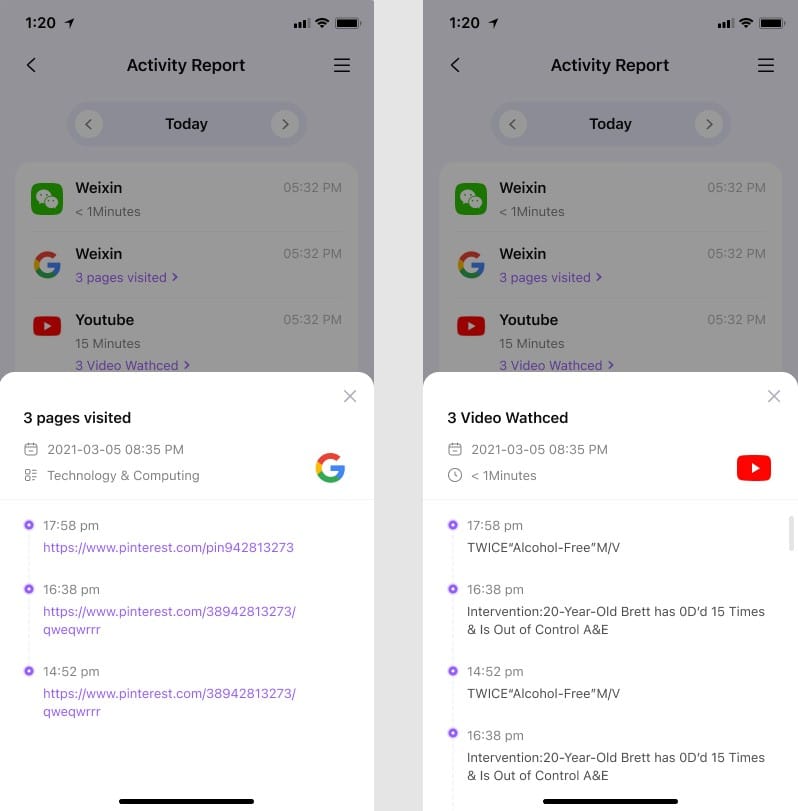
The key distinction is the access route: available reports depend on the tool, device and configuration. Screen-time totals, app activity, web rules and device location are separate features. A service can provide one without providing the others.
- App activity can show that a supported app was used, without exposing its conversations.
- Web reporting depends on the supported browser and filtering route. Do not assume every search or private window appears in a complete history.
- A location reading belongs to a device and a timestamp. Connectivity, permissions and positioning affect usefulness; a map pin is not proof of a child’s safety.
- A content alert highlights a supported concern. It is neither a complete transcript nor a guarantee that other risks will be detected.
The iPhone distinction: app-only controls versus computer sync

Some iPhone message features require more than installing an app. Qustodio’s iOS instructions, for example, require its Mac or Windows application, initial device access and a cable, followed by same-Wi-Fi syncing with the computer application running. Its documentation distinguishes SMS/iMessage contents from supported WhatsApp and LINE alerts and snippets.
That is endpoint/sync access, not a claim that a parent router decrypts iMessage. Ask whether the household can maintain the computer workflow. When it is not running or cannot reach the child device, an old report should not be mistaken for current visibility.
Apple’s iCloud security overview also separates standard protection, Advanced Data Protection and backup behaviour. Do not assume every cloud backup has the same access model. Keep account recovery secure rather than weakening encryption to make an unsupported monitoring promise work.
Android support is specific to the tool and messaging app
Android allows some supported monitoring workflows that differ from iOS, but “Android supported” does not mean every chat app is readable. Installation route, permissions, operating-system release and the individual messaging service all matter. An app update can change what the monitoring tool can report.
Qustodio’s message-content guidance distinguishes supported SMS content from selected concerning social messages. Its iOS setup page lists WhatsApp and LINE alerts, while the broader social-monitoring description names additional services. Do not transfer that broader list to a child’s iPhone. Check the exact platform-specific workflow before choosing a plan.
For product-specific trade-offs, use our parent text-monitoring guide. A monitoring feature is a reason to review its necessity and privacy cost, not a reason to collect everything available.
Separate a Missing Report From a Clean Report
An app can appear in a usage report while its message contents remain unsupported. A social-monitoring alert may include selected context without supplying the complete conversation. Ask whether the report means no qualifying alert, no recent sync or no supported collection; those answers lead to different decisions.
For Discord or another app outside a vendor’s content-monitoring list, a usage entry does not become a transcript by changing a display setting. Do not buy a more expensive tier without a documented feature that addresses the actual gap.
Where free built-in controls fit
Start with the job: app approval, bedtime schedules and age-appropriate content rules may be enough. Google’s supervision guidance lists reading emails or messages among the things Family Link does not do for an existing supervised account. Google’s separate account-access arrangements should not be described as a message feed inside Family Link.
On Apple devices, Screen Time is a way to manage supported use and restrictions. Family Sharing and location settings have their own purposes. Neither label should be used as shorthand for a universal chat reader. Check the current platform instructions and explain the arrangement to the child.
Choose the least intrusive setup that meets the need
- Write down the problem before selecting features: school-night use, unsuitable sites, unwanted contact or a missed check-in.
- List every child device and the exact app involved. Include tablets, computers and devices outside your household.
- Separate restrictions from visibility. Blocking an app and reading its contents are different decisions.
- If message visibility is necessary, check the vendor’s current app/platform list and setup requirements. Use only devices and accounts you are authorised to supervise.
- Agree what will be reviewed, who can access it and when the arrangement will be reconsidered. Protect the parent account and avoid collecting unrelated private conversations.
Children’s needs and independence change. Younger children may need closer help; an older teenager may benefit from agreed alerts and support rather than routine transcript reading. Age alone does not decide the right setting, and software cannot replace a conversation about a specific concern.
Check that reports mean what you think
Review the timestamp and device name before acting on a report. Missing activity can mean no qualifying activity, a permissions problem, an offline device, an unsupported app or a stopped sync. It does not automatically prove that the child is hiding something.
A useful household check is small and agreed: confirm that a chosen app rule applies and that an ordinary supported activity reaches the dashboard. Avoid sending harmful content to test a risk detector. An alert can be wrong, incomplete or delayed, so ask for context before drawing a conclusion.
Deleting an app does not necessarily end its subscription or remove data already collected. Follow the supplier’s cancellation and data-deletion procedures separately, and review permissions when you change tools.
Check the copies, not just the encrypted connection
Message privacy has more than one boundary. The app can protect a conversation in transit while a readable copy exists on a participant’s phone, in a notification preview, on an authorised linked device or in a permitted monitoring report. These are different exposures. A screenshot from a recipient does not demonstrate that a network filter cracked the encryption, and switching off home Wi-Fi does not erase copies already made.
Ask the child to review their own messaging app’s linked-device settings with you if an unfamiliar session is the concern. Use that app’s official instructions to remove an unrecognised session, secure the account and review recovery details. Do not connect a monitoring service to someone else’s account or enter account credentials into a site promising to decrypt private chats. An alert service is not a substitute for account recovery after suspected unauthorised access.
Lock-screen previews also need a separate decision: does the household need the sender and text visible whenever a phone lights up, or only after it is unlocked? Check the device’s notification settings together. Hiding a preview protects against casual viewing; it does not change what the recipient can read inside the app or remove information a service has already collected.
Review Authorised Linked Devices
Signal’s linked-device guidance explains that message history can be transferred when a device is linked. A linked device is another endpoint; the presence of messages there does not mean the home router decrypted the connection.
Review the linked-device list in the account’s primary app with the account holder. If a device is unfamiliar, follow Signal’s platform-specific unlinking instructions. Unlinking and deleting data on a desktop are distinct documented operations. Do not promise that stopping future access removes every copy already seen or exported.
Use only the official account interface for that review. Do not scan a linking code supplied by an unknown person or create a hidden linked session as a family-safety shortcut. Where coercion or abuse is a concern, use an appropriate trusted support route and a safe device before making changes that could expose the person seeking help.
Before paying, verify a usable report for this household
Write down the exact result you need: app-use time, the names of contacts, complete supported SMS contents or an alert containing a short excerpt. Ask the supplier which child operating system, app and subscription support that result. A general compatibility badge is insufficient when the report depends on a specific messaging app or a computer that the family does not own.
For the Qustodio iOS example above, the current setup page specifies Premium, a protected child device on iOS 15 or later, macOS 10.15 or Windows 10 or later, initial cable access and Wi-Fi. This is a maintenance commitment as well as an installation task. Its documented hourly update is conditional on the required devices sharing Wi-Fi and the computer application running; it is not a real-time safety guarantee. Do not interpret a missing update as evidence about what the child did.
Before relying on any dashboard, agree a harmless check with the child and compare the device name, event time and last successful sync. Confirm the report type rather than assuming an app-use entry includes a conversation. If the household cannot maintain the prerequisites, choose supported restrictions or a different arrangement instead of paying for a feature that will usually be stale.
Make an access and exit plan
| Change | Check together | Desired outcome |
|---|---|---|
| A new or shared parent device | Who can sign in, receive previews and open reports | Only the agreed caregivers can access sensitive information |
| A child changes phone or messaging app | Exact support, permissions and the most recent successful report | No assumption that old coverage transfers automatically |
| A parent device is lost or an account is exposed | Official account recovery, active sessions and recovery contacts | Unauthorised access is addressed before monitoring resumes |
| Monitoring is reduced or ended | Collection settings, device/account connections, cancellation and deletion procedures | Future access and previously stored data are considered separately |
Keep the agreement specific: who reviews reports, which concerns justify looking more closely and when the family will reconsider the arrangement. Protect the parent account with the supplier’s available security controls and keep its recovery route current. A shared family email inbox or an unlocked spare tablet can expose a report to people the child never agreed would see it.
When reducing monitoring, review each collection route rather than only deleting the parent app. Stop the relevant collection, remove authorised connections through the service’s supported process and check subscription cancellation separately. Ask about deletion of retained reports and any remaining backups. Do not promise that cancelling billing instantly erases every copy, or that deleting a message on one device deletes a recipient’s copy. Keep only information needed for a current safety concern and use official reporting guidance when that concern requires help.
Keep a Small Report-Readiness Record
For a report you intend to rely on, note the child device, messaging app, collection method, supported result and last successful update. Keep this record private. Recheck it after an app update, replacement device or computer change rather than assuming the old setup still applies.
If a report is stale, follow the supplier’s ordinary sync and permission checks. Ask the child what happened and preserve a route to help while troubleshooting. A reporting gap does not establish evasion; adding more intrusive access before diagnosing it can increase the family’s privacy cost without answering the original question.
When safety requires more than a dashboard
If a child reports coercion or an unsafe contact, start by listening and helping them use the platform’s reporting tools. A missing alert does not invalidate what they tell you. Our online grooming guide and sextortion response guide explain practical next steps.
Final answer
Can parental controls read encrypted messages? Some supported endpoint workflows can reveal specified content or alerts, while ordinary network filters cannot simply decrypt the conversation. Choose by the exact platform and access route, keep the arrangement transparent, and use the least data-intensive controls that meet the family’s need. Our built-in versus paid controls guide helps with the next decision.
Frequently asked questions
Can a Wi-Fi owner read end-to-end encrypted messages?
An ordinary router or DNS filter does not provide readable message contents merely because the device uses that Wi-Fi. Endpoint access, account access and backups are separate issues.
Does an app-use report show what was said?
No. It can record supported usage without exposing messages. Read the tool’s current description of content, alerts, snippets and supported apps separately.
Can iPhone parental monitoring work without a computer?
Some ordinary controls can. Particular message-monitoring features may require a Mac or Windows sync application and access to the child device. Requirements differ by supplier and feature.
Does Family Link provide a message transcript?
Do not treat Family Link as a transcript reader. Its supported controls and any separate authorised access to a child’s Google account have different purposes.
Are deleted messages or disappearing chats always recoverable?
No. Do not buy a monitoring app on a blanket recovery promise. Capture and retention depend on the supported app, timing, device and workflow.
Should I disable encryption to make monitoring work?
Do not weaken account or message security to meet an unsupported monitoring claim. Choose a supported, proportionate family arrangement and check the supplier’s current prerequisites.
Sources and image credits
Guidance checked 10 November 2026: Signal linked devices, Signal unlinking, Qustodio message visibility and Qustodio iOS requirements.
Activity-report image: FamiSafe user guide. Message-report image: Qustodio Help.
Share this article

Stuart Kerr Spindlow is Impulsec’s Publisher, Chief Editor and Lead Reviewer. He writes and maintains coverage of consumer cybersecurity and digital-safety software, with a focus on practical suitability, limitations and the evidence behind product claims. Read Stuart’s full profile.