


Quick answer: We assess parental control apps using six equally weighted criteria covering family rules, monitoring scope, child-device support, setup, privacy and plan value. Scores express editorial fit; they are not measured accuracy or proof of a fresh retest. See the six criteria, or jump to practical checks.
I’m Stuart Kerr Spindlow, Impulsec’s publisher and reviewer. My use and testing of parental control products informs our practical buying judgments. This page explains how we separate those observations from documented features and editorial scores, so you can understand the basis of a recommendation.
Start with the problem you want to solve: bedtime interruptions, unsuitable browsing, unfamiliar contacts or knowing whether a child arrived safely. An app with the longest monitoring list may collect more information than your family needs. Our parental control app guide applies those buying trade-offs to specific choices.
The evidence behind a review
A published feature, a hands-on observation and a measured result answer different questions. We keep their scope separate. Official support pages establish what a vendor says a particular plan and platform supports. Personal experience explains using a feature in practice. A numerical result needs an identifiable observation, method, device or version and date.
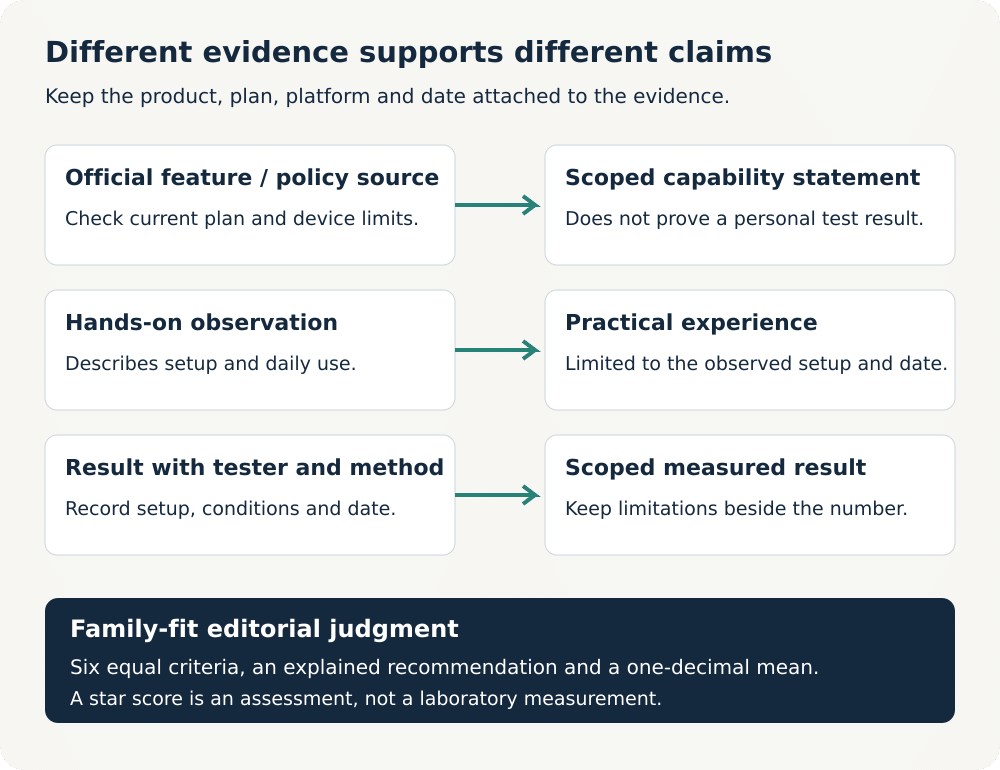
For example, a vendor’s description of location alerts establishes a supported feature. It does not establish how quickly a notification reached my phone. Likewise, an independent security audit can support a claim about its defined audit scope; it cannot prove our personal battery, accuracy or support-response results.
We retain useful first-person observations and buying judgments when updating a review. A feature check or editorial revision does not imply a fresh hands-on retest. When a material capability changes, the relevant recommendation needs another look; the whole product should not automatically inherit a new test date.
Our six parental control criteria
The current Impulsec family-app rubric assesses six criteria equally. We use the same definitions for comparable products and explain a purposeful exception where a different product category requires one. Privacy and buyer fit matter alongside the ability to enforce a rule.
1. Family rule controls
This criterion covers the rules a parent can actually apply: daily allowances, schedules, app restrictions and browsing controls. We distinguish an installed-app block from an internet pause, a bedtime window from a daily time budget, and a whole-device allowance from individual-app limits. Similar dashboard labels do not guarantee the same result.
A strong fit provides useful rules that match the child’s routine without excessive administration. Important limitations include unsupported browsers, apps that continue offline, permissions that must stay enabled, and whether an emergency or parent-approved exception is available. A useful review explains the affected activity rather than promising that every screen is locked.
2. Monitoring scope
We assess what information reaches the parent and how useful it is for a safety decision. Supported-message alerts differ from full message transcripts; web history differs from social-app content; a last reported location differs from continuous live tracking. Plan, service and child-platform restrictions belong beside the feature.
More surveillance does not earn a higher score by itself. A focused alert can be more appropriate than a large archive of private conversations. We consider whether a parent can understand what triggered an alert, whether monitoring covers the service the family uses, and whether the limits are clear.
3. Child-platform coverage
The child’s operating system determines what can be controlled. A parent dashboard available on iPhone does not mean the app can supervise a child’s iPhone. We distinguish parent-device compatibility, child-device compatibility, browser extensions and any companion desktop software.
Cross-platform value also depends on feature parity. Families should not discover after purchase that their most important control works only on Android. Reviews identify the relevant platform and prerequisites instead of treating an app’s broad compatibility list as proof that every feature works everywhere.
4. Setup requirements
This criterion covers installation, account linking, permissions, ongoing maintenance and recovery when a connection stops working. A setup that requires physical access, a management profile, accessibility access or a computer has different implications from a simple family-account invitation.
We explain important prerequisites and how they affect ordinary parents. Ease of setup is not just the number of taps: clear instructions, understandable permissions, useful error messages and a way to check that supervision is active all matter. Resistance to removal is assessed within the platform’s supported controls, without treating hidden installation as a benefit.
5. Family privacy controls
We look at the information collected, who can access it, available account protections, family visibility and data-management choices. A location or messaging tool introduces sensitive information about the child and sometimes other people. That deserves more scrutiny than a decorative privacy badge.
Published privacy and deletion policies support policy claims. They are not a substitute for a technical security audit, and neither a review nor an app can guarantee safety. Our recommendation considers whether the collection is proportionate to the family’s purpose and whether supervision can be explained openly and adjusted as the child matures.
6. Family plan value
Value depends on the useful features and devices included, setup burden and total commitment. We separate a continuing free plan from a trial, app-store trial terms from a website refund offer, introductory pricing from renewal, and trial-device access from the paid allowance.
A low headline monthly equivalent can require a longer prepaid term. Refund conditions, supported payment channels, regional availability and help resources can change the buying decision. We check the relevant published terms before relying on them, and identify the plan rather than applying its features to every subscription.
How scores and recommendations work
Each criterion uses a five-point editorial scale: 1 means poor fit, 2 limited, 3 mixed, 4 strong with meaningful limitations, and 5 exceptional fit for that defined criterion. Half-point steps can express an intermediate judgment. These are explained editorial assessments, not customer averages or measured performance percentages.
The overall score is the arithmetic mean of the six equally weighted criterion values, rounded to one decimal. The explanation, criterion values and displayed total should agree. A criterion definition must remain consistent when comparing products; a new definition should not inherit customer votes about an old feature.
This equal-weight rubric replaces the earlier weighted description on this page. It does not mean every older review has already been recalibrated, and a changed assessment method is not evidence that a product deteriorated. Individual review updates explain material score changes and their reasons.
A best guide answers a narrower question than a standalone review. The best choice for a child’s Android phone may differ from the best option for a mixed-device household. We reassess the eligible choices, order and list length against that reader’s job, then align the shortlist, comparison and mini reviews. An overall score alone does not determine the winner.
What practical checks should establish
Rules, filtering and daily use
For a reported screen-time or blocking result, the useful question is what happened on the child device after the parent applied the rule. A review should identify the activity and platform involved, whether the restriction was immediate or scheduled, and any exceptions. Changing a dashboard switch alone does not establish enforcement.
Web-filter checks should distinguish browser support, category restrictions, specific website rules and search filtering. Blocking an unsuitable page is only half the decision: ordinary school, health and family resources must remain usable. SafeSearch is not a guarantee that an entire device or every app is filtered.
When troubleshooting, check the supervised account, child-device permissions, network connection and supported browser before assuming the service has failed. Sleep, offline use, operating-system updates and changed permissions can affect reporting. A useful account of a problem describes the conditions and the recovery, rather than generalising one event into a universal result.
Location, alerts and communications
Location claims need particular care. Current position, saved history, arrival alerts and emergency actions are distinct capabilities. A map pin should be assessed with its update time and device conditions. Battery settings, an offline phone, background permissions and indoor reception can all matter.
A numerical accuracy or notification-delay claim belongs to an identified test with its conditions and date. We do not derive metres, seconds or reliability percentages from a vendor’s feature list. A qualitative observation can remain useful without pretending to be a benchmark.
For communications, we distinguish which apps or message types are supported, what setup is required, and whether the parent sees an alert, a sample or a transcript. Text-message supervision and social-media monitoring should not be treated as interchangeable.
Privacy, support and the buying decision
Parental controls work best as part of an age-appropriate family agreement. Explain what is monitored, why a restriction exists and how a child can ask for help or an exception. Tools should support safety conversations, not replace them. Features marketed for covert access require scrutiny rather than an automatic recommendation.
Support assessment separates the availability of a channel from a successful interaction. A help centre, email address or live-chat button establishes a way to seek help. Claims about response time or problem resolution need an actual identifiable interaction; listing several channels does not prove responsive service.
Before paying, compare the recurring plan against the family’s essential rules and child devices. Our guides to free Android family controls and free iPhone location-sharing choices explain when a narrower free option may be sufficient. A paid plan should solve a specific remaining need.
Affiliate links can support Impulsec’s work, but commission is not a scoring criterion. Our judgments should still explain meaningful limits, suitable alternatives and the circumstances in which a product is a poor fit. A monitoring product is not a substitute for medical, emergency or professional support.
Frequently Asked Questions
Do you personally use and test parental control products?
Yes. Stuart’s product use and testing informs Impulsec’s practical observations and buying judgments. A factual update does not by itself mean every feature was freshly retested. Specific measured results need their own identifiable observation and scope.
How are parental control review scores calculated?
Six equally weighted criteria cover family rule controls, monitoring scope, child-platform coverage, setup requirements, family privacy controls and family plan value. The arithmetic mean is rounded to one decimal. Scores express editorial fit, not measured accuracy or a customer average.
Why can iPhone and Android recommendations differ?
The child operating system, account setup and available permissions affect what a product can supervise. Parent-dashboard availability does not establish child-device support, and a subscription may offer different features on each platform.
Does more message monitoring mean a better app?
No. We consider usefulness, supported services, privacy and the family’s safety purpose. Supported-message alerts, full transcripts and activity summaries are different capabilities; collecting more private information is not merit by itself.
Do you measure location accuracy and alert speed?
A published numerical result must be traceable to a genuine observation with the relevant method, device or version, conditions and date. Feature documentation alone cannot support personal accuracy or speed results.
Does this methodology mean every older review has been rescored?
No. This page explains the current assessment framework. Individual reviews require their own evidence and score reconciliation, and a revised rubric is not proof of a fresh retest or a completed archive audit.
Share this article

Stuart Kerr Spindlow is Impulsec’s Publisher, Chief Editor and Lead Reviewer. He writes and maintains coverage of consumer cybersecurity and digital-safety software, with a focus on practical suitability, limitations and the evidence behind product claims. Read Stuart’s full profile.