


Quick verdict: Life360 remains the strongest general family-location choice because it combines continuous circle sharing with arrival, safety and driving options. Use Google Maps for consent-based sharing, Find Hub for a lost Android device, Family Link for a supervised child, and Samsung Find when the household is already inside Samsung’s account ecosystem.
These tools are not interchangeable. Decide whether you are sharing a person’s location by consent, supervising a child account, or recovering a missing device. Android permissions, battery settings and account scope can change what each app reports.
Choose by the Location Job
| Reader job | Best starting point | Why |
|---|---|---|
| Ongoing family circle | Life360 | Purpose-built household sharing, places and safety features |
| Temporary consent-based sharing | Google Maps | Choose who can see you and for how long |
| Supervised child location | Google Family Link | Parent-managed child-device location with account supervision |
| Lost Android device | Google Find Hub | Device recovery rather than continuous family monitoring |
| Samsung family ecosystem | Samsung Find | Family sharing tied to Samsung accounts and compatible Galaxy devices |
Official Google, Life360 and Samsung guidance was checked on 13 October 2026. Google Location Sharing is device- and account-specific; Life360 Bubbles deliberately show an approximate area; Samsung family-device sharing requires a Samsung Account family group.
Best Location Tracker Apps for Android Ranked (2026)
Below is a ranked list of the best location tracker apps for Android, including picks for anyone who wants a family location tracker app for Android, a simple free sharing tool, or a more advanced child-safety solution.
- Life360 — best overall family-location circle
- Google Maps — best for consent-based live sharing
- Google Find Hub — best for a lost Android device
- Qustodio — best for location plus broader parental controls
- FamiSafe — best for geofencing and location history
- Google Family Link — best free child-account option
- Bark — best for teen-safety alerts plus location
- Samsung Find — best for Galaxy-family accounts
- OurPact — best for scheduled rules plus location
- Find My Kids — best for younger children and GPS watches
This ranking mixes Android built-in tools and third-party location tracker apps because both match real search intent. Some people want to find a lost Android phone, some want free live location sharing, and others want a stronger parental control app with GPS tracking, geofencing, and location history.
Quick Comparison: Best Android Location Tracker Apps
If you want the best location app for Android for general family use, start with Life360 or Google Maps. Both work well as an android location sharing app for everyday check-ins and live map updates. If you need to recover a missing Android phone, Google Find Hub is the better fit. If you are a parent and want a child location tracker app for Android with broader controls, Qustodio, FamiSafe, Bark, and Google Family Link are better choices.
Compare tools by the job you need them to do. The four groups below cover all ten tools; the numbered reviews retain their existing order.
Family location sharing
Scroll horizontally to see all columns.
| Product | Main features | Important limitations |
|---|---|---|
 Life360 Life360Full review Read mini-review | Family location sharing; place alerts; location history. Driving reports, crash detection and SOS features depend on the selected plan and region. | Do not mix international Silver/Gold benefits with US membership offers. Emergency-related services and location updates depend on eligibility, permissions and connectivity. |
 Google Maps Location Sharing Google Maps Location SharingRead mini-review | Share current location with selected people; battery status; manage sharing permissions and supported location notifications. | Sharing is device/account-specific and off by default. Supervised and Workspace accounts have additional restrictions. This is location sharing, not app blocking or message monitoring. |
 Findmykids FindmykidsRead mini-review | Current location; place notifications; route history on paid plans; supported SOS and loud-signal functions. | Features differ by plan and child device. Sound Around minutes are purchased separately. Do not assume advertised app blocking or call filtering works equally on Android and iPhone. |
Lost-device recovery
Scroll horizontally to see all columns.
| Product | Main features | Important limitations |
|---|---|---|
 Google Find Hub Google Find HubRead mini-review | Locate registered devices; show an available last-known location; play a sound; mark a supported device as lost; remotely erase a supported Android device. | Remote securing and erasure require power, connectivity and the relevant account/settings. Offline finding depends on prior setup and device/network support. After a factory reset, the device is no longer available in Find Hub. |
 Samsung Find Samsung FindRead mini-review | Locate registered Galaxy devices; ring supported devices; Lost mode; supported offline finding; remote data erasure through the website. | Requires a Samsung account and appropriate finding settings. App and website functions differ. Offline finding does not guarantee a current location. Samsung Find is distinct from SmartThings Find. |
Location alongside parental controls
Scroll horizontally to see all columns.
| Product | Main features | Important limitations |
|---|---|---|
 Qustodio QustodioFull review Read mini-review | Web/app controls, time limits, reports and location tools. Advanced routines and monitoring depend on plan/platform. | iOS calls/messages and supported WhatsApp/LINE alerts require a Windows/Mac computer and the documented sync setup. Panic button is Android-only; social-app coverage varies by platform. |
 FamiSafe FamiSafeFull review Read mini-review | App/time controls and location tools; geofencing and journey-related features on supported devices. | No detailed WhatsApp/social monitoring on child iOS. One-way audio is advertised for supported Android child devices and can be disabled by the child. Other features vary by platform. |
 Bark BarkFull review Read mini-review | Jr: screen-time, app/web controls and location. Premium adds alerts about supported content and communications. | iOS content monitoring uses Bark Desktop, Bark Sync or Bark Home; setup requirements differ and alerts are not instantaneous. Account/app coverage varies; Phone and Watch are separate products. |
 OurPact OurPactFull review Read mini-review | App blocking and schedules. Premium+ adds View screenshots/content monitoring. Location history: 14 days Premium, 30 days Premium+. | View snapshots are not continuous live video. iOS 27 Full Pair requires a computer and backup/erase/restore; Quick Pair is limited. |
Google account supervision
Scroll horizontally to see all columns.
| Product | Main features | Important limitations |
|---|---|---|
 Google Family Link Google Family LinkFull review Read mini-review | App and screen-time limits; schedules; app approvals; Google-service content restrictions; account settings; supported device location and arrival/departure alerts. | A parent’s iPhone app does not provide equivalent control of a child’s iPhone. Filters cannot catch all unsuitable content. Location requires a powered-on, connected and recently active supported device. |
Choosing the best location tracker apps for Android can feel overwhelming, especially when some tools are built for family location sharing, some are designed to recover a lost phone, and others bundle location tracking into wider parental controls. To make things easier, I’ve ranked the strongest Android options for real-time GPS tracking, safe-zone alerts, child location sharing, and lost-device recovery so you can match the right app to your actual needs.
Detailed Reviews of the Best Location Tracker Apps for Android
1. Life360: Best Overall Android Location Tracker App
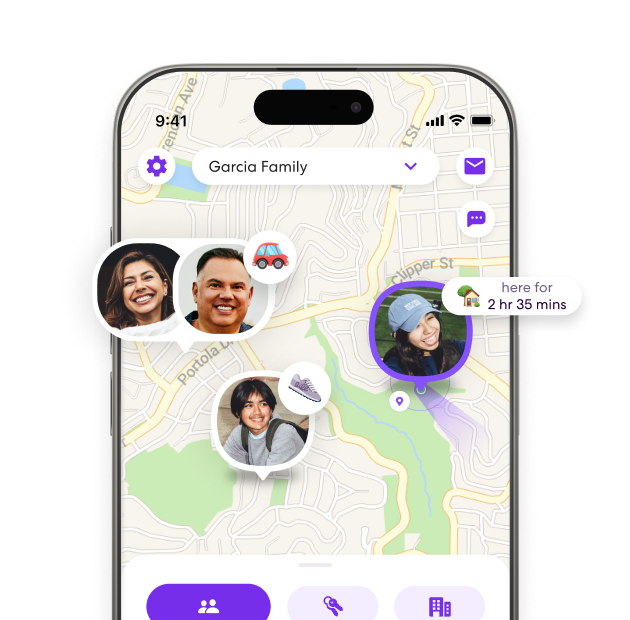
Overview: Life360 is the strongest all-round pick for most Android users because it is built around live family location sharing first, rather than treating location as a secondary add-on. It combines real-time GPS tracking, place alerts, driving insights, and a polished family map that works well across mixed-device households.
- Key Features: Real-time location sharing; place alerts; location history; driving reports; crash detection on higher plans
- Pros: Best pure family-location experience; easy to use; strong Android app; useful arrival and departure alerts
- Cons: Best features sit behind paid plans; can feel overbuilt if you only want a basic phone finder; refund policy is strict
- Pricing and Refunds: Free plan available; paid plans start from premium tiers with added history, alerts, and safety features. Life360 states that unused subscription time is generally non-refundable after purchase, aside from rights required by law.
- Why This Ranking: I ranked Life360 first because this keyword is about the best location tracker app for Android, and Life360 is the cleanest dedicated location-sharing solution for real families, not just device recovery or broader parental control.
If Life360 is your front-runner, you may also want to compare it against other family-focused tools in my Life360 vs Find My and Life360 vs Family360 breakdowns.
2. Google Maps: Best Free Live Location Sharing App for Android
Overview: Google Maps is the best free option for Android users who want simple live location sharing without installing a dedicated family-tracking platform. It is built into the Google ecosystem, familiar to most users, and works especially well for sharing trips, arrivals, and current location with trusted contacts.
- Key Features: Real-time location sharing; time-limited or ongoing sharing; location requests; easy contact-based sharing
- Pros: Free; already installed or easy to access; low friction; ideal for adults, couples, and older kids
- Cons: Not a full parental control app; lacks richer family-safety tools like geofence dashboards and detailed family controls; weaker as a lost-device tool than Find Hub
- Pricing and Refunds: Free; no subscription or refund issues for the core feature
- Why This Ranking: I ranked Google Maps second because it matches a huge part of the search intent behind best location app for Android; many users want free, accurate location sharing rather than a full safety suite.
3. Google Find Hub / Find My Device: Best for Finding a Lost Android Phone
Overview: Google Find Hub is the right pick if your main goal is to locate a missing Android phone, tablet, earbuds, or tracker-compatible item. It is less of a family-locator app than Life360 or Google Maps, but it is the strongest Android-native recovery tool and now also brings people sharing into the same broader experience.
- Key Features: Locate devices on a map; play sound; remotely secure device; erase device; offline finding support on compatible devices; people tab integration
- Pros: Best Android-native lost-device tool; free; built by Google; excellent for phone recovery
- Cons: Not a full parental control app; weaker for family coordination than Life360; less useful for richer location-history use cases
- Pricing and Refunds: Free; no subscription or refund issue for core use
- Why This Ranking: I ranked Find Hub third because it absolutely belongs in this article, but its main strength is recovering lost Android devices rather than acting as the best all-round family location tracker.
4. Qustodio: Best for Parents Who Want Tracking Plus Parental Controls

Overview: Qustodio is the best premium pick here for parents who want Android location tracking as part of a fuller parental control setup. It is not as location-first as Life360, but it adds useful parenting tools like app controls, screen time limits, web filtering, and activity reporting alongside location features.
- Key Features: Child location tracking; web filtering; app blocking; screen-time controls; routines; activity monitoring
- Pros: Location visibility alongside screen-time limits and app controls; useful for families who want one parental-control toolkit
- Cons: Not the cheapest premium option; location is part of a broader toolkit rather than the app’s whole focus; some advanced monitoring differs by platform
- Pricing and Refunds: Paid plans start from Basic and move up to Complete; Qustodio says direct website purchases can be refunded within 30 days if requested through support.
- Why This Ranking: Qustodio earns this place for parents who need location tracking alongside wider Android supervision. Life360 is more focused on family coordination, while Google’s free tools suit simpler sharing or device recovery.
If you want more than simple GPS sharing, read my full guides to the best parental control app for Android and the best parental control apps overall.
Read the full Qustodio review.
5. FamiSafe: Best for Location History and Geofencing on Android

Overview: FamiSafe is one of the better Android parental control apps when your main focus is location tracking, safe zones, and movement history. It sits slightly below Qustodio overall because Qustodio feels broader and stronger as a full family-control package, but FamiSafe is very competitive on GPS-focused use.
- Key Features: Real-time GPS; location history; geofencing alerts; app blocking; screen-time tools; SOS support
- Pros: Strong Android location features; useful safe-zone setup; good fit for school-run and commute tracking; clearer GPS-first positioning than some rivals
- Cons: Location depends on device permissions and connectivity; pricing and refund eligibility vary by billing term and purchase channel
- Pricing and Refunds: FamiSafe offers monthly, quarterly, and annual subscriptions. Its product-specific refund policy sets a 7-day request window with eligibility conditions and exclusions, including change of mind. App-store purchases follow the store’s refund process; confirm the terms for your purchase channel.
- Why This Ranking: I ranked FamiSafe fifth because it does a very good job on the Android-specific GPS side, but it is a slightly weaker all-round recommendation than Qustodio for this exact page.
Read the full FamiSafe review.
6. Google Family Link: Best Free Android Option for Child Location Tracking
Overview: Google Family Link is the best free child-focused Android choice for parents who mainly want location visibility, app approvals, and basic device supervision without paying for a premium tracker. It is not as advanced as Qustodio or FamiSafe, but it is highly relevant for Android families and should be included prominently.
- Key Features: Child location on one map; arrival and departure alerts; ring child device; battery visibility; app approvals; Google service controls
- Pros: Free; excellent fit for Android families; trusted Google ecosystem; great starting point for younger kids
- Cons: Less advanced than premium parental control apps; lighter reporting; fewer geofence-style extras than dedicated family tracker apps
- Pricing and Refunds: Free; no subscription refund concern
- Why This Ranking: I ranked Family Link sixth because it is one of the most intent-relevant inclusions for this article, but it is narrower and less feature-rich than the higher-ranked all-round options.
Read the full Google Family Link review.
7. Bark: Best for Teen Safety Alerts Plus Location Tracking
Overview: Bark is best for parents of older kids and teens who care about risky online behaviour as much as physical location. Its location tools are solid, with real-time maps and location alerts, but Bark stands out more for alerts around messages, social content, and broader digital-safety risks.
- Key Features: Real-time map; location alerts; check-ins; screen-time controls; website and app blocking; content-risk alerts on higher plans
- Pros: Strong for teen-focused digital safety; good alert system; unlimited family coverage on one subscription; good Android fit
- Cons: Not as pure a location app as Life360; stronger value if you also want monitoring and alerts; less ideal if you only want free or simple tracking
- Pricing and Refunds: Check the current Bark app plan and its monitoring and location features before paying. Refund handling depends on where you subscribe; Apple-billed subscriptions are managed by Apple. Bark Phone hardware return offers should not be treated as an app-subscription money-back guarantee.
- Why This Ranking: I ranked Bark seventh because it fits the article, especially for parents of teens, but its core appeal is broader safety monitoring rather than being the very best dedicated Android location tracker.
8. Samsung Find: Best for Samsung Galaxy Families
Overview: Samsung Find deserves a place in this article because many Android users specifically use Galaxy devices, and Samsung offers its own real-time location sharing and device-finding layer. It is most useful inside a Samsung household rather than as a universal Android recommendation.
- Key Features: Real-time family location sharing; Galaxy device finding; map-based tracking; device-location support within Samsung ecosystem
- Pros: Strong for Samsung families; relevant Android-native inclusion; good if your home already runs on Galaxy devices
- Cons: More niche than Google Maps or Life360; best value depends on having Samsung hardware; weaker for mixed-device families
- Pricing and Refunds: Free core use within Samsung ecosystem; no subscription refund issue for the core app
- Why This Ranking: I ranked Samsung Find eighth because it is highly relevant for one big Android segment, but it is not as broadly useful as the higher-ranked cross-platform choices.
The web action below opens Samsung’s SmartThings Find device-recovery service. Family people-sharing is managed separately in the Samsung Find app.
9. OurPact: Best for Screen Time Control Plus Family Location Tools
Overview: OurPact is a better fit for families who care about screen-time structure first and location tracking second. It still has useful GPS tracking and place alerts, but its strongest identity is device management, routines, and app-blocking rather than being a top-tier location specialist.
- Key Features: GPS family locator; geofencing with Places; app blocking; schedules; screen-time allowances; location history on higher plans
- Pros: Good blend of screen-time and location tools; strong family-management angle; works across iOS and Android
- Cons: Weaker pure location value than Life360 and Google Maps; sits behind stronger parental-control competitors like Qustodio and FamiSafe; no friendly refund policy
- Pricing and Refunds: Plan availability and pricing vary by platform and region; confirm the current OurPact offer in the app store or official plan page. OurPact states that it does not offer refunds or partial credits for monthly or annual subscriptions.
- Why This Ranking: I ranked OurPact ninth because it is still a valid inclusion, but location tracking is not the main reason most Android users choose it.
10. Find My Kids: Best for Younger Kids and GPS Watch Use
Overview: Find My Kids is a child-focused tracker that works best for parents of younger kids, especially where GPS watches or a very child-specific tracking setup matters. It is not as broad or as polished a general Android recommendation as the apps above, but it fits the narrower child-safety angle well enough to keep on the list.
- Key Features: Live GPS location; location history; custom places; loud signal; battery checks; family chat; GPS watch support
- Pros: Child-focused design; useful for younger children; GPS watch angle helps it stand out; practical school and route alerts
- Cons: More specialized than general family sharing; GPS-watch compatibility needs checking; refund eligibility depends on the purchase channel and policy conditions
- Pricing and Refunds: Pricing varies by platform, region and purchase channel. Findmykids’ website money-back guarantee has eligibility conditions and excludes some reasons for cancellation. App-store purchases follow the store’s refund policy. Check the terms shown for your exact subscription before paying.
- Why This Ranking: I ranked Find My Kids tenth because it serves a real use case, but it is more specialised and less broadly useful for the average Android user searching this keyword.
For a more child-specific roundup, see my guide to the best child tracking apps and my full breakdown of apps that help track your child’s phone.
Built-In Android Location Tracking Options vs Third-Party Apps

Google Maps, Google Find Hub, Google Family Link, and Samsung Find are the strongest built-in or platform-native choices in this space. They are ideal if you want free or low-friction Android location tracking, especially if you just need an android location sharing app or a basic tool for finding your own device. Third-party apps like Life360, Qustodio, FamiSafe, and Bark make more sense when you want a stronger family location tracker app for Android or a more advanced child location tracker app for Android with geofencing, location history, arrival alerts, screen-time controls, or broader family safety tools.
Key Features of Location Tracker Apps

Modern location tracker apps usually offer three main features that make them genuinely useful for staying in touch with family and friends. You’ll get instant location updates, boundary alerts, and secure data handling—pretty much the essentials you’d expect.
Real-Time Location Sharing
Real-time location sharing means you can check where your family members are, pretty much whenever you want. The best apps out there update every few seconds, so you’re not left guessing.
Most GPS tracking apps for Android display everyone’s location on interactive maps. You can zoom way in to see an exact address, or zoom out if you just want the general area.
Key real-time features include:
- Live location updates every 3-30 seconds
- Battery level monitoring
- Movement speed tracking
- Location history for the past 24-48 hours
Honestly, I’ve noticed that apps with lightning-fast updates seem to chew through battery life. Most decent apps let you tweak how often locations update, so you can find a good balance.
Some location tracker apps for Android will also ping you when someone gets to or leaves important places like home, work, or school. Once you set up those spots, it just works in the background.
Geofencing Capabilities
Geofencing is kind of cool—it sets invisible boundaries around places you care about. When someone crosses in or out, you get a notification right away.
You can set up several geofences around places like home, your kid’s school, or your parents’ neighborhood. Most apps let you create anywhere from 5 to 20 of these zones.
Common geofence settings:
- Circular zones: Radius from 100 feet to 5 miles
- Custom shapes: Draw your own boundaries
- Time-based rules: Different alerts for weekdays or weekends
- Multiple contacts: Send alerts to several family members
I usually start with bigger geofences and shrink them if I get too many alerts. GPS isn’t perfect, so tiny zones can be annoying.
The best location tracking apps let you pick how you want to be notified—push, text, or email. You can set different alerts for each place, which is handy.
Privacy and Data Protection
Privacy matters a lot with location tracking. The way these apps handle your data can make or break the experience.
Look for apps that encrypt location data both when it’s stored and when it’s sent between devices. End-to-end encryption is best—only you and your family should see your info.
Important privacy features:
| Feature | What It Does |
|---|---|
| Data encryption | Scrambles location data so hackers can’t read it |
| Local storage | Keeps some data on your phone, not just company servers |
| Account controls | Lets you delete history and control sharing |
| No third-party ads | Stops your data from being sold to advertisers |
I always check what else an app collects besides location. Some apps grab phone usage, contacts, or even browsing history, which feels invasive.
Plenty of apps let you set automatic data deletion. You can keep history for 30 days, 90 days, or whatever works for you.
The most secure location tracker apps for Android also use two-factor authentication and require strong passwords. It’s extra work, but it keeps your family’s info safer.
Choosing the Best Location Tracker for Your Needs
When I’m picking a location tracker app for Android, two things really stand out. Device compatibility is huge—if the best location app for Android doesn’t play nice with my phone, it’s a no-go.
Battery usage is the other big one. Nobody wants their phone dead by lunchtime.
Compatibility With Android Devices
I always check which Android versions an app supports before I even bother downloading. Most top location tracking apps work on Android 7.0 and up, but some fancy features need Android 10 or newer.
The phone brand also matters. Samsung, Google Pixel, and OnePlus usually work best, but some Chinese brands can block location services for certain apps.
Here’s what I look for:
- Minimum Android version – Usually at least Android 7.0
- RAM requirements – 2GB RAM is pretty standard
- Storage space – Most apps need 50-200MB free
- Google Play Services – Needed for GPS and maps
Some apps run smoother on stock Android, but might get glitchy on heavily customized versions like MIUI or ColorOS.
Battery Usage Considerations
Location tracking apps are notorious for draining battery. I look for apps that have power-saving modes or let me set longer tracking intervals.
High battery drain features:
- Real-time GPS tracking every few seconds
- Nonstop background location updates
- Constant data uploads
Battery-saving options I like:
- Adjustable tracking intervals (5-30 minutes)
- Wi-Fi-based location when possible
- Sleep mode at night
I usually test a new app’s battery impact during my first week. If it eats more than 10-15% of my daily battery, I ditch it. The best ones barely use 5% a day.
Some apps let you pick between accuracy and battery life. I’ll use precise tracking for trips, but switch to power-saving mode for the usual day-to-day stuff.
Final Verdict: Which Location Tracker App for Android Should You Choose?
The best location tracker app for Android depends on what you actually need it to do. If you want the best all-round family location app, Life360 is still the strongest overall choice because it is built for live tracking, place alerts, and everyday family coordination. If you want a free option, Google Maps is the best starting point for simple live sharing, while Google Find Hub is the smartest choice for recovering a lost Android phone.
For parents, the decision is slightly different. Qustodio is the best premium pick if you want location tracking plus wider parental controls like screen time, app blocking, and web filtering. Google Family Link is the best free child-focused Android option if you want a lighter setup without paying for a full subscription.
My Personal Recommendation
If I were choosing just one app for most Android users, I would go with Life360. It is the most complete and easiest to recommend because it does not force you to choose between usability and useful features. It works well for families, gives clear location updates, and feels more purpose-built for shared location tracking than the built-in alternatives.
That said, I would not pay for a premium app if all I needed was occasional location sharing or a way to find my own device. In that case, I would stick with Google Maps or Google Find Hub. If your main goal is keeping tabs on a child’s phone as part of broader digital parenting, I would lean toward Qustodio or another strong Android parental control app rather than a basic location-only tool.
Frequently Asked Questions
Below are the most common questions people ask when comparing location tracker apps for Android, including free options, family tracking, consent, and the difference between everyday location sharing and broader parental control tools.
What are the top-rated Android apps for real-time location tracking?
I always recommend Life360 Family Locator best location app for Android as the top choice for real-time tracking. It’s accurate and works great for families.
Google Find My Device is perfect for tracking your own devices. It’s already on most Android phones and just works.
How can I track another person’s location using my Android device?
For family, I use Life360 or Find My Kids. You’ll need permission from whoever you’re tracking, though.
The person being tracked has to install the app and agree to share their location. That’s actually a good thing—privacy and all.
If you’re a parent, Find My Kids comes with features just for monitoring children. It’s got geofencing alerts and keeps a location history.
Is there a free location tracker for Android?
Yes. There are several good free options if you want a free location tracker for Android. Google Maps is the easiest choice for live location sharing, Google Find Hub is best for finding your own lost Android phone, and Google Family Link is a strong free option for parents tracking a child’s Android device.
Life360 also has a free plan, which makes it a good starting point for family location sharing. The main trade-off is that premium plans unlock more detailed alerts, history, and extra safety features.
How to track family members location on Android?
The safest way to track family members on Android is with consensual location sharing. For most families, Life360 and Google Maps are the easiest tools to set up for live location sharing. If you are a parent tracking your child’s Android phone, Google Family Link, Qustodio, and FamiSafe are better choices because they add parental controls alongside GPS tracking.
Each person usually needs to install the app or enable location sharing and agree to share their location. That is important for privacy, safety, and legal use.
Which Android app should I use for keeping track of my family’s whereabouts?
Life360 is my pick for all-in-one family tracking. You get family circles and everyone’s location on one map.
Find My Kids is perfect for parents who want to keep an eye on their children. It’s got features built for safety and parental control.
Famisafe is another good option, especially if you want parental controls like screen time management and app blocking along with location tracking.
What are the best location tracker apps for Android phones?
The best location tracker apps for Android phones depend on your goal. Life360 is the best overall for family location sharing, Google Maps is the best free option for simple live sharing, and Google Find Hub is the best built-in tool for locating a lost Android device.
If you are a parent, Qustodio, FamiSafe, and Google Family Link are better fits when you want location tracking plus extra child safety tools.
Can someone track your Android phone without you knowing?
Yes—someone can track an Android phone without you knowing, but it usually requires installing spyware, accessing your Google account, or exploiting weak security settings.
Signs include fast battery drain, unusual data use, unknown apps, or changed permissions. Protect yourself by updating your phone, using strong passwords, enabling 2FA, and regularly checking app permissions and device activity.
What is the app that tells you where someone is?
Apps that “tell you where someone is” are usually location-sharing apps used with consent, like Google Maps Location Sharing, Apple Find My, or Life360. These apps let people voluntarily share their real-time location for safety, family coordination, or travel updates.
Tracking someone without their permission is unsafe and illegal, so these tools must always be used responsibly and transparently.
Share this article

Stuart Kerr Spindlow is Impulsec’s Publisher, Chief Editor and Lead Reviewer. He writes and maintains coverage of consumer cybersecurity and digital-safety software, with a focus on practical suitability, limitations and the evidence behind product claims. Read Stuart’s full profile.