


🚀 In a hurry? Read this short Spyera Review snapshot Check current plan and full billing term

Name: Spyera
Description: Monitoring software for supported phones, tablets and computers. Features vary by plan, platform, permissions and device configuration. Confirm authorised use and the required function before purchase.
Operating System: Android, iOS, Windows, macOS
Application Category: Parental Control
🕵️ Why I Recommend Spyera
Quick verdict: Spyera is a specialist option for an authorised, proportionate monitoring requirement on a confirmed supported device. Its broad advertised reporting must be weighed against intrusive access, platform limits and recurring cost. This correction checks current official information; it is not a new device or security test.
- Separate phone, tablet and computer plans; feature availability varies.
- Confirm the exact device, permissions and required report before purchase.
- No free trial; read detailed renewal and conditional refund terms.
- Existing editorial score retained, without a new comparative test.
Overall
-
Features & Functionality
-
Ease of Use
-
Performance & Reliability
-
Compatibility
-
Privacy & Security
-
Customization Options
-
Customer Support
-
Value for Money
Pros
- Advertised reporting across supported phone, tablet and computer products
- Separate plan and bundle options for different device needs
- Published compatibility and support guidance
Cons
- Recurring cost and restrictive device or feature requirements
- Sensitive collection requires appropriate authority, notice and consent
- Some functions require additional configuration or device changes
- Detailed refund exclusions qualify the broad marketing guarantee
Spyera offers monitoring software for supported phones, tablets and computers. Its appeal is the breadth of advertised reporting, but sensitive access, device requirements and recurring cost make it a specialist choice. Start with a lawful, clearly explained purpose and verify the exact feature on the intended device before buying.
This review examines the product scope, setup requirements, price and practical limits. The 26 October 2026 correction checks official pricing, compatibility and policies; it does not claim a new installation, interception test, security audit or customer survey. The existing editorial score is retained.
Overview of Spyera

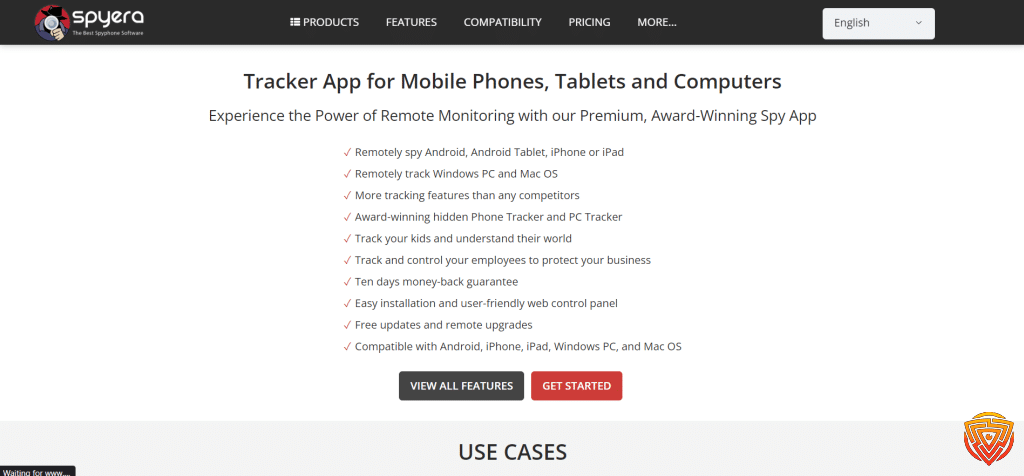
Spyera markets separate smartphone, tablet and computer subscriptions, plus an All-in-One bundle. A long trading history or a large feature list does not establish that every function works on every release. Match the selected licence to the actual device and required report.
Positive testimonials are not a measured reliability rate or proof that a proposed use is appropriate. This correction did not authenticate a new sample of customer reviews. Give more weight to current device requirements, written feature confirmation and the terms attached to the actual subscription.
Software and third-party messaging apps change over time. A feature described in an older review or screenshot can depend on an older configuration. Ask the provider about the specific device, operating-system release and app version rather than assuming that a general product description guarantees support.
How does spyera work?
The product is intended for authorised device monitoring. Ownership alone does not resolve every privacy or communications issue, particularly where records involve employees, other adults or people outside the household. Use a proportionate arrangement and obtain appropriate advice if authority or notice requirements are unclear.
The vendor advertises call and message records, selected social-app reporting and location tools. These are advertised capabilities, not fresh results from this correction. Their availability depends on the product, platform, permissions, configuration and supported third-party app versions.
Features and Functionality
The following feature areas explain what to check for the intended device:
Call Monitoring Feature of Spyera
Call reporting and recording are different functions. Confirm whether the selected setup supports logs, recordings or live listening, and which permissions and device changes it requires. A call-history entry does not establish that call audio is available or that recording it is lawful.
Text Message Tracking Feature of Spyera
The vendor advertises message monitoring, but this does not establish complete recovery of every incoming, outgoing or deleted message. Check the message type, supported application and platform. Records may contain information about people who are not the device user, so limit collection to the authorised purpose.
Social Media Surveillance Feature of Spyera
Support for WhatsApp, Facebook, Instagram or another service is feature- and version-specific. A platform name in marketing is not a promise of every chat, media item or deleted record. Confirm the particular report and configuration rather than treating social-app access as unrestricted.
GPS Location Tracking Feature of Spyera
Location tools can provide reported positions and history in a supported setup. Connectivity, permissions, device state and timestamps matter. No new accuracy or update-delay measurement was collected here, and a reported position should not be treated as an emergency response or a guarantee of someone’s safety.
Ambient Recording Feature of Spyera
The provider advertises ambient recording on supported configurations. This is highly sensitive collection that can involve bystanders and private conversations. Do not treat the feature as general permission to record surroundings or as assurance that a recording will be complete, reliable or admissible evidence.
Keylogger Feature of Spyera
A keylogger can expose passwords and other sensitive text, including information unrelated to the monitoring purpose. Availability is platform-specific. This review does not establish capture of every keystroke or recommend collecting another person’s credentials as a routine family-safety measure.
Stealth Mode Feature of Spyera
Spyera markets discreet operation, but an advertising claim of invisibility is not an independently verified guarantee. Device security tools, permissions, account notices or software changes may expose monitoring. Concealment does not remove the need for authority, appropriate notice and consent.
Performance depends on the exact supported device and configuration, connectivity and relevant software updates. Customer comments do not replace a repeatable test. This correction provides no universal success rate, battery benchmark or guarantee of complete, continuous data delivery.
Ease of Use
Ease of use includes installation, maintaining permissions, interpreting records and handling software changes. A dashboard that looks simple in an image does not prove that the device setup is straightforward. Read the current instructions before committing to a subscription.
The dashboard is intended to bring supported reports together. Evaluate whether it distinguishes devices, timestamps and report types clearly enough for the authorised purpose. The historical images below are useful context, but they are not a new walkthrough of the current interface.
Setup varies between installed device software and any supported account-based route. Check the precise platform instructions and prerequisites. This correction did not install the app or measure setup time, so it does not certify effortless installation or an absence of device disruption.
Allow time to understand permissions, account access and any platform limitations before purchasing. If the proposed setup requires weakening device protections or unsupported changes, consider a less intrusive alternative that meets the actual family or workplace requirement.
Earlier claims that numerous parents found setup easy were not backed by a newly authenticated review sample. They should not be read as a current satisfaction statistic. Ask specific pre-sales questions and keep the provider’s answer about the intended device and feature.
For everyday family rules, compare a conventional screen-time and filtering product with Spyera’s more intrusive monitoring scope. More captured information is not automatically easier to interpret or more useful for protecting a child.
How to Install Spyera
Before setup, confirm lawful authority, appropriate notice and the exact supported device and feature. These steps explain checks to make, not a newly completed installation.
-
Read the current official product, compatibility and policy information. Confirm that the proposed purpose and collection are appropriate before accessing a device or account.
-
Compare the exact device plan, full charge, renewal and refund conditions. A purchase decision should follow the compatibility check, not precede it.
-
If you purchase through the legitimate seller, keep the order and official setup instructions. Protect account and activation details; do not share them with an unverified third party.
-
Use only the current supported installation or account-based route for the selected platform. Do not assume an installed Android procedure applies to an iCloud configuration.
-
Check the prerequisites for the exact operating-system release before running any installer. Stop if support or authority is uncertain.
-
Review requested permissions against the agreed purpose. Do not disable security tools simply to suppress a warning.
-
Follow the platform-specific configuration guidance. Opening an app or dashboard alone does not establish that every report is available.
-
Associate only the authorised device and account with the correct licence. Confirm the number of simultaneous devices covered.
-
Review the selected settings and activation state. The wording and controls can vary by product and release.
-
Explain the agreed monitoring scope to the device user as appropriate. Do not treat icon hiding or discreet operation as a substitute for required notice and consent.
-
Check that an authorised report appears with the correct device and timestamp. No guarantee of every event or uninterrupted delivery follows from one successful report.
-
Protect dashboard access, limit unnecessary collection and reassess after software changes. Stop collection when the legitimate purpose or authority no longer applies.
The earlier review discussed the following setup challenges. They remain practical checks, not evidence of a newly completed installation:
- Authorised access: Confirm the supported setup route and your authority before accessing the intended device or account. Do not obtain another person’s account credentials without permission.
- Security warnings: Monitoring software may trigger security tools. Do not suppress or disable protections merely to complete setup. Consider a supported alternative if the required configuration conflicts with the device’s security policy.
- Internet connectivity: For the successful installation and remote monitoring of Spyera, stable and dependable internet connectivity is crucial. During the setup procedure, make sure the target device has a dependable internet connection.
Software Performance – Does Spyera really work?
The earlier author assessment described Spyera favourably, but this correction did not reproduce those results. The following sections distinguish advertised functions from tested outcomes and explain what remains to be confirmed for a particular device.
This correction does not substantiate the earlier claim that Spyera reliably blocks websites, apps and keywords as a complete content-filtering system. Monitoring a browsing record and preventing access are different functions. If blocking is essential, obtain exact current product confirmation or compare a dedicated parental-control tool.
The breadth of advertised reporting is the main product attraction. It does not establish complete visibility into every part of a device. Consider each required report separately, including its source, permission requirements, timestamp and platform limits.
Remote functions should be checked individually in current documentation. The earlier blanket promise of remote data deletion and loss-or-theft protection is not verified here. Do not treat a monitoring subscription as a substitute for the device maker’s supported recovery or security tools.
Background operation is not evidence of zero battery impact, no notifications or guaranteed invisibility. No fresh device-resource or detection test was performed. Maintain an authorised arrangement and do not disable security protections simply to make monitoring less noticeable.
The earlier general claims of consistently precise, current results were not supported by a new measurement dataset. Check actual timestamps and limitations when assessing a permitted report, and avoid drawing conclusions from an incomplete or delayed record.
Recheck compatibility after relevant operating-system or messaging-app updates. An old screenshot or a successful setup on another device does not establish continued support. The provider’s current requirements and feature-specific guidance are more useful than a generic promise of regular updates.
Compatibility

The official compatibility page lists Android, iOS, Windows and macOS, with material differences. Its current claims are summarised below as vendor information checked on 26 October 2026, not independently tested coverage of every listed release.
Operating Systems
- Android: The current official page claims Android support including 17, with most features not requiring root. This is vendor coverage information, not a new test of every device or function. Obtain confirmation for the exact model and release.
- iOS: The compatibility page lists versions through 16.x and jailbreak for the full feature set. The separately advertised iCloud route has a different scope; confirm the exact version and function before purchase.
- Windows: The current compatibility page lists Windows 10 and 11. It does not substantiate the older blanket Windows 7/8 claim. Check the precise edition, device and required report.
- macOS: The official page names specific releases, including Sonoma, Monterey, Big Sur and Mavericks. Do not infer that every release in between or any newer release is supported. Confirm the actual Mac and requested function.
Compatible devices
For Android, the vendor says most features do not need root, while some functions need additional configuration. Do not infer that unrooted and rooted setups provide identical access. Confirm the exact function without assuming that device-security warnings should be suppressed.
The compatibility page currently lists iOS through 16.x and says jailbreak is required for its full feature set. Separate iPhone marketing also describes a no-jailbreak iCloud route. These are different scopes; do not assume support for a newer iOS release or full feature parity between the two routes.
Feature Supported
- Android feature scope: Check calls, messages, location, social apps and typed-text reporting individually. A listed platform is not evidence that all 240-plus advertised features work in the same configuration.
- iOS feature scope: Distinguish account-based reporting from installed jailbroken-device features. Do not assume identical call, message, location, email or app reporting across those routes.
Spyera Pricing

The official pricing page offers different device plans. Compare the full charge, term, currency and device allowance. A monthly equivalent of an annual payment is not a monthly-billed subscription.
Plans Overview:
During the 26 October check, the USD monthly view displayed Computer USD 49, Tablet USD 69 and Smart Phone USD 89 per month. Those are separate plan quotes, not a single USD 49-per-month all-device offer. Check the selected country, tax and final order before paying.
- Smart Phone: displayed USD 89 per month, or USD 389 for one year; confirm the selected offer and device allowance.
- Tablet: displayed USD 69 per month, or USD 279 for one year; confirm the selected offer and device allowance.
- Computer: displayed USD 49 per month, or USD 199 for one year. The USD 16.58 monthly equivalent requires an annual payment.
- All-in-One: displayed USD 479 per year, described as one smartphone, one tablet and one computer licence; annual billing only.
Initial Vs. Renewal Rates:
The annual view displayed Computer USD 199, Tablet USD 279 and Smart Phone USD 389 for a year, with an All-in-One bundle at USD 479 per year. Annual equivalents shown on the page do not change the full charge. Current terms say renewal occurs at the then-current rate unless disabled, so matching initial and renewal prices is not guaranteed.
Comparison to Industry Standard:
Assess value against the specific reporting requirement and less intrusive alternatives. This correction does not establish a cheapest-in-market ranking or prove that a larger feature list offsets a higher charge for every household.
Additional Spyera Costs:
Check the exact licence, device prerequisites, tax and any optional order items. No checkout was completed here, so no universal promise of zero additional costs is made. A smartphone alone is not sufficient for every advertised configuration.
Payment Options:
Use the methods actually offered in the selected checkout. The provider describes card payments with other options in some regions, but this correction did not submit payment details or verify a successful transaction with any particular card network.
Contract Terms:
Compare monthly billing with an annual commitment, including automatic renewal and the procedure for stopping future charges:
Monthly Subscription
The monthly pricing view offers separate computer, tablet and smartphone plans. All-in-One is displayed as annual-only. A paid monthly subscription is not a free trial, and a refund headline should be read together with the actual eligibility terms.
Annual membership
Annual billing requires the full annual charge rather than only the displayed monthly equivalent. Check how many simultaneous devices the licence covers. Moving one licence between devices is different from monitoring several devices at once.
Free Trial:
The official support page says no free trial, demo or test version is offered. The 10-day refund policy is a separate purchase protection with conditions; it should not be described as an unconditional free way to test every setup.
Refund Policy and Money-Back Guarantee:
The published refund policy applies to first purchases requested within 10 calendar days after contacting support. It excludes renewals, late requests, published incompatibility and policy violations. Approved refunds are described as taking 5 to 10 business days, not a guaranteed three-day turnaround. This detailed policy is more restrictive than the unconditional wording used elsewhere in the marketing.
Promotional Deals or Discounts:
A promotional offer should be evaluated against the full selected term and renewal, not only a headline reduction. This correction did not authenticate a current coupon or complete an order. Keep the actual quoted terms and receipt rather than relying on an old promotional image.
Customer Support & Resources
How Responsive and Helpful Are They?
The earlier author said they personally contacted support and observed a response in under 18 hours. That historical account is retained as prior provenance, not a response-time guarantee or a new test. The earlier customer service link is retained for reference; current advertised contact channels do not establish how quickly a particular issue will be resolved.
What Resources Are Available?
- Support Channels: Spyera provides a number of ways for users to get help and support, including:
- Written support: Use a verified official support route and retain answers about the specific product and device. No current response-time guarantee was verified.
- Live chat: The official site offers a chat route. Its availability does not guarantee immediate access to a human or resolution of every technical issue.
- Help resources: Current support articles explain intended setup and limitations. Match each article to the exact platform and version; documentation is not proof of a successful test on your own device.
- Installation guidance: Read the current prerequisites before buying. A manual does not establish that every device can be configured easily or without security and privacy tradeoffs.
- Software changes: Recheck support after operating-system and messaging-app updates. No guaranteed update timetable or uninterrupted feature availability is established here.
- Refund conditions: Read the detailed official policy linked above before payment. Marketing headlines alone do not establish eligibility for a particular request.
Privacy and Security
Monitoring records can contain private messages, passwords, location and information about other people. Evaluate the provider’s policies and the necessity of each collection. This correction does not certify a new independent security audit or promise that sensitive data can never be exposed.
- Encryption: The provider policy describes encrypted transfer and storage. This is a vendor statement, not a fresh independent audit or guarantee against unauthorised access.
- Confidentiality: Review the actual collection, use, retention and disclosure policy. This correction does not certify that monitored information can never be accessed or disclosed.
- Dashboard access: Protect the monitoring account and related email with available security controls. No new penetration test or authentication audit was performed.
- Detection: Discreet-operation marketing is not a guarantee that the app, permissions or account access remain unnoticed. Appropriate authority and notice remain necessary.
- Legal Compliance: Spyera places significant emphasis on the legal and ethical utilization of its software in accordance with established regulations. It is the responsibility of users to ensure that they adhere to the relevant laws and regulations pertaining to monitoring activities within their jurisdiction. Acquiring knowledge about the legal regulations pertaining to privacy and surveillance in one’s particular jurisdiction is of the utmost importance.
- Data risk: Limit collection and retention to the legitimate purpose. Private messages, location and typed credentials can affect people beyond the monitored device user; no software eliminates those risks.
The provider privacy policy describes encryption and data handling, but those statements are vendor commitments rather than independently tested security results. Use available account protections and avoid collecting information that is unnecessary for the authorised purpose.
Limitations and Drawbacks
The following limitations are material to a buying decision. They are not resolved simply by buying a subscription or by the existence of a large feature list:
- Compatibility: Confirm the exact device, version, plan and function before buying. An unsupported setup may fail and may also fall outside the published refund conditions.
- Device changes: Some functions require root, jailbreak or additional permissions. Such changes can affect security and support. Do not assume every advertised feature justifies weakening device protections.
- An active internet connection is a prerequisite for remotely monitoring the target device and accessing the monitoring data. In the absence of internet connectivity, Spyera’s ability to transmit the accumulated data to the user’s control panel may be impeded.
- There are legal restrictions on the use of monitoring software, like Spyera, in many jurisdictions, necessitating ethical consideration. Comprehension and adherence to the relevant laws and regulations pertaining to the utilization of said software are imperative for users. It is advisable to employ Spyera in an ethical and responsible manner, while also upholding the privacy rights of individuals.
- Awareness and consent: Resolve the required authority, notice and consent before collecting information. Do not infer permission to intercept another person’s private communications from device ownership alone.
- Support uncertainty: No new customer survey or response-time measurement was performed. Ask a specific compatibility question before paying rather than relying on an unverified satisfaction claim.
- Spyera is regarded as a high-end monitoring solution, and its pricing is commensurate with its premium status. Spyera’s pricing may be relatively higher when compared to other available monitoring software alternatives on the market. Prior to investing in the software, it is advisable for users to meticulously evaluate their budgetary constraints and monitor prerequisites.
User Spyera Testimonials and Reviews
The earlier article summarised Trustpilot and Reddit comments without a newly authenticated source sample. Treat the following themes as questions for due diligence, not verified current customer aggregates or independent proof of product effectiveness:
Spyera Testimonials on Trustpilot

For family use, ask whether the required report is supported and proportionate to the child’s needs. Earlier favourable customer summaries do not establish that the product guarantees safety, prevents harm or captures every important interaction.
For support, check current channels and ask about the exact device and feature before paying. No current average response time, resolution rate or verified customer-satisfaction measure was collected for this correction.
Spyera Testimonials on Reddit
For workplace use, a device being company-owned does not make unrestricted collection appropriate. Establish the required purpose, authority and notification arrangement. The earlier Reddit summary is not evidence that Spyera improves productivity or prevents data breaches.
For discreet operation, distinguish vendor marketing from independently verified detection resistance. This correction does not authenticate testimonials promising invisible monitoring or endorse collecting data from an adult without appropriate authority and notice.
For setup, consider permissions, software-version support and the ability to maintain the arrangement after updates. Earlier user comments about technical difficulty were not re-surveyed, and neither a positive nor a negative anecdote guarantees the experience on another device.
Conclusion and Personal Recommendation to my Spyera Review
Spyera is a specialist monitoring option rather than a universal family-safety recommendation. The strongest reason to consider it is a specific supported reporting requirement that simpler tools do not meet. The strongest reasons for caution are intrusive access, platform constraints and recurring cost.
The earlier editorial conclusion was favourable toward the product’s breadth. That assessment and the existing score are retained, but the recommendation is conditional on lawful, proportionate use, confirmed device support and acceptable commercial terms. No new comparative test was performed.
Personal Experience, Spyera how does work, My Pros and cons…
The earlier author described monitoring two children who resisted the proposal and valued the product’s discreet mode. This is a historical personal account, not a newly reproduced test or a recommendation to replace an age-appropriate family agreement with concealed monitoring.
The earlier author also reported viewing typed passwords and a deleted call-history entry. Those statements are retained as historical provenance only. They do not establish access to every app or every deleted record, and collecting credentials should not be treated as a routine safety requirement.
The prior account included location and ambient-audio use and a favourable impression of encryption. This correction did not reproduce those actions or independently audit security. No claim of complete control, guaranteed confidentiality or unrestricted recording follows from that earlier experience.
Spyera, Whom is Spyera best for?
For parents, first compare transparent web, app and screen-time rules with the actual problem. For employers, separate an authorised device-management requirement from broad surveillance. Spyera should be considered only where its exact supported scope and data handling fit the legitimate purpose.
Spyera, Whom is Spyera not best for?
The provider terms prohibit stalking and unlawful interception. Product availability does not determine whether a particular collection is lawful. Do not proceed where ownership, authority, consent or notice requirements remain unresolved.
Spyera may not be appropriate for individuals who intend to employ it without obtaining proper consent or for engaging in any illicit activities. Observing privacy rights and complying with relevant laws and regulations regarding monitoring practices within your jurisdiction is of the utmost importance.
The earlier author wrote from the perspective of a parent of two children. That perspective is preserved, while the recommendation now emphasises necessary, understandable rules and respect for privacy rather than a promise of complete digital control.
Spyera Alternatives
The existing comparison below can help identify alternatives to investigate. It is not a new head-to-head performance test or certification of every shared-table offer. Check each product’s current platform, licence and commercial terms.
Scroll horizontally to see all columns.
| Product | Child devices | Important limitations |
|---|---|---|
 Qustodio Full review | Child devices: Windows 10+; macOS 10.15 through 26; Android 9+; iOS 15+; Google Play-capable Chromebook; Fire OS 6+ (standard profiles). Parent iOS app requires iOS 16+. | iOS calls/messages and supported WhatsApp/LINE alerts require a Windows/Mac computer and the documented sync setup. Panic button is Android-only; social-app coverage varies by platform. |
 Bark Full review | iOS and Android child apps; other device/account workflows differ. | iOS content monitoring uses Bark Desktop, Bark Sync or Bark Home; setup requirements differ and alerts are not instantaneous. Account/app coverage varies; Phone and Watch are separate products. |
 Mobicip Full review | iOS, Android, Windows, Mac, Chromebook and Kindle. | Supported platforms do not have identical features. Detailed Basic-plan capabilities need checking against your requirements. |
 Norton Family Full review | Windows, Android and iOS. No child-Mac support or Windows S mode. | Mobile video/search supervision requires Norton Browser. YouTube app viewing is not covered. |
 Canopy Full review | Android, iOS 12+, macOS 10.13+, Windows 10+ excluding ARM, and Chromebook. Android minimum conflicts: pricing says 9+, FAQ says 12+; confirm the child device before purchase. | Android photo prevention differs from iOS camera-roll alerts. No SMS/email/call scanning or filtering inside nonbrowser apps and streaming services. |
 FamiSafe Full review | Android, iOS, Kindle, Windows, Mac and Chromebook are listed; capabilities vary. | No detailed WhatsApp/social monitoring on child iOS. One-way audio is advertised for supported Android child devices and can be disabled by the child. Other features vary by platform. |
 OurPact Full review | iOS and Android child devices; laptops need separate controls. | View snapshots are not continuous live video. iOS 27 Full Pair requires a computer and backup/erase/restore; Quick Pair is limited. |
Final Words
Compare the exact feature and full subscription commitment before buying. Free versions, time-limited trials and conditional refund policies are different things; Spyera does not currently advertise a free trial. Prefer the least intrusive supported tool that meets the actual requirement.
FAQs
Can I monitor multiple devices with Spyera?
A single licence is described as active on one device at a time, with transfers allowed. Simultaneous monitoring requires the appropriate additional licences or All-in-One bundle. Check the actual order rather than assuming unlimited devices.
Can Spyera track the device’s GPS location?
Location reporting is advertised for supported setups. Check the exact platform, permissions, connectivity and timestamp. This correction did not measure accuracy or guarantee continuous updates.
What devices are compatible with Spyera?
The current page lists Android, iOS, Windows and macOS with specific limits. In particular, its iOS list reaches 16.x; do not assume that a newer release or every feature is supported. Confirm the precise device before paying.
Do I need to root or jailbreak the target device to use Spyera?
The vendor says most Android features need no root, while some need additional configuration. Its iOS full feature set requires jailbreak, and a separately advertised iCloud route has different scope. Verify the specific function without assuming feature parity.
Can Spyera monitor social media activities?
The provider advertises selected social-app reporting, but support depends on the product, device configuration and app version. This is not a guarantee of every private or deleted message.
Can Spyera be detected on the target device?
No guarantee of undetectability is established here. Security tools, permissions, notices or software changes can expose monitoring. Discreet operation does not remove authority, notice or consent requirements.
That’s All For Now;
Use the related articles below to compare supported approaches to family safety and device monitoring. Recheck current device requirements and terms before acting on an older screenshot or author anecdote.
Related Articles


Share this article

Stuart Kerr Spindlow is Impulsec’s Publisher, Chief Editor and Lead Reviewer. He writes and maintains coverage of consumer cybersecurity and digital-safety software, with a focus on practical suitability, limitations and the evidence behind product claims. Read Stuart’s full profile.