


🚀 In a hurry? Read this short KidLogger Review snapshot: Basic plan: free; Standard and Professional plans cost extra

Name: KidLogger
Description: KidLogger records keystrokes, app time, web visits and screenshots without draining resources or wallets. A forever-free tier plus ultra-cheap upgrades (Standard $29 / yr; Pro $89 / yr) make it the easiest entry point for budget-minded parents.
Best for: No-cost activity logging on Windows, macOS & Android
Currency: USD
Operating System: "Android", "Windows", "macOS"
Application Category: "Parental Control"
🕵️ Why I Recommend KidLogger
- Zero-cost starter plan lets parents try before they buy.
- Lightweight agents run smoothly even on older PCs and budget Android phones.
- Simple web dashboard summarises keystrokes, websites and screenshots—no root or jailbreak required.
🔥 Quick Facts
- ⌨️ Logs keystrokes, clipboard and search terms
- 🖼️ Captures periodic screenshots
- 🌐 Tracks websites & app-usage time
- 📍 Android GPS history on paid plans
- 📧 Automatic e-mail reports
Overall
-
Features & Functionality
-
Ease of Use
-
Performance & Reliability
-
Compatibility
-
Privacy & Security
-
Customization Options
-
Customer Support
-
Value for Money
Pros
- 💸 Truly free basic monitoring for up to 5 devices
- 🖥️ Supports Windows, macOS & Android without root/jailbreak
- 📧 Daily e-mail summaries keep parents informed
Cons
- 🔐 No real-time blocking—only after-the-fact logs
- 📱 No iOS support
- 🛠️ Interface feels dated next to modern rivals
- 🆘 Limited customer service (mainly forums & e-mail)
Parents who want to keep an eye on their child’s online actions often rely on tracking apps. KidLogger is an efficient and user-friendly parental control software that allows parents to oversee their kids’ internet activities. This tool lets parents track their children’s online habits and the sites they visit. Although the free version has some restrictions, parents concerned about their children’s online safety will appreciate this program. Families seeking to improve their online monitoring techniques can greatly profit from using KidLogger. The parents of young internet users will gain peace of mind by using this software for safeguarding their children online.
Overview of KidLogger
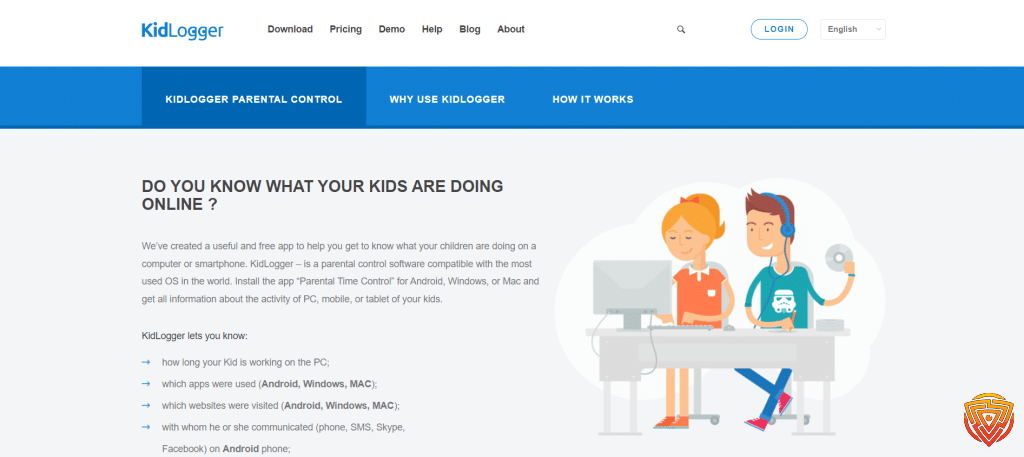
KidLogger was developed by safejKA S.R.L in 2001. SafejKA S.R.L is a Moldova-based company dedicated to security solutions and is renowned for Rohos software. Fundamentally, KidLogger was developed as an app for conducting data collection for academic purposes and scientific experiments based on a machine learning approach. Later, its sole mission became to create an innovative platform for parental control, as specified by its developers.
Features and Functionalities
Here are some of the major and compelling features of KidLogger
Tracking Time
Knowing your kid’s time expenditure on the internet can be crucial in maintaining their timetable. KidLogger keylogger allows you to do so effectively by surveilling the time your kid spends on a specific app. The only problem is you must use the standard or professional account for tracking activity periods.
Tracking Conversations
KidLogger also allows you to track who is calling or texting your children. You can see Incoming calls and sms sorted out corresponding to the numbers and recipient names. The app is not only restricted to default messaging apps, but it also gives access to Skype messages.
Keystrokes Tracking
The KidLogger keylogger can also access the keyboard in the activity type filter, allowing you to view typed keystrokes. This section gives you a count of the typed symbols in various apps. Parents who use Mac can get access to this version, but if you are using KidLogger Android, you will need a professional subscription to KidLogger software for this feature.
Location Tracking
In this KidLogger reviews i will explore its exceptional features that do not end with screenshots and on-device recordings, as it can also be used to track the step-by-step location of the targeted device. The app records GPS coordinates, and you can see all the points in the Maps section of the analytics of your account.
Voice Recording
In the analytics, you will find Voice records, and opening it will lead you to your child’s call recordings. You can listen to or download the recordings from the log. The recordings include Skype calls and phone calls.
Application Tracking
This feature is the most important to include in any parental control software as there are innumerable applications that a parent does not want to be reachable by their kid. The KidLogger app gives a comprehensive view of used applications, the duration of time, and clicks. It also allows the blocking of unwanted applications for a safer environment.
Screenshots
KidLogger is efficient in taking photos of your kid’s online doings and saves them chronologically on the activity log’s screenshot section. You can access the photos anytime and even control when to take a picture, such as after regular intervals or after the user types a specific keyword. However, the feature is only available on Windows and macOS.
Email Reports
The one useful features that provide a base for monitoring the online activities of your child is email reports. The KidLogger app provides prompt action for receiving emails about the targeted device’s activity as you schedule it.
Website Tracking
Website tracking or internal history provides statistical analysis of how many times a particular website is visited and how much time is spent on that website. KidLogger keylogger keeps the record of websites in descending order as the most visited websites top the list.
Website Blocking
If you don’t want your child to use a potentially harmful website, you can block it with the help of this starling parental control tool. KidLogger allows you to write multiple domains you want to block on the targeted device. The software instructs to write the names without spaces and use commas between two domains such as www.roblox.com,www.youtube.com. After writing the names, click save, and you are all set to log your child out of all the unwanted web addresses.
Ease of Use
The dashboard is your key to monitoring the ongoing activities of the linked devices. It is simple to use and provides information in a clean interface. Every added device is displayed separately on the board, and you can choose which kid is going to be under surveillance this time. The KidLogger dashboard panel is designed to give the utmost information about the analytics of intended monitoring.
After setting the KidLogger, you will see the device’s information. If the interested device is active, the icon of that device will pop up green and if the user is inactive, the icon will show gray. On every device’s panel, you will see relevant details and statistics about the applications, websites, and other specifications it offers to monitor.
The navigation through KidLogger is coherent and without any lags. On the top left corner of the panel, you will see the plan you are using, such as Standard or Professional with a designated time of subscription. On the top right, you can add devices for monitoring under parental control and change the names of the added devices according to your convenience.
Setup Process
For Windows users
Druing my KidLogger review testing, i found there are different steps to install the application depending on your device. If you are a Windows user, follow the below-mentioned steps to install and use the Kidlogger app.
- Open the control panel.
- Go to Updates and Security settings.
- Now open window Security and go to Virus and Threat protection settings, click on “ Manage settings”
- Add or remove exclusions
- To successfully download the KidLogger app add the Downloads and C:/program files folder to the exclusion list so that the application does not get blocked by the threat protection.
- Now open the KidLogger tool from the official page.
- In case Google is still not allowing the download, go to the Downloads and click “Keep dangerous files.”
Once the file is complete, unzip it into a new folder, command “Extract all,” and run the application by right-clicking the package and selecting ” Run as administrator.” The application will launch automatically after successful installation, and you will be able to add your email or Id on a popped-up “KidLogger Properties” tab.
For Mac users
- Make sure your Mac protection is off before starting the KidLogger download.
- To do so go to “Settings” and Open Security and Privacy.
- Click on “General”
- From the Option “Allow application download from” choose “Anywhere.”
- After downloading and unzipping the file, launch the app and click “Options.”
- KidLogger tab will appear, and now you can add your ID or email and click the connect button.
If you have installed the app, follow the simple steps to initiate KidLogging.
- Register at kidlogger.net.
- Login to your account from your device.
- Install the KidLogger app on the device or devices you intend to monitor.
- To connect your account, open KidLogger>go to “Options”>link account by entering your email and click “connect”.
- The name of the device you connected to will appear on the dashboard of your account.
- Start surveilling and recording anything from anywhere.
- KidLogger download and set-up are straightforward if you pay attention to our KidLogger.
Parental Time Control on Android
According to my KidLogger review, the following settings are pivotal if you want to use the KidLogger phone monitoring app for parents on your kid’s Android phone.
You can download the application from the official page and keep your kid under your nose.
- The app installation is handy, as once installed, it automatically launches a configuration and asks, ” Does the phone belong to a child.”
- Click “yes” and proceed to settings.
- In the next step, you can set the “School time” and “Daily time limit.” After reading this setup process you will know how to use KidLogger
Software Performance
As a whole, the software works well and is practically convenient to navigate through, but you might find it difficult to download due to viruses and threat protections. However, after you have mastered the first steps your app is good to go. The basic features of the KidLogger parental control app (like history monitoring and time tracking keylogging features) are pretty laid out on the dashboard, as I did not find it difficult to watch over a child’s daily activities and I was not troubled by extravagant configurations.
It took me around 20 minutes to transfer data and show details of the targeted devices on the dashboard. Its proficiency in surveillance makes the setup time worth it, as you can not only see the images of what your child is watching but also observe what they are typing or typing even when the conversation is deleted.
Apart from the amazing features of KidLogger Windows and Mac, the Parent time control and KidLogger Pro also provide improved surveillance service. The monitoring and time-tracking keylogging are exceptional. The parent control is not hidden and is a free version of KidLogger Android and permits the monitoring of websites, applications block, time control, and unauthorized game installation.

Compatibility
In my KidLogger review, I found, that KidLogger is compatible with Mac, Android, and iOS. It also provides source parental controls for Windows. Almost every version of the KidLogger is an exception in its way and requires different configuration steps according to the device you are using. The parent-time control and KidLogger Pro are specifically for Android phones. The KidLogger iPhone app is a bit outdated but if you are using it on other mentioned devices, the software works well.
Below are the versions that are compatible with KidLogger
- MacOs-version 10.2-12
- Windows-Windows 7-10
- Android-Version 4+
KidLogger Pricing
Plans Overview:
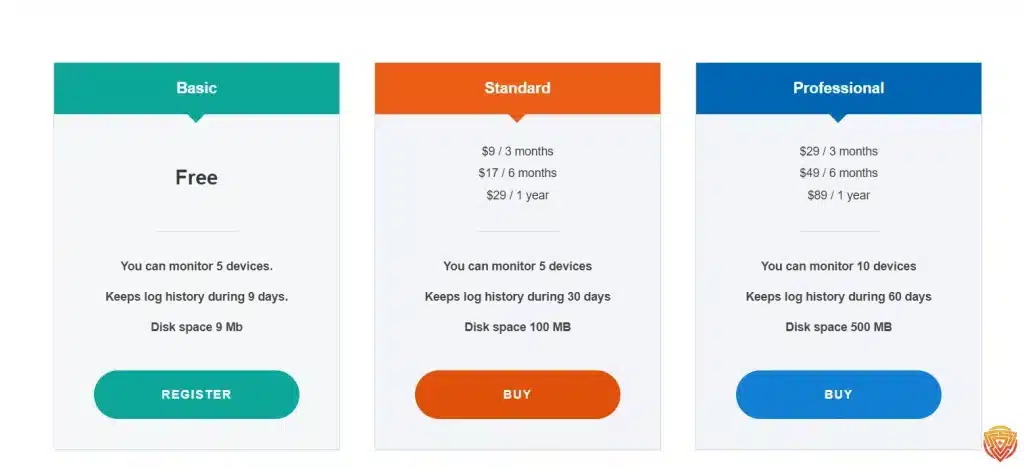
In my KidLogger review, I found that KidLogger offers three packages, Basic Standard, and professional. Let’s dig into each pack one by one.
Basic package
It’s the KidLogger free version that gives you the following features
- It allows the monitoring of 5 devices
- The available disk space is 9 MB
- You can keep the history of the logs for nine days
The free version offers pretty much everything required for in-depth parental control on a child’s device. Registering the free version is available for all platforms from MacOS to Android.
On Android, you can check calls and sms, block applications, limit time spent on the phone, and track location.
On Windows and Mac, you can use the screenshots feature and multiple-user monitoring.
Standard package
The standard package will cost you
- 9$ per month
- 17$/6 months
- $29/1 per year
You can monitor five devices and use 100 MB of disk space with 30 days of log history. It comes with additional features for every device, such as accessing chats and SMS, technical support, backup downloads, and email reports. It does not mention the permission of screenshots for Android but provides it for Windows and Mac.
Professional package
The KidLogger professional package will cost you
- $29/3 month
- $49/6 month
- $89/ 1 year
This package offers the monitoring of 10 devices, keeps the log history for 60 days, and increases the disk space to 500 MBs.
The multiple features of this package provide everything that is included in the standard package plus email schedule reports 5 per day for every device.
Additionally, it gives you invisible control over the targeted device, conversation lookover for every renowned application such as Facebook, WhatsApp, and Viber, and voice recording of the calls. Blocking websites, keystrokes, ambient sound recording, and cum-shots can also be accessed on Windows and MacOS. The paid parental controls always work better than freeware and open-source parental service tools, so they always mind paying something to get a good feature.
Initial Vs. Renewal Rates:
Renewal rates are almost the same as of initial rate, you can easily renew any of your plans at the same rate as your purchasing price. (Be sure to check if the price has not increased in recent times)
Comparison to Industry Standard:
As compared to the industry standard the price of $89/ Year is very reasonable, you can check other competing products, but they usually cost much, so it’s a better idea to get a yearly subscription to get the best deal.
Additional Costs:
There is no additional cost added to the plan, there are no strings attached. You can simply sign up and that’s all, one-time cost is all you have to pay for a year of high surveillance on your children.
Payment Options:
You can pay using any VISA, Master, or AMEX card, anywhere in the world
Contract Terms:
There are no hard and fast contract terms, you can choose the length of the contract at the start and then you can simply follow their simple terms and conditions to stay in business.
Free Trial:
KidLogger has a free version for you, you can use that free version to get to know the app better. This version can only keep your data for 9 days in a row. After that, if you decide to update to a paid plan, you can do that anytime and your previous data will be still with you.
Refund Policy and Money-Back Guarantee:
On top of a free version, KidLogger also offers a 10-day no question asked refund policy, you can simply get your whole money back within 10 days of initial payment for any plan.
Promotional Deals or Discounts:
KidLogger frequently introduces new discounts and special offers. To stay updated, visit their official website for the latest deals.
Customer Support and Resources
How Responsive and Helpful Are They?
Speaking the truth, the customer support services of the KidLogger parental control tool are underwhelming as you can only contact them via email, and you can get a reply within 48 hours. However, going to the “Help” section of the official page of KidLogger will cover pretty much everything you need to know. The website updates timely and gives information about any new system updations.
What Resources Are Available?
The video tutorials are a huge help in understanding the setup of the device usage of the apps, and the organization of the data across the dashboard for every monitored computer. If you expecting live chats and an active Facebook page, you may need to reconsider your assumptions.
They do have a fully dedicated Blog section to give you the latest information about the new features and how you can benefit from them.
They also have a knowledgebase section, where you can find answers to many of your frequently asked questions.
Privacy and Security
If you are seeking to question whether is KidLogger safe to use as a parental control tool, the answer is yes because it offers End-to-End encryption. End-to-end encryption means the data that transfers from the child’s device to the parent device remains concealed and can only be decrypted on the parent browser.
Although this one is the latest update and is available in experimental trials, new account users can have it on their devices. If you want to avail of this on your device, you will need to download a new KidLogger agent with end-to-end encryption from the website.
Even if you are using an older version of the Kidogger Windows or Mac agent, your data is safe, and you can use this software without the fear of a data breach. Nonetheless, your device will try to label KidLogger as malware, but that happens to every third-party app or software, and you don’t have to sweat over security compromises.
Limitations and Drawbacks
KidLogger phone monitoring software has some definite advantages, but everything has its flaws. From a rational perspective, the KidLogger free plan is inadequate compared to competitors as it does not allow website blocking for Windows and Mac. However, the application block is available in the Android version.
Some other improvements in application recognition must be employed for a more swift user experience. Another drawback is its disk space which comes with free and standard plans with only 9 MBs and 100 MBs, respectively. It is way less than the usual mark. Secondly, the KidLogger iPhone version is highly deprived of the necessities required for proper parental control.
KidLogger App Reviews and Testimonials
KidLogger Testimonails on Trustpilot

The app is rated 3.6 on Trustpilot which is pretty good. Users have shown satisfaction with the overall use of the app. Whether it is the interface or the features the app offers a safe child monitoring platform that is trusted by users.
KidLogger Testimonials on Reddit
On Reddit, many people discussed the use of KidLogger as a parental app and preferred it over others. Users deemed pretty pleased with the overall experience and emphasized the use of parental apps to monitor kids.
Conclusion and Personal Recommendation
The KidLogger app is nothing but an excellent tool for monitoring the online activities of your children. You can use features such as web blocking, web filtering, and app monitoring to see what is happening at any time. The app also provides screenshots of the activity all the time. You will be pleased to know that its pricing is very reasonable and its installation process is nothing complicated.
Personal Experience
KidLogger can be described as an on-par software for parent control owing to its dedicated approach toward monitoring. I was thrilled by its many exciting features when I first used it to monitor my girl’s phones. I find the specifications, such as email reports, keystroke monitoring, history monitoring, and time tracking very promising in their usability. Nonetheless, the software is rated one of the most affordable tools in the market, even if you want to monitor two or more kids’ devices.
Who is this best for? What is this best used for?
Parents who can afford the paid version of KidLogger must try this software as it covers almost every aspect of monitoring with its paid plans, even the ambient sounds and screenshots of the webcam calls.
Who is this not best for? What is this not best used for?
Parents who are short of the budget and are opting for the free version must reconsider because the free plan comes with numerous limitations when used with Windows or Mac.
KidLogger Alternatives
Here are a few best alternatives to KidLogger:
| Software | Pricing (Devices) | Free Plan / Trial | Key Features | Best For | Key Limitation | Supported Platforms | Review |
|---|---|---|---|---|---|---|---|
 🏆 Qustodio (Editor’s Choice)Read Qustodio Review 🏆 Qustodio (Editor’s Choice)Read Qustodio Review | Basic: US$59.95/year, 5 devices; Complete: US$104.95/year, family devices subject to terms. Check Qustodio Pricing | Check current free/trial eligibility during signup. | 🕒 Screen-time limits and schedules 🌐 Web and app filtering 📍 Location monitoring 📊 Activity reports | Editorial all-round pick for everyday controls and reporting; not a measured test winner. | Calls and messages on iOS require a Windows or Mac computer; other features vary by platform. | 🪟 Windows, 🍎 macOS, 📱 iOS, 🤖 Android, Chromebook, Kindle Fire | Read Qustodio Review |
 BarkRead Bark Review BarkRead Bark Review | Bark App: from US$14/month; unlimited devices and accounts. Phone and Watch are separate products. Check Bark Pricing | 7-day app trial; check signup terms. | 🚨 Concerning-content alerts 💬 Text, email and social-app monitoring 🕒 Screen-time schedules 🌐 Website and app blocking | Best for behaviour-based safety alerts without routinely exposing every conversation | Check country availability and exact account/device coverage; Bark App, Phone and Watch have different capabilities. | iOS and Android app; other devices and connected services depend on the monitoring feature. | Read Bark Review |
 MobicipRead Mobicip Review MobicipRead Mobicip Review | Lite: US$2.99/month for 5 devices; Standard: US$4.99 for 10; Premium: US$7.99 for 20. All billed annually. Check Mobicip Pricing | 7-day Premium trial; check cancellation/refund terms. | 🌐 Website and app blocking 🕒 Screen-time schedules 📍 Family location 📊 Activity and social-media reports | Best for mixed-device families wanting flexible device allowances | Check plan and platform support for each required feature; a supported device does not have every control. | 🪟 Windows, 🍎 macOS, 📱 iOS, 🤖 Android, Chromebook, Kindle Fire | Read Mobicip Review |
 Norton FamilyRead Norton Family Review Norton FamilyRead Norton Family Review | US$49.99 for the first year; check renewal price. Included with selected Norton 360 subscriptions. Check Norton Family Pricing | Check current trial availability in your country. | 🌐 Web, search and video supervision 🕒 Time limits and schedules 📍 Location history and alerts 📊 Email activity reports | Best for large families and households already using Norton | A Mac can manage Norton Family but cannot be monitored as a child device; features differ across platforms | 🪟 Windows, 📱 iOS, 🤖 Android | Read Norton Family Review |
 CanopyRead Canopy Review CanopyRead Canopy Review | Essential: US$8.33/month for 1 device; Plus: US$9.99 for 3; Premium: US$12.50 for up to 10. All billed annually. Check Canopy Pricing | 7-day trial; 30-day guarantee subject to terms. | 🌐 Real-time content filtering 🖼️ Sensitive-image detection 🚫 App and website blocking 🕒 Screen-time management | Best for filtering explicit images and web content | Check coverage for the particular app/browser and device; filtering is not a guarantee that every risk is detected. | 🪟 Windows, 🍎 macOS, 📱 iOS, 🤖 Android, Chromebook | Read Canopy Review |
 Wondershare FamiSafeRead FamiSafe Review Wondershare FamiSafeRead FamiSafe Review | US$59.99/year for up to 10 devices, or US$9.99/month for up to 5 devices. Check FamiSafe Pricing | 3-day annual-plan trial; 7-day money-back guarantee subject to terms. Free tier has restricted/demo features. | 📍 Location and geofencing 🚗 Driving reports 🚫 App and website controls 🕒 Screen-time schedules | Best for families with teenagers and driving-safety needs | Advanced visibility features are platform-specific and should be used transparently with older children | 🪟 Windows, 🍎 macOS, 📱 iOS, 🤖 Android, Chromebook, Kindle Fire | Read FamiSafe Review |
 OurPactRead OurPact Review OurPactRead OurPact Review | Premium: US$69.99/year; Premium+: US$99.99/year. Both cover up to 20 child devices. Check OurPact Pricing | Trial offered; confirm duration and cancellation terms during signup. | 📱 Detailed app rules 🕒 Screen-time schedules and allowances 📍 Live location and location alerts 📸 Screen snapshots with Premium+ | Best for app blocking and detailed schedules across iPhone and Android | Limited to mobile devices; Premium+ is required for screenshots and content monitoring, and initial pairing may require a computer | 📱 iOS, 🤖 Android | Read OurPact Review |
Final words
KidLogger phone monitoring app for parents is a distinctive software with three plans, it offers features according to your requirements. Using an appropriate plan is important if you want to get the most out of the software. I would recommend you try the free version first to understand the software and select your permanent plan accordingly.
FAQs
What is KidLogger?
KidLogger is a parental control software that tracks and logs activities on your child’s device. It monitors keyboard strokes, opened apps, web history, and more. Ideal for parents who want to keep an eye on their kid’s digital footprint. 🕵️♀️📱
Is KidLogger available for free?
Yes, Kidlogger is available for free, but it has some limitations. It is better to use the free version for Android rather than Windows or Mac.
Is KidLogger safe to use?
Yes, it is safe to use KidLogger as its privacy and security are always up-to-date with the latest inclusion of end-to-end encryption.
Why am I unable not download KidLogger on my Windows?
Maybe because your computer’s threat and virus protection is on. It is recommended to Disable virus protection before downloading KidLogger on any device.
How can I get customer support?
You can email directly to customer support or submit a ticket on the official website.
Does end-to-end encryption work?
Yes, it works, but you must download the latest KidLogger encryption agent. If you are using an older version your data is not encrypted but is still safe because it comes with a source code and there is no clandestine malware.
That’s All For Now;
We appreciate you taking the time to read our thorough KidLogger Review. We value your concern about maintaining the security of your digital life, and we hope the information we’ve provided has been helpful. To stay ahead of the digital curve, we invite you to return for more cybersecurity software news and reviews. Please read the articles linked below for further information and viewpoints. Think carefully about your online security!
Related Articles



Share this article

Stuart Kerr Spindlow is Impulsec’s Publisher, Chief Editor and Lead Reviewer. He writes and maintains coverage of consumer cybersecurity and digital-safety software, with a focus on practical suitability, limitations and the evidence behind product claims. Read Stuart’s full profile.