


🚀 In a hurry? Read this short McAfee Safe Family Review snapshot USD 39.99

Name: McAfee Safe Family
Description: Part of McAfee’s security ecosystem, Safe Family adds web filtering, screen-time schedules, app blocking, and live GPS—managed from one clean parent app. One plan covers all your kids’ phones and PCs, making it a low-friction way to add parental controls alongside antivirus.
Best for: Cross-platform parental controls bundled with trusted McAfee security
Offer price: 39.99
Currency: USD
Operating System: “Windows”, “macOS”, “Android”, “iOS”
Application Category: “Parental Control”
🕵️ Why I Recommend McAfee Safe Family
- 👨👩👧👦 Unlimited devices on one affordable plan—perfect for big households.
- 🧰 All essentials covered: category web filter, app blocking, time limits, GPS check-ins.
- 🛡️ Plays nice with McAfee AV—manage security and parental controls together.
🔥 Quick Facts
- 🌐 Filter & reports across major browsers (extensions on desktop)
- ⏰ Bedtime, homework, and custom schedules + Instant Pause
- 📍 Family location with arrival/departure alerts (mobile)
- 🆓 30-day free trial • money-back guarantee via McAfee
- 💬 Support via chat & knowledge base
Overall
-
Features & Functionality
-
Ease of Use
-
Performance & Reliability
-
Compatibility
-
Privacy & Security
-
Customization Options
-
Customer Support
-
Value for Money
Pros
- 💸 Strong value: unlimited installs under one price
- 🧭 Simple, parent-friendly dashboard
- 🖥️ Works across Windows/macOS + Android/iOS
- 🔒 Integrates smoothly with McAfee antivirus suites
Cons
- 💬 No deep social-media DM/SMS monitoring (consider Bark/Eyezy if you need this)
- 🍎 iOS feature depth lighter than Android (Apple restrictions)
- 🖥️ Desktop filtering relies on browser extensions—extra setup step
- 🆘 Support is chat/KB-first; limited live phone options
If you’re concerned about your kids’ safety online, reliable parental control software can give you peace of mind. In today’s tech-savvy world, online safety often goes unnoticed but is essential, especially with the increase in online risks. Using parental control software is the best method to protect your children from online threats. Parents benefit the most from using this software to keep their kids safe on the internet. Be sure to discover how parental control software can assist you in keeping your family secure online. Start today to safeguard your loved ones on the web.
McAfee offers highly effective real-time malware detection and comprehensive web protection at an affordable price. Additionally, this service offers a wide range of valuable features and distinguishes itself as a limited provider that permits users to protect unlimited devices. McAfee Family Safe provides various conventional parental control tools, including web filtering, time management, geofencing, and app-blocking functionalities.
This McAfee Family Safe review helps offer guidance and valuable insights for parents searching for an excellent parental control app for their children. Stay with me!
An Overview of the McAfee Family Safe Software

The cybersecurity company, McAfee, introduced McAfee Parental Control in 2016 as the first release version. The McAfee Parental Control application is a comprehensive parental control software. This technology allows parents to monitor their children’s online activities efficiently and safely.
McAfee Family protection provides a range of features, including efficient web filtering, device tracking, screen time management, and app blocking. It is compatible with Windows operating systems and mobile devices.
Moreover, McAfee offers a highly advanced array of security functionalities by consistently safeguarding one’s computer against ransomware, crypto-jacking, and malware and providing additional functionalities to enhance web browsing speed and ensure the security of data, documents, and passwords.
Features and Functionalities
McAfee Family Safe provides an extensive range of security features that afford users comprehensive protection. McAfee parental control app facilitates the monitoring of children’s phone activities and safeguards them against exposure to inappropriate online content. Next in my McAfee Safe Family Review, i will detail the available features and functionalities of the McAfee Family Plan :
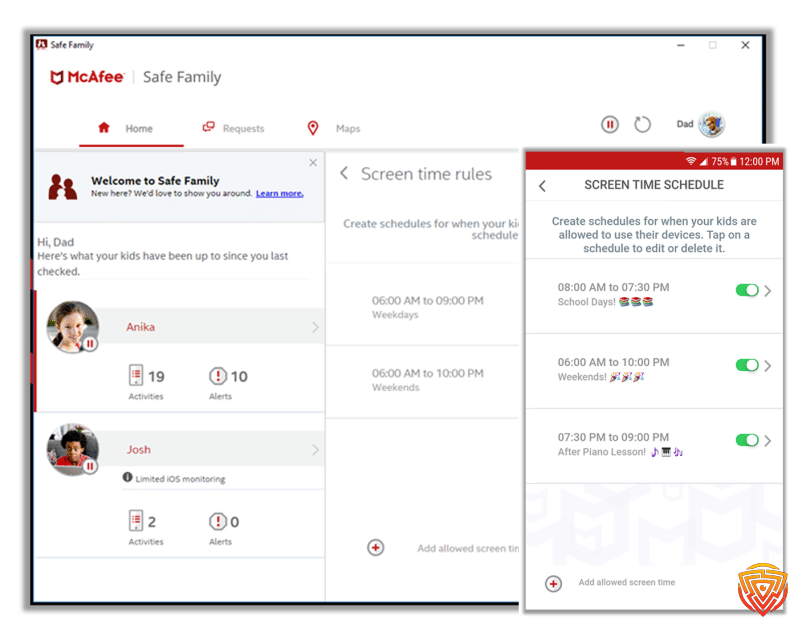
Screen Time Limits
The Mcafee Family Safe application enables users to set restrictions on how much time their children spend using digital devices. Parents can set up rules regarding how much time their child spends using screens, such as prohibiting screen usage during school hours or before bedtime. One potential strategy for motivating children involves implementing flexible rules in which additional screen time is provided upon completing designated tasks successfully.
Website Filtering
The Safe Family application allows users to restrict access to designated websites on their child’s device. This feature can restrict access to inappropriate content, including websites related to adult content and gambling. Children can potentially experience an extensive range of unsuitable contacts on the internet, and parents must mitigate these risks, making this functionality advantageous.
App Blocking
McAfee Parental Control App allows users to restrict access to specific applications on their children’s devices. The system provides app-blocking tools for a range of platforms.
- Parents can restrict or allow access to particular applications on Android devices, as well as establish time restrictions for each application.
- In the case of the Windows operating system, the procedure is similar, and Safe Family presently can identify applications originating from the Microsoft Store.
- The limitations of app blocking on iOS come from Apple’s policies, resulting in a heavy reliance on age rating limitations as the primary means of control.
When a child tries to initiate a restricted application, Safe Family displays a warning notification and allows soliciting authorization from the parental figure. To achieve enhanced control over iOS devices, users can use Apple’s integrated Screen Time tools.
Location Tracking
Parents can track the location of their children by utilizing Safe Family, enabling them to have real-time updates on their children’s locations. Additionally, it is possible to configure the application to generate notifications upon the arrival or departure of children at significant locations, such as their educational institution or residence.
The Safe Family application lets users track their children’s location through an interactive map interface. This feature offers practical benefits and enhances the user experience with its appealing design.

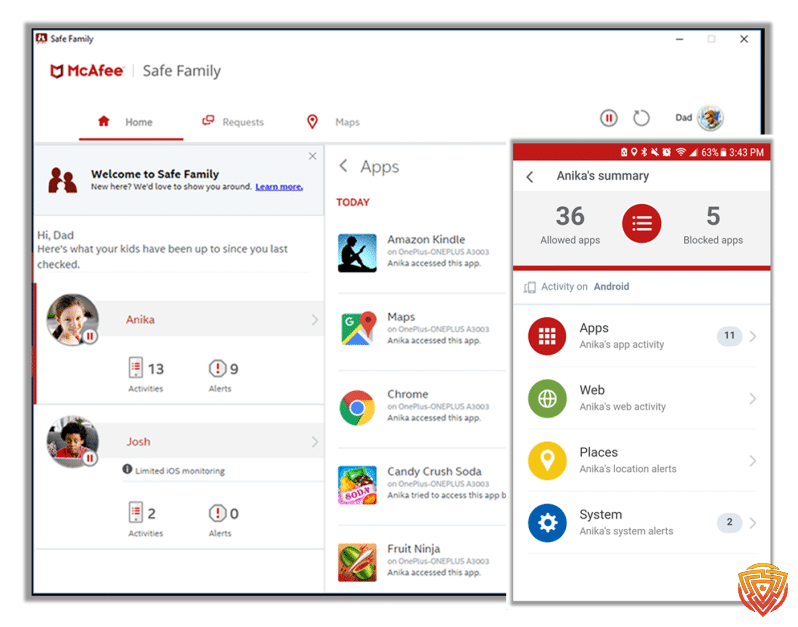
Web/App Usage Activity
It provides parents with the ability to monitor the internet browsing activities and application usage of their children. The application provides users with comprehensive reports regarding the duration of time their children spend on individual applications. Similarly, examining their web browsing history is possible to ensure that they engage in safe internet browsing practices.
Block In-App Purchase
It allows users to restrict in-app purchases exclusively on iOS devices. Numerous applications employ questionable strategies to entice children into making purchases of in-app items, making them susceptible to these tactics. This functionality enables users to mitigate such occurrences.
Rule-Break Notifications
The Safe Family application can provide users with notifications whenever their child attempts to violate a pre-established rule, such as attempting to access a website that has been blocked.
Digital Time-Out
One can implement a “digital time-out” by temporarily suspending all activities on a kid’s device during designated periods. This feature proves advantageous when individuals prioritize familial participation by minimizing potential distractions.
Ease of Use
The desktop applications developed by McAfee for the Windows and macOS operating systems exhibit a high degree of coherence in their designs. These apps and McAfee’s functions are straightforward to navigate and use. The application includes an easy-to-use sidebar that can be accessed at any time, providing users with one-click access to all the features of the security app.
The McAfee Android and iOS applications exhibit high intuitiveness, including an extensive range of features necessary to ensure mobile device security. All the features are easy to find and use because of their intuitive user interfaces. In addition, the real-time scanning feature also operates continuously in the background to safeguard users against potential threats.
The user interface is generally easy to navigate. The design of the screens prioritizes user-friendliness, catering to the needs of both experienced and novice users. The design of each section’s layout is straightforward and unambiguous, facilitating comprehension for parents lacking computer literacy. The process of creating and editing user account profiles is relatively straightforward. Parents can either utilize the default settings or customize the settings for individual user accounts they create.
Installation Setup McAfee Safe Family
You can install and set up McAfee Parental Control by following the given steps:
Windows
Navigate to the official website of McAfee Family Safe. Select one of the following options:
- Select “Try now” to initiate a free 30-day trial.
- To initiate the process, navigate to the Menu option and proceed to select the “Try now” feature, which grants access to a free 30-day trial period.
- The Safe Family setup file is automatically downloaded.
- Click or double-click on the downloaded file to initiate the installation process.
- If a User Account Control prompt is visible, click the “Yes” option.
- To proceed with the installation process, ensure that you have selected the checkbox indicating your acceptance of the License Agreement. Once done, proceed by clicking the “Install” button.
- Wait for the installation, during which the desktop and tool tray icons appear.
Android
There are two methods for installing Safe Family on an Android device:
Install from the Safe Family homepage
Navigate to the official website of McAfee Family Safe. Select one of the following options:
- Click the “Try now” option to initiate a free 30-day trial.
- To initiate the process, tap on the Menu option and proceed by selecting the “Try now” feature, which offers a free 30-day trial period.
- Click on the “Get it on Google Play” button.
- If prompted, choose Always Open with Play Store in the pop-up window and proceed by following the instructions provided.
- To proceed, tap on the “Install” button and, if prompted, authenticate your identity by signing into the Google Play store.
- Click on the “Open” option.
- To grant Safe Family permission to access your device’s location information, tap the “Allow” option.
Install from Google Play
- To start, access the Google Play Store and initiate a search for the application titled “Safe Family.”
- Click on the McAfee Parental Control App and proceed to install it.
- If necessary, proceed to log in to the Google Play store.
- Click on the “Accept” button. Once the installation process has been finished, tap the “Open” option.
- To grant Safe Family access to your device’s location information, tap the “Allow” option.
iOS
There are two distinct methods for installing Safe Family on an iOS device:
Install from the Safe Family homepage
- Click the “Try now” option to initiate a free 30-day trial.
- To initiate the process, please tap on the Menu option and proceed to select the option labeled “Try now,” which grants access to a free 30-day trial period.
- Click on the “Download” button located on the App Store platform.
- Click on the “Get” button. Once the installation has been successfully finished, launch the Safe Family application.
- Select the “Allow” option to grant Safe Family permission to access the location information on your device.
Install from the App Store
- To access the Safe Family application on your iOS device, navigate to the App Store and initiate a search for the application.
- Click on the McAfee Family safe application and select the “Get” option.
- Click on the “Install” button.
- Upon the completion of the installation process, proceed to open the Safe Family application.
- To grant Safe Family permission to access your device’s location information, please tap the “Allow” button.
- The Safe Family application has been successfully installed and is now prepared for configuration on this particular device.
Software Performance
The developers of McAfee Family safe have implemented comprehensive measures to address any potential efforts made by the child to uninstall/disable the software. Adults frequently try to figure out their administrator password by contacting technical support.
The difficulty of this process arises from the need to correctly answer a secret question that the technical support staff poses to grant access to the password. The uninstallation process follows a comparable protocol for all attempts to remove the program. To initiate the uninstallation, users must acquire an uninstall code from the support personnel. However, the provision of this code is dependent upon successfully answering a series of undisclosed questions.
One prevalent limitation of parental protection software is its susceptibility to exploitation by teenagers through the use of proxy sites as a means to circumvent the implemented website content filters. To address this issue, McAfee employs encrypted website blocking to effectively filter proxy sites, thereby preventing children’s circumvention of the software. However, kids can still bypass the filters if they learn how to utilize network commands, as McAfee Safe Family has this weakness.
Compatibility
McAfee Safe Family exhibits compatibility with a wide range of computing devices, including Windows laptops, desktops, tablets, and mobile devices. The following is a look at its compatibility:
Operating System
- ARM64 processors: Microsoft Windows 11 and newer
- X64 processors: Microsoft Windows 11 and Windows 10 (RS5) and newer
- Build 4.9.1: macOS 10.12 – 10.14
- Build 4.11.1 or higher: macOS 10.15 and above
- Apple iOS 13 or later
- Google Android smartphones and tablets 8 or higher
- ChromeOS 102.0.5005 and higher
Hardware
- 1.3 GB free drive space
- 1 GHz Processor
- 2 GB RAM
Supported Browsers
- Google Chrome
- Safari (macOS and iOS only)
- Firefox
- Microsoft Edge (Chromium-based)
McAfee Safe Family Pricing

Plans Overview:
McAfee Safe Family pricing structure is simple. The monthly fee is $7.99, providing coverage for unlimited devices. By selecting the annual plan, customers must pay $49.99, which represents a significant price reduction.
Initial Vs. Renewal Rates:
There is no major difference in the initial and renewal rates of McAfee Safe Family. The pricing remains consistent for both new customers and those who wish to renew their subscriptions. This allows users to continue enjoying the same level of protection without any additional financial burden.
Comparison to Industry Standard:
McAfee demonstrates a slightly higher cost than other similar parental control applications. If you want to get to get McAfee LiveSafe, McAfee total protection parental controls see the table below. Here is complete information about pricing and features offered by McAfee:
| Feature | McAfee LiveSafe | McAfee Safe Family | Total Protection | Total Protection Family |
| Pricing | From $39.99 per year | From $49.99 per year | From $39.99 per year | From $74.99 per year |
| Number of Devices | Unlimited | Unlimited | 1 device | 5 devices |
| VPN | ✓ | ✓ | ✓ | ✓ |
| Payment Protection | ✓ | ✓ | ✓ | ✓ |
| Screen-Time Management | ✓ | ✓ | x | ✓ |
| Adult Content Blocker | ✓ | ✓ | x | ✓ |
| File Protection | ✓ | ✓ | ✓ | ✓ |
| GPS Child Locator | ✓ | ✓ | x | ✓ |
| Password Manager | ✓ | ✓ | ✓ | ✓ |
| Performance Optimization | ✓ | ✓ | ✓ | ✓ |
Additional Costs:
There are no necessary additional costs, however, if you choose to upgrade to a higher tier of protection or add on any extra features, there may be an additional fee. These optional upgrades are designed to enhance your online security and provide even more comprehensive protection for your family.
Payment Options:
You can use almost any major credit or debit card to purchase a McAfee package. In addition, McAfee also accepts PayPal as a convenient payment method. This flexibility in payment options ensures that customers can easily and securely make their purchases, regardless of their preferred payment method.
Contract Terms:
There are no hard and fast contract terms, you can easily cancel your McAfee subscription at any time. McAfee understands that customers’ needs may change over time, and they strive to provide flexibility and convenience in their services. Whether you need to upgrade, downgrade, or cancel your subscription, McAfee makes it hassle-free and ensures that you are in control of your digital security.
Free Trial:
For individuals who are unfamiliar with this particular software, the utilization of the 30-day trial version is helpful.
Refund Policy and Money-Back Guarantee:
If you contact Customer Service within 30 days of your first purchase or 60 days of auto-renewal, you will receive a full refund.
Promotional Deals or Discounts:
McAfee regularly shares new promotional deals and discounts. Check their official website for the most up-to-date offers.
Customer Support & Resources

How Responsive and Helpful Are They?
In terms of responsiveness, they are quite good, they were able to address my request in under 24 hours, there are things that could be better, like the customer dealing and staff.
What Resources Are Available?
Support can be accessed via several online support tools and email. The live chat and phone call services are accessible round the clock. If users require technical assistance or have inquiries about the software, they can avail of free phone support for 30 days within their subscription period.
Users who need additional assistance are provided with the opportunity to acquire McAfee’s Express setup service. This service involves an expert who assists the customer in configuring the software by remotely accessing and controlling their personal computer.
Privacy and Security
The primary focus of McAfee Safe Family is to prioritize safeguarding user data through robust privacy and security measures. The service utilizes data encryption to protect information transmitted between devices and servers, mitigating unauthorized access risks. McAfee Safe Family prioritizes user privacy while offering several parental control features. It equips parents with the essential tools to monitor and manage their kid’s online activities without infringing on their privacy.
McAfee adheres to stringent privacy rules and regulations for a limited amount of personal information exclusively to provide parental control features. Ensuring children’s privacy is of utmost importance, as Safe Family strictly avoids disclosing any personally identifiable data about children to external entities for marketing purposes.
The security of account management is ensured through implementing resilient security measures by McAfee. These measures include the administration of strong password requirements, the utilization of account verification mechanisms, and the implementation of safeguards to prevent unauthorized access. Users can improve their online safety while using McAfee Safe Family by adhering to recommended security practices and consistently updating their software and devices.
Limitations and Drawbacks
Here are some limitations and drawbacks of McAfee Safe Family:
- The software does not provide compatibility with iPhone and iPad devices.
- The app is not compatible with macOS.
- The user interface exhibits a high degree of complexity.
- Web interfaces are not present.
- The Windows application exhibits performance issues characterized by delays and unresponsiveness.
- The application boost feature does not yield any noticeable effects or improvements.
User McAfee Safe Family Reviews and Testimonials
McAfee Safe Family on Trustpilot

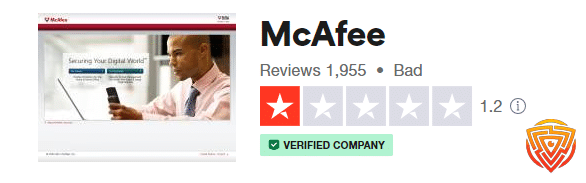
It should be noted that its Trustpilot page is for all McAfee Software together rather than just the McAfee Safe Family Reviews;
- Overall Rating: It’s a middle-of-the-road scenario with a 3-star average. Not terrible, not great.
- Reliability: Trustpilot users generally agree that the app does what it says but might falter occasionally.
- Privacy Concerns: Not much chatter on this. Seems like McAfee’s reputation keeps folks from worrying too much about data security.
- Updates: Some praise for keeping the app current, but also some flak for updates that appear to break more than they fix.
McAfee Safe Family on Reddit
- Ease of Use: Mixed feelings here. While some Reddit users find the app straightforward, others gripe about a clunky interface.
- Performance: The app gets some love for its robust features like screen time limits and location tracking. But, glitches and laggy performance also pop up.
- Customer Support: In general, support seems to be a sore point. Expect some waiting if you run into issues.
- Value for Money: The consensus? It’s a bit on the pricey side. Especially when features go AWOL or bugs sneak in.
Conclusion and Personal Recommendation
McAfee Safe Family includes a comprehensive range of features that align with the typical expectations associated with parental protection software. The software possesses a user-friendly interface, enabling parents to personalize configurations and effectively safeguard their children against accessing undesirable websites. The parental control software includes three licenses and is highly versatile and suitable for parents with more than one child.
One benefit of opting for the monthly or annual package is gaining unrestricted access to unlimited child accounts. The platform’s reporting system is highly commendable, exhibiting robust functionality. Additionally, the notification feature demonstrates a high level of sophistication. However, due to its relatively high cost, it is imperative to evaluate the available features comprehensively.
Personal Experience
McAfee Safe Family is a very comprehensive app and I use it to monitor my teenage daughters. I can put screen time and block or permit access to the internet when I feel right. I was so frustrated when my daughters would pay for games, so McAfee Safe Family helped me block all the in-app purchases.
Whenever my kids do anything out of the routine, I instantly get notifications. Moreover, I always restrict apps like Netflix and Spotify when it’s school and homework time. The tool is easy to use even for me because I do not have any technical background.
What is McAfee Safe Family best used for?
McAfee Safe Family is best used for website and app blocking capabilities and the location tracker. These features give parents the capability to establish a digital atmosphere that is safer and more regulated for their children, thereby ensuring protection from unsuitable content and granting parents enhanced visibility and peace concerning their child’s whereabouts.
What is McAfee Safe Family not best used for?
McAfee Safe Family is not best for highly customizable or sophisticated parental control requirements. Although it provides a full range of features, it may need to improve in certain sophisticated functions and customization choices available in alternative specialized parental control software.
McAfee Safe Family Alternatives
Here is a comparison of McAfee Safe Family with other parental controls:
| Software | Pricing (Devices) | Free Plan / Trial | Key Features | Best For | Key Limitation | Supported Platforms | Review |
|---|---|---|---|---|---|---|---|
 🏆 Qustodio (Editor’s Choice)Read Qustodio Review 🏆 Qustodio (Editor’s Choice)Read Qustodio Review | Basic: US$59.95/year, 5 devices; Complete: US$104.95/year, family devices subject to terms. Check Qustodio Pricing | Check current free/trial eligibility during signup. | 🕒 Screen-time limits and schedules 🌐 Web and app filtering 📍 Location monitoring 📊 Activity reports | Editorial all-round pick for everyday controls and reporting; not a measured test winner. | Calls and messages on iOS require a Windows or Mac computer; other features vary by platform. | 🪟 Windows, 🍎 macOS, 📱 iOS, 🤖 Android, Chromebook, Kindle Fire | Read Qustodio Review |
 BarkRead Bark Review BarkRead Bark Review | Bark App: from US$14/month; unlimited devices and accounts. Phone and Watch are separate products. Check Bark Pricing | 7-day app trial; check signup terms. | 🚨 Concerning-content alerts 💬 Text, email and social-app monitoring 🕒 Screen-time schedules 🌐 Website and app blocking | Best for behaviour-based safety alerts without routinely exposing every conversation | Check country availability and exact account/device coverage; Bark App, Phone and Watch have different capabilities. | iOS and Android app; other devices and connected services depend on the monitoring feature. | Read Bark Review |
 MobicipRead Mobicip Review MobicipRead Mobicip Review | Lite: US$2.99/month for 5 devices; Standard: US$4.99 for 10; Premium: US$7.99 for 20. All billed annually. Check Mobicip Pricing | 7-day Premium trial; check cancellation/refund terms. | 🌐 Website and app blocking 🕒 Screen-time schedules 📍 Family location 📊 Activity and social-media reports | Best for mixed-device families wanting flexible device allowances | Check plan and platform support for each required feature; a supported device does not have every control. | 🪟 Windows, 🍎 macOS, 📱 iOS, 🤖 Android, Chromebook, Kindle Fire | Read Mobicip Review |
 Norton FamilyRead Norton Family Review Norton FamilyRead Norton Family Review | US$49.99 for the first year; check renewal price. Included with selected Norton 360 subscriptions. Check Norton Family Pricing | Check current trial availability in your country. | 🌐 Web, search and video supervision 🕒 Time limits and schedules 📍 Location history and alerts 📊 Email activity reports | Best for large families and households already using Norton | A Mac can manage Norton Family but cannot be monitored as a child device; features differ across platforms | 🪟 Windows, 📱 iOS, 🤖 Android | Read Norton Family Review |
 CanopyRead Canopy Review CanopyRead Canopy Review | Essential: US$8.33/month for 1 device; Plus: US$9.99 for 3; Premium: US$12.50 for up to 10. All billed annually. Check Canopy Pricing | 7-day trial; 30-day guarantee subject to terms. | 🌐 Real-time content filtering 🖼️ Sensitive-image detection 🚫 App and website blocking 🕒 Screen-time management | Best for filtering explicit images and web content | Check coverage for the particular app/browser and device; filtering is not a guarantee that every risk is detected. | 🪟 Windows, 🍎 macOS, 📱 iOS, 🤖 Android, Chromebook | Read Canopy Review |
 Wondershare FamiSafeRead FamiSafe Review Wondershare FamiSafeRead FamiSafe Review | US$59.99/year for up to 10 devices, or US$9.99/month for up to 5 devices. Check FamiSafe Pricing | 3-day annual-plan trial; 7-day money-back guarantee subject to terms. Free tier has restricted/demo features. | 📍 Location and geofencing 🚗 Driving reports 🚫 App and website controls 🕒 Screen-time schedules | Best for families with teenagers and driving-safety needs | Advanced visibility features are platform-specific and should be used transparently with older children | 🪟 Windows, 🍎 macOS, 📱 iOS, 🤖 Android, Chromebook, Kindle Fire | Read FamiSafe Review |
 OurPactRead OurPact Review OurPactRead OurPact Review | Premium: US$69.99/year; Premium+: US$99.99/year. Both cover up to 20 child devices. Check OurPact Pricing | Trial offered; confirm duration and cancellation terms during signup. | 📱 Detailed app rules 🕒 Screen-time schedules and allowances 📍 Live location and location alerts 📸 Screen snapshots with Premium+ | Best for app blocking and detailed schedules across iPhone and Android | Limited to mobile devices; Premium+ is required for screenshots and content monitoring, and initial pairing may require a computer | 📱 iOS, 🤖 Android | Read OurPact Review |
Final Word
McAfee Safe Family app is a very versatile platform for monitoring online activities. It is one of those tools that come with deep technological advancement when it comes to online monitoring. From Digital time to restricting device usage to malware detection, the McAfee parental control app offers all the essentials required for online surveillance. The software is relatively very easy to use but if you have some concerns you can try a 30-day free trial before opting for a permanent paid version.
FAQs
What is McAfee Family Protection?
McAfee Family Protection enables users to control kids’ access to specific apps and websites, safeguarding them against possible risks. The McAfee Family Plan covers six individuals, providing a comprehensive range of identity, privacy, and device safety features to safeguard their online activities.
Does McAfee have parental controls?
McAfee’s Safe Family is a comprehensive parental controls solution that enables users to effectively monitor and restrict access to applications and websites, regulate screen time, track the location of their children’s devices, and provide additional features. This software aims to provide security and reassurance in an increasingly mobile-oriented society.
Is McAfee VPN free?
Users will be provided unrestricted usage of our VPN wireless service on compatible devices. Those not enrolled in the automatic renewal program are granted a monthly bandwidth allocation of 500 MB.
Is McAfee Safe Family free?
Navigate to the official website of McAfee Safe Family. Choose one of the following options: Select the option to initiate a trial period of 30 days at no cost by tapping “Try now.” Access the menu and choose “Try now” to initiate a free 30-day trial.
Share this article

Stuart Kerr Spindlow is Impulsec’s Publisher, Chief Editor and Lead Reviewer. He writes and maintains coverage of consumer cybersecurity and digital-safety software, with a focus on practical suitability, limitations and the evidence behind product claims. Read Stuart’s full profile.