


Today’s parents face a challenging task of ensuring their children’s online safety. As kids spend hours on smartphones and social media, parents might feel disconnected from what’s truly going on. Discover how to navigate this digital landscape effectively. By understanding the online world better, you can protect your children and stay informed.
And honestly? Picking the right monitoring tool isn’t simple. There are just so many options out there, it can feel overwhelming fast.
Moniterro is a comprehensive parental control app that lets parents monitor their children’s phone activities including text messages, GPS location, social media use, and app usage from a remote dashboard. It works on both Android and iOS, running quietly in the background once it’s set up.
I’ve dug into Moniterro’s features, pricing, and what it’s actually like to use. If you’re wondering if this is the right monitoring solution for your family, I’ll lay out the facts—from installation to privacy concerns—so you can make up your own mind.
📌 TL;DR For most users, Moniterro delivers powerful, all-in-one phone tracking with real-time GPS, message logs, and social media monitoring. It’s discreet, accurate, and backed by a solid 14-day refund policy — making it one of the best-value stealth monitoring apps in 2026.
Key Takeaways
- Moniterro covers GPS tracking, message monitoring, and social media oversight for parents
- The app installs discreetly and gives real-time data through a web dashboard
- Pricing starts at roughly $46.62, with 24/7 customer support and support for both Android and iOS
What Is Moniterro?
Moniterro is a comprehensive phone monitoring app that tracks text messages, calls, GPS locations, and social media activity from a remote device. It works on both Android and iOS, and is aimed at parents, employers, and anyone who needs to monitor smartphone usage without drawing attention.
Core Purpose and Market Position
Moniterro sets itself up as an all-in-one cell phone tracker focused on remote monitoring. The main idea? Give users thorough surveillance tools while still keeping privacy and security in mind.
Primary Features Include:
- GPS location tracking with exact coordinates and timestamps
- Message monitoring across platforms (iMessage, Google Messages, WhatsApp)
- Social media surveillance (Facebook, Snapchat, Instagram DMs)
- Screen recording and keylogger functions
- Call logs with contact details and timestamps
- Browser history tracking, including incognito mode
The app runs in hidden mode, so it just quietly does its job in the background. Moniterro uses cloud technology to store and send data, so you can check up on things from any browser.
It’s built for real-time monitoring. Data pops up in your dashboard just minutes after it happens on the device.
Supported Devices and Platforms
Moniterro works on all Android phones and tablets running OS version 4 or higher. It also covers all iPhones and iPads with compatible iOS versions.
How to install Moniterro?
Installation Methods:
- Android devices: Direct APK file download and install
- iOS devices: Multiple ways, including iCloud Sync
The monitoring dashboard is browser-based, so there’s no need for a separate app on your device. If you’ve got internet, you’re set.
The app updates itself to stay compatible with new device models and operating systems. That’s a relief—no one likes surprise bugs after an update.
Intended User Base
The monitoring app Moniterro mainly targets parents who want to keep an eye on their kids’ phone activities. It’s designed to help track online habits, social media interactions, and even physical location.
Target Groups:
- Parents: Keeping tabs on kids under 18
- Employers: Checking employee productivity and stopping data leaks
- Individuals: Watching over personal devices for security
The app’s website has testimonials from parents using GPS to find family members or keep tabs on social media chats.
Some business owners use the spy app to make sure employees stay on task. Geofencing and keylogger features can help spot suspicious activity or keep track of where people are during work hours.
Just a heads up: legal use means you need either parental authority over a minor or clear consent from the person being monitored.
Key Features of Moniterro

Moniterro offers a bunch of phone monitoring features—call tracking, social media oversight, media analysis, and keystroke recording. You can monitor device activity across lots of channels and apps.
Call and SMS Tracking
Moniterro’s call and text monitoring gives detailed reports on every call and message. Through the dashboard, you get full call logs with contact info and call duration.
It records both incoming and outgoing calls, complete with timestamps. SMS tracking grabs message content and sender/recipient details.
Key Call Tracking Features:
- Full call history with contact names
- Call duration and time stamps
- Incoming and outgoing call logs
- Recovery of deleted call records
Text message monitoring works for both SMS and MMS. Even deleted messages can show up in your dashboard.
All this data is easy to access through the web control panel. The interface is pretty straightforward, with search and filter tools.
Social Media and Messaging Monitoring
The social media monitoring covers popular apps like WhatsApp, Instagram, and Snapchat. You can check private conversations and shared media right from the dashboard.
WhatsApp monitoring keeps track of all chat conversations, including groups. It also records photos, videos, and voice messages sent or received.
Supported Platforms:
- WhatsApp and WhatsApp Business
- Instagram direct messages
- Snapchat conversations
- Kik messenger
- Facebook Messenger
Instagram tracking lets you see DMs, story views, and post interactions. You can even check who the user follows and how they interact.
Shared media like photos, videos, and documents are accessible through the dashboard, and you can download them if needed.
Media and App Usage Tracking
Social media monitoring covers photos, videos, and downloads stored on the device. You can peek into the phone’s gallery or see files saved from messaging apps or browsers.
App monitoring shows which apps are installed and how often they’re used.
Media Tracking Includes:
- Camera roll photos and videos
- Downloaded images and files
- Screenshots and screen recordings
- Audio files and voice memos
App usage data reveals daily and weekly patterns. You’ll know which apps eat up the most time and when they’re opened.
The system also sends alerts when new apps are installed. Even deleted apps appear in the history, along with install and removal dates.
Advanced Keylogger Capabilities
The keylogger tracks every keystroke on the device. That means passwords, search terms, and messages typed in any app.
Keystroke data comes with timestamps and the app where it was typed. You get a clear picture of what’s being said or searched for.
Keylogger Functions:
- Complete keystroke recording
- Password and login capture
- Search query tracking
- Form input monitoring
It runs silently and doesn’t slow down the device. All content is encrypted and sent to the dashboard securely.
Search history and website visits are tracked too, giving you a pretty thorough view of online activity.
GPS Location Tracking and Geofencing

Moniterro’s GPS tracking is surprisingly accurate and gives you real-time positioning plus detailed location history. The geofencing feature lets you draw virtual boundaries and get instant alerts if a device enters or leaves a certain area.
Real-Time GPS Tracking
The GPS tracking shows you exactly where a device is right now. Moniterro uses built-in GPS to keep tabs on location constantly.
You can check the current spot on an interactive map in your dashboard. It updates as the device moves, which is handy if you’re worried about where someone’s going.
GPS data includes precise coordinates and timestamps. You can track movements throughout the day, down to the minute.
Key tracking features:
- Live location updates
- Interactive map display
- Precise coordinate data
- Continuous monitoring
Location History and Alerts
Location history gives you a full log of where the device has been. You can check past routes and spot patterns in daily movement.
The system saves detailed journey reports with dates and times. That makes it easy to see which places are visited most often.
Custom alerts can be set for specific locations or movements. The app sends notifications right away when certain conditions are met.
Available alert types:
- Arrival notifications
- Departure alerts
- Route change warnings
- Location updates
Geofencing Setup and Notifications
Geofencing lets you draw virtual boundaries around any spot on the map. You can set up allowed or forbidden areas with zones of any size.
Setting up a geofence is quick—just draw the area and name it. When the device crosses that line, you get notified instantly.
Geofencing benefits:
- Custom boundary creation
- Instant entry/exit alerts
- Multiple zone management
- Flexible size options
Notifications come through your dashboard and email. You can pick which alerts you want for each location.
Installation and Compatibility
Moniterro is compatible with both Android and iOS, but the setup is a bit different for each. The installation process is just three steps, but you’ll need physical access to the Android device, or iCloud credentials for iOS.
Android Setup Process
Installing Moniterro on Android does take a few prep steps. First, you have to turn off Google Play Protect so the app installs correctly.
Pre-Installation Steps:
- Make sure the phone is charged, unlocked, and online
- Open Google Play Store and tap the menu or profile picture
- Go to Play Protect settings and turn off “Scan apps with Play Protect”
The actual installation is pretty straightforward. Download the APK file via Chrome using the link you get after buying a subscription.
Installation Steps:
-
Tap “Allow” on all popups asking for data access
-
Follow the wizard and grant every permission
-
Enter the registration code from the setup wizard
-
Tap “Complete Installation” to finish
The app starts monitoring as soon as installation wraps up.
iOS Installation and iCloud Credentials
iOS installation is a bit easier since you don’t need the phone in your hand. The simplest method is iCloud Sync with the target’s iCloud credentials.
Just pick iCloud Sync after buying your subscription, then put in the Apple ID and password.
iCloud Setup Process:
- Choose iCloud Sync during setup
- Enter the Apple ID username and password
- Wait for the 2FA code to arrive by email
- Enter that code on Moniterro’s site
The person you’re monitoring will get a two-factor authentication code by email. You’ll need to enter that to finish. This is a no-jailbreak solution for iPhone monitoring.
System Requirements and Limitations
Moniterro works with most modern smartphones, since it’s available for both Android and iOS. If you’re using iOS, it’ll run on versions 7 through 13+ and, thankfully, you don’t have to mess around with jailbreaking.
Device Compatibility:
| Platform | Requirements |
|---|---|
| Android | Android 4.0+ |
| iOS | iOS 7-13+ (no jailbreak) |
| Access | Physical (Android) or iCloud (iOS) |
One catch: for Android, you do need physical access to the device during setup. For iPhones, valid iCloud credentials are a must.
Either way, the device needs to be online for syncing data.
Moniterro asks for some pretty specific permissions on Android—think access to messages, calls, location, and social media apps.
Privacy, Security, and Remote Controls

Moniterro claims to use several security layers to keep user data safe, all while giving full remote monitoring powers. The app encrypts data transfers and lets parents or employers manage devices remotely.
Encryption and Data Protection
From what I’ve seen, Moniterro takes privacy pretty seriously. They don’t store or share your info with outside parties.
All transfers are end-to-end encrypted, so only you can see your monitoring data on your dashboard.
Key Security Features:
- Cloud-based storage with encryption
- Private dashboard access in your browser
- No third-party data sharing
- Secure transmission protocols
Your login credentials are the gatekeeper for the control panel. Encryption keeps intercepted data unreadable to anyone snooping.
Moniterro runs in invisible mode on the target device. That hidden approach helps prevent tampering and keeps things secure.
Remote Monitoring and Control
You can check in on target devices from anywhere, just using your browser. The app gives real-time updates on phone activity—no need to keep grabbing the device.
Available Monitoring Options:
- GPS tracking with timestamps
- Texts and social media monitoring
- Call logs with contact info
- Browser history, even private mode
- App usage and screen recording
Remote control features let you manage the device from afar. You can turn on cameras, snap screenshots, and watch live activity.
The keylogger tracks everything typed—passwords, searches, messages, you name it.
Remote Locking and Access Blocking
Remote locking and device management come in handy if a device is lost or stolen. You can lock it remotely and keep prying eyes out.
Remote Management Features:
- Device Locking: Lock the phone instantly from anywhere
- Data Wiping: Erase everything if you have to
- App Blocking: Stop certain apps from running
- Website Filtering: Block access to sketchy sites
If you need to, you can wipe all the data remotely. That’s a lifesaver if sensitive info is at risk.
Geofencing lets you set up alerts for when devices enter or leave certain areas. You get instant notifications for those triggers.
You can even activate the camera remotely and snap photos discreetly, even if the device looks idle.
🧰 Best Alternatives & Comparisons

| Feature | Moniterro | mSpy | Spynger |
|---|---|---|---|
| GPS & Geofencing | ✅ Yes | ✅ Yes | ✅ Yes |
| Call & Message Logs | ✅ Full access | ✅ Full access | ✅ Full access |
| Social Media Tracking | ✅ Broad coverage | ✅ Extensive | ✅ Deep + Deleted Chats |
| Hidden/Stealth Mode | ✅ 100% invisible | ✅ 100% invisible | ✅ 100% invisible |
| Refund Policy | 14 days | 14 days | 30 days |
| Platforms | iOS + Android | iOS + Android | iOS + Android |
| Best For | All-Round Stealth Monitoring | Legal Family Use | Deep Tracking & Recovery |
💡 Pro Tip: Moniterro offers more monitoring channels per dollar than most competitors — especially when billed annually.
Pricing, Value, and Refund Policy
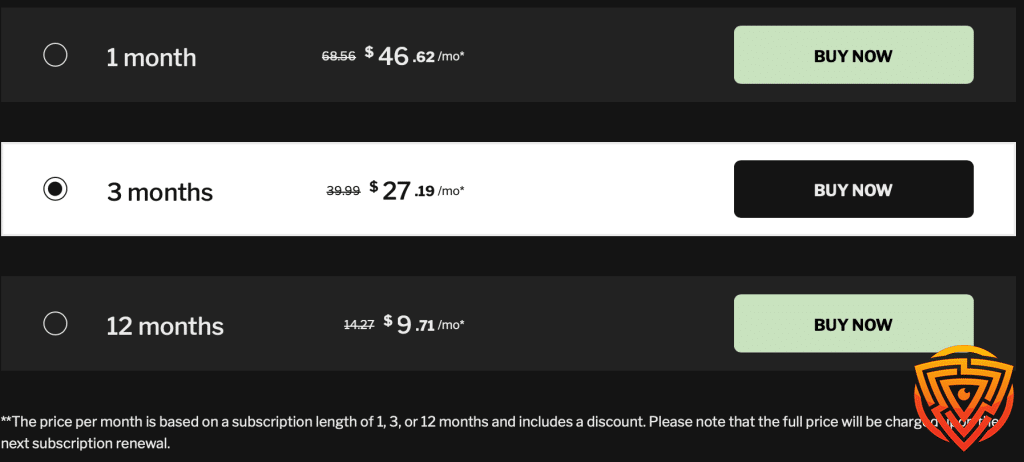
Moniterro has three subscription tiers, and honestly, the pricing isn’t bad—especially if you’re willing to commit for a longer stretch. There’s no free trial, but they do offer a 14-day money-back guarantee.
Subscription Plans and Value for Money
You get three subscription choices, each with its own pricing.
- The monthly plan is $46.62, which is honestly a bit steep.
- The 3-month plan cuts the price down to $27.19 per month, so that’s a decent savings.
- If you’re in it for the long haul, the annual plan is $12.79 per month. That’s less than a third of the monthly rate.
Compared to other monitoring apps, Moniterro’s prices are competitive, especially if you go for the yearly plan. The longer the commitment, the more you save.
All the plans unlock the same set of features—no holding back functionality based on what you pay.
Money-Back Guarantee and Refund Policy
There’s no free trial, but you do get a 14-day refund window on all subscriptions.
If Moniterro doesn’t live up to your expectations, you can ask for a full refund within two weeks. This money-back guarantee covers every plan.
The refund policy does have a few catches. You’ve only got 14 days, and some technical or personal issues might void your request.
To get your money back, you’ll need to reach out to customer support before your 14 days are up. Be ready to explain why the app didn’t work for you.
Customer Support and Reliability
Moniterro’s customer support is there to help with setup, troubleshooting, or any questions. They cover everything from installation to getting the most out of the app.
Customer reviews are pretty positive, with a 4.7 out of 5 overall rating. People seem happy with the service, shipping, and returns.
The support team tries to help you get the best value from your subscription. They’ll guide you through features and sort out any issues.
Data security is a big focus—they use encryption to keep your info and monitoring data safe.
Conclusion & Personal Recommendation
After reviewing Moniterro’s installation, dashboard, and privacy design, I can confidently say it’s a legit, well-built monitoring tool — especially for parents and small businesses who value simplicity.
It doesn’t have the brand recognition of mSpy yet, but its speed, stealth mode, and real-time data make it a strong contender in 2026.
If you want a monitoring app that balances power, privacy, and price, Moniterro is an excellent choice.
For users needing deeper social tracking or longer refund windows, Spynger and mSpy remain close competitors.
Frequently Asked Questions
Moniterro systems pack in advanced surveillance tools, like real-time monitoring and GPS tracking. But before you dive in, you’ll want to think about integration, maintenance, and whether you actually need all those analytics features for your security setup.
What are the primary features of a moniterro surveillance system?
Moniterro phone monitoring systems offer a pretty wide range of tracking options—GPS, social media, the works. You get real-time updates on everything happening with the device.
For me, the social media monitoring is a highlight. It tracks chats across apps like WhatsApp and Snapchat.
GPS tracking lets you see device locations in real time, right on a map. That’s super handy for keeping tabs on movement.
There’s also SMS tracing for texts and iMessages, all accessible from your dashboard.
Screenshot capture and keystroke logging add another layer of insight. You get a detailed look at how the device is being used.
How does Moniterro technology integrate with existing security infrastructure?
Moniterro works on both iOS and Android, so you’ve got flexibility. The setup process does depend on which device you’re targeting.
For iOS, the no-jailbreak method is easiest—just iCloud credentials, no need to touch the device after setup.
On Android, you’ll need to physically access the phone once to install. After that, it’s all remote.
You monitor everything through a web dashboard. All your surveillance data is accessible securely from any device with internet.
Integration happens via cloud-based syncing, so data is always up to date on your dashboard.
What are the consideration points when selecting a moniterro system for public safety applications?
Legal stuff comes first. Organizations need to check that monitoring is legal in their region before rolling it out.
For public safety, real-time monitoring is key. You want instant alerts and location updates, especially in emergencies.
Data security and privacy can’t be ignored. Public deployments have to be extra careful with sensitive info.
Scalability matters too. If you need to monitor a lot of devices, make sure the system can handle it.
Budget’s always a factor—look at setup costs and ongoing fees, and weigh them against what you’re getting.
What is the expected lifespan of moniterro equipment, and how does it compare with traditional systems?
Moniterro is software, not hardware, so its lifespan depends on updates and device compatibility—not wear and tear.
Honestly, cloud-based systems like this tend to last longer than hardware ones. Updates keep things running without needing to swap out gear.
They roll out compatibility fixes for new phone models and OS versions. The platform keeps up by updating software, not hardware.
Physical surveillance gear needs replacing every 5-7 years, usually. With Moniterro, hardware lifespan isn’t really an issue.
The subscription model means you get constant updates and support, so the system stays current.
How does the data analytics capability of a moniterro system enhance security operations?
Machine learning helps power smart alerts, flagging suspicious activity automatically. That takes a lot of manual work off your plate and speeds up response.
Pattern recognition digs into user behavior, looking for anything out of the ordinary. The system learns what’s normal and alerts you when something’s off.
Location analytics break down movement patterns and support geofencing. Teams get notified the moment a device crosses a virtual boundary.
Communication analysis checks message content and contact patterns, helping spot potential threats early.
With real-time data processing, you get instant alerts and can respond right away—no waiting around for delayed reports.
What are the best practices for maintaining and updating moniterro systems to ensure optimal performance?
Regular software updates are key for keeping your system secure and running smoothly. Honestly, I’d suggest turning on automatic updates—you don’t want to miss out on important security patches or new features.
24/7 customer support availability is a lifesaver when you hit those weird maintenance snags. If something goes sideways with configuration or performance, the tech support team is usually quick to help.
It’s a good idea to review your configuration settings every so often. Threats change, and so do your needs, so tweaking those monitoring parameters just makes sense.
Backing up your data? Absolutely essential. Sticking to a regular backup schedule can save you from losing valuable surveillance info if something goes wrong during an update or a crash.
Performance monitoring is another thing you shouldn’t overlook. Keeping an eye on system health helps you catch bottlenecks or connection hiccups before they turn into bigger issues.
Don’t forget about training. Giving users updates about new features or changes means your team can actually use the system to its full potential. Ongoing education really does pay off here.
That’s All for Now
That wraps up our Moniterro 2026 review. It’s fast, invisible, and accurate — ideal for anyone needing reliable phone activity tracking. If you want to see it in action, try the Moniterro annual plan for the best value — or explore Spynger for more advanced recording features.
Share this article

Stuart Kerr Spindlow is Impulsec’s Publisher, Chief Editor and Lead Reviewer. He writes and maintains coverage of consumer cybersecurity and digital-safety software, with a focus on practical suitability, limitations and the evidence behind product claims. Read Stuart’s full profile.