


**Canopy** is a must-have app for concerned parents looking to keep their kids safe on the internet. With its cutting-edge technology, this app quickly blocks harmful content, giving you peace of mind as you browse online. If you want to feel secure while surfing the web, this app is definitely a game-changer for you! Stay worry-free with **Canopy** parental control app at your fingertips.
Canopy’s AI filter scans websites and apps to stop inappropriate material before kids see it. This includes social media platforms like Instagram and TikTok. The app works on phones, tablets, and computers to provide wide coverage.
Parents can use Canopy to set limits on screen time and app usage. They can also get alerts about their child’s online activity. A 7-day free trial lets families test out the features before committing.
Key Takeaways
- Canopy uses AI to filter harmful content in real-time across devices
- The app allows parents to set limits and monitor online activity
- A free trial is available for families to test Canopy’s features
Understanding Parental Controls
Parental controls help keep kids safe online. They block harmful content and set limits on screen time. Two key aspects are how these tools have changed over time and why they matter for families today.
Evolution of Parental Control Software
Early parental controls were simple website blockers. Now they do much more. Modern parental control apps can filter content in real-time. They work across devices and platforms.
Some tools use AI to spot new threats. Others let parents track location and set time limits. Apps like Canopy use smart filters to block bad content fast.
Parental controls have become easier to use. Many now have simple settings for different age groups. Some can even monitor social media and texting.
Importance of Digital Supervision
Kids spend a lot of time online. This can be good and bad. Digital supervision helps keep them safe as they learn and grow online.
Parental controls block porn, violence, and other harmful content. They also help manage screen time. This can improve sleep and study habits.
But tech alone is not enough. Open communication about online safety is key. Parents should talk with kids about what they see online. This builds trust and teaches good digital habits.
Supervision also protects kids from online predators and cyberbullying. It gives parents peace of mind about their child’s digital world.
Overview of Canopy Parental Control App
Canopy is a parental control app designed to protect children in the digital age. It uses advanced AI technology to filter content and provide parents with tools to manage their children’s online activities.
Key Features of Canopy
The key feature of Canopy is its AI-powered content filtering. This system scans images, videos, and websites in real-time before they appear on a child’s device. It blocks inappropriate content instantly, even on popular apps like Instagram and TikTok.
The app goes beyond simple site blocking. It can filter out harmful content from everyday websites, giving parents peace of mind. This advanced filtering sets Canopy apart from many other parental control apps.
Canopy works across multiple devices, allowing parents to monitor all their children’s gadgets from one central dashboard. This comprehensive coverage helps ensure consistent protection across all platforms a child might use.
App Management and Usage Reports
Canopy provides detailed insights into app usage on children’s devices. Parents can view which apps their kids are using and for how long. This feature helps identify potentially problematic app usage patterns.
The app generates easy-to-understand reports. These show daily and weekly summaries of online activities. Parents can quickly spot trends or changes in their child’s digital behavior.
Canopy also allows parents to set app-specific rules. They can block certain apps entirely or limit their use during specific times. This granular control helps create a balanced digital environment for children.
Screen Time Management
Screen time management is a key component of Canopy. Parents can set daily time limits for device use. This helps prevent excessive screen time and promotes a healthier balance between digital and real-world activities.
The app offers flexible scheduling options. Parents can create custom schedules for school days, weekends, and holidays. This ensures that screen time rules adapt to the family’s changing needs.
Canopy also provides instant pause features. Parents can temporarily halt device access when needed, such as during family dinners or study hours. This immediate control helps reinforce family rules and routines.
Location Tracking Features
Canopy includes location tracking capabilities to help parents keep tabs on their children’s whereabouts. The app can show a child’s current location on a map in real-time.
Parents can set up geofences – virtual boundaries on a map. The app sends notifications when a child enters or leaves these designated areas. This feature is useful for ensuring kids arrive at and leave school safely.
Historical location data is also available. Parents can review past locations to understand their child’s movement patterns. This information can be valuable for discussing safety and building trust between parents and children.
Content Filtering with Canopy

Canopy offers powerful content filtering to protect children online. Its smart technology blocks inappropriate material while allowing safe access to the internet.
Protecting Against Inappropriate Content
Canopy’s parental control app aims to shield kids from harmful online content. It blocks pornography, violence, and other age-inappropriate materials. The app works across devices and platforms to provide comprehensive protection.
Canopy doesn’t just block entire websites. It uses advanced tech to filter content within apps and sites. This allows more nuanced control over what children can access.
The filtering extends beyond just web browsing. Canopy also monitors and filters content in messaging apps, social media, and other programs kids use.
Smart Filter Technology
Canopy uses artificial intelligence to power its smart filtering. This AI can identify inappropriate images and text in real-time. It doesn’t rely solely on blacklists of banned sites.
The AI adapts to new content, helping block emerging threats. It can detect attempts to access blocked material through proxies or VPNs.
Canopy’s tech works quickly, filtering content without noticeably slowing down browsing. This helps ensure kids don’t get frustrated and try to bypass the controls.
Customizing Filtering Options
Parents can adjust Canopy’s filtering to match their family’s needs. The app offers preset filter levels like “Strict” and “Moderate” for easy setup.
Custom settings allow fine-tuned control. Parents can block or allow specific sites and content categories. They can also set different rules for each child’s devices.
The app sends alerts when it blocks content. This lets parents know what their kids are trying to access. Parents can then decide if they want to adjust the filtering rules.
Canopy allows temporary unblocking of sites. This gives flexibility for homework or other legitimate needs while maintaining overall protection.
Specialized Features for Online Safety

Canopy offers advanced tools to protect kids online. These features use smart tech to spot risks and block harmful content before it reaches devices.
Preventing Sexting and Cyberbullying
Canopy’s app has strong tools to stop sexting and cyberbullying. It scans text messages and social media for bad words or mean comments. If it finds risky texts, it alerts parents right away.
The app also checks photos before they’re sent. It can spot nude or partly nude pics. This helps stop kids from sharing private images that could be used to bully them later.
Canopy gives tips to talk about online risks with kids. This helps families discuss hard topics like sexting in a safe way.
Artificial Intelligence in Identifying Risks
Canopy uses AI to find bad content online. The AI checks websites and apps in real-time. It can spot porn, violence, and other stuff kids shouldn’t see.
This AI works fast. It blocks bad content in less than a second. This means kids won’t see anything bad, even for a moment.
The AI keeps learning, too. It gets better at finding new risks over time. This helps it catch tricky content that other filters might miss.
Partial Nudity and Explicit Image Blocks
Canopy parental control tool is great at blocking inappropriate photos. It doesn’t just block full nudity. It also catches partial nudity and suggestive pics.
The app works on social media too. It can filter out bad pics on Instagram, TikTok, and other apps kids use. This keeps kids from seeing stuff that’s not right for their age.
Canopy also blocks explicit drawings and cartoons. This stops kids from seeing adult content in anime or other art forms.
Parents can set how strict the image blocking is. They can make it tougher for young kids and a bit looser for older teens.
Ensuring Location Awareness and Alerts

Canopy’s location features help parents keep track of their children’s whereabouts. These tools provide peace of mind and enhance safety through real-time alerts, location history, and geofencing capabilities.
Real-Time Location Alerts
Canopy parental control lets parents set up location alerts for specific places. When a child arrives at or leaves a designated location, the app sends a notification. This feature works well for monitoring arrivals at school, sports practice, or home.
Parents can easily add new locations through the app or web dashboard. They simply enter an address and select the correct place from the results. The system then tracks the child’s device in relation to that spot.
Real-time alerts help parents stay informed without constant checking. They can focus on other tasks, knowing they’ll be notified of important location changes.
Benefits of Location History
Location history provides a record of where a child has been. This data can be useful for several reasons:
- Verifying a child’s account of their day
- Identifying concerning patterns in movement
- Ensuring kids are where they say they’ll be
Parents can review this information to better understand their child’s routines and habits. It also serves as a safety measure in case of emergencies.
The app stores location data securely. Only authorized users can access this sensitive information.
Geofencing and Location Awareness
Geofencing uses GPS to create virtual boundaries around specific areas. When a child enters or exits these zones, Canopy sends an alert. Parents can set up geofences for:
- School grounds
- Neighborhoods
- Forbidden areas
This feature adds an extra layer of safety. It notifies parents if kids go somewhere unexpected or potentially dangerous.
Geofencing works with location awareness to provide a comprehensive safety net. Parents can customize alert settings to balance safety with privacy. They can choose how often to receive updates and which areas trigger notifications.
Comparing Canopy with Competitors

Canopy is one of several parental control options available. It has some unique features but also faces strong competition. Let’s look at how Canopy stacks up against two popular alternatives.
Canopy vs Qustodio
Canopy parental control app and Qustodio both offer key parental control features. Qustodio allows monitoring unlimited devices, while Canopy has device limits on some plans.
Qustodio provides more comprehensive monitoring and control options. It tracks social media, calls, and text messages on some platforms. Canopy focuses more on blocking explicit content.
Qustodio is more affordable for families needing to monitor multiple devices. Its plans cover unlimited devices at a lower cost than Canopy’s multi-device options.
Both apps are user-friendly, with intuitive interfaces for parents and kids. Qustodio offers a longer 30-day free trial compared to Canopy’s 7-day trial.
Bark vs Canopy
Canopy and Bark take different approaches to online safety. Canopy emphasizes real-time content filtering, especially for explicit material. Bark focuses more on monitoring and alerting.
Bark monitors more platforms, including social media, emails, and text messages. It uses AI to detect potential issues like cyberbullying or depression.
Canopy’s strength lies in its instant blocking of inappropriate content. This makes it particularly effective for preventing exposure to adult material.
Both apps work on major platforms like iOS, Android, and Windows. Bark offers a wider range of features, while Canopy provides more granular control over content filtering.
Feature and Price Comparisons
| Feature | Canopy | Qustodio | Bark |
|---|---|---|---|
| Web Filtering | Yes | Yes | Yes |
| App Blocking | Yes | Yes | Yes |
| Location Tracking | Yes | Yes | Yes |
| Social Media Monitoring | Limited | Yes | Yes |
| AI-powered Alerts | No | No | Yes |
| Price (monthly) | $9.99 – $15.99 | $4.58 – $11.67 | $5 – $14 |
Canopy’s pricing is on the higher end. It offers a 7-day free trial and a 30-day money-back guarantee.
Qustodio provides the most cost-effective option for large families. It covers unlimited devices on all plans.
Bark offers a middle ground in pricing. It includes unique features like AI-powered alerts for potential issues.
Implementing Canopy for Family Use

Canopy parental app offers effective tools for protecting children online. Proper setup, education, and communication are key to successful implementation.
Setting Up Canopy on Devices
Canopy can be installed on iPhones, iPads, and Android devices. Parents should start by creating an account and downloading the Canopy parental control app . Next, install Canopy Shield on each child’s device.
The setup process is straightforward:
-
Download Canopy Shield from the app store
-
Follow the installation prompts
-
Grant necessary permissions
-
Set content filters and time limits
Parents can customize settings for each child. This allows for age-appropriate restrictions. Younger children may need stricter filters, while teens might have more flexibility.
Educating Kids on Responsible Use
Teaching children about online safety is crucial. Parents should explain why Canopy is being used. This helps kids understand its importance.
Key points to discuss:
- Online dangers and inappropriate content
- The need for digital boundaries
- How Canopy protects them
Encourage responsible habits. Teach kids to think critically about what they see online. Show them how to report concerns or ask for help.
Set clear rules for device use. This might include time limits or device-free zones in the home.
Fostering Open Communication
Open dialogue is essential for effective online supervision. Create an environment where kids feel comfortable discussing their online experiences.
Tips for fostering communication:
- Ask about their favorite apps and websites
- Show interest in their online activities
- Be approachable and non-judgmental
Regular check-ins can help identify potential issues early. Discuss Canopy alerts or blocked content calmly. Use these as learning opportunities.
Adjust Canopy settings as children grow and demonstrate responsible behavior. This shows trust and encourages continued open communication.
Support and Resources

Canopy parental control offers robust customer support and helpful learning materials. Users can easily get assistance and find information to make the most of the parental control app.
Accessing Canopy Customer Support
Canopy provides multiple ways to get help. Users can contact customer support by phone from 12 p.m. to 8 p.m. CT daily. The company offers a dedicated support line at (888) 820-1918.
For online assistance, Canopy has a help center with answers to common questions. It covers topics like account settings, protection features, and app installation.
Canopy aims for transparency in its support. The team responds promptly to user inquiries and works to resolve issues quickly.
Learning with Tutorials and Guides
Canopy offers educational resources to help parents use the Canopy phone app effectively. The company provides step-by-step guides for setting up devices and configuring protection settings.
Users can find tutorials on topics like:
- Installing Canopy Shield
- Customizing filtering rules
- Managing sexting alerts
- Adding new devices
These materials use simple language and clear instructions. Canopy regularly updates its guides to reflect new features and changes to the app.
Short video walkthroughs are also available. These visual aids help users understand key functions of the parental control software.
Subscription Options and Free Trial
Canopy offers flexible pricing plans and a risk-free trial period for its parental control app. Parents can test the full features before committing to a subscription.
Evaluating Canopy’s Pricing
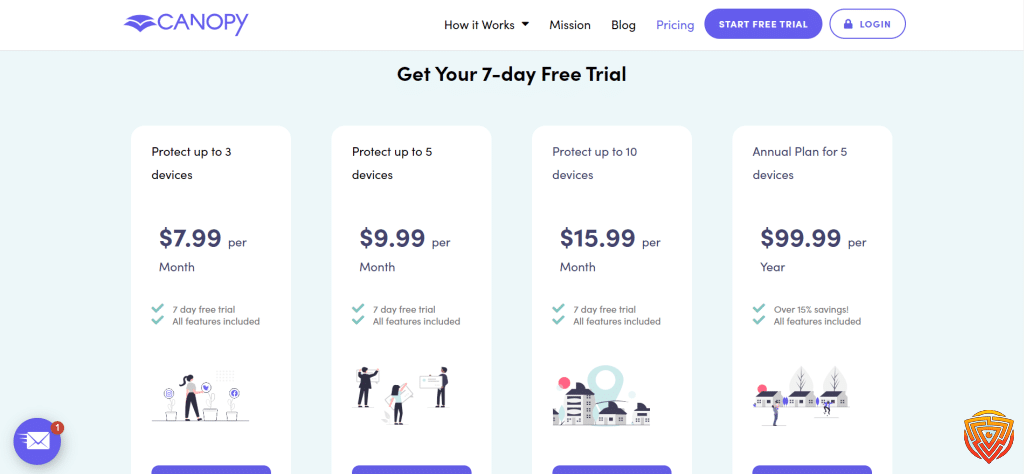
Canopy provides two main subscription options. The first plan covers up to 3 devices for $7.99 per month when billed annually. This option is good for small families or those just starting with parental controls.
For larger families, Canopy offers a plan that protects up to 10 devices. This plan costs $9.99 per month with annual billing. Both plans include all features and customer support.
Monthly billing is also available, but at a slightly higher rate. The 3-device plan is $9.99 monthly, while the 10-device plan is $11.99 per month.
Exploring the 7-Day Free Trial
Canopy gives parents a chance to try the app for free for 7 days. This trial includes all features of the paid plans. Parents can test content filtering, app blocking, and real-time alerts.
To start the trial, users download the Canopy app and create an account. No credit card is needed. The trial begins automatically after setup.
During the trial, parents can set up filters on their children’s devices. They can also explore the parent dashboard to see how Canopy works.
Understanding the Money-Back Guarantee
Canopy backs its service with a 30-day money-back guarantee. This policy starts from the day an account is created.
If parents are not satisfied with Canopy, they can request a full refund within 30 days. This applies even after the free trial ends.
To cancel and request a refund, users must go through the app, web dashboard, or app store where they subscribed. It’s important to cancel before the next billing cycle to avoid charges.
This guarantee lets parents try Canopy risk-free for a full month. It shows the company’s confidence in its product and commitment to customer satisfaction.
Conclusion and Personal Recommendation
Canopy offers a strong set of tools for protecting children online. Its AI-powered filtering stands out from other parental control apps. This technology scans content within apps and websites in real-time.
The app provides a user-friendly dashboard for parents. They can easily monitor their child’s online activities and adjust settings as needed. Canopy’s focus on blocking explicit content makes it especially useful for families concerned about exposure to inappropriate material.
Some key features of Canopy include:
- AI-powered content filtering
- Screen time management
- Location tracking
- Web filtering
- App blocking
While Canopy excels in content filtering, it lacks some features found in other parental control apps. For example, it doesn’t offer social media monitoring or call/text tracking.
Pricing may be a consideration for some families. Canopy is more expensive than some competing products, especially for households with multiple devices.
For parents primarily concerned with blocking explicit content, Canopy is a solid choice. Its advanced AI filtering provides peace of mind. However, families seeking a wider range of monitoring features may want to explore other options.
Frequently Asked Questions
Canopy Parental Control offers features to protect children online across devices. The app blocks inappropriate content and allows parents to monitor activity.
How do I set up Canopy Parental Control on multiple devices?
To set up Canopy on multiple devices, parents need to download the Canopy app on their own device first. Then they can install Canopy Shield on each child’s device they want to protect.
Parents create one account to manage all protected devices. The setup process is similar for phones, tablets, and computers.
What features does the Canopy app offer?
Canopy uses AI technology to detect and block inappropriate content in real-time. It filters out pornography and other explicit material before it reaches a child’s screen.
The app also allows parents to set time limits, monitor online activity, and receive alerts. Location tracking is available for mobile devices.
How does Canopy compare to other parental control software like Bark?
Canopy focuses heavily on its real-time content filtering technology. It blocks inappropriate content instantly, rather than just monitoring or reporting it after the fact.
The app has a more limited feature set compared to some competitors. It lacks social media monitoring capabilities that some other parental control apps offer.
Can Canopy Parental Control monitor and report on a child’s text messages?
Canopy does not currently offer text message monitoring or reporting. Its main focus is on blocking inappropriate web content and images.
Parents can view their child’s browsing history and receive alerts about concerning online activity. But direct monitoring of text messages is not a feature.
Are there any costs associated with the Canopy phone app, and what are the pricing plans?
Canopy is a paid service with subscription plans. Exact pricing is not provided in the search results.
The company does offer a 30-day money-back guarantee. If parents are not satisfied, they can request a full refund within 30 days of creating an account.
How effective is the Canopy porn blocker in filtering out inappropriate content?
Canopy claims its porn blocker is highly effective at filtering explicit content. The app uses advanced AI to detect and block inappropriate images and videos in milliseconds.
Its technology aims to recognize pornographic content across websites and apps. The filter works to block this material before it appears on a child’s screen.
That’s All For Now
Thanks for reading this article about Canopy parental control tools. The safety of children online is a crucial topic in today’s digital world.
Canopy offers several key features:
• AI-powered content filtering
• Real-time blocking of explicit content
• Monitoring across multiple devices
Parents can feel more at ease knowing tools exist to help protect kids from inappropriate material. The Canopy app aims to give families peace of mind while allowing children to explore the internet safely.
We encourage readers to stay informed on this important issue. New developments in online safety technology emerge regularly. Check back for future updates on Canopy and other parental control options.
For more information, browse the related articles linked below. These resources provide additional insights into keeping children safe in the digital age. Continued learning about online safety tools can benefit families navigating today’s connected world.
Share this article

Stuart Kerr Spindlow is Impulsec’s Publisher, Chief Editor and Lead Reviewer. He writes and maintains coverage of consumer cybersecurity and digital-safety software, with a focus on practical suitability, limitations and the evidence behind product claims. Read Stuart’s full profile.