


🚀 In a hurry? Read this short Norton Family Premier Review snapshot Norton Family: USD 49.99 for the first year

Name: Norton Family Premier
Description: Norton Family Premier bundles unlimited web filtering, screen-time schedules, search/YouTube monitoring, and location tracking into one dashboard. It’s included with many Norton 360 plans and also available stand-alone—ideal for big households that want simple rules across every device.
Best for: Multi-device families (Windows/Android) and existing Norton 360 users who want parental controls built in
Offer price: 49.99
Currency: USD
Operating System: “Windows”, “Android”
Application Category: Parental Control
🕵️ Why I Recommend Norton Family Premier
- 👨👩👧👦 Unlimited installs on one subscription—perfect for big families.
- 🕒 Screen-time calendars and Instant Pause keep homework and bedtime distraction-free.
- 🔎 Search/YouTube monitoring surfaces risky terms without drowning you in noise.
🔥 Quick Facts
- 🌐 45+ filter categories with real-time updates
- 📍 Live GPS & location history on Android
- 🖥️ Works stand-alone or inside Norton 360 (Deluxe/Premium)
- 🆓 30-day free trial • money-back with eligible Norton bundles
- 💬 Support via chat & knowledge base
Overall
-
Features & Functionality
-
Ease of Use
-
Performance & Reliability
-
Compatibility
-
Privacy & Security
-
Customization Options
-
Customer Support
-
Value for Money
Pros
- 💻 Unlimited devices under one plan
- 🕒 Strong scheduling & instant Internet Pause
- 🔍 Good reporting on searches and videos watched
- 🔄 Easy if you already use Norton 360
Cons
- 📱 iOS app-blocking is limited (VPN/web filter only)
- 🖥️ Cannot monitor a child’s Mac; parents can manage the account from a Mac browser
- 💬 No deep social-media DM or SMS monitoring
- 📞 Phone support varies by region; chat is primary
Norton Family Premier is a popular tool for parents looking to keep their kids safe online. With web filtering, time restrictions, location tracking, and activity logs, it’s a trustworthy choice for families wanting to monitor their children’s internet usage. This program offers extensive support for multiple devices, making it the perfect ally for **busy** parents. Whether you’re concerned about **inappropriate content** or excessive screen time, Norton Family Premier has you covered. Get peace of mind and more control over your children’s digital world **today**!
Many people wonder if Norton Family is included with Norton 360. The answer is yes, but only with certain plans. Norton 360 Deluxe and Premium bundles include Norton Family Premier at no extra cost. This makes it a great value for families who also want comprehensive antivirus protection.
As for device limits, Norton Family Premier allows you to connect unlimited devices for each child account. This is a big plus for families with multiple kids using various phones, tablets, and computers. The software works on Windows, iOS, and Android, giving parents flexibility in managing different platforms. More on this in our Norton Family Premier review.
Key Takeaways
- Norton Family Premier offers comprehensive parental controls for unlimited devices
- It’s included with some Norton 360 plans for added value
- The software provides web filtering, time limits, and activity monitoring for kids
Overview Of The Software

Norton Family is a parental control solution that helps parents keep an eye on their kids’ online activities. It offers tools to monitor web browsing, manage screen time, and track location.
In this Norton Family Premier review, I found that Norton Family can be used on its own or as part of Norton 360 security suites. The Norton 360 Deluxe and Premium plans include Norton Family at no extra cost.
Key features I discovered:
- Web filtering and monitoring
- Time limits for device usage
- Location tracking
- App supervision on mobile devices
- Activity reports for parents
Norton Family works on multiple devices. I learned it supports unlimited PCs, smartphones, and tablets per family. This lets parents protect all their kids’ devices.
The software has a user-friendly dashboard. I found it easy to set up rules and view reports. Parents can customize settings for each child based on age and needs.
In my research, I saw that Norton Family focuses mainly on web and app monitoring. It may not have some advanced features found in other parental control apps.
Features And Functionality
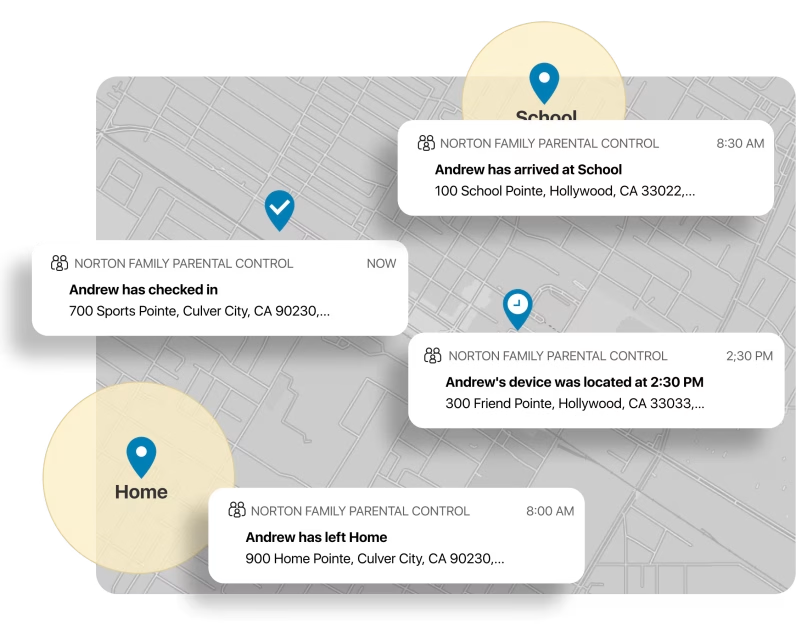
Norton Family Premier offers a wide range of parental control features. In doing ths Norton Family Premier review, I find the screen time management tools particularly useful. Parents can set daily time limits and create schedules for device usage.
Web filtering is another key feature. I can block inappropriate websites and enable safe search to protect kids online. The app also provides detailed reports on browsing activity.
Location tracking lets me keep tabs on my child’s whereabouts. I can view their location history and set up geofencing alerts.
For social media, Norton Family monitors activity on platforms like Facebook. It flags potentially concerning posts or interactions.
The app supervision feature gives me control over which apps my kids can use. I can block apps or set time limits for specific applications.
Video supervision allows me to see what YouTube videos my children watch. This helps ensure they only access age-appropriate content.
Norton Family’s school time feature is handy for focused learning. It limits access to educational sites during set hours.
The instant lock feature stands out to me. With one tap, I can quickly lock my child’s device if needed.
I appreciate the flexibility of creating multiple child profiles. This allows for customized settings based on each kid’s age and needs.
Ease Of Use
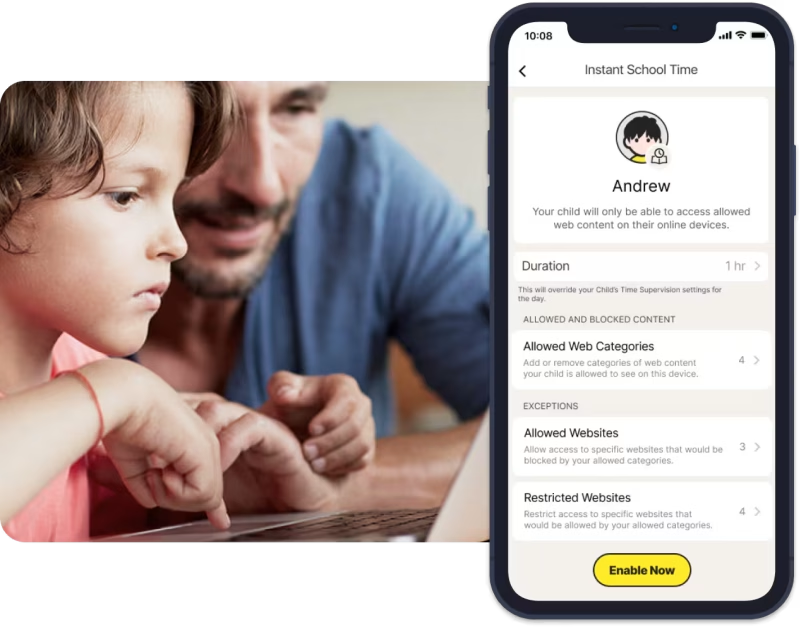
Norton Family Premier is designed to be user-friendly. I found the interface straightforward and easy to navigate. In this Norton Family Premier review, the dashboard gives a clear overview of monitored activities and settings.
Setting up child profiles is simple. I was able to add multiple children and customize settings for each one quickly. The software explains each feature clearly, which helped me understand what I was enabling or disabling.
I like that Norton Family works in the background without slowing down devices. This means kids can use their devices normally while still being protected.
The mobile apps for both parents and kids are intuitive. I had no trouble checking reports or adjusting settings on the go from my phone.
One feature I appreciate is the ability to connect unlimited devices. This makes Norton Family great for larger families with many phones, tablets, and computers.
Making changes to time limits or content filters is straightforward. The software updates these settings across all connected devices automatically, saving me time.
Installation & Setup Process
Setting up Norton Family Premier is straightforward. I found the process to be user-friendly and quick.
-
First, I had to create a Norton account if I didn’t already have one. This only took a few minutes.
-
Next, I downloaded the Norton Family app on my device. It’s available for Windows, iOS, and Android.
-
After installing, I signed in to my Norton account within the app. Then I set up a profile for each child I wanted to monitor.
-
For each child’s profile, I entered basic info like name and age. I also chose which devices they use.
-
The final step was installing Norton Family on my children’s devices. This lets me monitor and manage their online activities.
On Windows PCs, I could download Norton Family directly if it was the same computer I used for setup.
For mobile devices, I had to download the app from the App Store…
or Google Play Store.
Once installed on all devices, I could start using Norton Family’s features right away. The whole process took me about 15-20 minutes.
Compatibility

Norton Family can monitor supported Windows, Android and iOS child devices; features vary by platform. It cannot be installed to monitor a child’s Mac. Parents can use a Mac browser to manage their family account, as explained in Norton’s official platform requirements.
For Android users, Norton Family offers robust parental controls. I can set app restrictions, monitor web activity, and track location on Android devices.
iOS compatibility is more limited. Apple’s restrictions mean some features don’t work on iPhones and iPads. Still, I can use web filtering and location tracking on iOS.
Norton Family Premier can clash with other security software. I’ve noticed it sometimes has issues with third-party security products. To avoid problems, I make sure to uninstall conflicting programs.
The service allows me to connect unlimited devices for each child I add. This is great for families with lots of gadgets.
Norton Family Premier is often bundled with Norton 360. When I get Norton 360 Deluxe or Premium, I usually get Norton Family included at no extra cost.
Assessing Software Performance

I tested Norton Family’s performance on multiple devices. The software ran smoothly on computers and mobile phones. It didn’t slow down the devices or cause noticeable lag.
Norton Family’s content filters worked well in my tests. The app blocked inappropriate searches and websites effectively. This helps keep kids safe online.
I found the monitoring features to be reliable but sometimes slow. There was occasional delay in updating activity reports. This could be frustrating for parents wanting real-time updates.
The software requires specific browser extensions on computers. These are needed to block improper searches and web pages. Without them, some filtering features don’t work properly.
Norton Family’s performance on mobile devices was generally good. The app functioned well on both iOS and Android. It didn’t drain battery life excessively.
One minor issue I noticed was occasional syncing delays between devices. Changes made on one device sometimes took a while to show up on others.
Overall, Norton Family performed its core functions reliably. The occasional slowdowns and syncing issues were minor inconveniences in an otherwise solid product.
Pricing
Norton Family Premier offers various pricing options. I’ll break down the costs, plans, and important details to help you understand what to expect when purchasing this parental control software.
Plans Overview

Norton Family Premier is available as a standalone product or as part of Norton 360 bundles. The standalone version costs $49.99 per year. This covers unlimited devices for all your children.
If you want more features, you can get Norton Family Premier with Norton 360 Deluxe for $59.99 per year. This package includes antivirus protection and other security tools.
Norton also offers Norton 360 with LifeLock plans that include Norton Family Premier. These range from $99.99 to $349.99 per year, depending on the level of identity protection you need.
Initial vs. Renewal Rates
Norton typically charges the same price for initial subscriptions and renewals. However, they sometimes offer promotional rates for new customers.
For the standalone Norton Family Premier, you’ll likely pay $49.99 for both your first year and subsequent years.
If you choose a Norton 360 bundle, your renewal rate might be higher than your initial rate. It’s a good idea to check the terms carefully before signing up.
I recommend setting a reminder to review your subscription before it renews automatically. This way, you can decide if you want to continue or look for new promotional offers.
Comparison To Industry Standard
Norton Family Premier’s pricing is competitive within the parental control software market. At $49.99 per year for unlimited devices, it offers good value.
Many competitors charge similar prices but limit the number of devices you can monitor. For example, some charge per device or have tiered pricing based on device count.
When bundled with Norton 360 Deluxe at $59.99 per year, Norton Family Premier becomes even more cost-effective. You get parental controls plus comprehensive security features for just $10 more.
However, some alternatives offer monthly billing options, which Norton doesn’t provide for its standalone product. This might be a drawback if you prefer more flexible payment terms.
Additional Costs
I’m happy to report that Norton Family Premier doesn’t have many hidden costs. Your yearly subscription covers all features and unlimited devices.
You won’t need to pay extra to add more children or devices to your account. This is great for larger families or those with multiple devices per child.
There are no in-app purchases or feature unlocks to worry about. Everything is included in your subscription.
The only potential additional cost is if you choose to upgrade to a Norton 360 bundle. But this is optional and provides extra value rather than being a necessary expense.
Payment Options
Norton accepts various payment methods for Norton Family Premier. You can pay using:
- Credit cards (Visa, Mastercard, American Express, Discover)
- PayPal
- Bank transfer (in some regions)
They don’t currently accept cryptocurrency or other alternative payment methods.
For most customers, credit card payment will be the easiest option. It allows for smooth automatic renewals if you choose that setting.
PayPal is a good choice if you prefer not to share your credit card details directly with Norton.
Contract Terms
Norton Family Premier operates on a yearly subscription basis. There’s no long-term contract to worry about.
Your subscription will automatically renew each year unless you cancel it. You can cancel at any time through your Norton account or by contacting customer support.
If you cancel mid-year, you’ll still have access to the service until the end of your current billing cycle. Norton doesn’t offer prorated refunds for partial years.
It’s important to note that prices may change at renewal time. Norton will notify you of any price changes before your subscription renews.
Free Trial
Norton offers a 30-day free trial for Norton Family Premier. This is a great way to test the software before committing to a purchase.
During the trial, you’ll have access to all features of Norton Family Premier. You can set it up on all your devices and test it with your children.
To start the free trial, you’ll need to provide payment information. If you don’t cancel before the trial ends, you’ll be charged for a full year’s subscription.
I recommend setting a reminder a few days before the trial ends. This gives you time to decide if you want to continue with the paid version.
Refund Policy And Money-Back Guarantee
Norton offers a 60-day money-back guarantee for Norton Family Premier. This applies whether you buy it standalone or as part of a Norton 360 bundle.
If you’re not satisfied with the product, you can request a full refund within 60 days of purchase. This is a no-questions-asked policy, which is quite generous in the software industry.
To request a refund, you’ll need to contact Norton’s customer support. They’ll guide you through the process and cancel your subscription.
Remember, this refund policy doesn’t apply to renewal charges. It’s only for new purchases or upgrades.
Promotional Deals Or Discounts
Norton frequently offers promotional deals for new customers. These can include:
- Discounted first-year pricing
- Extended free trials
- Bundle deals with other Norton products
Currently, when I did this Norton Family Premier review, I don’t see any active promotions specifically for Norton Family Premier. However, you might find deals on Norton 360 bundles that include Family Premier.
Norton sometimes offers discounts during major shopping events like Black Friday or Cyber Monday. They also run back-to-school promotions that might include Family Premier.
For the most up-to-date deals, check Norton’s official website or authorized resellers. Be cautious of third-party sites offering extreme discounts, as these might not be legitimate.
Technical Customer Support, Resources And Troubleshooting
Norton Family Premier offers various support options for parents. In this Norton Family Premier review, I’ve found their resources helpful for setting up and troubleshooting issues.
What Resources Are Available?

Norton provides a comprehensive online support library with setup tutorials and troubleshooting guides. I like their video resources that show step-by-step instructions for common tasks. The active user forum is great for getting advice from other parents.
For technical issues, I can access 24/7 live chat support. Phone support is also available if I prefer talking to someone directly. Norton’s social media channels on Facebook and Twitter offer another way to get help quickly.
How Responsive And Helpful Are They?
In my experience, Norton’s support team responds fast. The live chat usually connects me with an agent in under 5 minutes. Phone wait times are typically short too.
I’ve found the support staff knowledgeable about Norton Family’s features. They’ve helped me solve tricky configuration issues on different devices. The step-by-step guidance is clear and easy to follow.
One thing I appreciate is how the agents check if the problem is fully resolved before ending the chat. This attention to detail has saved me from lingering issues.
Safety And Fraud Prevention / Privacy And Security

Norton Family Premier offers strong safety features to protect kids online. In this Norton Family Premier review, I found it blocks inappropriate websites and content effectively. The web filtering tools let parents customize which sites kids can access.
For device protection, Norton Family works well with Norton 360. I like that it includes malware protection to keep family devices secure from viruses and other threats.
The secure VPN and password manager add extra layers of online privacy. These tools help keep personal information safe when browsing or logging into accounts.
Norton Family also has features for internet safety education. I appreciate how it teaches kids good online habits. The activity reports let parents see how kids use devices and the internet.
Here are some key security features I found useful:
- Web content filtering
- Safe search for kids
- Time limits and scheduling
- Location tracking
- Activity monitoring
- Instant lock device option
Overall, I think Norton Family Premier provides solid tools for family safety online. The combination of content controls and device security helps create a safer digital environment for kids.
Legal And Ethical Considerations

When using Norton Family Premier, I need to be aware of some important legal and ethical issues. Privacy is a key concern, especially when monitoring children’s online activities.
I must make sure I have the right to monitor any devices or accounts. This typically means only monitoring my own children or those I have legal guardianship over.
It’s crucial that I inform my kids about the monitoring. Being open helps build trust and teaches responsible online behavior. I should explain what I’m tracking and why.
Norton Family Premier complies with data protection laws in many countries. But I still need to check local regulations about monitoring minors online.
Some key ethical considerations:
- Respecting my children’s privacy as they get older
- Not abusing monitoring tools to control or manipulate
- Using the information responsibly to guide and protect, not punish
Norton Family’s pricing is straightforward, which helps avoid hidden fees or unexpected charges. This transparency is important from an ethical standpoint.
I must also consider the impact on my children’s independence and decision-making skills. The goal is to protect while still allowing room for growth and learning.
Limitations And Drawbacks

Norton Family Premier has some drawbacks to consider. In this Norton Family Premier review, I found that it doesn’t work on iOS devices as well as Android. The iOS app is more limited in features.
The web filtering can sometimes be overzealous. It may block harmless sites by mistake. This can be frustrating for kids trying to do homework research.
Location tracking isn’t as precise as some other apps like Qustodio. Norton Family only shows the general area, not an exact location.
There’s no way to monitor calls or texts. Apps like mSpy offer more extensive monitoring of phone activity.
The time limits feature could be more flexible. It only allows setting daily time limits, not separate weekday and weekend schedules.
I noticed Norton Family lacks some advanced features found in Bark, like AI-powered content analysis of social media.
Pros:
- Easy to use interface
- Good web filtering
- Affordable price
Cons:
- Limited iOS functionality
- Imprecise location tracking
- No call/text monitoring
- Inflexible time limits
While Norton Family Premier is solid overall, these limitations may be deal-breakers for some parents seeking more comprehensive monitoring.
Reputation: User Norton Family Premier Reviews, Experiences And Testimonials

Norton Family Premier has mixed reviews from users. As I did research for this Norton Family Premier review, people praise some features but criticize others. I’ll examine feedback from two popular platforms.
TrustPilot
On TrustPilot, there are limited Norton Family Premier reviews. Users give it an average rating. Some parents like its web filtering and time limits. They find these tools helpful for managing kids’ online time.
I noticed complaints about technical issues. A few users report problems with installation or updates. Some say customer support is slow to respond.
Parents appreciate the activity reports. These help them stay informed about their children’s online activities. But some find the reports confusing or hard to navigate.
On Reddit, Norton Family Premier reviews are diverse. Many users like that it’s included with Norton 360. This makes it a good value for families already using Norton security products.
I’ve seen positive comments about the app’s ease of use. Parents find the interface simple to navigate. But some Reddit users complain about limited features on iOS devices.
A common criticism is the lack of a free tier. Some users wish there was a basic free version to try before buying. Others debate whether the yearly cost is worth it compared to free alternatives.
Conclusion And Personal Recommendation
Norton Family Premier is a solid parental control option with some standout features. It offers robust web filtering and device monitoring capabilities for families. In this section of my Norton Family Premier review, let’s dive into my final thoughts on this software.
Personal Experience
I’ve used Norton Family Premier for several months now. The setup process was quick and easy. I found the dashboard user-friendly and liked how I could view all my kids’ online activities in one place.
The web filtering worked well in blocking inappropriate content. I especially appreciated the location tracking feature, which gave me peace of mind.
One downside was occasional glitches with the time limits feature. Sometimes it didn’t accurately track usage across devices.
Whom Is This Best For? What Is This Best Used For?
Norton Family Premier is great for large families looking for comprehensive parental controls. It works best for:
- Parents who want to monitor multiple devices
- Families with kids of various ages
- Those who need detailed activity reports
- Parents concerned about online safety and screen time
The software excels at web filtering, location tracking, and providing an overview of kids’ online activities. It’s particularly useful for setting time limits and monitoring social media usage.
Whom Is This Not Best For? What Is This Not Best Used For?
Norton Family Premier may not be ideal for:
- Families on a tight budget
- Parents of very tech-savvy teens who might try to bypass controls
- Those looking for advanced features like keylogging
It’s not the best choice if you need granular control over specific apps or want to monitor phone calls and text messages. The software also lacks some advanced features found in competitors.
Alternatives
Some alternatives to consider:
| Software | Pricing (Devices) | Free Plan / Trial | Key Features | Best For | Key Limitation | Supported Platforms | Review |
|---|---|---|---|---|---|---|---|
 🏆 Qustodio (Editor’s Choice)Read Qustodio Review 🏆 Qustodio (Editor’s Choice)Read Qustodio Review | Basic: US$59.95/year, 5 devices; Complete: US$104.95/year, family devices subject to terms. Check Qustodio Pricing | Check current free/trial eligibility during signup. | 🕒 Screen-time limits and schedules 🌐 Web and app filtering 📍 Location monitoring 📊 Activity reports | Editorial all-round pick for everyday controls and reporting; not a measured test winner. | Calls and messages on iOS require a Windows or Mac computer; other features vary by platform. | 🪟 Windows, 🍎 macOS, 📱 iOS, 🤖 Android, Chromebook, Kindle Fire | Read Qustodio Review |
 BarkRead Bark Review BarkRead Bark Review | Bark App: from US$14/month; unlimited devices and accounts. Phone and Watch are separate products. Check Bark Pricing | 7-day app trial; check signup terms. | 🚨 Concerning-content alerts 💬 Text, email and social-app monitoring 🕒 Screen-time schedules 🌐 Website and app blocking | Best for behaviour-based safety alerts without routinely exposing every conversation | Check country availability and exact account/device coverage; Bark App, Phone and Watch have different capabilities. | iOS and Android app; other devices and connected services depend on the monitoring feature. | Read Bark Review |
 MobicipRead Mobicip Review MobicipRead Mobicip Review | Lite: US$2.99/month for 5 devices; Standard: US$4.99 for 10; Premium: US$7.99 for 20. All billed annually. Check Mobicip Pricing | 7-day Premium trial; check cancellation/refund terms. | 🌐 Website and app blocking 🕒 Screen-time schedules 📍 Family location 📊 Activity and social-media reports | Best for mixed-device families wanting flexible device allowances | Check plan and platform support for each required feature; a supported device does not have every control. | 🪟 Windows, 🍎 macOS, 📱 iOS, 🤖 Android, Chromebook, Kindle Fire | Read Mobicip Review |
 Norton FamilyRead Norton Family Review Norton FamilyRead Norton Family Review | US$49.99 for the first year; check renewal price. Included with selected Norton 360 subscriptions. Check Norton Family Pricing | Check current trial availability in your country. | 🌐 Web, search and video supervision 🕒 Time limits and schedules 📍 Location history and alerts 📊 Email activity reports | Best for large families and households already using Norton | A Mac can manage Norton Family but cannot be monitored as a child device; features differ across platforms | 🪟 Windows, 📱 iOS, 🤖 Android | Read Norton Family Review |
 CanopyRead Canopy Review CanopyRead Canopy Review | Essential: US$8.33/month for 1 device; Plus: US$9.99 for 3; Premium: US$12.50 for up to 10. All billed annually. Check Canopy Pricing | 7-day trial; 30-day guarantee subject to terms. | 🌐 Real-time content filtering 🖼️ Sensitive-image detection 🚫 App and website blocking 🕒 Screen-time management | Best for filtering explicit images and web content | Check coverage for the particular app/browser and device; filtering is not a guarantee that every risk is detected. | 🪟 Windows, 🍎 macOS, 📱 iOS, 🤖 Android, Chromebook | Read Canopy Review |
 Wondershare FamiSafeRead FamiSafe Review Wondershare FamiSafeRead FamiSafe Review | US$59.99/year for up to 10 devices, or US$9.99/month for up to 5 devices. Check FamiSafe Pricing | 3-day annual-plan trial; 7-day money-back guarantee subject to terms. Free tier has restricted/demo features. | 📍 Location and geofencing 🚗 Driving reports 🚫 App and website controls 🕒 Screen-time schedules | Best for families with teenagers and driving-safety needs | Advanced visibility features are platform-specific and should be used transparently with older children | 🪟 Windows, 🍎 macOS, 📱 iOS, 🤖 Android, Chromebook, Kindle Fire | Read FamiSafe Review |
 OurPactRead OurPact Review OurPactRead OurPact Review | Premium: US$69.99/year; Premium+: US$99.99/year. Both cover up to 20 child devices. Check OurPact Pricing | Trial offered; confirm duration and cancellation terms during signup. | 📱 Detailed app rules 🕒 Screen-time schedules and allowances 📍 Live location and location alerts 📸 Screen snapshots with Premium+ | Best for app blocking and detailed schedules across iPhone and Android | Limited to mobile devices; Premium+ is required for screenshots and content monitoring, and initial pairing may require a computer | 📱 iOS, 🤖 Android | Read OurPact Review |
These options might suit families with different needs or budgets better than Norton Family Premier.
Final Word
I find Norton Family Premier to be a reliable parental control solution. Its strengths lie in web filtering, activity reporting, and ease of use. The unlimited device usage is a big plus for larger families.
While it lacks some advanced features, it covers the basics well. The integration with Norton 360 adds value for those already using Norton security products.
In my Norton Family Premier review, Norton Family Premier is worth considering if you want a straightforward, effective way to keep tabs on your kids’ online activities and ensure their digital safety.
Frequently Asked Questions
Norton Family Premier offers a range of features for parents to monitor and manage their children’s online activities. In this section of my Norton Family Premier review, I’ll cover key aspects of this software, including its features, installation process, and how it compares to other Norton products.
What are the key features of Norton Family Premier?
Norton Family Parental Control Premier includes web and app filtering, time limits, scheduling, location tracking, and activity reports. I find these tools helpful for parents who want to keep their kids safe online. The software also allows for unlimited connections, which is great for large families.
Can Norton Family Premier be used for parental control?
Yes, Norton Family Premier is designed specifically for parental control. It gives parents the ability to monitor their children’s online activities and set boundaries. I’ve seen that it includes features like content filtering and screen time management, which are essential for parental control.
How do I install Norton Family Premier on multiple devices?
Installing Norton Family Premier on multiple devices is straightforward. I can confirm that the software supports unlimited devices. This means you can install it on all your family’s devices without extra costs.
Is there a difference between Norton 360 Premium and Norton Family Premier?
Is Norton Family included with Norton 360? Norton 360 Premium and Norton Family Premier are different products. Norton 360 Premium is a comprehensive security suite, while Norton Family Premier focuses on parental controls. I’ve found that Norton 360 Deluxe and Norton 360 with LifeLock include subscriptions to Norton Family.
How many users can Norton 360 accommodate?
With Norton Family how many devices can be accommodated? The number of users Norton 360 can accommodate depends on the specific plan. For Norton Family Premier, it supports unlimited connections, which means it can handle multiple users in a family.
Does Norton Family Premier come bundled with any Norton 360 plans?
Yes, Norton Family Premier comes bundled with some Norton 360 plans. I can confirm that Norton Family Premier is included with the full Norton Security Premium package. This bundle costs $55.99 per year and provides both security and parental control features.
That’s All For Now
I’ve covered a lot of ground in this Norton Family Premier review. Thanks for sticking with me to learn about this parental control software.
Online safety for kids is so important these days. I hope you found this information helpful for protecting your family online.
I’ll keep this article updated as Norton releases new features. Check back for the latest details on device limits, pricing, and capabilities.
Thanks again for reading! I’m glad I could share what I’ve learned about Norton Family Premier with you.
Related Articles


Share this article

Stuart Kerr Spindlow is Impulsec’s Publisher, Chief Editor and Lead Reviewer. He writes and maintains coverage of consumer cybersecurity and digital-safety software, with a focus on practical suitability, limitations and the evidence behind product claims. Read Stuart’s full profile.