


Best Mobicip alternatives help parents find a better fit for screen time rules, web filtering, app blocking, location tools, and family safety alerts. Mobicip is still a capable parental control app, but it will not be the best fit for every family, especially if you want simpler free controls, stronger content filtering, broader reporting, or better overall value.
In this guide, I compare the top alternatives to Mobicip for Android, iPhone, Windows, Mac, Chromebook, and mixed-device families. I focus on trusted parental control apps first: visible family-safety tools with content filters, app controls, screen-time settings, and age-appropriate monitoring.
If you are comparing apps like Mobicip, searching for a better Mobicip alternative, or weighing up different family-safety apps, this list starts with the strongest all-round options for most families: Qustodio, Bark, Norton Family, Canopy, Wondershare FamiSafe, Kaspersky Safe Kids, and Net Nanny.
⏳ Want the quick answer? For most families, the best Mobicip alternative is Qustodio. It gives you stronger all-round parental controls across major platforms without overcomplicating setup.
Key Takeaways
- Qustodio is the best overall Mobicip alternative for most families.
- Bark is the strongest pick for alert-led monitoring and digital risk warnings.
- Canopy stands out for stronger explicit-content filtering and image-based protection.
- Norton Family is a strong fit for larger households and Windows-heavy families.
- Google Family Link and Apple Screen Time are the best free starting points before upgrading.
Top Alternatives to Mobicip Ranked
These are the strongest options I would prioritize for this article. I have ordered the premium picks first to match your core parental control software stack, then placed the free and lightweight options lower down.
- 🏆 Qustodio – Best Overall Mobicip Alternative (Editor’s Choice)
- Bark – Best for Social Media Alerts and Digital Risk Detection
- Norton Family – Best for Large Families and Windows Coverage
- Canopy – Best for Explicit Content Filtering
- Wondershare FamiSafe – Best for Balanced Features and Ease of Use
- Kaspersky Safe Kids – Best Budget-Friendly Alternative
- Net Nanny – Best for Real-Time Web Filtering
- Google Family Link – Best Free Alternative for Android Families
- Apple Screen Time – Best Free Alternative for iPhone Families
- Microsoft Family Safety – Best Free Alternative for Microsoft Households
- OurPact – Best for App Blocking and Scheduling
Quick Comparison Table
This table shows the main premium Mobicip competitors I would compare first. It keeps the article aligned to your core parental control software stack before moving into free alternatives lower down.
This table compares the core parental control apps by pricing, free trial availability, key features, age suitability, supported platforms, and full review links.| Software | Pricing (Devices) | Free Plan / Trial | Key Features | Best For | Key Limitation | Supported Platforms | Review |
|---|---|---|---|---|---|---|---|
| 🏆 Qustodio (Editor’s Choice) | Basic: US$59.95/year, 5 devices; Complete: US$104.95/year, family devices subject to terms. Check Qustodio Pricing | Check current free/trial eligibility during signup. | 🕒 Screen-time limits and schedules 🌐 Web and app filtering 📍 Location monitoring 📊 Activity reports | Editorial all-round pick for everyday controls and reporting; not a measured test winner. | Calls and messages on iOS require a Windows or Mac computer; other features vary by platform. | 🪟 Windows, 🍎 macOS, 📱 iOS, 🤖 Android, Chromebook, Kindle Fire | Read Qustodio Review |
| Bark | Bark App: from US$14/month; unlimited devices and accounts. Phone and Watch are separate products. Check Bark Pricing | 7-day app trial; check signup terms. | 🚨 Concerning-content alerts 💬 Text, email and social-app monitoring 🕒 Screen-time schedules 🌐 Website and app blocking | Best for behaviour-based safety alerts without routinely exposing every conversation | Check country availability and exact account/device coverage; Bark App, Phone and Watch have different capabilities. | iOS and Android app; other devices and connected services depend on the monitoring feature. | Read Bark Review |
| Mobicip | Lite: US$2.99/month for 5 devices; Standard: US$4.99 for 10; Premium: US$7.99 for 20. All billed annually. Check Mobicip Pricing | 7-day Premium trial; check cancellation/refund terms. | 🌐 Website and app blocking 🕒 Screen-time schedules 📍 Family location 📊 Activity and social-media reports | Best for mixed-device families wanting flexible device allowances | Check plan and platform support for each required feature; a supported device does not have every control. | 🪟 Windows, 🍎 macOS, 📱 iOS, 🤖 Android, Chromebook, Kindle Fire | Read Mobicip Review |
| Norton Family | US$49.99 for the first year; check renewal price. Included with selected Norton 360 subscriptions. Check Norton Family Pricing | Check current trial availability in your country. | 🌐 Web, search and video supervision 🕒 Time limits and schedules 📍 Location history and alerts 📊 Email activity reports | Best for large families and households already using Norton | A Mac can manage Norton Family but cannot be monitored as a child device; features differ across platforms | 🪟 Windows, 📱 iOS, 🤖 Android | Read Norton Family Review |
| Canopy | Essential: US$8.33/month for 1 device; Plus: US$9.99 for 3; Premium: US$12.50 for up to 10. All billed annually. Check Canopy Pricing | 7-day trial; 30-day guarantee subject to terms. | 🌐 Real-time content filtering 🖼️ Sensitive-image detection 🚫 App and website blocking 🕒 Screen-time management | Best for filtering explicit images and web content | Check coverage for the particular app/browser and device; filtering is not a guarantee that every risk is detected. | 🪟 Windows, 🍎 macOS, 📱 iOS, 🤖 Android, Chromebook | Read Canopy Review |
| Wondershare FamiSafe | US$59.99/year for up to 10 devices, or US$9.99/month for up to 5 devices. Check FamiSafe Pricing | 3-day annual-plan trial; 7-day money-back guarantee subject to terms. Free tier has restricted/demo features. | 📍 Location and geofencing 🚗 Driving reports 🚫 App and website controls 🕒 Screen-time schedules | Best for families with teenagers and driving-safety needs | Advanced visibility features are platform-specific and should be used transparently with older children | 🪟 Windows, 🍎 macOS, 📱 iOS, 🤖 Android, Chromebook, Kindle Fire | Read FamiSafe Review |
| OurPact | Premium: US$69.99/year; Premium+: US$99.99/year. Both cover up to 20 child devices. Check OurPact Pricing | Trial offered; confirm duration and cancellation terms during signup. | 📱 Detailed app rules 🕒 Screen-time schedules and allowances 📍 Live location and location alerts 📸 Screen snapshots with Premium+ | Best for app blocking and detailed schedules across iPhone and Android | Limited to mobile devices; Premium+ is required for screenshots and content monitoring, and initial pairing may require a computer | 📱 iOS, 🤖 Android | Read OurPact Review |
For deeper product breakdowns, read my Qustodio review, Bark review, Norton Family review, and Canopy review.
Best Free Alternatives to Mobicip
If you do not need a full premium replacement yet, start with these free parental control options. They work best as entry-level apps like Mobicip for lighter supervision, basic app management, and screen-time control.
This master table compares genuine free parental-control plans and built-in family-safety tools. Individual articles may display only the rows relevant to that platform. Features and child-device compatibility vary by platform and region.
| App | Pricing / Paid Upgrade | Free Access | Key Features | Main Free Limitation | Best For | Child Devices Supported | Review |
|---|---|---|---|---|---|---|---|
| Qustodio Free | Free for 1 child device; paid plans from $59.95/year; 👉 Check Qustodio Pricing | ✔️ Permanent limited free plan | 🌐 Web filtering and Safe Search ⏸️ Restricted times and pause internet 📊 7-day activity reports 📱 Protection for 1 child device | Limited to 1 device; daily time allowances, app blocking, location and advanced monitoring require a paid plan | Best free third-party dashboard with a clear paid upgrade path | Android, iOS, Windows, macOS, Chromebook and Kindle | Read Qustodio Review |
| OurPact Free | Free starter tier; Premium from $6.99/month or $69.99/year; 👉 Check OurPact Pricing | ✔️ 1 child device 5 manual blocks per month 1 automated schedule Web-browser blocking | 🚫 Manual app and device blocking ⏱️ One automated block schedule 🌐 Web-browser blocking 📱 Management of 1 child device | Only 5 manual blocks per month and 1 automated schedule; most controls require Premium | Best simple free screen-time and blocking starter tool for one phone | Android and iOS | Read OurPact Review |
| Kaspersky Safe Kids Free | Free version available; paid plans and prices vary by region; 👉 Check Kaspersky Pricing | ✔️ Permanent free version with basic features | 🌐 Internet monitoring and website blocking 📱 Device-use monitoring 🖥️ App management 🔎 Basic activity visibility | Premium reporting, location and alerts are excluded; availability varies by country | Best free web filtering option where Kaspersky remains available; not recommended for US users | Android, iOS, Windows and macOS; features differ by platform | Read Kaspersky Safe Kids Review |
| Google Family Link | Free; Open Guide | ✔️ Completely free | 📱 App approvals and blocking 🕒 Screen-time limits 📍 Device location 🔎 Google Account supervision | Does not supervise a child’s iPhone or iPad; its main controls are for Google platforms | Best completely free parental control for Android and Chromebook families | Android and Chromebook child devices; parent app available on Android and iOS | Read Google Family Link Review |
| Apple Screen Time | Free and built into Apple devices; Open Guide | ✔️ Completely free | ⏱️ App limits and downtime 🔒 Content and purchase restrictions 📊 App and website activity summaries 👪 Family Sharing controls | Restricted to the Apple ecosystem; less suitable for mixed-device families | Best completely free parental controls for iPhone, iPad and Mac | iPhone, iPad and Mac | Read Apple Screen Time Review |
| Microsoft Family Safety | Free basic family-safety features; some benefits require Microsoft 365 Family; Open Guide | ✔️ Free basic family-safety features | ⏱️ Screen-time and app limits on supported devices 📊 Activity reports 🌐 Microsoft Edge content filtering 🎮 Windows and Xbox integration | Does not provide device-level control over a child’s iPhone; web filtering depends heavily on Microsoft Edge | Best for Windows, Xbox and Microsoft-centred households | Windows and Xbox; Android app and game limits; iOS parent-management app only | Read Microsoft Family Safety Review |
| Samsung Kids | Free and built into supported Samsung Galaxy devices; Open Guide | ✔️ Completely free on supported Samsung devices | 🧒 Child-friendly interface 🔒 Approved apps and content ⏱️ Usage controls 📊 Activity information | A local child environment rather than a full remote parental-control service | Best built-in child mode for younger children using Samsung devices | Supported Samsung Galaxy phones and tablets | Review Coming Soon |
| Amazon Kids | Free parental tools; optional Amazon Kids+ content subscription; Open Amazon Kids | ✔️ Free parental tools; Kids+ is optional | ⏱️ Daily time limits 📚 Educational goals 🔒 Content and age filters 👧 Child profiles | Designed mainly around Amazon devices and services; Kids+ content requires a subscription | Best free parental controls for Amazon Fire tablets and devices | Fire tablets, Kindle e-readers, Echo and supported Amazon devices | Review Coming Soon |

Why Parents Switch From Mobicip
Mobicip still covers the basics well, but many parents start looking for a better fit once their needs become more specific. Some want stronger content filtering. Some want a better free option. Others want a cleaner dashboard, easier app blocking, or broader support across Android, iPhone, Windows, and Mac.
That is why the strongest options in this guide are not all trying to beat Mobicip in exactly the same way. Qustodio is a better all-round pick for many families. Bark is stronger if you care most about alert-led online safety. Canopy stands out for explicit-content filtering. Norton Family makes a lot of sense for households with several devices, especially where Windows plays a big role. On the free side, Google Family Link, Apple Screen Time, and Microsoft Family Safety are all worth considering before you move into a paid plan.
If you want a broader shortlist beyond this page, start with my guides to the best parental control apps and the best free parental control apps. If your household is platform-specific, my roundups for the best parental control app for android and the best parental control app for iPhone will help you narrow things down faster.
When a Free Mobicip Alternative Is Enough
A free Mobicip alternative can be enough if your needs are fairly simple. That usually means you mainly want screen-time limits, app approvals, basic content restrictions, and some visibility into how a child is using their device. In that situation, Google Family Link, Apple Screen Time, and Microsoft Family Safety can all do a respectable job without forcing you into another subscription straight away.
Free tools make the most sense when your household is also strongly tied to one ecosystem. For example, Google Family Link is easiest when the child mainly uses Android, Apple Screen Time is most practical when the child uses iPhone or iPad, and Microsoft Family Safety is more useful when Windows PCs and Xbox are part of the setup. That is where these free tools can feel less like stripped-down compromises and more like sensible starting points.
Where parents usually outgrow free tools is when they want broader cross-platform coverage, more detailed reporting, stronger filtering, or a cleaner way to manage several devices at once. That is especially true in mixed households where one child uses Android, another uses iPhone, and the family also has laptops or shared computers. In those situations, the stronger premium apps higher up in this list are usually the better fit.
So, if your goal is basic digital boundaries, a free option may genuinely be enough. If your goal is fuller family supervision, better alerts, and stronger all-round controls, you will probably be happier starting with Qustodio, Bark, Canopy, or Norton Family instead.
- Choose free tools first if your needs are basic and device-specific.
- Choose Qustodio for the best all-round upgrade.
- Choose Bark for better alert-led digital safety.
- Choose Canopy for stronger explicit-content filtering.
- Choose Norton Family for broader household coverage.
1. 🏆 Qustodio – Best Overall Mobicip Alternative (Editor’s Choice)

Overview:
If you want a strong all-round upgrade, Qustodio is the leading Mobicip alternative for families that need advanced monitoring across multiple devices. It delivers strong filtering, screen-time controls, and clear reporting in an intuitive dashboard.
Key Features:
- Web filtering and app blocking
- Screen-time scheduling and activity reports
- GPS tracking with geofencing
- Multi-platform support (Windows, Mac, iOS, Android)
Pros:
- Easy-to-use dashboard
- Detailed reporting and alerts
- Covers multiple platforms
Cons:
- Free version is very limited
- Premium plans can feel expensive
Pricing
Pricing: Free basic version available. Premium plans currently start at $59.95/year for Basic, with Complete at $109.95/year.
2. Bark – Best for Social Media Alerts and Digital Risk Detection

Overview:
Bark is one of the strongest Mobicip alternatives for families who care most about social media alerts and digital risk detection. It focuses on flagging issues like bullying, predators, and risky conversations rather than giving parents endless manual logs to review.
Key Features:
- Monitors 30+ social media platforms
- Text, email, and web activity monitoring
- AI-driven alerts for harmful content
- Screen-time and web filtering tools
Pros:
- Best for social media safety
- Affordable monthly pricing
- Real-time alerts to parents
Cons:
- Limited location tracking
- Less control over app blocking
Pricing
Pricing: Starts at $14/month for the Bark App, with a 7-day free trial.
3. Norton Family – Best for Large Families
Overview:
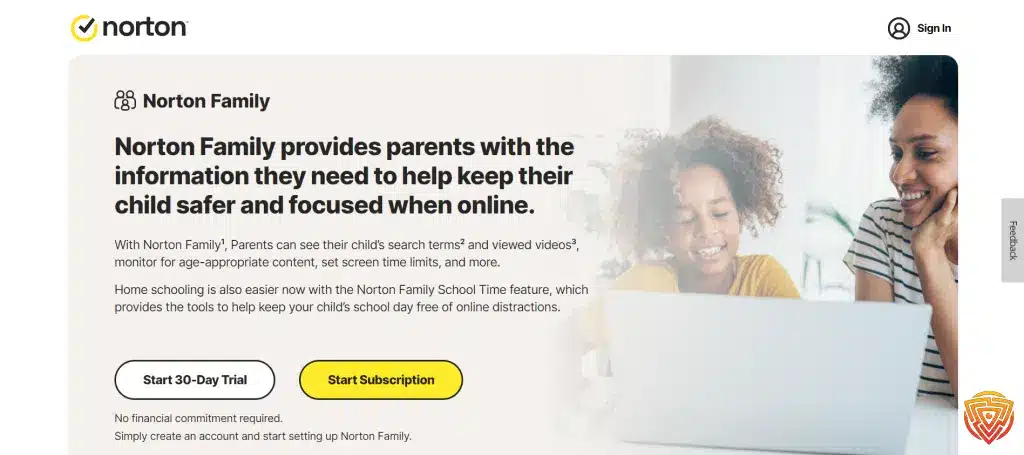
Norton Family is best for large families needing broad device coverage. It offers robust features like location tracking, web filtering, and screen time management, all backed by Norton’s trusted security tools.
Key Features
- Unlimited device support on premium plans.
- Web content filtering and safe search enforcement.
- Screen time scheduling and activity monitoring.
- Location tracking and geofencing.
- Activity history and monitoring.
Pros
- Supports large families with multiple devices.
- Trusted brand with robust security features.
- Comprehensive reporting and control tools.
Cons
- Free plan is limited; subscription needed for full features.
- Some advanced features can be complex to set up.
Pricing: $49.99/year.
4. Canopy – Best for Explicit Content Filtering
Overview:
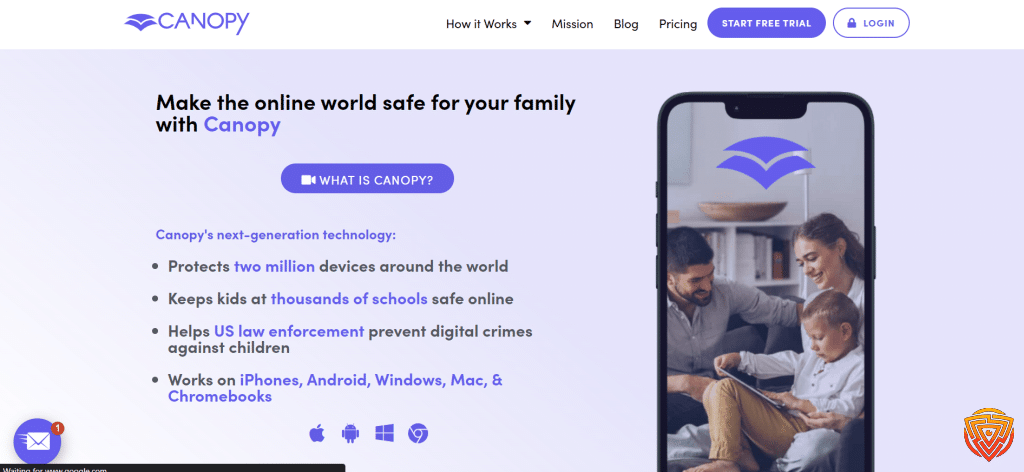
Canopy is one of the strongest Mobicip alternatives for families who care most about explicit-content filtering. It focuses on smarter real-time protection, including image-based filtering and stronger safeguards around inappropriate content.
Key Features:
- Real-time explicit-content filtering
- App blocking and website controls
- Sexting prevention alerts
- Location and screen-time tools
Pros:
- Excellent for explicit-content protection
- Cleaner, more modern user experience
- Good fit for parents who want stronger filtering without going overboard
Cons:
- Less established than some older parental control brands
- Best value is on annual billing
Pricing: Family plans currently start at $9.99/month billed annually.
5. Wondershare FamiSafe – Best for Balanced Features and Ease of Use

Overview:
Wondershare FamiSafe is best for parents looking for a balanced parental control app with location tracking, screen time tools, and a user-friendly setup.
Key Features
- Real-time location tracking and geofencing.
- Screen time scheduling and app usage monitoring.
- Web content filtering.
- Panic button for emergency alerts.
- Social media monitoring.
Pros
- Unique panic button for immediate safety alerts.
- Intuitive interface with robust location tracking.
- Wide range of monitoring features.
Cons
- Some features require a premium subscription.
- May consume more battery due to constant location tracking.
Pricing
- Pricing: Starts at $59.99/year, with quarterly and monthly plans also available.
6. Kaspersky Safe Kids – Best Budget-Friendly Option

Overview:
Kaspersky Safe Kids is best for those seeking a budget-friendly solution that balances content filtering, GPS tracking, and screen time management without compromising on essential features.
Key Features
- Web and app filtering.
- Screen time management and scheduling.
- GPS tracking and geofencing.
- Call and SMS monitoring.
- Content blocking and safe search enforcement.
Pros
- Affordable with a strong free version.
- Effective content filtering and GPS tracking.
- Trusted brand reputation.
Cons
- Free version offers limited features compared to premium.
- Interface may feel less modern to some users.
Pricing
- Pricing: Free version available. Paid pricing varies by region; in the US, Safe Kids is listed from $21.99 for the first year with a 30-day money-back guarantee.
7. Net Nanny – Best for Real-Time Content Filtering

Overview:
Net Nanny is best for families prioritizing real-time content filtering and screen time management. It blocks inappropriate content effectively, even in private browsing, making it a powerful tool for safer internet use.
Key Features
- Real-time web and content filtering.
- Customizable blocklists and categories.
- Screen time scheduling and monitoring.
- Location tracking features.
- Dashboard for managing multiple devices.
Pros
- Highly effective content filtering.
- Real-time alerts and customization options.
- Strong parental control features for web safety.
Cons
- Subscription required for full feature set.
- May require a learning curve for configuring filters.
Pricing
- Pricing: Net Nanny uses package-based pricing, so it is better to check the current plan options before buying.
8. Google Family Link – Best Free Alternative for Android Families
Overview:
Google Family Link is best for parents seeking a completely free solution for basic controls across Android (and partial iOS support). It manages apps, sets screen time limits, and monitors activity effortlessly.
Key Features
- Manage app installations and permissions.
- Screen time tracking and daily limits.
- Activity monitoring and reporting.
- Location tracking for Android devices.
- Browser safe search enforcement.
Pros
- Completely free and reliable.
- Seamless integration with Android.
- Simple and straightforward for basic controls.
Cons
- Limited features on iOS.
- Basic compared to specialized parental control apps.
Pricing
- Pricing: Free.
9. Apple Screen Time – Best Free Alternative for iPhone Families

Overview:
Apple Screen Time is the best free Mobicip alternative for iPhone and iPad families that want built-in parental controls without installing another app. It works well for app limits, downtime schedules, content restrictions, and purchase controls inside the Apple ecosystem.
Key Features
- App limits and downtime scheduling
- Content and privacy restrictions
- Purchase and download controls
- Remote family management through Apple family settings
- Usage reports for apps, websites, and categories
Pros
- Completely free for Apple families
- Built directly into iPhone and iPad settings
- Strong for app limits, downtime, and content restrictions
Cons
- Works best only inside the Apple ecosystem
- Lacks the deeper cross-platform reporting of premium apps
Pricing: Free.
10. Microsoft Family Safety – Best Free Alternative for Microsoft Households

Overview:
Microsoft Family Safety is the best free Mobicip alternative for Windows-first households. It is especially useful when your child uses Windows PCs, Microsoft accounts, Edge, or Xbox alongside mobile devices.
Key Features
- Screen time limits across Windows and Xbox
- Content filters and web filtering on Microsoft Edge
- Location sharing and family map tools
- App and game controls
- Activity reporting for family accounts
Pros
- Strong free option for Windows and Xbox families
- Easy fit for households already using Microsoft accounts
- Good core controls without another paid subscription
Cons
- Best experience depends on the Microsoft ecosystem
- Less flexible than top premium parental control apps across mixed devices
Pricing: Free.
11. OurPact – Best for Simple App Management and Scheduling

Overview:
OurPact is best for parents focusing on straightforward screen time and app management. Its user-friendly interface and flexible scheduling make it ideal for controlling app usage and setting screen time allowances from a smartphone.
Key Features
- Remote app blocking and approvals.
- Screen time scheduling and daily limits.
- Block internet access during specified times.
- Usage reports and alerts.
- Geofencing (premium feature).
Pros
- Easy to use and set up.
- Flexible scheduling and app control.
- Intuitive mobile interface.
Cons
- Free tier has feature limitations.
- Lacks comprehensive monitoring compared to competitors.
Pricing
- Pricing: Premium is $6.99/month or $69.99/year. Premium+ is $9.99/month or $99.99/year.
Which Mobicip Alternative Is Best for You?

- Choose Qustodio if you want the best all-round upgrade from Mobicip.
- Choose Bark if alerts about bullying, predators, or risky conversations matter more than deep manual review.
- Choose Canopy if your biggest concern is explicit-content exposure.
- Choose Norton Family if you manage a larger family or many Windows devices.
- Choose Google Family Link or Apple Screen Time if you want a free place to start.
Best Mobicip Alternative by Device and Family Type

For Android Families
If your household is mainly Android-based, Qustodio, Bark, and Google Family Link are usually the first three options worth comparing. Google Family Link is the easiest free starting point, but many parents outgrow it once they want broader reports, better filtering, or stronger cross-platform control. For a fuller shortlist, see my guide to the best parental control app for android.
For iPhone and iPad Families
If your children mainly use iPhone or iPad, start with Apple Screen Time if you want a free built-in solution. Move up to Qustodio, Bark, or Canopy if you want a more complete premium tool. Apple Screen Time is great for everyday limits, but it is still a lighter solution than the best paid parental control apps. My roundup of the best parental control app for iPhone goes deeper on that side.
For Windows and Mixed-Device Households
This is where Norton Family, Qustodio, and Microsoft Family Safety become more useful. If you are managing laptops, desktops, and phones together, a broader cross-platform tool usually makes more sense than a lightweight mobile-first app. That is one of the biggest reasons parents leave Mobicip: not because it fails, but because another tool handles the household mix better.
For Families Trying to Stay Free
If budget matters most, start with the best native or free options first: Google Family Link, Apple Screen Time, and Microsoft Family Safety. They can go surprisingly far when your needs are basic. But once you want stronger filtering, more detailed reports, or better all-round supervision, you will probably end up moving to one of the stronger premium tools in this list. That is why it helps to compare both this article and my guide to the best free parental control apps.
For Parents Who Want the Simplest Upgrade
If you do not want to overthink it, Qustodio is still the cleanest answer for most families. It sits in the middle of the market nicely: stronger than the free tools, easier to recommend broadly than more specialized apps, and a better all-round fit for parents who want practical family controls without turning the setup into a project.
Free vs Paid Mobicip Alternatives
One of the biggest questions parents ask is whether they should start with a free Mobicip alternative or move straight to a paid app. The answer depends less on price alone and more on what kind of control your household actually needs. If you only want app limits, simple schedules, and basic filtering, free tools can work surprisingly well. If you want stronger reporting, better alerts, easier management, and broader device support, paid tools usually make far more sense.
Free alternatives are best viewed as foundation tools. They help parents create rules and basic digital boundaries without much setup friction. That makes them ideal for younger children, lighter users, or households that want to start cautiously before deciding whether a premium subscription is justified.
Paid alternatives become more valuable once a child starts using more apps, more devices, and more online services. At that point, stronger filtering, location tools, clearer reports, and better oversight often matter more than simply having a low monthly cost. That is why premium apps like Qustodio, Bark, Canopy, and Norton Family sit at the top of this list. They are not just adding features for the sake of it; they are solving more demanding family use cases.
- Start free if your needs are basic and your household stays inside one device ecosystem.
- Upgrade to paid if you want stronger filtering, better alerts, clearer reporting, or easier multi-device control.
- Choose Qustodio if you want the safest premium all-rounder.
- Choose Bark if alerts and online risk detection matter most.
- Choose Canopy if explicit-content filtering is your top concern.
Is Mobicip Still Worth Using?

Yes. Mobicip is still a credible parental control app for app blocking, web filtering, screen-time rules, location tools, and family supervision. The reason to switch is not that Mobicip is unusable; it is that some alternatives now do specific jobs better, whether that is stronger filtering, better alerts, broader free controls, or a cleaner overall experience.
How I Chose the Best Mobicip Alternatives

- Free value and overall pricing
- Cross-platform support
- App blocking and screen-time controls
- Website filtering quality
- Location tools and alerts
- Ease of use for parents
What I Prioritized Most
For this roundup, I did not just look at which parental control apps are popular. I prioritized which tools make the most sense as actual Mobicip alternatives. That means looking at which apps do a better job for specific use cases, such as stronger filtering, clearer reporting, better free value, or easier family management across multiple device types.
I also gave extra weight to tools that are easier to recommend to normal families, not just power users. A parental control app can have a long feature list and still be a poor fit if setup is awkward or the dashboard feels frustrating. In practice, the best Mobicip alternative is the one a parent will actually use consistently.
Conclusion and Personal Recommendation
Best Mobicip alternatives are not all trying to do the same thing. Some are stronger for full family controls, some are better for alert-led monitoring, and some are simply better free starting points.
- Qustodio is my top recommendation for most families.
- Bark is the best alternative if social and communication alerts matter most.
- Canopy is the strongest pick for families focused on explicit-content protection.
If you want a free starting point, begin with Google Family Link or Apple Screen Time. If you want the strongest all-round upgrade from Mobicip, start with Qustodio.
Frequently Asked Questions
In navigating the complex landscape of parental control apps, common questions arise concerning functionality, cost-efficiency, and ease of use. These inquiries guide users toward making informed decisions to safeguard their children’s digital experiences.
What are the best Mobicip alternatives right now?
The best Mobicip alternatives for most families are Qustodio, Bark, Norton Family, Canopy, Wondershare FamiSafe, Kaspersky Safe Kids, and Net Nanny. Qustodio is the best overall option for most parents.
What is the best free Mobicip alternative?
The best free Mobicip alternative depends on your devices. Google Family Link is the best free pick for Android families, while Apple Screen Time is the best free pick for iPhone and iPad households.
Which Mobicip alternative is best for iPhone?
For iPhone families, Qustodio, Bark, Canopy, and Apple Screen Time are the strongest alternatives. Apple Screen Time is the easiest free option, while Qustodio is the best premium all-rounder.
Which apps like Mobicip are best for social media alerts?
Bark is the best Mobicip alternative for social media alerts and digital risk detection. It is built around warning parents about risky conversations and online behavior rather than just setting limits.
Which Mobicip competitor is best for blocking explicit content?
Canopy is one of the best Mobicip competitors for blocking explicit content. It stands out for stronger filtering aimed at reducing exposure to sexual or inappropriate material.
Is Mobicip still a good parental control app?
Yes. Mobicip is still a good parental control app for screen time, app blocking, web filtering, and location tools. Many parents switch only because another app fits their priorities better.
That’s All for Now
Thanks for reading my guide to the best Mobicip alternatives in 2026. Protecting kids online does not need to be complicated; you just need the right tool for your family’s needs.
For most parents, Qustodio is the safest all-round upgrade. If your biggest concern is social media alerts, choose Bark. If you want stronger explicit-content filtering, Canopy is one of the best options to consider.
Related Guides:
- best parental control app
- best free parental control apps
- best parental control app for android
- best parental control app for iPhone
Share this article

Stuart Kerr Spindlow is Impulsec’s Publisher, Chief Editor and Lead Reviewer. He writes and maintains coverage of consumer cybersecurity and digital-safety software, with a focus on practical suitability, limitations and the evidence behind product claims. Read Stuart’s full profile.