


As a caregiver, I know how crucial it is to prioritize **children’s** online safety. Discover more about the **Circle** parental control software through this insightful review. While many families swear by **Circle**, some are exploring different options. I have delved into the top alternatives to help guide you towards the ideal choice. Explore now to make an informed decision on safeguarding your loved ones online.
The best Circle alternatives offer improved features like social media monitoring, flexible screen time limits, and easier setup across devices. Some popular choices include Bark, which scans multiple messaging platforms, and Norton 360 Deluxe, which protects up to 5 devices. I’ll break down the pros and cons of different options to help you decide what works for your family’s needs.
⏳ Do you want to skip the read and get right to my top pick? The best Circle parental control alternative for most people is Qustodio.
Key Takeaways
- More Comprehensive Filtering & Monitoring – Many alternatives, like Qustodio and Net Nanny, offer stronger web filtering, app blocking, and real-time activity monitoring, providing better control over what kids access online.
- Stronger Time Management & Scheduling – Apps such as Bark and OurPact allow custom screen time limits, bedtime schedules, and remote device pausing, making it easier for parents to manage digital habits.
- Enhanced Social Media & Location Tracking – Some alternatives, like FamiSafe and mSpy, go beyond Circle’s features by offering social media monitoring, geofencing, and location tracking, ensuring both online safety and real-world security.
List of the Best Circle Parental Control Alternatives
Here is a rundown of the best Circle parental control alternatives in the market right now:
- Qustodio – Best for Comprehensive Parental Control – Editor’s Pick! 🏆
- Net Nanny – Best for Strong Web Filtering
- Bark – Best for Social Media and Text Monitoring
- FamilyTime – Best for Customizable Controls
- OurPact – Best for Screen Time Scheduling
- Norton Family – Best for Large Families
- Kaspersky Safe Kids – Best Budget-Friendly Option
- ESET Parental Control – Best for Android Users
- Mobicip – Best for School and Homework Time Management
Quick Comparison Table
This table compares the core parental control apps by pricing, free trial availability, key features, age suitability, supported platforms, and full review links.| Software | Pricing (Devices) | Free Plan / Trial | Key Features | Best For | Key Limitation | Supported Platforms | Review |
|---|---|---|---|---|---|---|---|
| 🏆 Qustodio (Editor’s Choice) | Basic: US$59.95/year, 5 devices; Complete: US$104.95/year, family devices subject to terms. Check Qustodio Pricing | Check current free/trial eligibility during signup. | 🕒 Screen-time limits and schedules 🌐 Web and app filtering 📍 Location monitoring 📊 Activity reports | Editorial all-round pick for everyday controls and reporting; not a measured test winner. | Calls and messages on iOS require a Windows or Mac computer; other features vary by platform. | 🪟 Windows, 🍎 macOS, 📱 iOS, 🤖 Android, Chromebook, Kindle Fire | Read Qustodio Review |
| Bark | Bark App: from US$14/month; unlimited devices and accounts. Phone and Watch are separate products. Check Bark Pricing | 7-day app trial; check signup terms. | 🚨 Concerning-content alerts 💬 Text, email and social-app monitoring 🕒 Screen-time schedules 🌐 Website and app blocking | Best for behaviour-based safety alerts without routinely exposing every conversation | Check country availability and exact account/device coverage; Bark App, Phone and Watch have different capabilities. | iOS and Android app; other devices and connected services depend on the monitoring feature. | Read Bark Review |
| Mobicip | Lite: US$2.99/month for 5 devices; Standard: US$4.99 for 10; Premium: US$7.99 for 20. All billed annually. Check Mobicip Pricing | 7-day Premium trial; check cancellation/refund terms. | 🌐 Website and app blocking 🕒 Screen-time schedules 📍 Family location 📊 Activity and social-media reports | Best for mixed-device families wanting flexible device allowances | Check plan and platform support for each required feature; a supported device does not have every control. | 🪟 Windows, 🍎 macOS, 📱 iOS, 🤖 Android, Chromebook, Kindle Fire | Read Mobicip Review |
| Norton Family | US$49.99 for the first year; check renewal price. Included with selected Norton 360 subscriptions. Check Norton Family Pricing | Check current trial availability in your country. | 🌐 Web, search and video supervision 🕒 Time limits and schedules 📍 Location history and alerts 📊 Email activity reports | Best for large families and households already using Norton | A Mac can manage Norton Family but cannot be monitored as a child device; features differ across platforms | 🪟 Windows, 📱 iOS, 🤖 Android | Read Norton Family Review |
| Canopy | Essential: US$8.33/month for 1 device; Plus: US$9.99 for 3; Premium: US$12.50 for up to 10. All billed annually. Check Canopy Pricing | 7-day trial; 30-day guarantee subject to terms. | 🌐 Real-time content filtering 🖼️ Sensitive-image detection 🚫 App and website blocking 🕒 Screen-time management | Best for filtering explicit images and web content | Check coverage for the particular app/browser and device; filtering is not a guarantee that every risk is detected. | 🪟 Windows, 🍎 macOS, 📱 iOS, 🤖 Android, Chromebook | Read Canopy Review |
| Wondershare FamiSafe | US$59.99/year for up to 10 devices, or US$9.99/month for up to 5 devices. Check FamiSafe Pricing | 3-day annual-plan trial; 7-day money-back guarantee subject to terms. Free tier has restricted/demo features. | 📍 Location and geofencing 🚗 Driving reports 🚫 App and website controls 🕒 Screen-time schedules | Best for families with teenagers and driving-safety needs | Advanced visibility features are platform-specific and should be used transparently with older children | 🪟 Windows, 🍎 macOS, 📱 iOS, 🤖 Android, Chromebook, Kindle Fire | Read FamiSafe Review |
| OurPact | Premium: US$69.99/year; Premium+: US$99.99/year. Both cover up to 20 child devices. Check OurPact Pricing | Trial offered; confirm duration and cancellation terms during signup. | 📱 Detailed app rules 🕒 Screen-time schedules and allowances 📍 Live location and location alerts 📸 Screen snapshots with Premium+ | Best for app blocking and detailed schedules across iPhone and Android | Limited to mobile devices; Premium+ is required for screenshots and content monitoring, and initial pairing may require a computer | 📱 iOS, 🤖 Android | Read OurPact Review |
In-Depth Reviews of the Best Circle Parental Control Alternatives
1. Qustodio – Editor’s Pick! 🏆

Qustodio is the best Circle Parental Control alternatives that offers many features similar to Circle. I find it to be a comprehensive option for families looking to manage their children’s online activities.
Main features:
• Web filtering and blocking
• Time limits and schedules
• Location tracking
• Social media monitoring
• App blocking
• Call and SMS monitoring (on some devices)
Pros:
• Works across multiple platforms and devices
• Detailed activity reports
• Easy-to-use interface
• Real-time alerts
Cons:
• Can be pricey for multiple children
• Some features only available on certain devices
• May slow down devices

Pricing and free trial:
- Free basic plan for 1 device
- Paid plans start at $54.95/year for up to 5 devices
- 3-day free trial of premium features
I think Qustodio offers robust protection, but it may be overkill for some families. Its cross-platform support is a big plus. The pricing can add up for larger families, though.
2. Net Nanny

Net Nanny is one of the best Circle Parental Control alternatives that offers a range of features to help parents monitor and manage their children’s online activities. I find it to be a solid alternative to Circle for those seeking comprehensive digital safety tools.
Net Nanny’s main features include:
- Web content filtering
- Screen time management
- Social media monitoring
- App blocking
- Location tracking
Pros of Net Nanny:
- User-friendly interface
- Customizable content filters
- Real-time alerts for parents
- Works across multiple devices and platforms
- Screens social media and messaging platforms
Cons of Net Nanny:
- Can be expensive compared to some alternatives
- Limited functionality on Mac and iOS devices
- Some users report occasional technical glitches

Pricing and free trial:
- Plans start at $39.99 per year
- Family protection plan covers up to 5 devices
- 14-day free trial available
I believe Net Nanny provides a comprehensive set of tools for parents concerned about their children’s online safety. While it may have some limitations, its robust features make it a worthy consideration for those looking beyond Circle’s offerings.
3. Bark

Bark is also one of the best Circle Parental Control alternatives that offers a different approach to online safety. I’ve found it focuses heavily on monitoring social media and messaging platforms.
Bark’s main features include:
- Social media and text message monitoring
- Content filtering for websites and apps
- Screen time management tools
- Location tracking
- Alerts for concerning content
Pros of Bark:
- Screens multiple messaging platforms
- Sensitive content filters
- Immediate alerts for parents
- Easy setup process
Cons of Bark:
- Limited web filtering compared to some alternatives
- Parent apps and alerts restricted by region
- May not be as comprehensive for device control

Pricing and free trial:
- 7-day free trial available
- Monthly and annual subscription options
- Prices start around $5-14 per month, depending on the plan
I think Bark is a solid option for parents primarily concerned with monitoring communications. However, those seeking more robust web filtering or device management might want to consider other alternatives.
4. FamilyTime

FamilyTime is a parental control app that helps parents monitor and manage their children’s device usage. It offers features to track location, control screen time, and block specific apps, making it one of the is also one of the best Circle Parental Control alternatives.
I find FamilyTime to be a solid option for parents looking for comprehensive device management tools. Here are its main features:
- Real-time location tracking
- App blocking and usage limits
- Web filtering
- Call and SMS monitoring
- Geofencing alerts
Some pros of FamilyTime include:
- Easy-to-use interface
- Flexible screen time scheduling
- SOS button for emergencies
- Detailed activity reports
A few cons to consider:
- Some features only available on certain devices
- May impact device battery life
- Occasional syncing delays

FamilyTime offers different pricing tiers:
- Free trial available
- Monthly plans starting around $27 for 5 devices
- Annual plans with discounts for more devices
I think FamilyTime provides a good balance of monitoring and control features. It gives parents useful tools to guide their children’s digital habits.
5. OurPact

OurPact is a parental control and family locator app that offers a range of features for managing children’s device usage. I find it to be one of the is also one of the best Circle Parental Control alternatives for parents looking for comprehensive control options.
Key features of OurPact include:
- Screen time management
- App blocking and filtering
- Location tracking
- Family scheduling tools
Pros of using OurPact:
- Easy-to-use interface
- Works across multiple devices and platforms
- Geofencing capabilities
- Customizable block schedules
Cons to consider:
- Limited web filtering on iOS devices
- Some features require a paid subscription
- May drain battery life on monitored devices

Pricing and trial information:
- Free basic plan available
- Premium plans start at $6.99 per month
- 7-day free trial for premium features
I believe OurPact offers a good balance of control and flexibility for families. Its cross-platform compatibility makes it suitable for households with different types of devices. The free version provides a taste of its capabilities, while paid tiers unlock more advanced features.
6. Norton Family

Norton Family is also one of the best Circle Parental Control alternatives that offers a range of features to help parents monitor and manage their children’s online activities. I find it to be a solid alternative to Circle for those looking for comprehensive digital safety solutions.
The main features of Norton Family include:
- Web filtering and blocking
- Time limits and schedules
- Location tracking
- Activity reports
- Social media monitoring
Pros of Norton Family:
- User-friendly interface
- Works on multiple devices and platforms
- Detailed activity reports
- Included with some Norton 360 plans
Cons of Norton Family:
- Limited iOS functionality
- No call or text monitoring
- Can be bypassed by tech-savvy kids
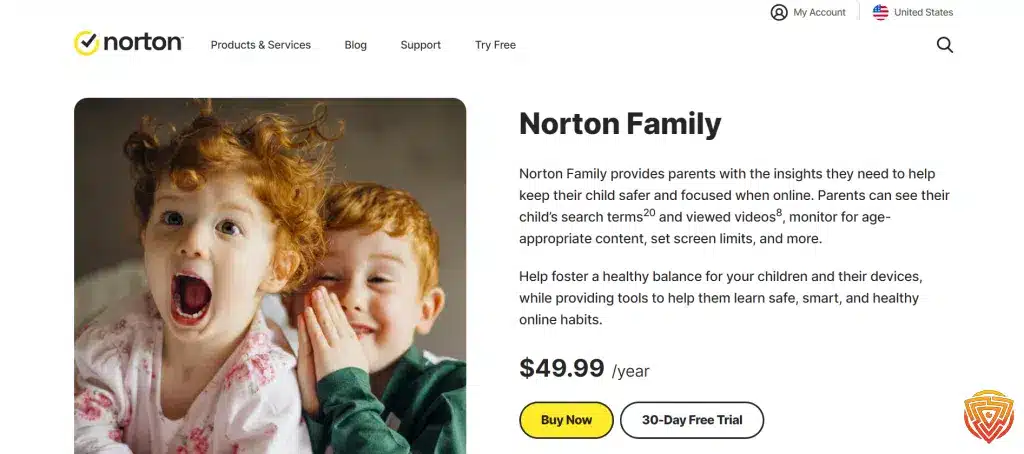
Pricing and free trial details:
- 30-day free trial
- Annual subscription required after trial
- Included with Norton 360 Deluxe and higher plans
I believe Norton Family is a good choice for parents who want a reliable parental control app with strong web filtering and activity monitoring features. It’s especially valuable for those already using Norton’s antivirus products.
7. Kaspersky Safe Kids

Kaspersky Safe Kids is one of the is also one of the best Circle Parental Control alternatives that helps parents keep their children safe online. It offers a range of features to monitor and manage kids’ digital activities across various devices.
Main features:
- Web filtering and safe search
- Screen time management
- Location tracking
- Social media monitoring
- App usage control
Pros:
- Works on multiple platforms (Android, iOS, Windows, Mac)
- Real-time alerts for parents
- Flexible settings for different age groups
- Affordable pricing compared to some competitors
Cons:
- Limited features on iOS devices
- Can be bypassed by tech-savvy kids
- Some users report occasional glitches
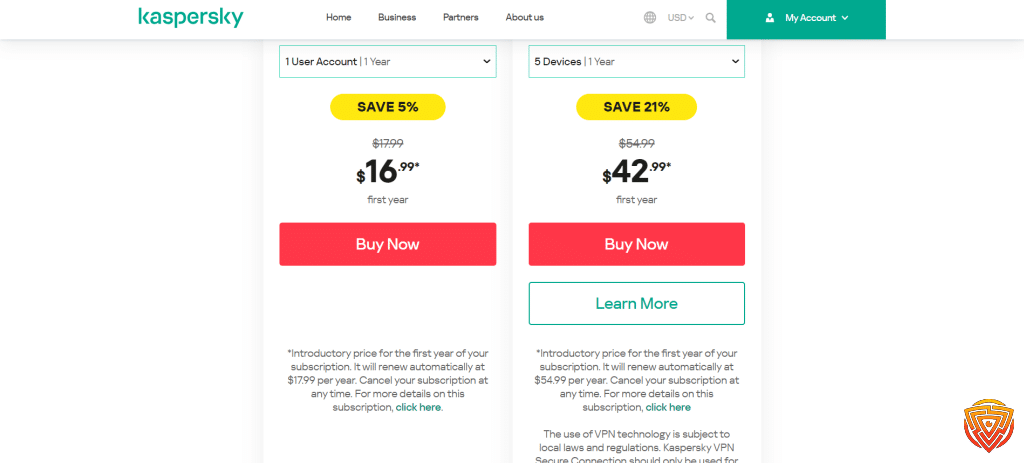
Pricing and free trial:
- Free version with basic features
- Premium version starts at $14.99 per year
- 7-day free trial of premium features
I find Kaspersky Safe Kids to be a solid option for parents looking for comprehensive parental control software. It strikes a good balance between functionality and ease of use.
The app’s cross-platform compatibility is a big plus. It allows parents to monitor their kids’ activities on various devices from a single dashboard.
While it may not be perfect, especially for iOS users, Kaspersky Safe Kids offers good value for its price. The free version can be a good starting point for parents new to parental control tools.
8. ESET Parental Control

ESET Parental Control is also one of the best Circle Parental Control alternatives for parents looking to manage their children’s online activities. I find it to be a solid alternative to Circle, offering a range of features to help keep kids safe on the internet.
The main features of ESET Parental Control include:
- Web Guard for filtering inappropriate content
- Application Guard to control app usage
- Child Locator for tracking your child’s location
- Parental Message system for communication
Pros of ESET Parental Control:
- User-friendly interface
- Real-time web filtering
- Supports multiple devices
- Detailed activity reports
Cons of ESET Parental Control:
- Limited features on iOS devices
- No call or text monitoring
- Lacks some advanced features found in other parental control apps

Pricing and free trial details:
- 30-day free trial available
- Annual subscription plansPricing starts at around $30 per year for one device
ESET Parental Control as one of the is also one of the best Circle Parental Control alternatives provides a balance between protection and flexibility. I appreciate its straightforward approach to managing screen time and online safety. While it may not have all the bells and whistles of some competitors, it covers the essential needs of most families.
9. Mobicip

Mobicip is yet another one of the best Circle Parental Control alternatives. I find it provides a wide range of features to help parents monitor and manage their children’s online activities.
The main features of Mobicip include:
- Website blocking and filtering
- Screen time limits
- App usage controls
- Social media monitoring
- Family location tracking
Some pros of using Mobicip are:
- Works across multiple devices and platforms
- User-friendly interface
- Customizable filtering options
- Real-time alerts and reports
A few cons to consider:
- Can be somewhat pricey for multiple devices
- May slow down internet speed slightly
- Some features require rooting or jailbreaking devices

Pricing and trial info:
- Plans start at $49.99 per year for 5 devices
- 7-day free trial available
- Family plan covers up to 20 devices
I think Mobicip stands out for its responsive customer service. It’s a solid choice for families looking for a versatile parental control solution that works on various devices and operating systems.
Understanding Parental Control Software

Parental control software helps keep kids safe online. It lets parents set limits on screen time and block inappropriate content. I’ll explain key features to look for and how these tools can benefit families.
Features to Consider
When choosing the is also one of the best Circle Parental Control alternatives, I recommend looking at a few key features. Content filtering blocks access to adult sites and other inappropriate content. Time limits let you set how long kids can use devices each day.
Activity monitoring tracks what sites kids visit and apps they use. Location tracking shows where your child’s device is. Some tools can block specific apps or games. Remote management lets parents adjust settings from anywhere.
Look for software that works on all your family’s devices. Easy setup and a user-friendly interface are important too. The best tools strike a balance between protection and privacy.
Benefits of Using Control Tools
Parental control software gives peace of mind. I know my kids are protected from online dangers when I can’t watch them. It helps teach healthy tech habits and time management skills.
These tools open up conversations about online safety. Families can discuss appropriate content and set rules together. Kids learn to be responsible digital citizens.
Control software reduces screen time and encourages other activities. This leads to better sleep, more family time, and improved focus on schoolwork. It also protects against cyberbullying and online predators.
Using these tools shows kids you care about their well-being. It builds trust as you guide them in the digital world.
Evaluating Security and Privacy

When choosing one of the best Circle Parental Control alternatives, security and privacy are crucial factors. I’ll examine how these apps protect user data and their privacy policies.
Data Protection Measures
Strong data protection is key for parental control apps. I found that Canopy uses built-in settings on Android and iPhone to prevent kids from removing the app without parent approval. This adds an extra layer of security.
Many apps use encryption to safeguard user information. I recommend looking for apps that use at least 256-bit encryption for data storage and transfer.
Two-factor authentication is another important security feature. It helps prevent unauthorized access to parental accounts.
Regular security audits and updates are vital. The best apps conduct frequent security checks and quickly patch any vulnerabilities.
Privacy Policies
Privacy policies outline how apps handle user data. I always read these carefully before choosing an app.
Look for apps that clearly state they don’t sell user data to third parties. This is especially important for children’s information.
Some apps collect minimal data to function. These are often better choices for privacy-conscious families.
I check if apps allow data deletion upon account closure. This ensures your family’s information isn’t stored indefinitely.
Bark screens social media and messaging platforms. While helpful, consider if this level of monitoring aligns with your family’s privacy values.
Conclusion and Personal Recommendation
After looking at the best Circle Parental Control alternatives, I think Qustodio is the best option for most families. It offers strong parental controls while being easy to use.
For tech-savvy parents, self-hosted options can work well. Setting up your own VPN and DNS server gives you full control. But this takes more time and skill to set up.
No single app is perfect for everyone. I suggest trying a few to see what fits your family’s needs best. The right tool depends on your kids’ ages, devices, and online habits.
Remember that parental controls work best with open communication. Talk to your kids about online safety and set clear rules together.
Frequently Asked Questions
Parental control apps offer various features to help families manage device usage and online safety. I’ll cover the best Circle Parental Control alternatives options for different needs and platforms.
What are the top-rated parental control apps available for iOS devices?
For iOS, I recommend Qustodio and OurPact. Qustodio provides comprehensive monitoring and filtering tools. OurPact excels at screen time management and app blocking.
Both work well with Apple’s built-in Screen Time features.
Which parental control software offers the best features for monitoring PC usage?
For PC monitoring, I find Net Nanny to be one of the best choices. It offers powerful content filtering and detailed activity reports.
Bark is another strong option, especially for social media and text message monitoring on computers.
Are there any high-quality free parental control software options?
While most robust parental control tools require payment, some free options exist. FamilyShield offers basic DNS filtering at no cost.
Screen Time is another free alternative with basic features for device management.
What is the best parental control app suitable for monitoring teenagers?
For teens, I recommend Bark. It’s designed to balance privacy with safety, focusing on alerting parents to potential issues rather than full monitoring.
Bark uses AI to scan for cyberbullying, self-harm, and other risks in texts and social media.
How do Qustodio and Net Nanny compare in terms of features and effectiveness?
Qustodio and Net Nanny are both top-tier parental control apps. Qustodio offers a more user-friendly interface and works across more platforms.
Net Nanny has stronger web filtering technology. Both provide robust monitoring and time management features.
What are the advantages of using Canopy for parental controls?
Canopy stands out for its real-time image and video filtering technology. It can block inappropriate content before it reaches a child’s device.
Canopy also offers location tracking and screen time management features.
That’s All For Now
I hope you found this article on the best Circle Parental Control alternatives helpful. Online safety for kids is a crucial topic for families today.
Thank you for taking the time to read through the options I’ve presented. I aim to keep this information up-to-date as new tools emerge.
I encourage you to explore the related articles linked below for more insights on digital parenting. There’s always more to learn in this rapidly changing area.
Please check back soon for fresh content on keeping kids safe online. I’m committed to providing useful resources on this important subject.
Your interest in protecting children in the digital world is admirable. Together, we can help create a safer online environment for the next generation.
Share this article

Stuart Kerr Spindlow is Impulsec’s Publisher, Chief Editor and Lead Reviewer. He writes and maintains coverage of consumer cybersecurity and digital-safety software, with a focus on practical suitability, limitations and the evidence behind product claims. Read Stuart’s full profile.