


Snapchat’s disappearing messages may sound fun for teens — but for parents, they’re a nightmare. Between vanishing chats, Snap Maps, and filters that hide risky behavior, it’s easy to miss signs of trouble. That’s why the best Snapchat monitoring tools in 2026 are essential for keeping your kids safe without invading their privacy.
At Impulsec, we test parental control apps across Android, iOS, and desktop to find out which actually deliver clear reports, alerts, and safety insights for parents. Here’s how you can keep your child’s Snapchat use healthy and secure this year.
TL;DR 📌 For most parents, Qustodio is the best Snapchat monitoring app in 2026 — combining social app tracking, screen-time limits, and alerts for suspicious content.
Ranked: Best Snapchat Monitoring Apps (2026)
- 🥇 Qustodio — Best Overall for Most Families (Editors Choice!)
- Bark — Best for Social Media Risk Alerts
- mSpy — Best for Capturing Snapchat Messages & Media
- Norton Family — Best for Large Households
- Google Family Link — Best Free Option for Basic Monitoring
Quick Apps Comparison Table
This table compares the core parental control apps by pricing, free trial availability, key features, age suitability, supported platforms, and full review links.| Software | Pricing (Devices) | Free Plan / Trial | Key Features | Best For | Key Limitation | Supported Platforms | Review |
|---|---|---|---|---|---|---|---|
| 🏆 Qustodio (Editor’s Choice) | Basic: US$59.95/year, 5 devices; Complete: US$104.95/year, family devices subject to terms. Check Qustodio Pricing | Check current free/trial eligibility during signup. | 🕒 Screen-time limits and schedules 🌐 Web and app filtering 📍 Location monitoring 📊 Activity reports | Editorial all-round pick for everyday controls and reporting; not a measured test winner. | Calls and messages on iOS require a Windows or Mac computer; other features vary by platform. | 🪟 Windows, 🍎 macOS, 📱 iOS, 🤖 Android, Chromebook, Kindle Fire | Read Qustodio Review |
| Bark | Bark App: from US$14/month; unlimited devices and accounts. Phone and Watch are separate products. Check Bark Pricing | 7-day app trial; check signup terms. | 🚨 Concerning-content alerts 💬 Text, email and social-app monitoring 🕒 Screen-time schedules 🌐 Website and app blocking | Best for behaviour-based safety alerts without routinely exposing every conversation | Check country availability and exact account/device coverage; Bark App, Phone and Watch have different capabilities. | iOS and Android app; other devices and connected services depend on the monitoring feature. | Read Bark Review |
| Mobicip | Lite: US$2.99/month for 5 devices; Standard: US$4.99 for 10; Premium: US$7.99 for 20. All billed annually. Check Mobicip Pricing | 7-day Premium trial; check cancellation/refund terms. | 🌐 Website and app blocking 🕒 Screen-time schedules 📍 Family location 📊 Activity and social-media reports | Best for mixed-device families wanting flexible device allowances | Check plan and platform support for each required feature; a supported device does not have every control. | 🪟 Windows, 🍎 macOS, 📱 iOS, 🤖 Android, Chromebook, Kindle Fire | Read Mobicip Review |
| Norton Family | US$49.99 for the first year; check renewal price. Included with selected Norton 360 subscriptions. Check Norton Family Pricing | Check current trial availability in your country. | 🌐 Web, search and video supervision 🕒 Time limits and schedules 📍 Location history and alerts 📊 Email activity reports | Best for large families and households already using Norton | A Mac can manage Norton Family but cannot be monitored as a child device; features differ across platforms | 🪟 Windows, 📱 iOS, 🤖 Android | Read Norton Family Review |
| Canopy | Essential: US$8.33/month for 1 device; Plus: US$9.99 for 3; Premium: US$12.50 for up to 10. All billed annually. Check Canopy Pricing | 7-day trial; 30-day guarantee subject to terms. | 🌐 Real-time content filtering 🖼️ Sensitive-image detection 🚫 App and website blocking 🕒 Screen-time management | Best for filtering explicit images and web content | Check coverage for the particular app/browser and device; filtering is not a guarantee that every risk is detected. | 🪟 Windows, 🍎 macOS, 📱 iOS, 🤖 Android, Chromebook | Read Canopy Review |
| Wondershare FamiSafe | US$59.99/year for up to 10 devices, or US$9.99/month for up to 5 devices. Check FamiSafe Pricing | 3-day annual-plan trial; 7-day money-back guarantee subject to terms. Free tier has restricted/demo features. | 📍 Location and geofencing 🚗 Driving reports 🚫 App and website controls 🕒 Screen-time schedules | Best for families with teenagers and driving-safety needs | Advanced visibility features are platform-specific and should be used transparently with older children | 🪟 Windows, 🍎 macOS, 📱 iOS, 🤖 Android, Chromebook, Kindle Fire | Read FamiSafe Review |
| OurPact | Premium: US$69.99/year; Premium+: US$99.99/year. Both cover up to 20 child devices. Check OurPact Pricing | Trial offered; confirm duration and cancellation terms during signup. | 📱 Detailed app rules 🕒 Screen-time schedules and allowances 📍 Live location and location alerts 📸 Screen snapshots with Premium+ | Best for app blocking and detailed schedules across iPhone and Android | Limited to mobile devices; Premium+ is required for screenshots and content monitoring, and initial pairing may require a computer | 📱 iOS, 🤖 Android | Read OurPact Review |
1. 🥇 Qustodio — Best Overall for Most Families

Overview:
In 2026, Qustodio remains the gold standard for parents who want both control and peace of mind. It tracks app activity, filters web content, monitors screen time, and flags risky behavior — all while maintaining a friendly interface that doesn’t feel invasive. It’s ideal for monitoring Snapchat alongside other social media apps your child uses daily.
Key Features:
- Tracks app usage, social activity, and web history in real time
- Sends alerts for suspicious or risky searches
- Cross-platform compatibility (Android, iOS, Windows, Mac, Chromebook)
- Screen-time limits and instant device pause
- Dashboard summaries that make parental monitoring easy
Pros:
- Clean, intuitive interface with reliable activity reports
- Detects and manages Snapchat use effectively
- Excellent multi-device support for families
Cons:
- No full message-level monitoring (like mSpy)
- Some advanced reports require Premium
Pricing & CTA:
Free version available; Premium plans start at $54.95/year (5 devices).
2. Bark — Best for Social Media Risk Alerts

Overview:
Bark isn’t about spying — it’s about protection. Using advanced AI, Bark scans Snapchat, Instagram, TikTok, and 30+ other platforms for harmful language and emotional red flags. Parents receive alerts only when a potential issue arises, so kids still have privacy while staying safe.
Key Features:
- AI-powered detection for bullying, depression, grooming, or self-harm cues
- Monitors texts, emails, photos, and over 30 social apps
- Real-time alerts with recommended next steps
- Screen-time management and content filters (Premium plan)
- Location alerts and check-ins
Pros:
- Excellent for social and emotional risk detection
- Reduces over-monitoring with contextual alerts
- Supports Android, iOS, and Chromebook
Cons:
- No full chat recording or deleted message recovery
- Occasional false positives with slang or sarcasm
Pricing & CTA:
Plans start at $5/month (Bark Jr) or $14/month (Bark Premium), with a 7-day free trial.
3. mSpy — Best for Capturing Snapchat Messages & Media

Overview:
When parents need deeper insight into what’s really happening on Snapchat, mSpy is the heavyweight. It captures screenshots, messages (including deleted ones), and shared media — giving full visibility across social and chat apps. It’s best suited for parents of older teens or situations where stronger oversight is essential.
Key Features:
- Monitors Snapchat messages, photos, and videos, even if deleted
- Tracks GPS location, browser history, and keystrokes
- Provides social app logs (WhatsApp, Instagram, Telegram, etc.)
- Includes remote control tools such as app blocking and screen capture
- Works quietly in the background without detection
Pros:
- Deep Snapchat data collection unmatched by competitors
- Real-time location and chat visibility
- Powerful parental or investigative monitoring suite
Cons:
- Android offers more features than iOS
- Requires more setup and technical familiarity
Pricing & CTA:
Plans start at $11.67/month (annual billing).
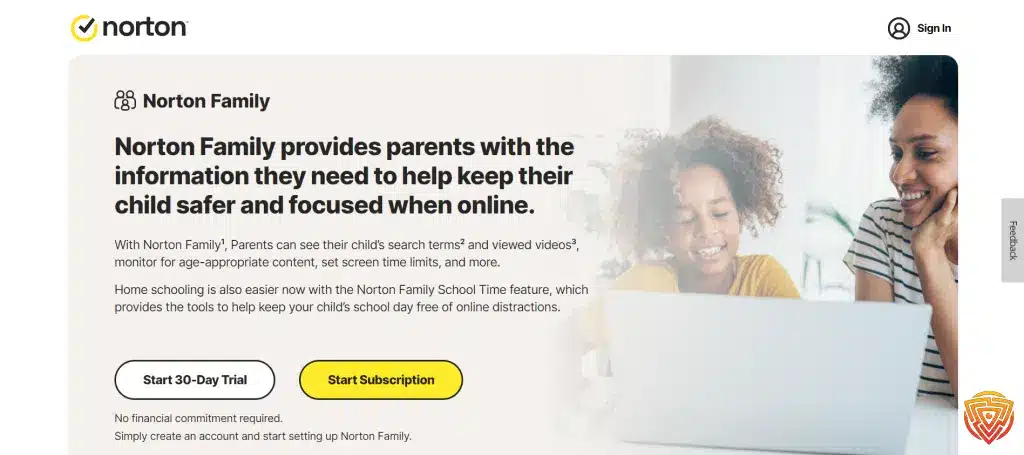
4. Norton Family — Best for Large Households
Overview:
Norton Family offers strong device supervision for big families who want an affordable way to monitor kids’ social-media habits, including Snapchat usage trends. While it doesn’t read messages, it tracks time spent on social platforms and provides detailed weekly activity summaries for parents — all under one easy subscription.
Key Features:
- Unlimited device coverage on one plan
- Tracks web, search, and video activity with app-usage time logs
- Customizable screen-time schedules and daily limits
- Location supervision and driving mode for teens
- Simple parent dashboard accessible from any browser
Pros:
- Best value for households with multiple kids or devices
- Reliable reports and time-management controls
- Easy setup with a trusted cybersecurity brand
Cons:
- Limited Snapchat-specific insights
- Works best on Windows and Android; fewer iOS options
Pricing & CTA:
Annual plan at $49.99/year with unlimited devices.
5. Google Family Link — Best Free Option for Basic Monitoring

Overview:
If you’re looking for a completely free way to supervise Snapchat and other apps, Google Family Link is a solid entry-level option. It’s best for younger children who use Android or Chromebook devices, letting parents review app activity, approve downloads, and set daily screen-time limits.
Key Features:
- Tracks app activity, downloads, and screen time
- Blocks unapproved apps and manages content filters
- Allows location tracking and device locking
- Integrates with Google accounts for seamless use
- Built directly into Android and ChromeOS
Pros:
- 100% free and easy to set up
- Ideal for early smartphone users
- Syncs directly with the Google ecosystem
Cons:
- Limited Snapchat insights — monitors usage, not content
- Not available for iOS users
Pricing:
Completely free for Android and Chromebook users via Google Play.
Understanding Snapchat

As a parent, it is important to understand the social media app that your child is using. Snapchat is a popular social media app that allows users to share photos and videos that disappear after a short period of time. It is important to note that while the content may disappear from the app, it can still be saved or captured by the recipient.
Snapchat is primarily used by young people, with a majority of its users being under the age of 25. It is important to note that Snapchat has age restrictions in place, with users needing to be at least 13 years old to create an account. However, there is no age verification process, so it is possible for younger users to create an account.
Snapchat allows users to add friends by searching for their username or by scanning their unique Snapcode. Users can also add friends by syncing their contacts or by being in close proximity to someone else who has the app open. It is important to note that Snapchat also allows users to share their location with friends, which can be a concern for some parents.
Snapchat has a number of features that allow users to customize their snaps. Users can add filters, stickers, and text to their photos and videos. They can also use lenses, which are augmented reality filters that can change their appearance or add special effects to their snaps.
Overall, Snapchat is a popular social media app among young people. While it can be a fun way to stay connected with friends, it is important for parents to be aware of the potential risks associated with the app. By understanding how Snapchat works and knowing the best app to monitor Snapchat on iPhone, parents can better monitor their child’s use of the app and ensure their safety online.
Why Parents Should Monitor Snapchat

As a parent, I believe it is crucial to monitor my child’s social media activity, including their use of Snapchat. Here are a few reasons why I think parents should monitor Snapchat:
Safety Concerns
Snapchat can be a fun way for kids and teenagers to connect with friends, but it can also pose safety risks. For example, some users may share their location with others, which could potentially put them in danger. Additionally, cyberbullying is a real issue on social media platforms, including Snapchat. By monitoring your child’s Snapchat activity, you can help ensure their safety and prevent them from becoming victims of cyberbullying.
Inappropriate Content
Snapchat allows users to share images, videos, and messages that may not be appropriate for children and teenagers. By monitoring your child’s Snapchat activity, you can ensure that they are not exposed to inappropriate content. Additionally, you can have conversations with your child about what is and is not appropriate to share on social media.
Conversations and Messages
Snapchat conversations and messages can be easily deleted, which can make it difficult for parents to monitor their child’s activity. However, by using Snapchat monitoring tools, parents can keep track of their child’s conversations and messages, even if they are deleted. This can help parents identify potential issues and address them before they become bigger problems.
Location Sharing
Snapchat allows users to share their location with friends. While this feature can be fun, it can also pose safety risks. By monitoring your child’s location sharing on Snapchat, you can help ensure their safety and prevent them from sharing their location with strangers.
Parental Control Features on Snapchat
As a parent, I understand the importance of ensuring my child’s safety while they use social media apps like Snapchat. Snapchat has several parental control features that can help me monitor my child’s activity on the app.
Content Controls
Snapchat has built-in content controls that allow me to restrict certain types of content from appearing in my child’s feed. These controls work for the Stories and Spotlight feeds only and can be accessed through the Family Center feature. I can also report problematic profiles to Snapchat’s Trust and Safety team if I come across any inappropriate content.
Privacy Controls
Snapchat’s privacy controls allow me to see who my child interacts with on the app. I can inspect their friends list and set up privacy settings to ensure that only their family and friends can see their snaps. Snapchat also allows me to set up screen time limits to control the amount of time my child spends on the app.
Family Center
Snapchat’s Family Center is a new feature that allows me to access all of the parental control features in one place. I can access the Family Center from the app’s Profile Settings or by searching for “family center” in the app’s Search feature. The Family Center also provides resources and tips for parents to help keep their children safe while using the app.
External Tools for Snapchat Monitoring

As a parent, it is crucial to keep an eye on your child’s online activities, especially on social media platforms like Snapchat. Fortunately, there are several external tools available that can help you monitor your child’s Snapchat activity. You may ask now, how do I monitor my childs Snapchat?
Parental Control App for SnapChat
Parental control solutions like Bark and Qustodio are specifically designed to help parents monitor their child’s online activity. These best parental control app for Snapchat allow you to set up alerts for specific keywords, such as profanity or bullying, and notify you when your child uses them on Snapchat. Additionally, these apps let you limit your child’s screen time and restrict access to certain apps on their device.
Monitoring Apps
Monitoring apps like mSpy and uMobix are another option for parents who want to monitor their child’s Snapchat activity. These apps that monitor Snapchat on iPhone allow you to track your child’s Snapchat messages, photos, and videos, including those that have been deleted. Additionally, they provide you with access to your child’s call logs, text messages, and location.
AI-Powered Monitoring
Some monitoring apps, like Eyezy, use artificial intelligence (AI) to help parents monitor their child’s Snapchat activity. These apps analyze your child’s messages and photos for inappropriate content and notify you if they find anything concerning. Additionally, they provide you with real-time alerts when your child receives or sends messages containing specific keywords.
Keyloggers
Keyloggers are another type of monitoring tool that can be used to track your child’s Snapchat activity. These tools record every keystroke made on your child’s device, including their Snapchat login information. While keyloggers are an effective way to monitor your child’s Snapchat activity, they can be difficult to install and require physical access to your child’s device.
How to Monitor Snapchat on Different Devices
As a concerned parent, monitoring your child’s Snapchat activity is crucial in ensuring their online safety. Here’s how to monitor Snapchat on different devices:
Monitoring Snapchat on Apple Devices
iPhone and iPad
If your child uses an iPhone or iPad, you can use Apple’s Screen Time feature to monitor their Snapchat activity. Screen Time allows you to set time limits for specific apps, including Snapchat. You can also view usage reports to see how much time your child spends on the app.
To enable Screen Time, go to Settings > Screen Time > Turn On Screen Time. You can then set app limits and view usage reports by going to the Screen Time tab.
Mac
If your child uses a Mac, you can use third-party software like Net Nanny or Qustodio to monitor their Snapchat activity. These programs allow you to block certain websites and apps, including Snapchat, and view usage reports.
Monitoring Snapchat on Android Devices
Android Phone
If your child uses an Android phone, you can use Google’s Family Link app to monitor their Snapchat activity. Family Link allows you to set time limits for specific apps, including Snapchat, and view usage reports.
To set up Family Link, download the app from the Google Play Store and follow the on-screen instructions.
Tablet
If your child uses an Android tablet, you can use third-party software like Net Nanny or Qustodio to monitor their Snapchat activity. These programs allow you to block certain websites and apps, including Snapchat, and view usage reports.
Protecting Privacy While Monitoring

As a parent, monitoring your child’s Snapchat activity is important for their online safety. However, it is also important to respect their privacy and autonomy. Here are some tips to help you protect your child’s privacy while monitoring their Snapchat activity:
- Discuss Monitoring with Your Child: Before you start monitoring your child’s Snapchat activity, have a conversation with them about why you want to monitor their activity and how you plan to do it. This will help them understand that you are doing it to keep them safe and not to invade their privacy.
- Use Parental Control Features: Snapchat has parental control features that allow you to monitor your child’s activity without invading their privacy. For example, you can use the Family Center feature to view your child’s activity and report any concerns to Snapchat. This feature is designed to respect your child’s privacy and autonomy while still allowing you to monitor their activity.
- Set Ground Rules: Set clear ground rules with your child about what is and is not acceptable behavior on Snapchat. This will help them understand what you expect from them and what consequences they will face if they break the rules. It will also help you monitor their activity more effectively.
- Use Third-Party Monitoring Apps: If you want to monitor your child’s Snapchat activity more closely, you can use third-party monitoring apps. These apps allow you to monitor your child’s activity in real-time and provide you with detailed reports on their activity. However, it is important to choose a reputable app that respects your child’s privacy and autonomy.
By following these tips, you can protect your child’s privacy while monitoring their Snapchat activity. Remember, monitoring your child’s activity is important for their online safety, but it is also important to respect their privacy and autonomy.
Dealing with Harmful Content and Cyberbullying
As a parent, it’s important to be aware of the potential risks of Snapchat and how to handle them. Harmful content and cyberbullying are two of the most common issues parents face when their children use Snapchat. Here are some tips on how to deal with these issues:
Harmful Content
Snapchat has guidelines that prohibit illegal and harmful content, and they have a zero-tolerance policy for users committing these harms. However, it’s still possible for your child to come across inappropriate content. Here’s what you can do:
- Report the content: If you come across any inappropriate content on Snapchat, you can report it. Snapchat has a reporting system that allows you to flag any content that violates their guidelines. This will help keep your child and other users safe.
- Use parental controls: Snapchat has basic parental controls that allow you to restrict certain content in the Stories and Spotlight feed. You can also monitor who your child interacts with and inspect their friends list.
Cyberbullying
Cyberbullying is a serious issue that can have a negative impact on your child’s mental health. Here’s how you can deal with it:
- Educate your child: Talk to your child about cyberbullying and let them know that it’s not okay to bully or harass others online. Encourage them to speak up if they see someone else being bullied.
- Use parental controls: Parental control tools can send real-time alerts to parents if they detect harmful or offensive content in a child’s messages, allowing for timely intervention.
- Report the bully: If your child is being cyberbullied, encourage them to report the bully. Snapchat has a reporting system that allows users to flag any content that violates their guidelines. You can also contact Snapchat’s support site for additional help and support.
Snapchat Vs. Other Social Media Platforms

As a parent, it’s important to understand the differences between Snapchat and other social media platforms like Instagram, TikTok, and YouTube. While all of these platforms allow users to share photos and videos with friends and followers, there are some key differences to keep in mind.
One of the biggest differences is the way content is presented. On Snapchat, the main feature is the “Stories” section, where users can share photos and videos that disappear after 24 hours. This is different from other platforms like Instagram, where stories also disappear after 24 hours, but the main feed is a permanent collection of photos and videos that users can scroll through at any time.
Another key difference is the “Spotlight” feature on Snapchat, which allows users to share short-form videos with a wider audience. This is similar to the “For You” page on TikTok, where users can discover new content based on their interests. However, unlike TikTok, Snapchat’s Spotlight feature does not have a “like” or “comment” system, which can help reduce the pressure to compete for likes and followers.
When it comes to parental control app for SnapChat, Snapchat offers some basic features that allow parents to monitor their child’s activity on the platform. For example, parents can view their child’s friends list, restrict certain content, and even report problematic profiles. However, there are also third-party apps like Bark and Qustodio that offer more comprehensive parental control for Snapchat and other social media platforms.
Conclusion and Personal Recommendation
When it comes to Snapchat monitoring for parents in 2026, the app you choose should balance visibility, safety, and trust.
After testing dozens of tools, Qustodio consistently stands out as the best all-round monitoring solution. It tracks app activity across devices, filters web content, and gives parents the insights they need — without being overly invasive.
If your priority is emotional risk detection, Bark is a great secondary choice, while mSpy remains unbeatable for deep message monitoring. But for most families, Qustodio offers the perfect balance of ease, coverage, and peace of mind.
👉 For most parents, Qustodio is the #1 Snapchat monitoring app of 2026 — reliable, user-friendly, and built for real family life.
Frequently Asked Questions
What are some effective parental control app for Snapchat?
There are several effective parental control app for Snapchat that can be used to monitor Snapchat. Some of the popular options include Bark, mSpy, and Mobicip. These apps allow parents to monitor their child’s Snapchat activity, including messages, photos, and videos. They also provide real-time alerts and notifications when inappropriate content is detected.
How can I monitor my child’s Snapchat without them knowing?
Monitoring your child’s Snapchat activity without them knowing can be a tricky task. However, some parent apps like Bark allow you to monitor Snapchat activity without your child knowing. Bark is a parental control app for Snapchat that uses advanced algorithms to detect potential risks and sends alerts to parents without the child’s knowledge. Another option is to set up a Snapchat account yourself and add your child as a friend. This way, you can monitor their activity without them knowing.
Is there a Snapchat spy app for parents?
No, there is no official Snapchat spy app for parents. However, there are several third-party apps available that claim to provide Snapchat spy features. It is important to note that using such apps can be illegal and may violate Snapchat’s terms of service.
Can Snapchat messages be monitored by parents?
Yes, Snapchat messages can be monitored by parents using parent apps like Bark, mSpy, and Mobicip. These apps allow parents to monitor their child’s Snapchat messages, including text messages, photos, and videos.
Is there a parental control for Snapchat?
Yes, Snapchat has a built-in parental control feature called Family Center. This feature allows parents to monitor their child’s Snapchat activity, including their friends list and the content they share. Family Center also provides real-time alerts and notifications when inappropriate content is detected.
Are there any free options for best Snapchat monitoring for parents?
There are some free parental control app for Snapchat options available for Snapchat monitoring, but they may not provide all the features that paid parent apps offer. One such option is the built-in parental control feature of Snapchat called Family Center. However, it is important to note that free options may not be as effective as paid options when it comes to monitoring and protecting your child’s online safety.
That’s All for Now
Snapchat’s disappearing messages don’t have to leave you in the dark. With apps like Qustodio, Bark, and mSpy, you can stay informed and involved — without crossing privacy boundaries.
The right Snapchat monitoring app for parents keeps kids safe, builds trust, and helps families navigate social media together.
Share this article

Stuart Kerr Spindlow is Impulsec’s Publisher, Chief Editor and Lead Reviewer. He writes and maintains coverage of consumer cybersecurity and digital-safety software, with a focus on practical suitability, limitations and the evidence behind product claims. Read Stuart’s full profile.
This guide hit the nail on the head! 👏 With Snapchat’s disappearing messages and Snap Map, it’s easy for parents to feel out of their depth. Thanks to this article, I finally understand how tools like Family Center and third-party apps can bridge the gap without invading my kid’s space. Love that it balances safety with privacy — that’s key in today’s digital parenting game. 🙌