


Raising children in the digital age can be worrisome for many families. Mobicip offers a helpful solution to this common concern. This parental control tool is compatible with various devices, including phones, tablets, and computers. Thanks to Mobicip, parents can easily regulate screen time, block inappropriate websites, and keep an eye on their kids’ online behavior. If you want peace of mind while your children explore the online world, Mobicip is the answer you’ve been looking for!
Mobicip started as a safe browser but grew into more. Now it’s a full app for digital safety. Parents can use it to set rules for internet use and keep an eye on their kids’ online habits. The app works on many devices, so it can protect kids no matter what they use to go online.
Some people wonder how Mobicip compares to other apps like Qustodio. Both try to keep kids safe online, but they have different features. It’s a good idea to look at what each one offers before picking one. The right choice depends on what a family needs.
Key Takeaways
- Mobicip is a parental control app for many devices.
- It has features like screen time limits and content filtering.
- Parents can choose from different plans to fit their needs.
Understanding Mobicip

Mobicip is a parental control app designed to help parents manage their children’s online activities. It offers a range of features to promote safe internet use.
The app includes a safe browser that blocks inappropriate content. This browser works even in private browsing modes, keeping kids protected.
Content filtering is a key part of Mobicip. Parents can set up filters based on their child’s age and needs. This helps block access to harmful or unsuitable websites.
Mobicip also lets parents set screen time limits. They can create daily or weekly limits for device use. Parents can even set schedules for when certain apps can be used.
The app works on many devices, including phones, tablets, and computers. This makes it easy for families with multiple devices to use Mobicip.
Mobicip offers a user-friendly dashboard for parents. From here, they can monitor their child’s online activities and adjust settings as needed.
While Mobicip isn’t free, it does offer a trial period. This lets parents test the app before committing to a subscription.
Key Features of Mobicip
Mobicip offers several tools to help parents manage their children’s online activities. These features aim to create a safer digital environment for kids.
Safe Browser
The Mobicip safe browser filters out harmful content. It blocks websites with inappropriate material like violence, drugs, and adult content.
Parents can set custom filters based on their family’s needs. The browser works on different devices, including computers, tablets, and phones.
It also has a safe search feature. This stops kids from seeing unsafe results when using search engines.
VPN for Online Privacy
Mobicip includes a VPN to protect online privacy. The Mobicip VPN hides the user’s real IP address and location.
This makes it harder for others to track online activities. It also helps bypass geo-restrictions on content.
The VPN works on various devices and operating systems. It’s easy to set up and use, even for those new to VPNs.
Parental Control Options
Mobicip offers many parental control features. Parents can set screen time limits for different devices and apps.
They can also block specific apps or websites. This helps manage how much time kids spend on games or social media.
The app allows parents to set schedules. They can choose when kids can use devices or certain apps.
Mobicip also lets parents set up different rules for each child. This makes it flexible for families with kids of various ages.
Activity Reports and Monitoring
Mobicip provides detailed reports on online activities. Parents can see which websites their kids visit and how long they spend online.
The app also monitors search terms and social media use. This helps parents spot potential issues early.
Reports are easy to read and understand. They show data in graphs and charts.
Parents can get alerts about suspicious activities. This allows them to act quickly if needed.
Device Compatibility

Mobicip works on many popular devices and operating systems. The app offers different features depending on the platform. Here’s a breakdown of how Mobicip functions across iOS, Android, Windows, MacOS, Kindle, and Chromebook devices.
Mobicip on iOS Devices
Mobicip is compatible with iPhones and iPads running recent versions of iOS. On these devices, Mobicip operates as a VPN rather than a browser. This allows it to filter content across all apps, not just web browsing.
Parents can set up screen time limits and app restrictions through the Mobicip dashboard. The app can block inappropriate content in Safari and other browsers. It also monitors social media use and messaging.
One key benefit is Mobicip Technologies’ seamless iOS setup process. This makes it easy for parents to get started quickly on their children’s Apple devices.
Mobicip on Android Devices
Mobicip is compatible with Android devices running Android 5.0 (Lollipop) or newer. On Android, Mobicip functions as both a VPN and a safe browser app.
The Android version offers robust monitoring of app usage. Parents can view which apps their kids use most and set time limits. Mobicip can also block certain apps entirely.
Content filtering works across browsers and apps on Android. The safe browser ensures kids can’t easily bypass restrictions. Location tracking is another helpful feature for parents on Android devices.
Mobicip on Windows and MacOS
Mobicip provides solid coverage for desktop computers. It works on both Windows PCs and Mac computers.
On these platforms, Mobicip installs as software rather than an app. It can monitor all online activity across browsers and programs. Parents get detailed reports on computer usage.
Key features include:
- Content filtering
- Time limits for computer use
- Ability to block specific programs
- Keystroke logging (optional)
The desktop versions give parents strong control over their kids’ computer use.
Mobicip on Kindle and Chromebooks
Mobicip extends its protection to Kindle Fire tablets and Mobicip Chromebooks. This is helpful for families using these popular, affordable devices.
On Kindle, Mobicip works similarly to its Android version. It can filter content, set time limits, and block apps.
For Chromebooks, Mobicip offers a browser extension. This filters web content and provides activity reports. It’s a good option for school-issued Chromebooks.
Mobicip’s support for these platforms helps parents maintain consistent rules across all family devices.
Setting Up Mobicip
Mobicip offers a straightforward setup process to help parents protect their children online. The steps involve downloading the app, creating a family profile, and customizing parental controls.
Mobicip Downloading and Installing
To start using Mobicip, parents need to download the app on all devices they want to monitor. The app is available for various platforms, including iOS, Android, Windows, and Mac.
For Windows users, Mobicip isn’t on the Microsoft Store. Instead, they must download it directly from the Mobicip website. After downloading, launch the installer and give admin access to proceed.
On mobile devices, parents can find Mobicip in the App Store or Google Play Store. Once downloaded, they should open the app and follow the on-screen instructions to set it up.
Creating Your Family Profile
After installing Mobicip, the next step is setting up a family profile. This process involves creating an account and adding family members.
-
Parents start by choosing Parent as the primary user when opening the app for the first time. They then enter their email and create a password for the account.
-
Next, they add profiles for each child. This step requires entering the child’s name and age. Parents can also set up different rules for each child based on their age and maturity level.
-
To set app limits, parents select the child’s profile and choose which apps to restrict. They can set daily time limits or block certain apps entirely.
Configuring Parental Controls
Mobicip offers various parental control options to customize the online experience for children. Parents can set app limits, create web filters, and monitor screen time.
Web filtering allows parents to block inappropriate content. Mobicip provides preset filter categories, but parents can also customize these to their preferences.
Screen time management lets parents set usage schedules. They can define when devices can be used and for how long, helping to create healthy digital habits.
Mobicip Plans and Pricing
Mobicip offers several plans to fit different family needs and budgets. The options include a free trial, premium features, and various tiers with different device limits and capabilities.
Mobicip Free Trial
Parental control app Mobicip provides a 7-day free trial of its Premium plan. This trial gives families full access to all Premium features, including app blocking and daily screen time limits. Users can monitor up to 5 devices during the trial period.
The free trial is a great way to test Mobicip’s parental controls. It lets parents see if the software meets their needs before paying. No credit card is required to start the trial.
Mobicip Premium Plan
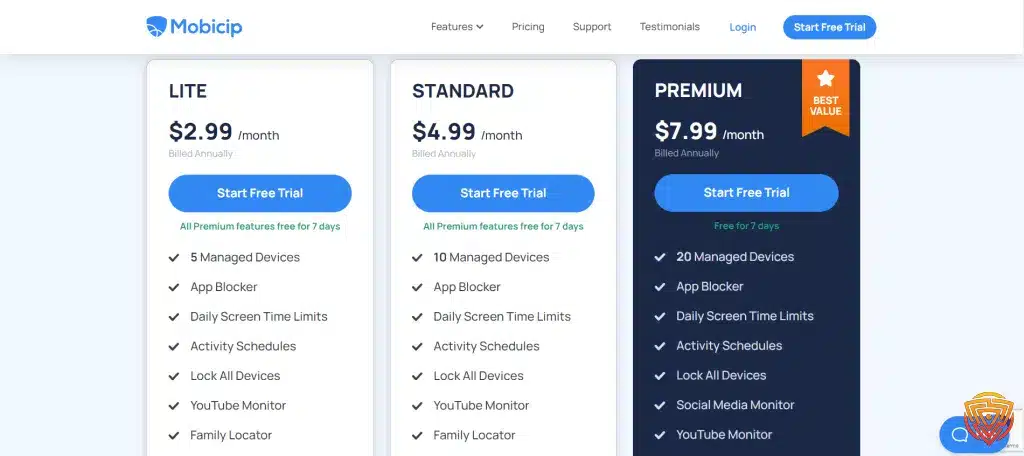
The Premium plan is Mobicip’s top-tier offering. It supports up to 20 devices, making it ideal for larger families. Key features include:
- App blocking
- Daily screen time limits
- Activity schedules
- Social media monitoring
Premium users can set custom time limits for specific apps. This helps parents manage their children’s device use more precisely.
The plan also includes a lock feature for all devices. This gives parents quick control in urgent situations.
Comparing Lite, Standard, and Basic Plans
Mobicip offers three main plans: Lite, Standard, and Premium. Here’s a quick comparison:
| Plan | Devices | Key Features |
|---|---|---|
| Lite | 5 | Basic filtering, reports |
| Standard | 10 | App blocking, time limits |
| Premium | 20 | Social monitoring, advanced controls |
The Lite plan is best for small families with basic needs. Standard adds more control features for growing families. Premium offers the most comprehensive protection.
All plans include Mobicip’s core web filtering technology. This helps keep kids safe from harmful online content across devices.
Managing Online Safety with Mobicip

Mobicip offers tools to set time limits, track locations, and filter web content. These features give parents control over their children’s online activities and help create a safer digital environment.
Time Limits and Schedules
Mobicip’s parental control app lets parents set daily and weekly screen time limits. This helps prevent excessive device use. Parents can create custom schedules for different times of day or week.
The app allows setting limits for specific apps. This is useful for managing time spent on social media, games, or videos. Parents can adjust these limits as needed.
Mobicip sends alerts when time limits are reached. This reminds kids to take breaks from screens. The app can also automatically block access when time is up.
Location Tracking and Geofencing
Mobicip includes GPS tracking to show a child’s location. Parents can view this information in real-time through the app.
The geofencing feature lets parents set up virtual boundaries. They can receive alerts when a child enters or leaves these areas. This is helpful for knowing when kids arrive at or leave school, home, or other locations.
Location history is also available. Parents can see where their child has been throughout the day. This feature adds an extra layer of safety and awareness.
Web Filtering and Internet Filters
Mobicip’s safe browsing features include web filtering to block inappropriate content. Parents can choose from pre-set filter levels or create custom settings.
The app can block specific websites or entire categories. This helps protect children from adult content, violence, or other unsuitable material.
Mobicip works across devices and browsers. This ensures consistent protection whether a child is using a phone, tablet, or computer.
The app provides reports on browsing activity. Parents can see what sites their children visit and adjust filters as needed. This helps maintain a balance between safety and freedom online.
Mobicip Support and Usability

Mobicip aims to provide a user-friendly experience with helpful support options. The app offers tools to manage settings, get assistance, and resolve issues.
Navigating the Mobicip Interface
The Mobicip interface is designed for ease of use. Parents can quickly set up screen time limits and app blocking from the main dashboard.
The app uses clear icons and labels for different features. This makes it simple to find and adjust settings.
Mobicip’s menu system is organized by function. Parents can easily switch between monitoring, scheduling, and filtering tools.
The mobile app mirrors the web interface. This consistency helps users manage controls across devices.
Accessing Customer Support
Mobicip offers several ways to get help. Users can browse the online support articles and FAQs for quick answers.
The company provides email support for more complex issues. Response times may vary depending on the plan level.
Some users report that Mobicip lacks live chat or phone support. This can make it harder to get immediate help for urgent problems.
Mobicip’s website includes video tutorials. These can be helpful for visual learners setting up the software.
Troubleshooting Common Issues
Mobicip provides a troubleshooting guide to help users solve frequent problems. This covers topics like connection issues and filter errors.
The app includes built-in diagnostics. These can help identify and fix setup problems on devices.
Uninstalling Mobicip requires following specific steps. The company offers guides to remove the software completely if needed.
Some users find that restarting devices can resolve syncing issues. Mobicip recommends this as a first step for many problems.
Comparing Mobicip to Alternatives

Mobicip is a popular parental control app, but it’s not the only option. Other tools offer similar features and may be better suited for some families.
Mobicip vs Qustodio
Mobicip and Qustodio are both parental control tools that help parents manage their children’s online activities. Mobicip focuses on website blocking and screen time limits, while Qustodio offers a wider range of features.
Qustodio includes social media monitoring and a family locator, which Mobicip lacks. However, Mobicip’s interface is often considered more user-friendly.
Price-wise, Mobicip tends to be more affordable for families with multiple devices. Qustodio can be pricier but may offer better value for those who need its extra features.
Both apps work on various platforms, including Android, iOS, Windows, and Mac.
Alternatives to Mobicip
This table compares the core parental control apps by pricing, free trial availability, key features, age suitability, supported platforms, and full review links.| Software | Pricing (Devices) | Free Plan / Trial | Key Features | Best For | Key Limitation | Supported Platforms | Review |
|---|---|---|---|---|---|---|---|
| 🏆 Qustodio (Editor’s Choice) | Basic: US$59.95/year, 5 devices; Complete: US$104.95/year, family devices subject to terms. Check Qustodio Pricing | Check current free/trial eligibility during signup. | 🕒 Screen-time limits and schedules 🌐 Web and app filtering 📍 Location monitoring 📊 Activity reports | Editorial all-round pick for everyday controls and reporting; not a measured test winner. | Calls and messages on iOS require a Windows or Mac computer; other features vary by platform. | 🪟 Windows, 🍎 macOS, 📱 iOS, 🤖 Android, Chromebook, Kindle Fire | Read Qustodio Review |
| Bark | Bark App: from US$14/month; unlimited devices and accounts. Phone and Watch are separate products. Check Bark Pricing | 7-day app trial; check signup terms. | 🚨 Concerning-content alerts 💬 Text, email and social-app monitoring 🕒 Screen-time schedules 🌐 Website and app blocking | Best for behaviour-based safety alerts without routinely exposing every conversation | Check country availability and exact account/device coverage; Bark App, Phone and Watch have different capabilities. | iOS and Android app; other devices and connected services depend on the monitoring feature. | Read Bark Review |
| Mobicip | Lite: US$2.99/month for 5 devices; Standard: US$4.99 for 10; Premium: US$7.99 for 20. All billed annually. Check Mobicip Pricing | 7-day Premium trial; check cancellation/refund terms. | 🌐 Website and app blocking 🕒 Screen-time schedules 📍 Family location 📊 Activity and social-media reports | Best for mixed-device families wanting flexible device allowances | Check plan and platform support for each required feature; a supported device does not have every control. | 🪟 Windows, 🍎 macOS, 📱 iOS, 🤖 Android, Chromebook, Kindle Fire | Read Mobicip Review |
| Norton Family | US$49.99 for the first year; check renewal price. Included with selected Norton 360 subscriptions. Check Norton Family Pricing | Check current trial availability in your country. | 🌐 Web, search and video supervision 🕒 Time limits and schedules 📍 Location history and alerts 📊 Email activity reports | Best for large families and households already using Norton | A Mac can manage Norton Family but cannot be monitored as a child device; features differ across platforms | 🪟 Windows, 📱 iOS, 🤖 Android | Read Norton Family Review |
| Canopy | Essential: US$8.33/month for 1 device; Plus: US$9.99 for 3; Premium: US$12.50 for up to 10. All billed annually. Check Canopy Pricing | 7-day trial; 30-day guarantee subject to terms. | 🌐 Real-time content filtering 🖼️ Sensitive-image detection 🚫 App and website blocking 🕒 Screen-time management | Best for filtering explicit images and web content | Check coverage for the particular app/browser and device; filtering is not a guarantee that every risk is detected. | 🪟 Windows, 🍎 macOS, 📱 iOS, 🤖 Android, Chromebook | Read Canopy Review |
| Wondershare FamiSafe | US$59.99/year for up to 10 devices, or US$9.99/month for up to 5 devices. Check FamiSafe Pricing | 3-day annual-plan trial; 7-day money-back guarantee subject to terms. Free tier has restricted/demo features. | 📍 Location and geofencing 🚗 Driving reports 🚫 App and website controls 🕒 Screen-time schedules | Best for families with teenagers and driving-safety needs | Advanced visibility features are platform-specific and should be used transparently with older children | 🪟 Windows, 🍎 macOS, 📱 iOS, 🤖 Android, Chromebook, Kindle Fire | Read FamiSafe Review |
| OurPact | Premium: US$69.99/year; Premium+: US$99.99/year. Both cover up to 20 child devices. Check OurPact Pricing | Trial offered; confirm duration and cancellation terms during signup. | 📱 Detailed app rules 🕒 Screen-time schedules and allowances 📍 Live location and location alerts 📸 Screen snapshots with Premium+ | Best for app blocking and detailed schedules across iPhone and Android | Limited to mobile devices; Premium+ is required for screenshots and content monitoring, and initial pairing may require a computer | 📱 iOS, 🤖 Android | Read OurPact Review |
Several Mobicip alternatives exist in the market. Some popular options include:
- Screen Time
- OurPact
- Kaspersky Safe Kids
- Net Nanny
These apps offer different features and pricing structures. Screen Time, for example, focuses on device usage limits. OurPact provides strong app blocking and scheduling tools.
Kaspersky Safe Kids offers a free version with basic features. Net Nanny is known for its web filtering capabilities.
Parents should consider their specific needs when choosing an alternative. Factors like supported devices, features, and cost play key roles in the decision.
Mobicip and Microsoft Family Safety
Microsoft Family Safety is a free parental control option for Windows users. Unlike Mobicip, it’s built into Windows 10 and 11 operating systems.
Microsoft’s tool offers:
- Screen time limits
- Content filtering
- Location sharing
- Activity reporting
Mobicip provides more detailed reports and works across more platforms. It also offers more granular control over app usage.
Microsoft Family Safety integrates well with other Microsoft products. This can be helpful for families already using Microsoft services.
Both tools have their strengths. Mobicip is more versatile, while Microsoft Family Safety is free and easier to set up for Windows users.
Mobicip Advanced Topics

Mobicip offers advanced features to help parents navigate complex digital challenges. These tools address cyberbullying, online threats, and privacy concerns while promoting healthy technology use.
Understanding Technology and Digital Parenting
Digital parenting requires staying up-to-date with the latest tech trends. Mobicip provides resources to help parents learn about new apps and online platforms.
The Mobicip parental control app allows customized settings for each child. Parents can set different rules based on age and maturity level.
Mobicip’s dashboard gives parents an overview of their child’s online activities. This includes websites visited, apps used, and time spent on devices.
Regular family discussions about technology use are important. Mobicip’s reports can serve as conversation starters about digital habits.
Handling Cyberbullying and Online Threats
Cyberbullying is a serious concern for many parents. Mobicip helps detect potential bullying situations through keyword monitoring.
The app can alert parents to concerning online interactions. This allows for quick intervention if needed.
Mobicip’s safe browser blocks access to harmful websites. This reduces exposure to online predators and inappropriate content.
Parents can set up time limits to prevent excessive device use. This can help maintain a healthy balance between online and offline activities.
Privacy and Security Considerations
Mobicip takes user privacy seriously. The app encrypts data to protect sensitive information.
Parents can choose how much information to share with Mobicip. The app offers different levels of monitoring to suit family preferences.
Regular updates ensure Mobicip stays effective against new online threats. The software adapts to changes in the digital landscape.
Mobicip’s VPN feature adds an extra layer of security when using public Wi-Fi. This helps protect against hackers and data theft.
Social Media and Content Access

Mobicip offers tools to help parents monitor and manage their children’s online activities. These features aim to keep kids safe while allowing appropriate internet use.
Monitoring Social Media Platforms
Mobicip proactively monitors social media for potentially harmful content. The app tracks activity on popular platforms like Facebook, Instagram, and Snapchat. Parents can view their child’s posts, messages, and interactions.
The tool flags concerning content such as cyberbullying or inappropriate images. It sends alerts to parents about risky behavior. This allows for timely intervention.
Mobicip’s social media monitoring respects privacy while prioritizing safety. It gives parents insight without being overly intrusive.
Safe Search and Blocking Harmful Content
Mobicip includes a safe browsing feature to filter out inappropriate content. It uses advanced algorithms to block harmful websites and search results.
The app enforces safe search on major search engines. This prevents explicit images and videos from appearing in results.
Parents can customize content filters based on their child’s age. They can block specific categories like violence, adult content, and gambling.
Mobicip’s filtering system updates regularly to stay effective against new threats.
Restricting Specific Apps and Websites
Mobicip allows parents to block specific apps and websites on their child’s device. This feature helps manage screen time and prevent access to inappropriate content.
Parents can set time limits for individual apps. They can also completely restrict access to certain apps or sites.
The app provides detailed reports on app usage. This helps parents understand their child’s online habits.
Mobicip’s app control feature works across multiple devices. It ensures consistent rules whether the child uses a phone, tablet, or computer.
Conclusion and Personal Recommendation
Mobicip stands out as a solid choice for parents seeking a reliable parental control solution. Its safe browser effectively blocks inappropriate content, even in private browsing modes.
The app’s compatibility is impressive. It works with a wide range of devices, making it versatile for families with different tech setups.
Privacy protection is a key strength of Mobicip. The software offers options like “safe browser mode” and “VPN mode”, giving parents flexibility in how they monitor their children’s online activities.
Mobicip’s web filtering system is comprehensive, with 18 categories to customize based on a child’s age. This feature helps ensure age-appropriate content access.
For families prioritizing online safety, Mobicip is worth considering. Its blend of features, reliability, and cross-platform support make it a strong contender in the parental control software market.
Frequently Asked Questions
Parents have many questions about Mobicip’s features, setup, and alternatives. These FAQs cover key aspects of using Mobicip for parental controls across devices and platforms.
How does Mobicip compare with Qustodio in terms of features and user experience?
Mobicip and Qustodio both offer comprehensive parental control features. Mobicip provides flexible scheduling options for device usage. Qustodio has a more user-friendly interface for some users.u003cbru003eu003cbru003eBoth apps allow content filtering and activity monitoring. Pricing and supported devices differ between the two options.
Is the Mobicip Safe Browser more effective than traditional parental controls for managing online content?
The Mobicip Safe Browser offers specialized content filtering for children. It blocks inappropriate websites and search results based on age settings. Traditional controls may not be as tailored for kids’ browsing. The Safe Browser integrates with Mobicip’s other parental control features for a complete solution.
What are some alternatives to Mobicip for parental control and monitoring?
Popular Mobicip alternatives include Qustodio, Norton Family, and Kaspersky Safe Kids. Each option has unique features and pricing plans. Some focus more on content filtering, while others emphasize location tracking or time management. Parents should compare features to find the best fit for their family’s needs.
How can I set up Mobicip on multiple platforms including iOS and Android?
Mobicip works on iOS, Android, Windows, and Mac devices. To set up: Create a Mobicip account. Download the app on each device. Log in and follow the setup prompts. Adjust settings in the parent dashboard Mobicip’s website offers platform-specific guides for detailed setup instructions.
Can I use Mobicip to monitor social media apps such as Snapchat?
Mobicip can monitor some social media activity. It tracks usage time and can block certain apps. Full content monitoring varies by platform. Some social apps like Facebook can be monitored more closely than others due to privacy restrictions.
What are the steps to disable Mobicip’s parental controls if needed?
To disable Mobicip controls. Log into the parent account. Navigate to device settings. Select the device to modify. Choose Disable monitoring or adjust individual settings. For full removal, uninstall the app from the device. On some devices, additional steps may be needed to remove admin privileges.
That’s All For Now
Thank you for reading this article about Mobicip and parental control apps. The safety of children online is a crucial topic in today’s digital world.
We hope this information has been helpful in understanding Mobicip’s features and how it compares to other options. Parental control software continues to evolve to meet new challenges.
For more details, check out the Mobicip parental control app review or explore Mobicip alternatives. The Mobicip website also provides useful resources.
Readers are encouraged to return for future updates on this important topic. Staying informed about online safety tools helps protect children as they navigate the internet.
Related articles linked below offer additional insights into parental controls and internet safety for families. Exploring these resources can further enhance understanding of this critical subject.
- importance of online safety
- Spynger vs mSpy vs EyeZy
- qustodio review
- best parental monitoring app
- best parental control app for android
Share this article

Stuart Kerr Spindlow is Impulsec’s Publisher, Chief Editor and Lead Reviewer. He writes and maintains coverage of consumer cybersecurity and digital-safety software, with a focus on practical suitability, limitations and the evidence behind product claims. Read Stuart’s full profile.